
Introduction
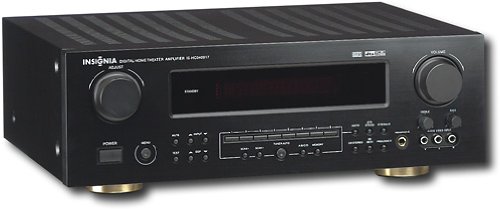
This manual provides essential instructions for the setup, operation, maintenance, and troubleshooting of your Insignia 6.1-Channel 600W Digital Home Theater Receiver, model IS-HC040917. Please read this manual thoroughly before using the receiver to ensure proper and safe operation.
Маанилүү коопсуздук нускамалары
- Эч кандай желдетүүчү тешиктерди жаап албаңыз. Өндүрүүчүнүн көрсөтмөлөрүнө ылайык орнотуу.
- Радиаторлор, жылуулук регистрлери, мештер же башка аппараттар (анын ичинде) сыяктуу жылуулук булактарынын жанына орнотпоңуз ampкөтөргүчтөр) жылуулукту пайда кылуучу.
- Электр шнурунун басылып кетүүсүнөн же кысып калуудан сактаңыз, өзгөчө сайгычтарда, розеткаларда жана алар аппараттан чыга турган жеринде.
- Өндүрүүчү тарабынан көрсөтүлгөн тиркемелерди/аксессуарларды гана колдонуңуз.
- Бул аппаратты чагылгандуу бороондордо же узак убакыт бою колдонбогондо электр розеткасынан ажыратыңыз.
- Бардык тейлөөнү квалификациялуу тейлөө кызматкерлерине тапшырыңыз. Аппарат кандайдыр бир жол менен бузулганда тейлөө талап кылынат.
Орнотуу колдонмосу
1. таңгактан чыгаруу
Carefully remove the receiver and all accessories from the packaging. Ensure all components are present:
- Insignia IS-HC040917 Receiver
- Алыстан башкаруу
- AM цикл антеннасы
- FM зым антеннасы
- Колдонуучунун Колдонмосу (бул документ)
2. Динамиктерди бириктирүү
The IS-HC040917 receiver supports a 6.1-channel speaker configuration. Connect your speakers to the corresponding terminals on the rear panel. Ensure correct polarity (+ to + and - to -) for each speaker.
- Алдыңкы сол/оң: Негизги стерео үн үчүн.
- Борбор: Диалог үчүн.
- Surround Left/Right: For ambient sound effects.
- Арткы айлана: For additional rear channel effects in 6.1 setups.
- Subwoofer (Pre-out): Connect to a powered subwoofer's LFE input.
Note: The receiver is designed for speakers with an impedance of 8 ohms.
3. Аудио/видео булактарын туташтыруу
Connect your external devices (e.g., DVD player, Blu-ray player, game console, cable box) to the appropriate input jacks on the receiver.
- HDMI: Use HDMI cables for high-definition audio and video signals. The receiver has 3 HDMI input ports.
- Digital Audio (Optical/Coaxial): For digital audio from devices like CD players or set-top boxes.
- Analog Audio (RCA): For standard stereo audio connections from devices like VCRs or older CD players.
- S-Video: For video signals from compatible devices.
4. Антенна туташтыруу
Connect the supplied AM loop antenna and FM wire antenna to their respective terminals on the rear panel for radio reception.
5. Power Connection
Once all audio/video and speaker connections are made, plug the receiver's power cord into a standard AC wall outlet.
Сүрөт: Rear panel of the Insignia IS-HC040917 receiver, showing various input and output connections for speakers, audio/video sources (HDMI, RCA, S-Video, Digital), and antenna terminals. This diagram is crucial for correctly wiring the home theater system.
Иштөө нускамалары
1. Күйгүзүү/өчүрүү
басыңыз КҮЧ ресиверди күйгүзүү же өчүрүү үчүн алдыңкы панелдеги же пульттун баскычын басыңыз.
2. Киргизүүнү тандоо
колдонуу КИРГИЗГИЧ ТАНДООЧУ knob/buttons on the front panel or the remote control to choose the desired audio/video source (e.g., HDMI 1, DVD, CD, Tuner).
3. Үндү башкаруу
Чоңду колдонуу менен башкы үндү тууралаңыз VOLUME алдыңкы панелдеги баскыч же VOLUME +/- алыстан башкаруудагы баскычтар.
4. Аудио режимдери
The receiver supports various audio modes, including 6.1-channel surround sound. Use the РЕЖИМ or DSP buttons on the remote to cycle through available sound modes (e.g., Stereo, Dolby Digital, DTS, Pro Logic).
5. Tuner Operation (AM/FM Radio)
Select the "Tuner" input. Use the БАНД button to switch between AM and FM. Use the ТУНЕ +/- buttons to manually tune to stations or АЛДЫН АЛА +/- to select stored stations. Refer to the remote control for specific tuner functions.
Техникалык тейлөө
1. Тазалоо
Wipe the exterior of the receiver with a soft, dry cloth. Do not use liquid cleaners or aerosol sprays, as they may damage the finish or internal components. Ensure the unit is unplugged before cleaning.
2. Вентиляция
Ensure that the ventilation openings on the top and sides of the receiver are not blocked. Proper airflow is essential to prevent overheating and ensure long-term performance.
3. Кабелдик башкаруу
Periodically check all cable connections to ensure they are secure. Loose connections can lead to poor audio or video quality.
Проблемаларды чечүү
| Көйгөй | Мүмкүн себеп | Чечим |
|---|---|---|
| Күч жок | Электр шнуру суурулган; розетка иштебейт. | Электр шнурунун туташуусун текшерүү; башка розеткага аракет кылып көрүңүз. |
| Үн жок | Туура эмес киргизүү тандалган; динамиктин зымдары бошоп кеткен; көлөмү өтө төмөн; үнсүз иштетилген. | Select correct input; check speaker connections; increase volume; deactivate mute. |
| Видео жок | Incorrect input selected; video cables loose or incorrect. | Select correct input; check video cable connections (HDMI, S-Video, RCA). |
| Пульт иштебей жатат | Batteries depleted; obstruction between remote and receiver; incorrect remote mode. | Replace batteries; remove obstructions; ensure remote is in the correct operating mode. |
Техникалык шарттар
- Модел: IS-HC040917
- Бренд: Insignia
- Чыгуу күчү: 600 Ватт
- Каналдардын саны: 6.1 канал
- Аудио чыгаруу режими: Курчап
- Жалпы HDMI порттору: 3
- Туташтыргычтын түрлөрү: 3.5mm Jack, HDMI, RCA, USB
- Шайкеш түзмөктөр: Баяндамачы
- Башкаруу ыкмасы: Алыстан
- Түсү: Кара
- UPC: 799530659962
- ASIN: B0075C3DN2
Кепилдик жана колдоо
For warranty information and customer support, please refer to the warranty card included with your product or visit the official Insignia webсайт. Кепилдик дооматтары үчүн сатып алуу дүмүрчөгүңүздү сактаңыз.
For further assistance, you may contact Insignia customer service. Contact details are typically available on the manufacturer's webсайтында же продуктунун таңгагында.