
Introduction
This manual provides essential instructions for the safe and effective use of your Canon PowerShot A4000 IS 16.0 MP Digital Camera. It covers basic setup, operation, maintenance, and troubleshooting to help you capture high-quality photos and 720p HD videos. The camera features an 8x optical zoom, a 28mm wide-angle lens, and optical image stabilization for clear images.
Кутуда эмне бар
Камера пакетиңизде бардык элементтер бар экенин текшериңиз:
- Canon PowerShot A4000 IS Digital Camera
- Батарея топтому
- Батарея заряддагыч
- USB кабели
- Билек боо
- Digital Camera Solution Disk (CD-ROM)

1-сүрөт: Included accessories with the Canon PowerShot A4000 IS camera.
Камеранын бөлүктөрү жана функциялары
Фронт View

2-сүрөт: Фронт view камеранын.
- Объектив: Сүрөттөрдү тартат.
- Flash: Жарык аз шарттарда жарыкты камсыз кылат.
- Жабык баскычы: Фокустоо үчүн жарымын, сүрөткө тартуу үчүн толук басыңыз.
- Чоңойтуу рычагы: Controls optical zoom (W for wide, T for telephoto).
- Кубат баскычы: Камераны күйгүзөт же өчүрөт.
Арткы View
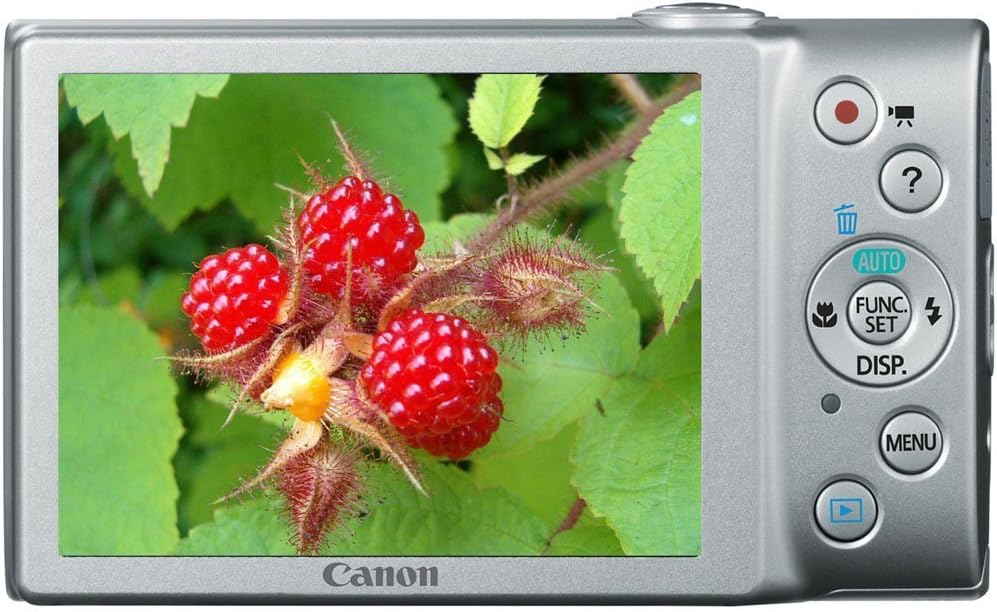
3-сүрөт: Арткы view of the camera with LCD screen.
- ЖК монитор: Displays images, menus, and camera settings.
- Кино баскычы: Видео жазууну баштайт жана токтотот.
- Ойнотуу баскычы: Ойнотуу режимине которулат view сүрөттөр жана видеолор.
- MENU баскычы: Камера жөндөөлөрүнө жана параметрлерине кирет.
- FUNC./SET Button: Confirms selections and accesses shooting function menus.
- Багыттоочу баскычтар (Өйдө, Төмөн, Солго, Оңго): Менюларды карап чыгып, жөндөөлөрдү тууралаңыз.
Жайгашуу
1. Inserting the Battery Pack
- Open the battery cover on the bottom of the camera.
- Insert the battery pack with the contacts facing the correct direction, as indicated by the diagram inside the compartment.
- Close the battery cover securely until it clicks.
2. Эстутум картасын салуу
- Open the battery/card cover.
- Insert an SD, SDHC, or SDXC memory card into the card slot until it clicks into place. Ensure the card is oriented correctly.
- Капкагын бекем жабыңыз.
3. Күндү жана убакытты белгилөө
- Камераны күйгүзүңүз.
- If prompted, follow the on-screen instructions to set the date, time, and time zone. Use the directional buttons to navigate and the FUNC./SET button to confirm.
Камераны иштетүү
1. Камераны күйгүзүү/өчүрүү
- басыңыз КҮЧ button to turn the camera on.
- басыңыз КҮЧ button again to turn the camera off.
2. Taking Still Photos (Smart AUTO Mode)
- Turn on the camera. The camera will typically start in Smart AUTO mode.
- Объектиңизди ЖК мониторунда кадрга түшүрүңүз.
- басыңыз Жабык баскычы halfway down to focus. The focus frame will appear green when focus is achieved.
- басыңыз Жабык баскычы сүрөткө тартуу үчүн толугу менен төмөн.
3. Тасмаларды жаздыруу
- With the camera on, press the dedicated Кино баскычы (red dot icon). Recording will begin immediately.
- басыңыз Кино баскычы жазууну токтотуу үчүн дагы.
4. ViewСүрөттөрдү ойнотуу (ойнотуу режими)
- басыңыз Ойнотуу баскычы (blue arrow icon).
- Use the directional buttons to scroll through your photos and videos.
- Тартуу режимине кайтуу үчүн, басыңыз Ойнотуу баскычы кайра же басыңыз Жабык баскычы жарым жол.
Advanced Features
1. Using Optical Zoom
While in shooting mode, push the Zoom Lever карай T (Telephoto) to zoom in on your subject, or towards W (Кең бурчтуу) чоңойтуу үчүн.
2. Flash режимдери
Тартуу режиминде басыңыз Up Directional Button to cycle through flash modes:
- Авто: Жарк керек болгондо автоматтык түрдө күйөт.
- Күйүк: Ар бир ок үчүн жаркылдаган оттор.
- Өчүк: Flash күйбөйт.
3. Атуу режимдери
басыңыз FUNC./SET Button to access various shooting modes, including:
- Smart AUTO: Камера автоматтык түрдө оптималдуу орнотууларды тандайт.
- Программа (P): Камера экспозицияны орнотуп жатканда, кээ бир жөндөөлөрдү кол менен көзөмөлдөө мүмкүнчүлүгүн берет.
- Сахна режимдери: Pre-set modes for specific situations (e.g., Portrait, Landscape, Night Snapshot).
Техникалык тейлөө
1. Камераны тазалоо
- Камеранын корпусун тазалоо үчүн жумшак, кургак чүпүрөктү колдонуңуз.
- For the lens, use a lens brush or a soft, lint-free cloth specifically designed for optical surfaces. Avoid touching the lens directly with your fingers.
- ЖК экранын жумшак, кургак чүпүрөк менен тазалаңыз.
2. Батареяга кам көрүү
- Батареяны биринчи жолу колдонуудан мурун жана узак убакыт бою колдонбогондон кийин толук заряддаңыз.
- Батареяны колдонбогондо салкын, кургак жерде сактаңыз.
- Батареяны экстремалдуу температурага калтырбаңыз.
3. Сактоо
Камераны узак убакытка сактоодо, батареяны жана эс тутум картасын алып салыңыз. Камераны кургак, жакшы желдетилген жерде, түз күн нурунан жана өтө жогорку температурадан алыс сактаңыз.
Проблемаларды чечүү
| Көйгөй | Чечим |
|---|---|
| Камера күйбөйт. | Ensure the battery is charged and inserted correctly. Try recharging the battery. |
| Сүрөттөр бүдөмүк. | Check if the lens is clean. Ensure the camera is held steady. Use the flash in low light. Allow the camera to focus before fully pressing the shutter button. |
| Flash күйбөйт. | Check the flash mode setting. Ensure it is not set to 'Off'. The flash may not fire if the ambient light is sufficient. |
| Эстутум картасынын катасы. | Ensure the memory card is inserted correctly. Try formatting the card (this will erase all data). Use a different memory card. |
| Видео жаздыруу мүмкүн эмес. | Check if the memory card has sufficient free space. Ensure the battery has enough charge. |
Техникалык шарттар
| Өзгөчөлүк | Деталь |
|---|---|
| Натыйжалуу дагы эле чечим | 16.0 мегапиксел |
| Оптикалык масштаб | 8x |
| Объектив | 28mm Wide-Angle |
| Image Stabilization | Оптикалык |
| Video Resolution | 720p HD |
| ЖК-экран Көлөм | 3.0 дюйм |
| Фото сенсор технологиясы | CMOS |
| Колдоого алынган File Формат | JPEG (Exif 2.3) |
| Эстутум картасынын түрү | SD/SDHC/SDXC |
| Байланыш | USB |
| Модель номери | 6148B001 |
Кепилдик жана колдоо
Кепилдик маалымат
This Canon PowerShot A4000 IS Digital Camera comes with a 1 жылдык чектелген кепилдик сатып алынган күндөн тартып. Кепилдик дооматтары үчүн сатып алганыңызды тастыктаган документти сактап коюңуз. Кепилдик өндүрүштөгү кемчиликтерди камтыйт, бирок адатта туура эмес колдонуудан, кырсыктардан же уруксатсыз оңдоодон келип чыккан зыянды камтыбайт.
Кардарларды колдоо
For technical assistance, service, or further information, please refer to the official Canon support website or contact their customer service. Contact details can usually be found on the manufacturer's webсайтында же продуктуңуз менен бирге берилген документтерде.