
1. Киришүү
Бул документ PWR+ 19V AC кубат адаптери үчүн маанилүү көрсөтмөлөрдү жана деталдуу мүнөздөмөлөрдү берет. Ал шайкеш келген Bmax MaxMini Mini PC моделдери менен колдонулганда коопсуз жана натыйжалуу иштөөнү камсыз кылуу үчүн иштелип чыккан. Колдонуудан мурун бул колдонмону кылдаттык менен окуп чыгыңыз.
2. Коопсуздук маалыматы
PWR+ 19V AC кубат адаптери UL тизмеленген, бул анын Underwriters Laboratories тарабынан коопсуздук стандарттары боюнча сыналганын, бекитилгенин жана сертификацияланганын көрсөтүп турат. UL сыноосу АКШнын Федералдык агенттиги OSHA тарабынан уруксат берилген. Бул коопсуздук стандарттарын сактоо ишенимдүү жана коопсуз иштөөнү камсыз кылат.
- Адаптерди суюктуктарга же өтө жогорку температураларга дуушар кылбаңыз.
- Адаптердин жерге туташтырылган розеткага туура туташтырылганын текшериңиз.
- Эгерде шнур жеasing бузулган.
- Тазалоодон мурун адаптерди кубат булагынан ажыратыңыз.

Сүрөт: PWR+ 19V AC кубат адаптери, анда негизги блок, кабелдер жана чыгуучу кабелге бекитилген көрүнүктүү UL тизмесиндеги сертификаттоо этикеткасы көрсөтүлгөн. Бул продуктунун коопсуздук стандарттарына шайкештигин баса белгилейт.
3. Продукциянын өзгөчөлүктөрү
- Кеңейтилген электр зымы: Ийкемдүү жайгаштыруу үчүн кошумча узун 12 футтук электр шнуруна ээ.
- Киргизүү көлөмүtage диапазону: Универсалдуу киргизүү көлөмүн колдойтtagд 100-240В чейин.
- Чыгуу спецификациялары: 19В, 3.42А максималдуу кубаттуулукту камсыз кылат жана 65Вт кубаттуулукту берет.
- Туруктуу дизайн: Бышыктыкты жогорулатуу жана колдонууну узартуу үчүн болоттон жасалган учу менен жабдылган.
- Камтылган коопсуздук коргоо: Кыска туташуудан коргоо (SCP), ашыкча ток коргоо (OCP), ашыкча агымдан коргоону камтыйтtage Коргоо (OVP) жана Ашыкча температурадан коргоо (OTP).
- UL коопсуздук тастыкталган: Коопсуздук стандарттары боюнча UL тарабынан текшерилген жана сертификацияланган.

Сүрөт: деталдуу диаграмма showcasing PWR+ кубат адаптеринин ички компоненттери, анын ичинде жогорку сапаттагы жез зымдары жана алюминий фольгадан жасалган коргоо. Ошондой эле, ал орнотулган коопсуздук коргоолорун (SCP, OCP, OVP, OTP) жана 12 футтук кошумча узун кубат зымынын артыкчылыгын көрсөтөт.
4. Шайкештик
Бул PWR+ кубат адаптери төмөнкү Bmax MaxMini Mini PC моделдери менен шайкеш келет:
- Bmax MaxMini B5 Pro мини компьютери
- Bmax MaxMini B7 Power Mini PC
- Bmax MaxMini B8 Plus мини компьютери
- Bmax MaxMini B8 Power Mini PC
- Bmax MaxMini B9 Power Mini PC
- Bmax MaxMini B10 Pro мини компьютери
Түзмөгүңүздүн кубаттуулук талаптары адаптердин чыгаруу мүнөздөмөлөрүнө (19V, 3.42A, 65W) дал келерин жана ал тегерек учтуу туташтыргычты колдоноорун текшериңиз.
5. Орнотуу нускамалары
- Таңылганын ачуу: PWR+ AC кубат адаптерин таңгагынан этияттык менен чыгарыңыз.
- Түзмөккө туташуу: Адаптердин чыгыш кабелинин тегерек учтуу туташтыргычын шайкеш келген Bmax MaxMini Mini компьютериңиздин кубат киргизүү портуна салыңыз. Коопсуз туташууну камсыз кылыңыз.
- Розеткага туташуу: AC киргизүү шнурун стандарттуу 100-240V розеткага сайыңыз.
- Байланышты текшерүү: Адаптерде кубаттоо индикаторунун жарыгы (адатта көк) бар, ал туура туташтырылганда жана кубат алганда күйөт.
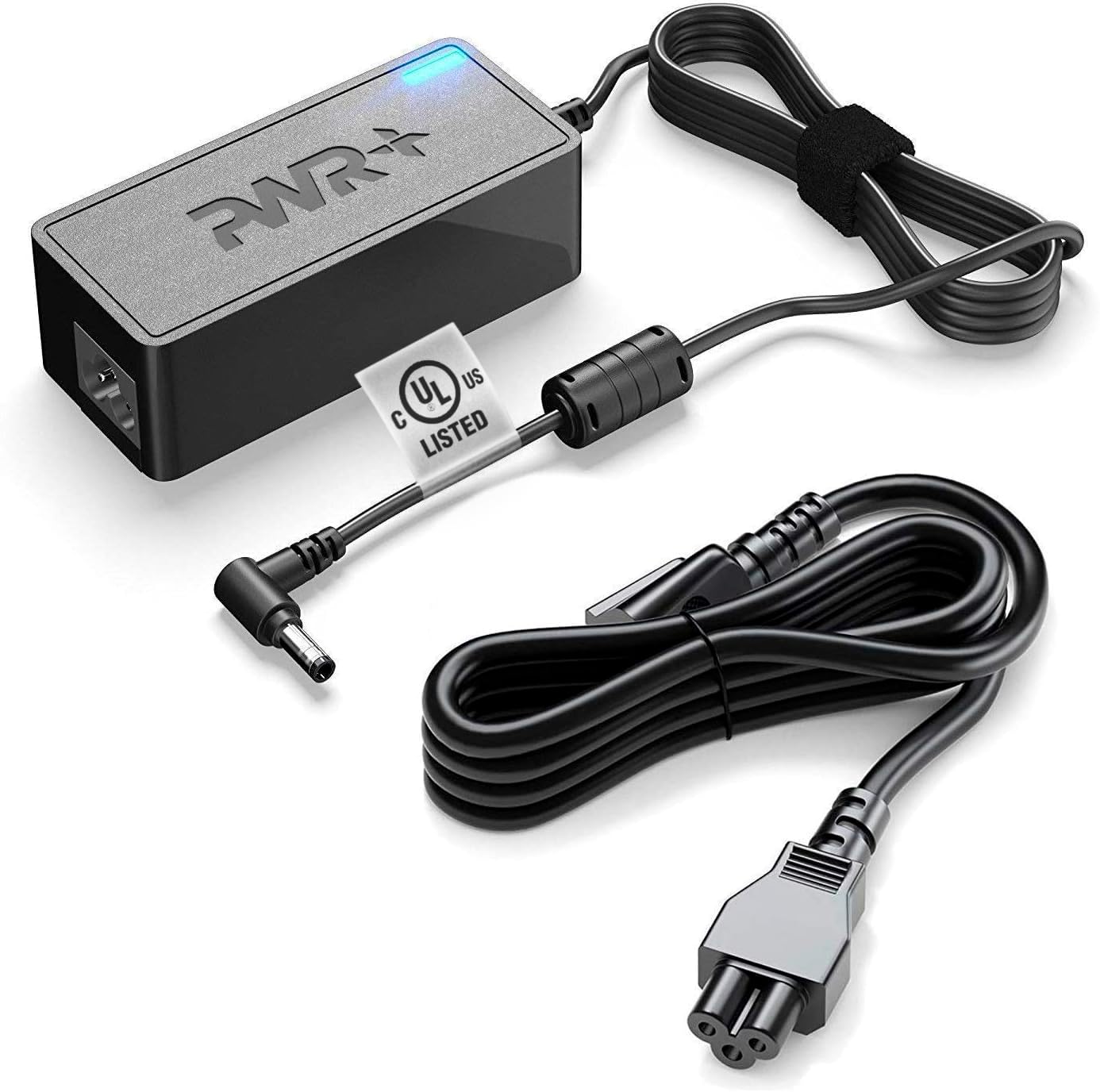
Сүрөт: PWR+ 19V AC кубат адаптери негизги блогу, ажыратылуучу AC киргизүү кубат шнуру жана тегерек учтуу туташтыргычы бар DC чыгуучу кабели менен көрсөтүлөт. Бул так көрүнүштү камсыз кылат view туташуу үчүн зарыл болгон бардык компоненттердин жыйындысы.
6. Иштетүү боюнча нускамалар
- Туташтырылгандан кийин, адаптер сиздин Mini PC'ңизге кубат берет.
- Адаптердеги көк индикатор жарыгы активдүү кубаттуулуктун берилишин билдирет.
- Оптималдуу иштеши үчүн, адаптерди жакшы желдетилген жерде иштетиңиз.
- Узак убакытка колдонулбай турган болсо, адаптерди розеткадан сууруп коюңуз.
7. Техникалык тейлөө
- Тазалоо: Адаптерди тазалоо үчүн кургак, жумшак чүпүрөктү колдонуңуз. Суюк тазалагычтарды же эриткичтерди колдонбоңуз.
- Сактагыч: Адаптерди колдонбогон учурда салкын, кургак жерде сактаңыз. Зыян келтирбөө үчүн кабелдерди өтө бекем ороп албаңыз.
- Текшерүү: Кубат шнурун жана адаптерди мезгил-мезгили менен текшерип туруңуз, casinБузулгандыктын белгилери үчүн g. Эгерде бузулуу байкалса, колдонууну токтотуп, адаптерди алмаштырыңыз.
8. Кыйынчылыктарды
| Көйгөй | Мүмкүн себеп | Чечим |
|---|---|---|
| Аппаратка кубат жок | Адаптер сайылган эмес; байланышы бош; розетка бузук; шайкеш келбеген түзмөк. | Бардык туташуулардын коопсуз экенин текшериңиз. Башка розетканы колдонуп көрүңүз. Түзмөктүн шайкештигин жана кубаттуулук талаптарын текшериңиз. |
| Адаптердин индикатор жарыгы өчүк | Электр кубаты кирбейт; ички ката. | Розетканы жана туташууларды текшериңиз. Эгерде көйгөй чечилбесе, адаптер бузук болушу мүмкүн. |
| Түзмөк кубатталбай/күйгүзүлбөй жатат | Туура эмес томtage/ampката; түзмөктүн катасы. | Адаптердин мүнөздөмөлөрү түзмөктүн талаптарына дал келгенин текшериңиз. Эгер мүмкүн болсо, түзмөктү башка белгилүү кубат булагы менен сынап көрүңүз. |
9. Техникалык шарттар
- Модель номери: PWR-TAJ190342
- Киргизүү көлөмүtage: 100-240В AC
- Output Voltage: 19V DC
- Чыгуу ток: 3.42 Amps
- Чыгуу Wattage: 65 Ватт
- Туташтыргыч түрү: Round Tip
- Корндун узундугу: 12 Фут (болжол менен 3.66 метр)
- Коопсуздук сертификаты: UL тизмеленген
- Өзгөчө өзгөчөлүгү: Заряддоо индикаторунун жарыгы
10. Кепилдик жана колдоо
PWR+ 19V AC кубат адаптери төмөнкүлөргө толук кепилдик менен келет:
- Төлөмдү кайтаруу саясаты: 30 күн кайтаруу
- Алмашуу саясаты: 24 айлык алмашуу
Колдоо боюнча суроолоруңуз же кепилдик боюнча дооматтарыңыз болсо, PWR+ кардарларды тейлөө кызматына кайрылыңыз. PWR+ - АКШнын Вашингтон шаарында жайгашкан жана кардарлардын канааттануусуна арналган компания.

Сүрөт: PWR+ 19V AC кубат адаптери, көк LED индикатору күйүп турат, бул активдүү кубаттуулукту билдирет. Адаптер блогунда продуктунун кепилдик мөөнөтүн баса белгилеген "2 жылдык узартылган кепилдик" деген чаптама көрүнүп турат.