
Selve i-R Receive (29 87 71)
Selve i-R Receive Radio Receiver Instruction Manual
Model: i-R Receive (29 87 71)
1. Киришүү
This manual provides comprehensive instructions for the installation, operation, and maintenance of the Selve i-R Receive radio receiver. Please read this manual carefully before installation and operation to ensure proper function and safety.
The Selve i-R Receive is designed to receive radio signals from Selve radio transmitters operating at 868 MHz, enabling control of connected devices such as roller shutters or awnings.
2. Коопсуздук нускамалары
Ар дайым төмөнкү коопсуздук чараларын сактаңыз:
- Орнотуу жергиликтүү электр эрежелерине жана эрежелерине ылайык квалификациялуу электрик тарабынан аткарылышы керек.
- Кандайдыр бир орнотууну, тейлөөнү же каталарды оңдоодон мурун электр кубатын өчүрүңүз.
- Аппаратты нымдуулукка же экстремалдык температурага дуушар кылбаңыз.
- Электр шоктун алдын алуу үчүн туура жерге туташтырууну камсыз кылыңыз.
- Түзмөктүн корпусун ачпаңыз. Ичинде колдонуучу тейлей турган тетиктер жок.
3. Продукт бүтүп калдыview
The Selve i-R Receive is a compact radio receiver designed for integration into electrical systems. It features terminals for input and output connections and a programming button.

Сүрөт 3.1: Алдыңкы view of the Selve i-R Receive showing input/output terminals and programming button.

3.2-сүрөт: Арткы view of the Selve i-R Receive indicating the programming button location.

3.3-сүрөт: Бурчтуу view of the Selve i-R Receive, highlighting its compact design.

Figure 3.4: The Selve i-R Receive unit alongside its packaging.

3.5-сүрөт: Төмөнкү view of the Selve i-R Receive, showing the "PROG" label and button.
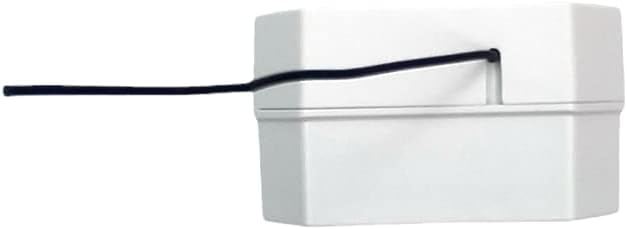
3.6-сүрөт: Каптал view of the Selve i-R Receive, illustrating the antenna cable exit point.

Figure 3.7: Functional example diagram showing the Selve i-R Receive connected to a roller shutter and controlled by an i-R Transmit unit.
4. Техникалык шарттар
| Өзгөчөлүк | Деталь |
|---|---|
| Модел | i-R Receive (Artikel-Nr.: 29 87 71) |
| Иштөө жыштыгы | 868 МГц |
| Киргизүү көлөмүtage | 230V 50Hz |
| Output Current/Voltage | Max. 3 A / 230V |
| Коргоо классы | IP 20 |
| ASIN | B007E5L328 |
| Өндүрүүчүнүн маалымдамасы | YUNHAI |
5. Орнотуу жана орнотуу
Маанилүү: Installation must be carried out by a qualified electrician. Disconnect the main power supply before beginning installation.
5.1 Зымдарды туташтыруу
Refer to the wiring diagram on the device and in Figure 3.7 for correct connections. The terminals are typically labeled as follows:
- IN: Power input (L - Live, N - Neutral).
- ЧЫГЫШ: Output to the motor/device (e.g., for roller shutters: Up, Down, Neutral).
- Бардык байланыштар коопсуз жана туура изоляцияланганын текшериңиз.
5.2 Монтаждоо
The i-R Receive is designed for flush-mounted installation behind a switch or in a junction box. Ensure adequate space for ventilation and wiring.
5.3 Антеннаны жайгаштыруу
The integrated antenna should be positioned freely and not be coiled or placed near large metal objects, which could interfere with signal reception.
6. Иштөө нускамалары
6.1 Өткөргүч менен жупташуу
To control the i-R Receive, it must first be paired with a compatible Selve radio transmitter (e.g., Selve i-R Transmit). The programming button is located on the back of the unit (see Figure 3.2 and 3.5).
- Ensure the i-R Receive is powered on.
- Press the programming button on the i-R Receive briefly (approx. 1 second). The connected device may briefly react (e.g., a short movement of a roller shutter) to indicate it is in pairing mode.
- Within approximately 10 seconds, press the desired "UP" or "DOWN" button on your Selve radio transmitter.
- The connected device should react again, confirming successful pairing.
- Repeat for additional transmitters if desired.
6.2 Негизги операция
Once paired, the i-R Receive will respond to commands from the linked Selve radio transmitter:
- Pressing the "UP" button on the transmitter will activate the 'Up' output.
- Pressing the "DOWN" button on the transmitter will activate the 'Down' output.
- A "STOP" or middle button (if available on the transmitter) will halt the current movement.
7. Техникалык тейлөө
The Selve i-R Receive is designed for maintenance-free operation. No regular maintenance is required.
- Тазалоо: If necessary, gently wipe the exterior with a dry, soft cloth. Do not use liquid cleaners or solvents.
- Текшерүү: Periodically check wiring connections for looseness or damage. Ensure the device is not exposed to excessive heat or moisture.
Do not attempt to open or repair the device. Refer to qualified personnel for any issues beyond basic operation.
8. Кыйынчылыктарды
| Көйгөй | Мүмкүн себеп | Чечим |
|---|---|---|
| Түзмөк өткөргүчкө жооп бербейт. | Not paired, transmitter battery low, out of range, power supply issue. |
|
| Үзгүлтүксүз иштөө. | Radio interference, antenna obstruction, loose wiring. |
|
| Түзмөк күйбөйт. | No power supply, incorrect wiring, faulty unit. |
|
9. Кепилдик жана колдоо
Selve products are manufactured to high quality standards. For warranty information, please refer to the terms and conditions provided at the point of purchase or visit the official Selve webсайт.
For technical support or service inquiries, please contact your authorized Selve dealer or the Selve customer service department. When contacting support, please have your product model (i-R Receive, 29 87 71) and ASIN (B007E5L328) ready.
Selve GmbH & Co. KG
Werdohler Landstraße 286
58513 Люденшейд
Германия
Note: Contact details are for informational purposes and may vary. Please refer to the official Selve webакыркы байланыш маалыматы үчүн сайт.
10. Жоюу
Do not dispose of electrical devices with household waste. In accordance with the European Directive on Waste Electrical and Electronic Equipment (WEEE), electrical and electronic equipment must be collected separately and recycled in an environmentally sound manner. Contact your local authorities for information regarding proper disposal and recycling facilities.
Ask a question about this manual
Ask about setup, troubleshooting, compatibility, parts, safety, or missing instructions. Manuals+ will review the question and use this page’s manual context to help answer it.