
1. Киришүү
This manual provides comprehensive instructions for the proper setup, operation, and maintenance of your 3nStar SC505 Omni-Directional 2D Barcode Scanner. The SC505 is designed to provide efficient and reliable barcode scanning for various applications, featuring omnidirectional scanning capabilities and an adjustable scan head.
2. Коопсуздук маалыматы
Please read and understand all safety instructions before operating the device. Retain this manual for future reference.
- Сканерди сууга же ашыкча нымдуулукка дуушар кылбаңыз.
- Сканерди түшүрүп алуудан же катуу соккуга кабылтуудан алыс болуңуз.
- Сканерди ажыратууга же өзгөртүүгө аракет кылбаңыз. Бул кепилдикти жокко чыгарат.
- Туташуу үчүн берилген USB кабелин гана колдонуңуз.
- Оптималдуу иштешин камсыз кылуу үчүн сканерлөө терезесин таза кармаңыз.
3. Пакеттин мазмуну
Пакетте бардык буюмдар бар экенин текшериңиз:
- 3nStar SC505 көп багыттуу 2D штрих-код сканери
- USB туташуу кабели
- Колдонуучунун Колдонмосу (бул документ)
4. Продукт бүтүп калдыview
The 3nStar SC505 is an omnidirectional 2D barcode scanner designed for efficient data capture. Its key features include:
- Ар тараптуу сканерлөө: Allows for quick and easy scanning from various angles without precise alignment.
- Adjustable Scan Head: The scanning head can be tilted within a 40-degree range to accommodate different item sizes and scanning preferences.
- Automatic Scanning Operation: The unit automatically scans a barcode when presented, simplifying the scanning process.

Сүрөт 4.1: Алдыңкы view of the 3nStar SC505 scanner, showing the scanning window and base.
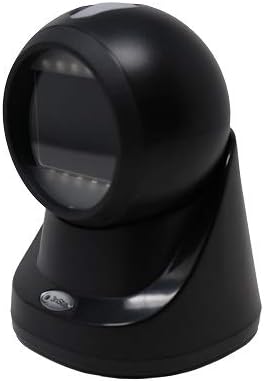
Figure 4.2: Angled front-right view of the scanner, highlighting its compact design.

Figure 4.3: Angled front-left view of the scanner, demonstrating its ergonomic shape.

4.4-сүрөт: Side profile view of the scanner, illustrating the adjustable head mechanism.
5. Орнотуу
Follow these steps to set up your 3nStar SC505 barcode scanner:
- Сканерди таңгактан чыгаруу: Carefully remove the scanner and USB cable from the packaging.
- USB кабелин туташтыруу: Insert the smaller end of the USB cable into the USB port located at the back of the scanner's base.
- Хост түзмөккө туташуу: Plug the larger end of the USB cable into an available USB Type-A port on your computer, laptop, or compatible POS system.
- Драйверди орнотуу (зарыл болсо): In most cases, the scanner is plug-and-play and will be recognized automatically by your operating system. If prompted, allow the system to install necessary drivers.
- Сканерди жайгаштырыңыз: Place the scanner on a stable, flat surface. Adjust the scanning head to your preferred angle for comfortable operation.
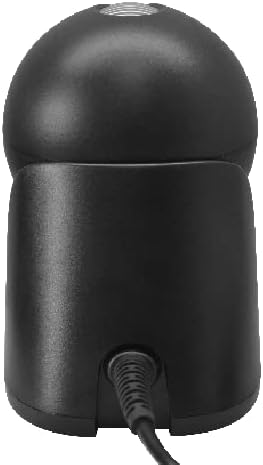
5.1-сүрөт: Арткы view of the scanner, showing the USB cable connected to the port.
6. Иштөө нускамалары
The 3nStar SC505 scanner is designed for ease of use with automatic scanning.
- Штрих-кодду сканерлөө: Simply present the barcode to the scanning window. The scanner will automatically detect and read the barcode.
- Omnidirectional Capability: Due to its omnidirectional design, precise alignment of the barcode is not required. You can present the barcode from various angles.
- Adjusting the Scan Head: If you are scanning items of different sizes or need a specific angle, gently tilt the scanning head up or down within its 40-degree range to optimize scanning position.
- Ийгиликтүү сканерлөө көрсөткүчү: A successful scan is typically indicated by an audible beep and/or a visual indicator (e.g., LED light flash).
7. Техникалык тейлөө
Тийиштүү техникалык тейлөө сканериңиздин узак мөөнөттүү иштешин жана оптималдуу иштешин камсыз кылат.
- Сканерлөө терезесин тазалоо: Regularly clean the scanning window with a soft, lint-free cloth. For stubborn dirt, dampen the cloth slightly with water or a mild, non-abrasive cleaner. Do not spray cleaning solutions directly onto the scanner.
- Жалпы тазалоо: Wipe the exterior of the scanner with a soft, dry cloth.
- Сактагыч: Колдонулбай турган учурда, сканерди таза, кургак жерде, күндүн түз нурунан жана өтө жогорку температурадан алыс сактаңыз.
8. Кыйынчылыктарды
Сканериңизде көйгөйлөргө туш болсоңуз, төмөнкү жалпы көйгөйлөрдү жана чечимдерди караңыз:
- Scanner is not powering on:
- USB кабелинин сканерге да, хост түзмөгүнө да бекем туташтырылганын текшериңиз.
- Try connecting the scanner to a different USB port on your host device.
- Verify that the host device is powered on and functioning correctly.
- Scanner is not reading barcodes:
- Штрих-код бузулганын же начар басылганын текшериңиз.
- Ensure the scanning window is clean and free of obstructions.
- Confirm that the scanner is properly connected and recognized by the host device.
- Башка, жакшы белгилүү штрих-кодду сканерлеп көрүңүз.
- No data transmitted to host device:
- Verify that the application on your host device is ready to receive input (e.g., a text field is active).
- USB байланышын текшериңиз.
9. Техникалык шарттар
| Өзгөчөлүк | Спецификация |
|---|---|
| Модель номери | SC505 |
| Продукциянын өлчөмдөрү | 3.94 x 4.33 x 5.83 дюйм |
| Элемент Салмагы | 12.3 унция |
| Бренд | 3nStar |
| Байланыш технологиясы | USB кабели |
| Power Source | USB Type A 5V |
| Шайкеш түзмөктөр | Desktop, Laptop, Smartphone (with USB host capability), Tablet (with USB host capability) |
| Скандоо ылдамдыгы | секундасына 60 кадр |
10. Кепилдик жана колдоо
For warranty information or technical support, please refer to the documentation provided with your purchase or contact 3nStar customer service. Keep your proof of purchase for warranty claims.