
Продукт бүттүview
The iSound Twist Portable Bluetooth Wireless Speaker offers a unique design combined with superior sound quality. Its compact form factor allows for portability, while its advanced features enable wireless music streaming and hands-free calling. The speaker features full stereo sound with 6 watts total output from two 40mm drivers and a passive radiator for enhanced bass.
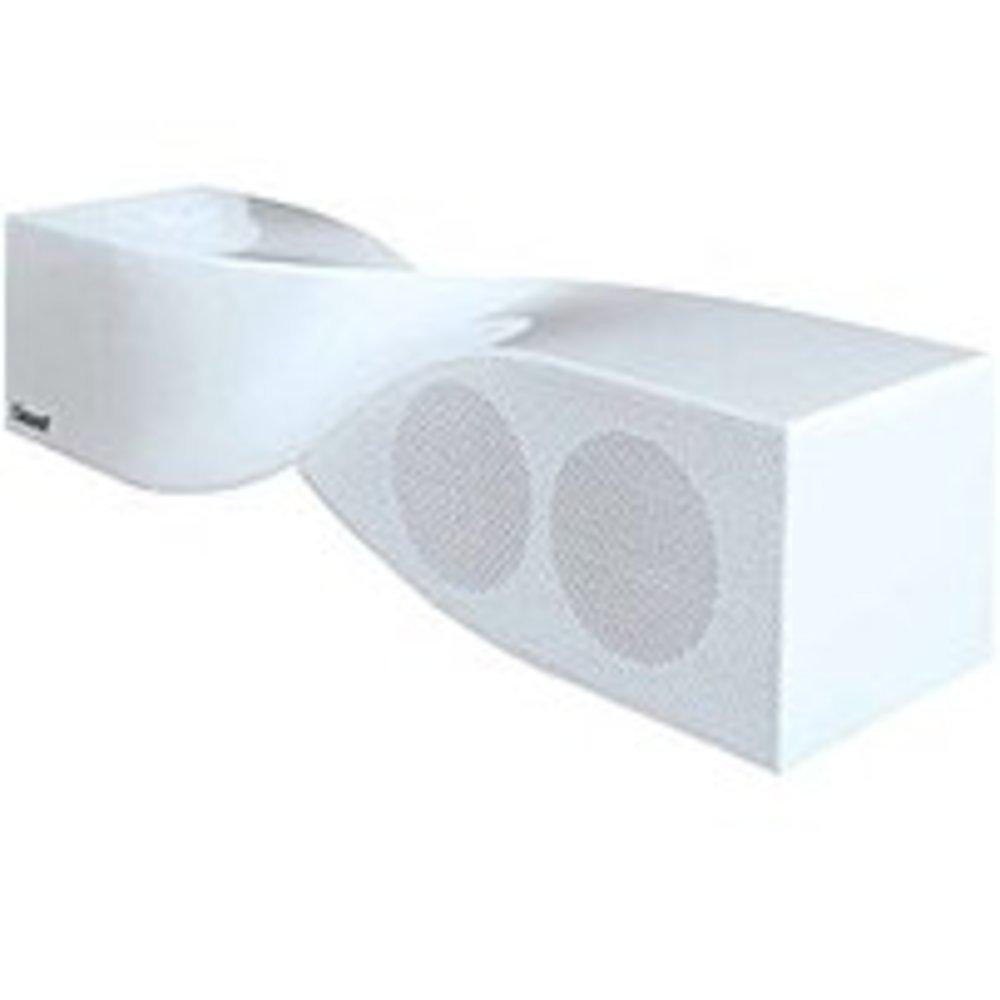
Image: The iSound Twist Portable Bluetooth Wireless Speaker in white, showcasing its unique twisted design.
Пакеттин мазмуну
- iSound Twist Portable Bluetooth Wireless Speaker
- USB заряддоо кабели
- 3.5mm AUX Input Cable
- Колдонуучунун Колдонмосу (бул документ)
Жайгашуу
1. Динамикти кубаттоо
Before initial use, fully charge the iSound Twist speaker. Connect the provided USB charging cable to the speaker's USB charging port and the other end to a powered USB source (e.g., computer, USB wall adapter). The charging indicator light will illuminate during charging and turn off when fully charged. A full charge provides up to 5 hours of continuous play.

Image: Rear panel of the speaker, highlighting the USB charging port, ON/OFF switch, and AUX IN port.
2. Күйгүзүү / Өчүрүү
Locate the ON/OFF switch on the rear panel of the speaker. Slide the switch to the "ON" position to power on the device. Slide it to the "OFF" position to power off.
3. Bluetooth Жупташтыруу
- Ensure the speaker is powered on and within close proximity to your Bluetooth-enabled device (e.g., smartphone, tablet, laptop).
- The speaker will automatically enter Bluetooth pairing mode. A blue indicator light will flash, indicating it is discoverable.
- Түзмөгүңүздө Bluetooth жөндөөлөрүнө өтүп, Bluetooth'ту күйгүзүңүз.
- Издөө available devices. The iSound Twist speaker should appear in the list, typically named "iSound Twist" or similar.
- Жупташтырууну баштоо үчүн тизмеден динамикти тандаңыз. Эгер сырсөз суралса, "0000" деп киргизиңиз.
- Once successfully paired, the blue indicator light on the speaker will stop flashing and remain solid. You will hear an audible confirmation.
- Your device is now connected, and you can stream audio wirelessly.
4. AUX киргизүү туташуусу
For devices without Bluetooth capability, or if you prefer a wired connection, use the provided 3.5mm AUX cable.
- Connect one end of the 3.5mm AUX cable to the AUX IN port on the rear of the speaker.
- Connect the other end of the cable to the headphone jack or audio output port of your audio device.
- Динамик автоматтык түрдө AUX киргизүү режимине өтөт.
Иштөө нускамалары
Башкаруу панелинин функциялары
The speaker features onboard controls located on its top surface for convenient operation.
- Кубат / режим баскычы: Күйгүзүү/өчүрүү үчүн басып туруңуз. Bluetooth жана AUX режимдеринин ортосунда которулуу үчүн кыска басыңыз.
- Ойнотуу/Тындыруу/Чакыруу баскычы: Short press to play or pause music. During an incoming call, short press to answer or end the call. Press and hold to reject an incoming call.
- Үнүн жогорулатуу/Кийинки трек баскычы: Short press to increase volume. Press and hold to skip to the next track.
- Үндү азайтуу/Мурунку трек баскычы: Short press to decrease volume. Press and hold to go to the previous track.
Hands-Free Чалуу
When connected via Bluetooth, the iSound Twist speaker's built-in microphone allows for hands-free phone calls.
- Чалууга жооп берүү: When a call comes in, the music will pause. Press the Play/Pause/Call button once to answer.
- Чалууну аяктоо: During a call, press the Play/Pause/Call button once to end the call.
- Чалуудан баш тартуу: Press and hold the Play/Pause/Call button to reject an incoming call.
Техникалык тейлөө
- Динамикти суудан, нымдан жана экстремалдык температурадан алыс кармаңыз.
- Динамикти жумшак, кургак чүпүрөк менен тазалаңыз. Абразивдүү тазалагычтарды же эриткичтерди колдонбоңуз.
- Спикерди түшүрүүдөн же катуу таасирлерге дуушар кылуудан качыңыз.
- Узак мөөнөткө колдонулбаганда, динамикти салкын, кургак жерде сактаңыз жана батареянын ден соолугун сактоо үчүн аны мезгил-мезгили менен заряддап туруңуз.
Проблемаларды чечүү
| Көйгөй | Чечим |
|---|---|
| Динамик күйбөйт. | Батарея заряддалганын текшериңиз. Динамикти USB кабели аркылуу кубат булагына туташтырып, кайра аракет кылыңыз. |
| Bluetooth аркылуу жупташтыруу мүмкүн эмес. |
|
| Үн жок же үнү төмөн. |
|
| Чалуу сапаты начар. |
|
Техникалык шарттар
| Өзгөчөлүк | Деталь |
|---|---|
| Модель аты | ISOUND-1691 |
| Бренд | iSound |
| Динамик түрү | Tower |
| Өзгөчө өзгөчөлүк | Камтылган микрофон |
| Сунушталган Колдонуулар | For Smartphones or Tablets, Music Players |
| Шайкеш түзмөктөр | Иш такта, ноутбук, MP3 плеер, проектор, смартфон, планшет, телевизор |
| Көлөмдүү үн каналынын конфигурациясы | 2.0 |
| Түс | Ак |
| Элемент Салмагы | 13.6 унция |
| Суу өткөрбөйт | ЖАЛГАН |
| Зымсыз байланыш технологиясы | Bluetooth |
| Динамик өлчөмү | 0.75 дюйм |
| Power Source | Батарея менен иштейт |
| Батареялардын саны | 1 литий-иондук батарейкалар талап кылынат. (камтылган) |
| Аудио драйвер түрү | Динамикалык драйвер |
| Аудио драйверинин өлчөмү | 40 миллиметр |
| Продукциянын өлчөмдөрү | 5 x 4 x 11.75 дюйм |
| Динамиктин максималдуу чыгаруу күчү | 6 Ватт |
| Байланыш технологиясы | Зымсыз |
| Аудио чыгаруу режими | Стерео |
| Монтаж түрү | Столдун үстү |
Расмий продукт Video
Video: Official product video for the iSound Twist Bluetooth Speaker, demonstrating its features and design. This video showcases the speaker's ability to stream audio from various devices and handle calls.
Кепилдик жана колдоо
The iSound Twist Portable Bluetooth Wireless Speaker comes with a Чектелген Кепилдик. For specific warranty terms, conditions, and support inquiries, please refer to the warranty card included in your product packaging or visit the official iSound webсайт.
For further assistance, please contact iSound customer support.