
Introduction
The Eton American Red Cross FRX2 is a versatile, multi-powered emergency weather radio designed to keep you informed and connected during emergencies. It features AM/FM and NOAA weather band reception, multiple charging options including solar and hand turbine, an LED flashlight, and a USB port for charging small devices. This manual provides detailed instructions for the proper setup, operation, and maintenance of your FRX2 radio.

Figure 1: Eton American Red Cross FRX2 Emergency Weather Radio
Коопсуздук маалыматы
- Аппаратты экстремалдык температурага, түз күн нуруна узак убакытка же жогорку нымдуулукка дуушар кылбаңыз.
- Агрегатты суудан жана башка суюктуктардан алыс кармаңыз.
- Радиону бөлүктөргө бөлүүгө же өзгөртүүгө аракет кылбаңыз. Бул кепилдикти жокко чыгарат жана зыянга же жаракатка алып келиши мүмкүн.
- Use only the specified charging methods (USB, solar, hand crank).
- Ensure the hand turbine crank is fully retracted when not in use to prevent damage.
- Батареяларды жергиликтүү эрежелерге ылайык жок кылыңыз.
Продукт бүттүview
Familiarize yourself with the various components and controls of your FRX2 radio.
Front Panel

Сүрөт 2: Алдыңкы панелдин башкаруу элементтери
- Тюнинг терүү: Used to select AM, FM, or Weather Band frequencies.
- Үндү көзөмөлдөө: Аудио чыгаруу деңгээлин тууралайт.
- Топту тандагыч: Switches between AM, FM, and Weather Band (WB) modes.
- LED көрсөткүчү: Shows charging status and alert status.
Side and Back Panels

Figure 3: Side Panel with Solar Panel
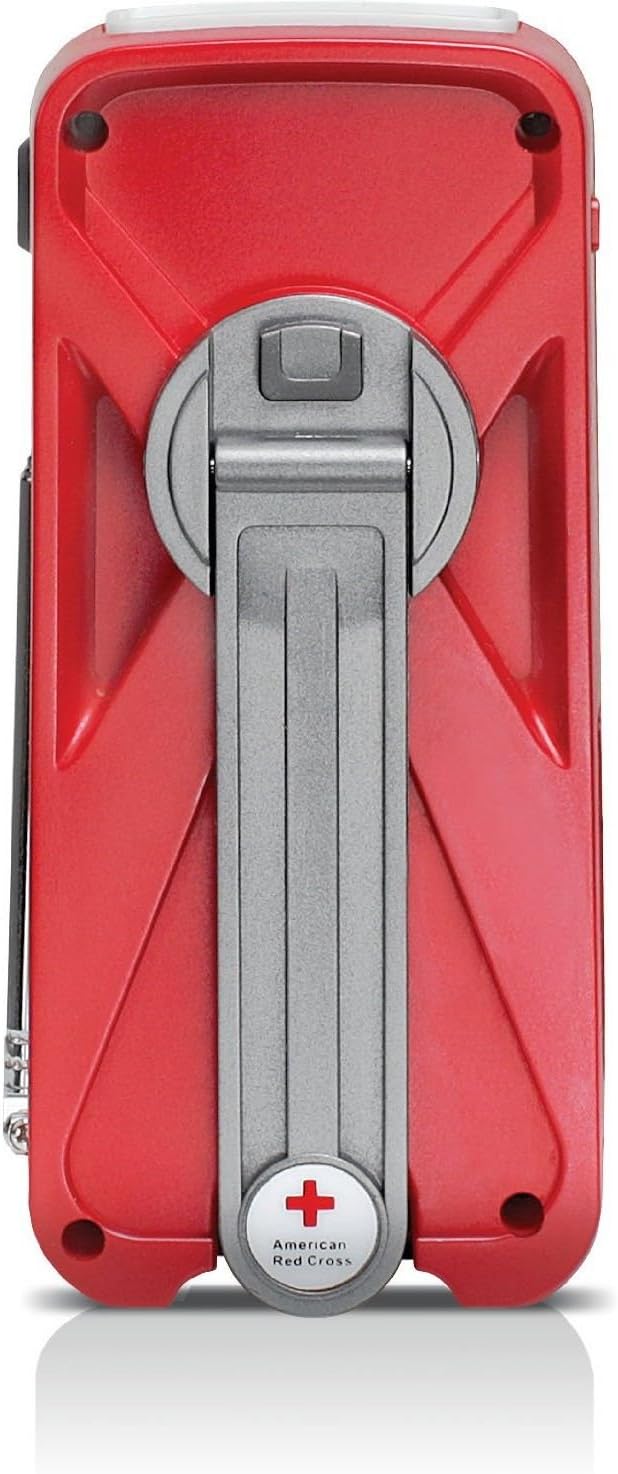
Figure 4: Back Panel with Hand Turbine Crank
- Күн панели: Located on the top/side for solar charging.
- Hand Turbine Crank: Fold-out crank on the back for manual power generation.
- Телескопиялык антенна: Extendable antenna for improved radio reception.
- Кол чырак: Интеграцияланган LED фонарь.
Порттор жана туташтыргычтар
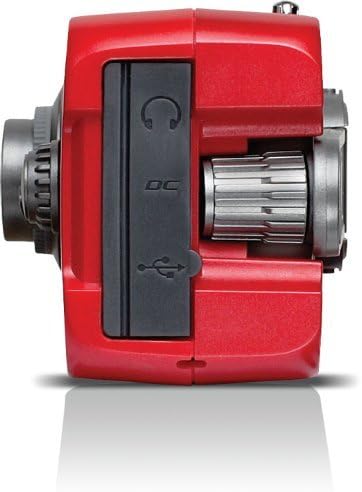
Figure 5: Top Panel Ports
- Mini-USB DC Input: For charging the internal battery via an AC adapter (not included) or computer USB port.
- USB чыгышы: Смартфондор сыяктуу тышкы түзмөктөрдү кубаттоо үчүн.
- Гарнитура уячасы: Жеке угуу үчүн.
Жайгашуу
Баштапкы заряддоо
Before first use, fully charge the internal battery using one of the following methods:
- USB заряддоо: Connect the supplied USB cable to the radio's Mini-USB DC input and to a powered USB port (e.g., computer, USB wall adapter). The charging indicator LED will illuminate.
- Күн кубаты: Place the radio with the solar panel facing direct sunlight. The solar panel charges the internal battery. This method is slower and best for maintaining charge or trickle charging.
- Hand Turbine Charging: Unfold the hand turbine crank and rotate it clockwise or counter-clockwise for 1-2 minutes. This provides power for immediate use or a quick boost to the internal battery.
Батарея маалыматы
The FRX2 is powered by a built-in 1000mAh rechargeable internal battery. This battery is designed for long-term use and is not user-replaceable. For optimal performance, ensure the battery is regularly charged.
Иштөө нускамалары
Күйгүзүү/өчүрүү
айлантыңыз Үндү көзөмөлдөө knob clockwise to turn the radio on. Rotate it counter-clockwise until it clicks to turn the radio off.
Radio Tuning (AM/FM/Weather Band)
- Оптималдуу кабыл алуу үчүн телескоптук антеннаны узартыңыз.
- колдонуу Band Selector switch to choose between AM, FM, or WB (Weather Band).
- айлантыңыз Тунинг терүү to find your desired station. The tuning indicator LED will light up when a strong signal is received.
- тууралаңыз Үндү көзөмөлдөө ыңгайлуу угуу деңгээлине.
NOAA Weather Alert Function
In WB mode, the radio can receive NOAA weather alerts. When an alert is broadcast, the radio will automatically switch from standby to the alert broadcast. Ensure the radio is in WB mode to receive these alerts.
Фонардын иштеши
Press the flashlight button to cycle through different modes: On, SOS (flashing), and Off. The flashlight provides illumination during power outagже караңгы чөйрөдө.
Smartphone Charging (Dump Charge)
The FRX2 can provide a 'dump charge' to small USB-powered devices like smartphones. This means it will transfer its stored battery power to the connected device. It is not designed for a full charge but can provide enough power for emergency communication.

6-сүрөт: Смартфонду кубаттоо
- Ensure the FRX2's internal battery has sufficient charge.
- Connect your smartphone's USB charging cable to the FRX2's USB output port.
- The radio will begin transferring power to your device.
Техникалык тейлөө
- Тазалоо: Радиону жумшак менен сүртүңүз, гamp кездеме. Абразивдүү тазалагычтарды же эриткичтерди колдонбоңуз.
- Сактагыч: Store the radio in a cool, dry place when not in use. For long-term storage, ensure the internal battery is charged every 3-6 months to maintain its lifespan.
- Антенна: Handle the telescopic antenna with care to prevent bending or breakage. Retract it when not in use.
Проблемаларды чечүү
| Көйгөй | Мүмкүн себеп | Чечим |
|---|---|---|
| Электр кубаты жок/Радио күйбөй жатат | Internal battery is depleted. | Charge the radio using USB, solar, or hand turbine. |
| Радио кабыл алуу начар | Антенна узартылган эмес, сигнал алсыз же тоскоолдук бар. | Телескопиялык антеннаны толугу менен сунуңуз. Радионун ордун башка жакка буруп көрүңүз. |
| Смартфон заряддалбай жатат | Радионун батареясы өтө аз, кабель туура эмес же түзмөк дал келбейт. | Ensure radio is sufficiently charged. Use the correct USB cable. Note that the FRX2 provides a 'dump charge' and may not fully charge all devices. |
| Колдун рычагы катуу же заряддалбай жатат | Mechanism obstruction or internal issue. | Ensure the crank moves freely. If issues persist, contact customer support. |
Техникалык шарттар
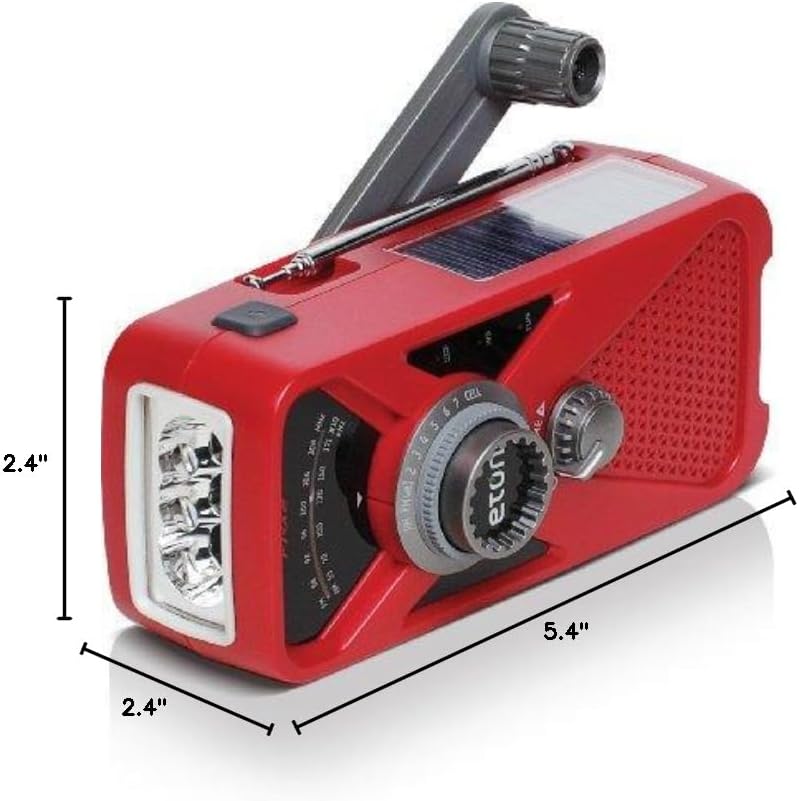
Сүрөт 7: Продукциянын өлчөмдөрү
- Модел: ARCFRX2WXR
- Өлчөмдөрү (L x W x Y): 5.4" x 2.4" x 2.4"
- Салмагы: 0.56 фунт
- Радио топтору: AM, FM, NOAA аба ырайы диапазону
- Кубат булактары: Internal Rechargeable Battery (1000mAh), Solar Panel, Hand Turbine, Mini-USB DC Input
- Чыгуу: USB (тышкы түзмөктөрдү кубаттоо үчүн)
- Өзгөчөлүктөрү: LED Flashlight, Headphone Jack
Кепилдик маалымат
Eton products are designed for reliability and performance. For specific warranty details, please refer to the warranty card included with your product or visit the official Eton webсайт. Кепилдик дооматтар үчүн сатып алганыңыздын далилин сактаңыз.
Колдоо
If you have any questions or require assistance with your Eton American Red Cross FRX2 radio, please contact Eton Customer Support:
- Webсайт: www.etoncorp.com
- Электрондук почта: кайрылыңыз webбайланыш формасын же электрондук почта дарегин алуу үчүн сайт.
- Телефон: кайрылыңыз webучурдагы колдоо телефон номерлери үчүн сайт.