
BONTEC 109MB
BONTEC TV Wall Bracket User Manual
Модел: 109MB
1. Киришүү
Thank you for choosing the BONTEC TV Wall Bracket. This full-motion wall mount is designed to securely hold 37-80 inch LED LCD flat and curved screen televisions, offering exceptional flexibility for optimal viewing angles. Manufactured from reinforced, compressed steel, it ensures durability and safety for your television. This manual provides essential information for safe installation, operation, and maintenance of your TV wall bracket.
2. Коопсуздук маалыматы
Please read all instructions carefully before installation and use. Failure to follow these instructions may result in serious personal injury, property damage, or voiding of your warranty.
- Салмак сыйымдуулугу: 65 кг (144 фунт) жүктүн максималдуу салмагынан ашпаңыз.
- Дубал түрү: This bracket is designed for installation on wood studs, concrete walls, or brick walls. DO NOT MOUNT ON DRYWALL ALONE without securing to a stud or using appropriate heavy-duty anchors for hollow walls.
- Кесиптик орнотуу: Эгерде сиз орнотуу процессине же дубалыңыздын ылайыктуулугуна күмөн санасаңыз, квалификациялуу адиске кайрылыңыз.
- VESA үлгүсүн текшерүү: Ensure your TV's VESA pattern is compatible with the bracket before beginning installation.
- Коопсуз бекиткичтер: Ensure all screws and bolts are securely tightened before mounting the TV. Do not overtighten.
- Кабелдик башкаруу: Route cables carefully to prevent pinching or damage when adjusting the TV.
3. Пакеттин мазмуну
Орнотуудан мурун бардык компоненттердин бар экенин жана бузулбаганын текшериңиз. Эгерде кандайдыр бир тетиктер жок болсо же бузук болсо, BONTEC кардарларды колдоо кызматына кайрылыңыз.
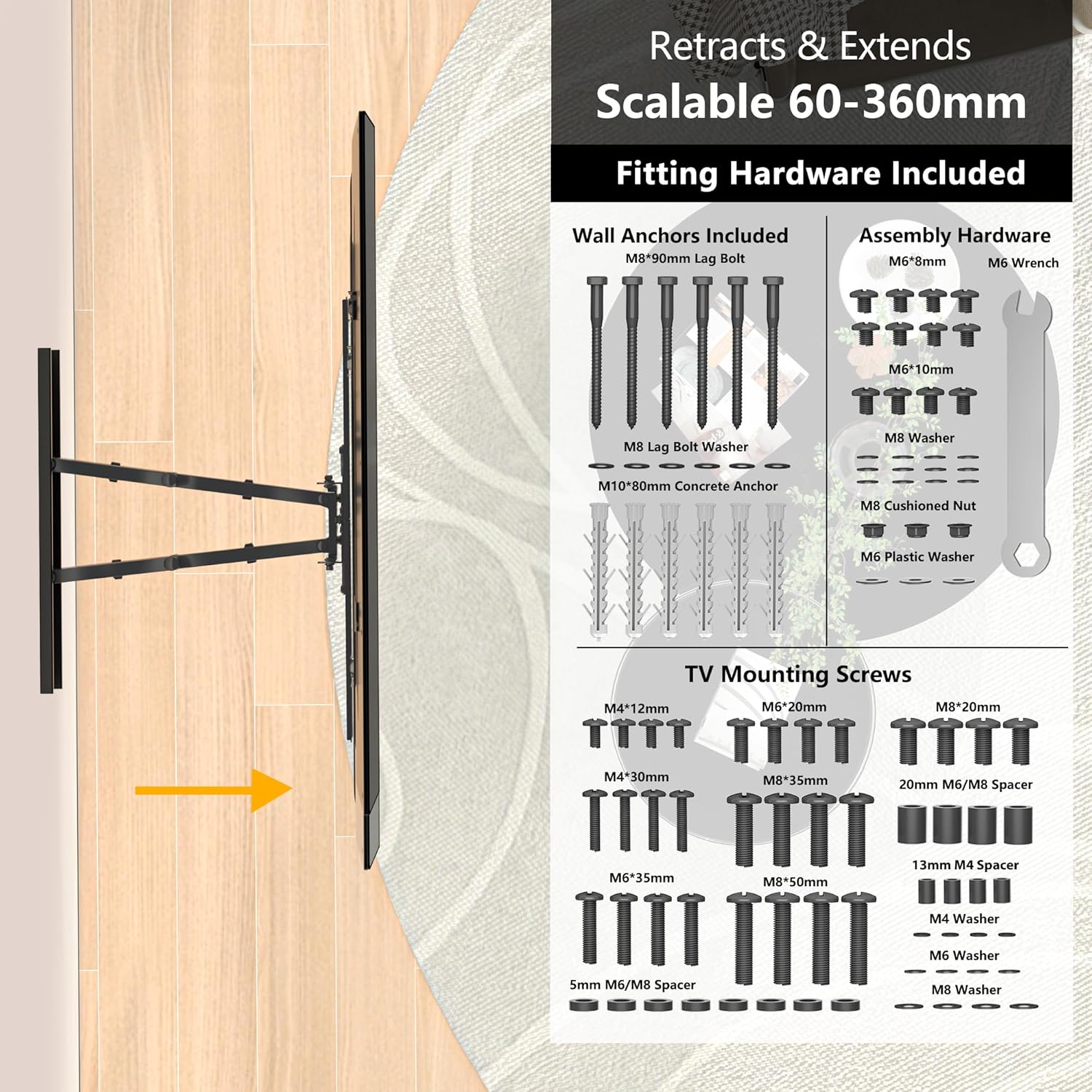
Сүрөт: бүттүview of included fitting hardware and TV mounting screws.
- TV Wall Bracket Assembly
- Wall Anchors (M8*90mm Lag Bolts, M10*80mm Concrete Anchors)
- Assembly Hardware (M6*6mm, M6*10mm screws, M8 Washers, M8 Cushioned Nuts, M6 Plastic Washers, M6 Wrench)
- TV Mounting Screws (Various sizes: M4*12mm, M4*30mm, M6*20mm, M6*35mm, M8*20mm, M8*35mm, M8*50mm)
- Spacers (20mm M6/M8, 13mm M4, 5mm M6/M8)
- Washers (M4, M6, M8)
- 1.8 м HDMI кабели
- Рух деңгээли
- Иллюстрацияланган нускамалар
4. Техникалык шарттар
| Өзгөчөлүк | Description |
|---|---|
| Туура келген сыналгы өлчөмдөрү | 37 - 80 дюйм |
| VESA шайкештиги | 100x100, 200x100, 200x200, 300x200, 300x300, 400x200, 400x400, 600x400mm |
| Максималдуу жүктөө жөндөмдүүлүгү | 65 кг (144 фунт) |
| Тит бурч | +5° (өйдө) -15° (төмөн) |
| Swivel Angle | ±45° (left to right) |
| Ротация тууралоо | ±3° (level adjustment) |
| Дубалдын аралыгы (жыйылган) | 60мм |
| Дубалдын аралыгы (кеңейтилген) | 360мм |
| Материал | Reinforced, Compressed Steel |
| Продукциянын өлчөмдөрү | 64 x 45 x 43 см |
| Продукт Салмагы | 7.71 кг |

Image: TV size and VESA compatibility overview.
5. Орнотуу жана орнотуу
Follow these steps for a secure and efficient installation. It is recommended to have at least two people for installation, especially when mounting the TV.
5.1. Орнотууга чейинки текшерүүлөр
- Сыналгы шайкештигин текшерүү: Check your TV's VESA pattern and weight against the specifications.
- Дубал түрүн аныктоо: Determine if your wall is wood stud, concrete, or brick. Use the appropriate anchors and drilling methods.
- Locate Studs (for wood walls): Use a stud finder to accurately locate the center of wood studs.
- Аймакты тазалоо: Ensure the installation area is clear of obstructions, electrical wires, and plumbing.

Image: Diverse wall compatibility information.
5.2. Дубал плитасын орнотуу
- Шаблонду жайгаштырыңыз: Hold the wall plate or use the provided template against the wall at your desired height. Use the spirit level to ensure it is perfectly horizontal.
- Бургулоо тешиктерин белгилөө: Дубал плитасындагы тешиктер аркылуу бургулоочу жерлерди белгилеңиз.
- Бургулоо тешиктери: Drill pilot holes according to the marked points and the type of wall. For concrete/brick, use a masonry drill bit and insert concrete anchors. For wood studs, drill pilot holes directly into the center of the studs.
- Дубал плитасын бекитүү: Дубал пластинасын тиешелүү болтторду жана шайбаларды колдонуп дубалга бекитиңиз. Бышык тартыңыз, бирок өтө катуу тартпаңыз.
5.3. Attaching Brackets to TV
- Lay TV Face Down: Чийилип калбашы үчүн, телевизоруңузду жумшак, таза бетке бетин ылдый каратып этияттык менен коюңуз.
- Сыналгы кашааларын тиркөө: Align the vertical TV brackets with the VESA mounting holes on the back of your TV. Use the correct size screws and spacers from the provided hardware kit. Ensure the brackets are securely fastened.
5.4. Hanging the TV and Final Adjustments
- Телевизор илип: With assistance, carefully lift the TV and hook the TV brackets onto the wall plate. Ensure the TV is securely seated on the wall plate.
- Коопсуз сыналгы: Кокусунан ордунан жылып кетишинин алдын алуу үчүн телевизорду дубалга бекитүүчү пластинага бекитүү үчүн сыналгынын кронштейндериндеги коопсуздук бурамаларын же бекитүүчү механизмдерди колдонуңуз.
- Деңгээлин тууралоо: Use the ±3° rotation adjustment feature to fine-tune the TV's level if needed.

Image: Easy installation steps.
6. Иштөө жана тууралоо
The BONTEC TV Wall Bracket offers full motion capabilities for an optimized viewтажрыйбасы.
6.1. Айлануучуну тууралоо
Gently push or pull the TV to swivel it up to 45° left or right. This allows you to direct the screen towards different viewing areas in your room.

Image: Swivel adjustment for optimal viewing.
6.2. жантайып тууралоо
To adjust the vertical tilt, gently push the top or bottom of the TV. The bracket allows for a tilt of +5° up and -15° down, helping to reduce glare and improve viewсооронуч.

Image: Tilt and level adjustment features.
6.3. Кеңейтүү жана артка тартуу
The dual arms allow the TV to extend up to 360mm from the wall and retract to a low profile of 60mm, saving space when not in use.
6.4. Кабелдик башкаруу
Utilize the integrated cable management system on the bracket arms to neatly route and conceal unsightly cables, maintaining a clean and tidy appearance.
7. Техникалык тейлөө
Үзгүлтүксүз техникалык тейлөө телевизоруңуздун дубал кронштейнинин узак мөөнөттүү жана коопсуз иштешин камсыздайт.
- Тазалоо: Wipe the bracket with a soft, dry cloth. Avoid using abrasive cleaners or solvents that could damage the finish.
- Мезгилдүү текшерүүлөр: Periodically check all mounting screws and bolts to ensure they remain tight and secure. Over time, vibrations or adjustments may cause them to loosen slightly.
- Майлоо: The moving parts are designed for smooth operation and generally do not require lubrication. If movement becomes stiff, consult BONTEC customer support.
8. Кыйынчылыктарды
If you encounter any issues with your BONTEC TV Wall Bracket, refer to the following common problems and solutions.
- ТВ деңгээл эмес: Use the ±3° rotation adjustment feature to fine-tune the level. Ensure the wall plate was installed horizontally using the spirit level.
- Bracket feels unstable or sags:
- Verify that the TV weight does not exceed the 65 kg (144 lbs) maximum capacity.
- Ensure all wall mounting bolts and TV attachment screws are securely tightened.
- Confirm that the bracket is mounted to appropriate wall studs or solid concrete/brick, not just drywall.
- Difficulty adjusting the TV (swivel/tilt/extension):
- Кыймылга тоскоол болгон бардык тоскоолдуктарды текшериңиз.
- Ensure no cables are caught in the moving parts.
- The joints are designed to be firm to hold the TV's position. Apply gentle, steady pressure.
If the problem persists after attempting these solutions, please contact BONTEC customer support for further assistance.
9. Кепилдик жана колдоо
For information regarding warranty coverage, returns, or technical support, please refer to the documentation provided at the time of purchase or visit the official BONTEC webсайт. Сатып алганыңыздын далили катары сатып алуу дүмүрчөгүңүздү сактаңыз.
BONTEC Customer Service: Please refer to the contact information provided on the product packaging or the official BONTEC webэң заманбап колдоо каналдары үчүн сайт.
Ask a question about this manual
Ask about setup, troubleshooting, compatibility, parts, safety, or missing instructions. Manuals+ will review the question and use this page’s manual context to help answer it.