
1. Киришүү
Сатып алганыңыз үчүн рахматasing the Medeli M30 61-Key Professional Keyboard. This instrument is designed to provide a rich musical experience with its touch-sensitive keys, extensive voice library, and versatile accompaniment styles. This manual will guide you through the setup, operation, and maintenance of your new keyboard.
Пакеттин мазмуну
- Medeli M30 61-Key Professional Keyboard
- Кубаттуу адаптер
- Музыкалык эс алуу
- Колдонуучунун Колдонмосу (бул документ)
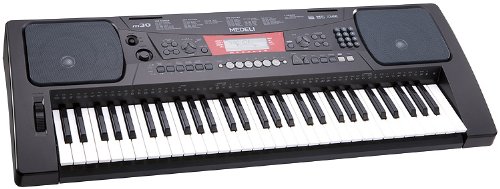
Figure 1: Medeli M30 61-Key Professional Keyboard. This image shows the keyboard from a front-angle view, highlighting its 61 keys, control panel, and display.
2. Коопсуздук нускамалары
- Электр камсыздоо: Белгиленген кубат адаптерин гана колдонуңуз. Voltage сиздин жергиликтүү электр камсыздооңузга дал келет.
- Суу жана ным: Do not expose the keyboard to water or moisture. Avoid placing liquids near the instrument.
- Вентиляция: Do not block ventilation openings. Ensure adequate airflow around the keyboard.
- Жылуулук булактары: Keep the keyboard away from heat sources such as radiators, heat registers, stoves, or other apparatus (including ampкөтөргүчтөр) жылуулукту пайда кылуучу.
- Тазалоо: Кургак чүпүрөк менен гана тазалаңыз. Суюк тазалагычтарды же аэрозолдорду колдонбоңуз.
- Тейлөө: Бул продуктту өзүңүз тейлөөгө аракет кылбаңыз. Бардык тейлөөнү квалификациялуу тейлөө кызматкерлерине тапшырыңыз.
3. Орнотуу
3.1 Пакеттен чыгаруу
Бардык компоненттерди таңгактан кылдаттык менен алып салыңыз. Таңгакты келечекте ташуу же сактоо үчүн сактаңыз.
3.2 Кубат туташтыруу
- Ensure the keyboard's power switch is in the "OFF" position.
- Connect the power adapter to the DC IN jack on the rear panel of the keyboard.
- Кубат адаптерин стандарттуу AC розеткага сайыңыз.
- Turn the power switch to the "ON" position to power on the keyboard.
3.3 Music Rest Installation
Insert the music rest into the designated slots on the top panel of the keyboard. Ensure it is securely seated.
4. Иштөө нускамалары
4.1 Негизги ойнотуу
- Күйгүзүү: Press the [POWER] button to turn on the keyboard.
- Үндү тууралоо: Жалпы үн деңгээлин тууралоо үчүн [МАСТЕР ҮНҮ] баскычын колдонуңуз.
- Ачкычтарды ойнотуу: The M30 features 61 touch-sensitive keys. The harder you press, the louder the sound.
4.2 Үндөрдү тандоо
The M30 offers 359 different voices (instrument sounds).
- [VOICE] баскычын басыңыз.
- Use the numeric keypad or the [+] / [-] buttons to select a voice number.
- The selected voice name will appear on the display.
4.3 Selecting Styles
The keyboard includes 150 accompaniment styles.
- [STYLE] баскычын басыңыз.
- Use the numeric keypad or the [+] / [-] buttons to select a style number.
- Press [START/STOP] to begin the accompaniment.
- Adjust the style volume using the [ACCOMPANIMENT VOLUME] button (if available, or general volume).
4.4 Playing Songs
The M30 has 100 built-in songs and 2 demo songs.
- [SONG] баскычын басыңыз.
- Use the numeric keypad or the [+] / [-] buttons to select a song number.
- Press [PLAY/PAUSE] to start or pause the song.
- Press [STOP] to stop the song.
5. Байланыш
5.1 USB туташуу
The Medeli M30 features a USB port for connecting to a computer. This allows for MIDI data transfer, enabling the keyboard to be used as a MIDI controller or to connect with music software.
- Connect a standard USB cable (Type B to Type A, not included) from the keyboard's USB port to your computer's USB port.
- Your computer should automatically recognize the keyboard as a MIDI device.
- Refer to your music software's documentation for instructions on setting up MIDI input devices.
6. Техникалык тейлөө
6.1 Тазалоо
- Клавиатуранын бетин жумшак, кургак чүпүрөк менен сүртүңүз.
- өжөр кир үчүн, бир аз гampчүпүрөктү суу жана жумшак жуугуч менен жууп, анан дароо кургатып сүртүңүз.
- Абразивдүү тазалагычтарды, момдорду же эриткичтерди колдонбоңуз.
6.2 Сактоо
- Узак убакыт бою колдонулбай турганда, кубат адаптерин сууруп коюңуз.
- Клавиатураны салкын, кургак жерде, күн нуру түз тийген жана өтө жогорку температурадан алыс сактаңыз.
- Consider using a dust cover to protect the keys and control panel.
7. Кыйынчылыктарды
| Көйгөй | Мүмкүн себеп | Чечим |
|---|---|---|
| Үн жок | Үн өтө төмөн же үнсүз. | Increase the [MASTER VOLUME] knob. |
| Баскычтоп күйбөйт | Кубат адаптери туташкан эмес же туура эмес. | Ensure power adapter is securely connected and plugged into a working outlet. Check power switch position. |
| Ачкычтар жооп бербей жатат | Keyboard may be in a specific mode (e.g., demo mode). | Try powering off and on again. Refer to the operating section for specific mode exits. |
8. Техникалык шарттар
| Өзгөчөлүк | Деталь |
|---|---|
| Ачкычтар | 61, Touch-Sensitive |
| Үндөр | 359 |
| Стилдер | 150 |
| Ырлар | 100 (plus 2 Demo Songs) |
| Байланыш | USB (MIDI) |
| Өлчөмдөрү (L x W x Y) | 93.98 x 35.56 x 15.24 см |
| Салмагы | 6.8 кг |
| Модель номери | M30 |
| UPC/GTIN | 857285003529 |
9. Кепилдик жана колдоо
For warranty information and technical support, please refer to the warranty card included with your product or visit the official Medeli webсайт. Ар кандай кепилдик дооматтары үчүн сатып алганыңыздын далилин сактаңыз.
Өндүрүүчү: Медели
Webсайт: www.medeli.com (Эскертүү: Бул толтургуч URL, колдоо кызматына туура байланышуу үчүн өнүмдүн чыныгы документтерин караңыз.)