
Introduction
The Medeli A800 61-Key Professional Keyboard is a versatile instrument designed for musicians seeking a wide range of sounds and performance features. It features Touch Responsive Keys, 583 Voices, 230 Styles, and 120 Songs, providing a comprehensive musical experience.
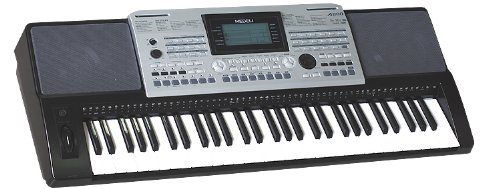
Үстүбүздөгү чыгым view of the Medeli A800 61-Key Professional Keyboard, showing the black and silver chassis, 61 white and black keys, and the control panel with a display screen and various buttons and knobs.
Жайгашуу
Follow these steps to set up your Medeli A800 keyboard:
- Пакеттен чыгаруу: Carefully remove the keyboard and all accessories from the packaging. Retain the original packaging for future transport or storage.
- Кубат туташуу: Connect the included AC power adapter to the DC IN jack on the rear panel of the keyboard. Plug the other end into a standard electrical outlet.
- Күйгүзүү: басыңыз КҮЧ button located on the control panel to turn on the keyboard. The display screen should illuminate.
- Аудио чыгаруу: For sound, connect headphones to the НАУШНИКТЕР jack (3.5mm) or connect the keyboard to an external amplifier/speaker system using the appropriate audio output jacks (if available, refer to the physical unit for exact port labels).
- Стенд жайгаштыруу: Place the keyboard on a stable, flat surface or a dedicated keyboard stand.
Иштөө нускамалары
The Medeli A800 offers a variety of features for musical expression:
- Үндөр: The keyboard includes 583 different voices (instrument sounds). Use the dedicated voice selection buttons or the numeric keypad to browse and select desired voices.
- Стилдер: Access 230 built-in accompaniment styles. These styles provide rhythmic and harmonic backing for your playing. Select a style and press the START/STOP коштоону баштоо үчүн баскычты басыңыз.
- Ырлар: Explore 120 pre-recorded songs. These can be used for listening, learning, or playing along. Use the song selection controls to choose a song and the ОЙНОО/ТЫНЫТТЫРУ ойнотууну башкаруу үчүн баскыч.
- Тийип жооп: The 61 keys are touch-responsive, meaning the volume and timbre of the sound will change based on how hard you strike the keys, allowing for dynamic expression.
- Башкаруу панели: Familiarize yourself with the control panel, which includes a display screen, navigation buttons, volume controls, and various function buttons for adjusting settings like tempo, transpose, and effects.
Техникалык тейлөө
Proper care will ensure the longevity and optimal performance of your Medeli A800 keyboard:
- Тазалоо: Клавиатуранын бетин жумшак, кургак чүпүрөк менен сүртүңүз. Өтө кир болсо, бир аз сүртүңүз.ampкездемени суу жана жумшак жуучу каражат менен сүртүп, андан кийин дароо кургатыңыз. Абразивдүү тазалоочу каражаттарды, эриткичтерди же момдорду колдонбоңуз.
- Чаңдан коргоо: When not in use, cover the keyboard with a dust cover to prevent dust accumulation, which can affect internal components and key action.
- Сактагыч: Клавиатураны күн нурунан, өтө температурадан жана жогорку нымдуулуктан алыс, салкын, кургак жерде сактаңыз.
- Колдонуу: Avoid dropping the keyboard or subjecting it to strong impacts. Do not place heavy objects on top of the keys or control panel.
- Өчүрүү: Always turn off the keyboard using the КҮЧ button before unplugging it from the power source or disconnecting any cables.
Проблемаларды чечүү
If you encounter issues with your Medeli A800, refer to the following common problems and solutions:
| Көйгөй | Мүмкүн себеп | Чечим |
|---|---|---|
| Үн жок | Volume too low; headphones connected; incorrect audio output connection; power issue. | Increase master volume. Disconnect headphones if using speakers. Check audio cable connections. Ensure power adapter is securely plugged in and keyboard is on. |
| Ачкычтар жооп бербейт | Keyboard may be in a demo mode; local control off; internal malfunction. | Exit any demo modes. Check if "Local Control" setting is enabled (refer to advanced settings in the full manual if available). Power cycle the unit. |
| Бурмаланган үн | Үнү өтө катуу; кабелдин бузук болушу; тышкы динамиктин көйгөйү. | Reduce keyboard volume. Try a different audio cable. Test with different headphones or speakers. |
| Дисплей иштебейт | Кубат маселеси; дисплей жөндөөлөрү. | Ensure keyboard is powered on. Check brightness/contrast settings if available. Power cycle the unit. |
If the problem persists after trying these solutions, please contact Medeli customer support or your retailer for further assistance.
Техникалык шарттар
| Өзгөчөлүк | Деталь |
|---|---|
| Ачкычтар | 61 with Touch Response |
| Үндөр | 583 |
| Стилдер | 230 |
| Ырлар | 120 |
| Модель аты | A800 |
| Элемент моделинин номери | A800 |
| Продукциянын өлчөмдөрү | 93.98 x 35.56 x 15.24 см |
| Элемент Салмагы | 6.8 кг (15 фунт) |
| UPC | 857285003598 |
| Наушник уясы | 3.5 мм Jack |
| Power Source | Battery Powered (or AC Adapter) |
Кепилдик жана колдоо
For information regarding warranty coverage, please refer to the warranty card included with your product or visit the official Medeli webсайт. Кепилдиктин шарттары аймакка жана сатуучуга жараша өзгөрүшү мүмкүн.
For technical support, service, or inquiries about your Medeli A800 keyboard, please contact your authorized Medeli dealer or the manufacturer directly. Keep your purchase receipt and product serial number handy when seeking support.