
1. Киришүү
This manual provides essential information for the safe and efficient operation of your Alto Professional TMX160 DFX 16-Channel Powered Mixer. The TMX160 DFX is a versatile audio mixing console featuring 16 input channels, a built-in Alesis digital effects processor, and an integrated power amplifier capable of delivering 750W stereo output at 4Ω or 1500W mono output at 8Ω. It includes 12 XLR microphone inputs with phantom power, 16 line inputs, and stereo RCA inputs, along with a 3-band equalizer on each mono and stereo channel.
Please read this manual thoroughly before using the product to ensure proper setup and operation. Keep this manual for future reference.
2. Коопсуздук маалыматы
Өрт, электр шок жана адамдардын жаракат алуу коркунучун азайтуу үчүн бул продуктуну колдонууда ар дайым негизги коопсуздук чараларын сактаңыз.
- Кубат булагы: Агрегатты көрсөтүлгөн көлөмдөгү AC розеткага гана туташтырыңызtage.
- Негиздөө: Ensure the unit is properly grounded. Do not defeat the safety purpose of the polarized or grounding-type plug.
- Суу жана ным: Do not expose this equipment to rain or moisture. Do not use near water.
- Вентиляция: Адекваттуу вентиляцияны камсыз кылыңыз. Вентиляция тешиктерин жаап албаңыз.
- Жылуулук: Радиаторлор, жылуулук регистрлери, мештер же башка аппараттар (анын ичинде) сыяктуу жылуулук булактарынын жанына орнотпоңуз ampкөтөргүчтөр) жылуулукту пайда кылуучу.
- Кабелдер: Электр зымдарын басуудан же кысып калуудан сактаңыз.
- Тейлөө: Бардык тейлөөлөрдү квалификациялуу тейлөө кызматкерлерине тапшырыңыз. Бул продуктуну өзүңүз тейлөөгө аракет кылбаңыз.
3. Орнотуу
3.1 Таңгактан чыгаруу жана текшерүү
Carefully unpack the TMX160 DFX mixer and inspect it for any signs of damage that may have occurred during transit. If any damage is found, contact your dealer immediately.
3.2 Кубатты туташтыруу
Connect the supplied AC power cord to the mixer's power input and then to a suitable grounded AC power outlet. Ensure the mixer's power switch is in the OFF position before connecting to power.
3.3 Киргизүүлөрдү туташтыруу
The TMX160 DFX offers a variety of input options:
- Микрофон киргизүүлөрү (MIC 1-12): Use XLR cables to connect microphones to the 12 XLR inputs. Phantom power (+48V) can be activated for condenser microphones.
- Line Inputs (Channels 1-16): Use 1/4-inch TRS or TS cables for line-level instruments or devices. Channels 13/14 and 15/16 are stereo line inputs, also accepting RCA for 2-Track In.
- 2-Track In: Connect external audio sources like CD players or media players using RCA cables.
3.4 Чыгууларды туташтыруу
Connect your speakers or monitoring system to the appropriate outputs:
- Динамиктин чыгышы: Connect passive speakers to the power amplifier outputs. Ensure the impedance of your speakers matches the mixer's output capabilities (e.g., 4Ω for 750W stereo, 8Ω for 1500W mono).
- Monitor/Aux Outputs: Use these outputs to send signals to stage monitors or external effects processors.
- Stereo Out/Mono Out: These outputs provide the main mix signal for recording or connecting to additional sound systems.
3.5 Баштапкы күйгүзүү
After all connections are made, ensure all channel faders and the main mix fader are at their lowest settings. Turn on any connected devices (e.g., microphones, instruments) first, then power on the TMX160 DFX mixer. Finally, turn on your power ampкөтөргүчтөр же активдүү спикерлер.
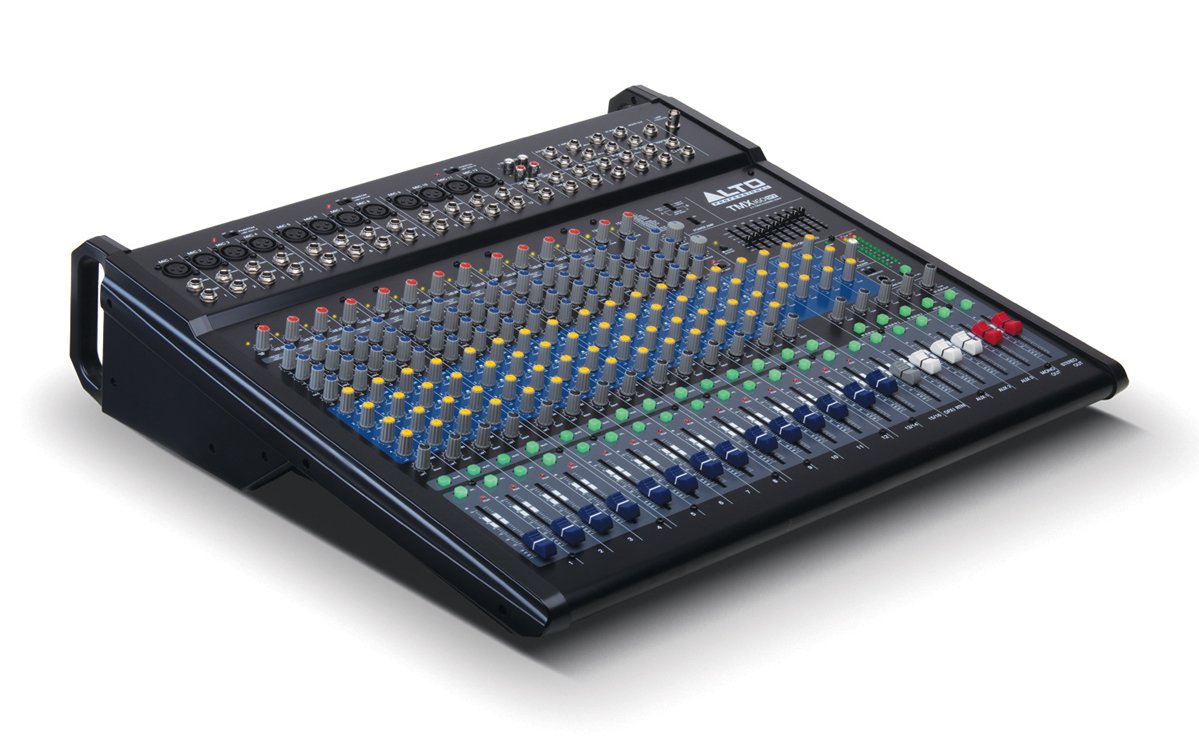
1-сүрөт: алдыңкы панелдин үстүндөview of the Alto Professional TMX160 DFX mixer. This image shows the comprehensive layout including microphone and line inputs at the top, channel controls in the middle, and faders at the bottom.
4. Операция
4.1 Каналды башкаруу
Each input channel (1-16) features a set of controls to shape its sound:
- УТУШ: Adjusts the input sensitivity for the connected microphone or line-level device. Set this to achieve a strong signal without clipping (distortion).
- EQ (жогорку, орто, төмөн): A 3-band equalizer allows you to boost or cut frequencies (treble, midrange, bass) for each channel.
- AUX жөнөтөт: Controls the amount of signal sent from the channel to the auxiliary outputs (e.g., for monitors or external effects).
- ПАН: Каналдын сигналын стерео талаанын ичинде (солдон оңго) жайгаштырат.
- LEVEL Fader: Негизги аралашмадагы каналдын жалпы көлөмүн көзөмөлдөйт.
4.2 Башкы бөлүм
The master section controls the overall output of the mixer:
- Main Mix Faders: Control the overall volume of the stereo output.
- DFX (Digital Effects) Controls: Select and adjust parameters for the built-in Alesis digital effects.
- Stereo Graphic EQ: A 7-band graphic equalizer allows for fine-tuning the overall frequency response of the main mix.
- Күч Amp Башкаруу каражаттары: Adjust the output level and mode (Stereo/Mono) for the integrated power ampөмүрлүү.
4.3 Built-in Alesis Digital Effects
The TMX160 DFX features a high-quality Alesis digital effects processor. Use the DFX controls in the master section to browse and select from various effects such as reverb, delay, chorus, and more. Adjust the effect send levels on individual channels and the overall effect return level in the master section to blend the effects into your mix.
2-сүрөт: Детальдуу view of the input channels, showing individual GAIN, EQ, AUX, PAN, and LEVEL controls for precise audio shaping.
5. Техникалык тейлөө
Proper maintenance ensures the longevity and optimal performance of your TMX160 DFX mixer.
- Тазалоо: Миксердин сыртын тазалоо үчүн жумшак, кургак чүпүрөктү колдонуңуз. Абразивдүү тазалагычтарды, эриткичтерди же момдорду колдонуудан алыс болуңуз.
- Чаң: Ашыкча ысып кетүүнүн алдын алуу үчүн желдетүү тешиктеринен чаңды үзгүлтүксүз алып салыңыз.
- Сактагыч: Миксерди көпкө чейин колдонбогон учурда, аны салкын, кургак жерде, күн нуру түз тийген жерден жана өтө жогорку температурадан алыс сактаңыз.
- Фадерлер жана баскычтар: Avoid applying excessive force to faders and knobs. Keep them free from dust and debris.
6. Кыйынчылыктарды
If you encounter issues with your TMX160 DFX, refer to the following common problems and solutions:
- Кубат жок:
- Check if the power cord is securely connected to both the mixer and the AC outlet.
- Кондиционер розеткасы иштеп турганын текшериңиз.
- Миксердин кубат которгучу ON абалында экенин текшериңиз.
- Үн чыгышы жок:
- Бардык киргизүү жана чыгаруу кабелдик байланыштарды текшериңиз.
- Ensure channel GAIN and LEVEL faders are appropriately set.
- Verify the Main Mix faders are raised.
- Check if connected speakers or power amplifiers are turned on and functioning.
- Күчтү камсыз кылуу Amp controls are set correctly for your speaker configuration.
- Бурмаланган үн:
- Reduce the GAIN setting for the input channel.
- Lower the channel LEVEL fader or Main Mix faders.
- Бузулган кабельдерди текшериңиз.
- Effects Not Heard:
- Ensure the DFX send controls on the channels are turned up.
- Verify the DFX return level in the master section is raised.
- Check the selected effect program.
If the problem persists after trying these steps, contact Alto Professional customer support.
7. Техникалык шарттар
| Өзгөчөлүк | Спецификация |
|---|---|
| Бренд | Alto Professional |
| Модел | TMX160 DFX |
| Каналдардын саны | 16 |
| Элемент Салмагы | 12.5 килограмм |
| Байланыш технологиясы | Көмөкчү |
| Аудио киргизүү | XLR, RCA, Line, AUX, 2-Track |
| Өндүрүүчү | inMusic |
| ASIN | B007T1VZ52 |
| Power Output (Stereo) | 750 Вт @ 4 Ом |
| Power Output (Mono) | 1500 Вт @ 8 Ом |
| Эквалайзер | 3-band EQ per channel, Stereo Graphic EQ |
| Эффекттер | Built-in Alesis Digital Effector (24-bit A/D and D/A converters) |
| Өлчөмдөрү (W x D x H) | Болжол менен 21.9 x 22.2 x 5.7 дюйм (555 x 565 x 145 мм) |
8. Кепилдик жана колдоо
For warranty information and technical support, please refer to the documentation included with your product or visit the official Alto Professional webсайт. Сатып алуу квитанциясын кепилдик дооматтары үчүн сатып алуунун далили катары сактаңыз.
For further assistance, you may contact Alto Professional customer service directly.