
Introduction
The Jabra Music Street2 Bluetooth Stereo Headset is designed to provide high-quality audio and hands-free communication. This manual provides essential information for the proper use, maintenance, and troubleshooting of your device. Please read it carefully before use.
Жайгашуу
1. Гарнитураны заряддоо
Before first use, fully charge the headset. Connect the micro-USB charging cable to the charging port on the headset and the other end to a USB power source.
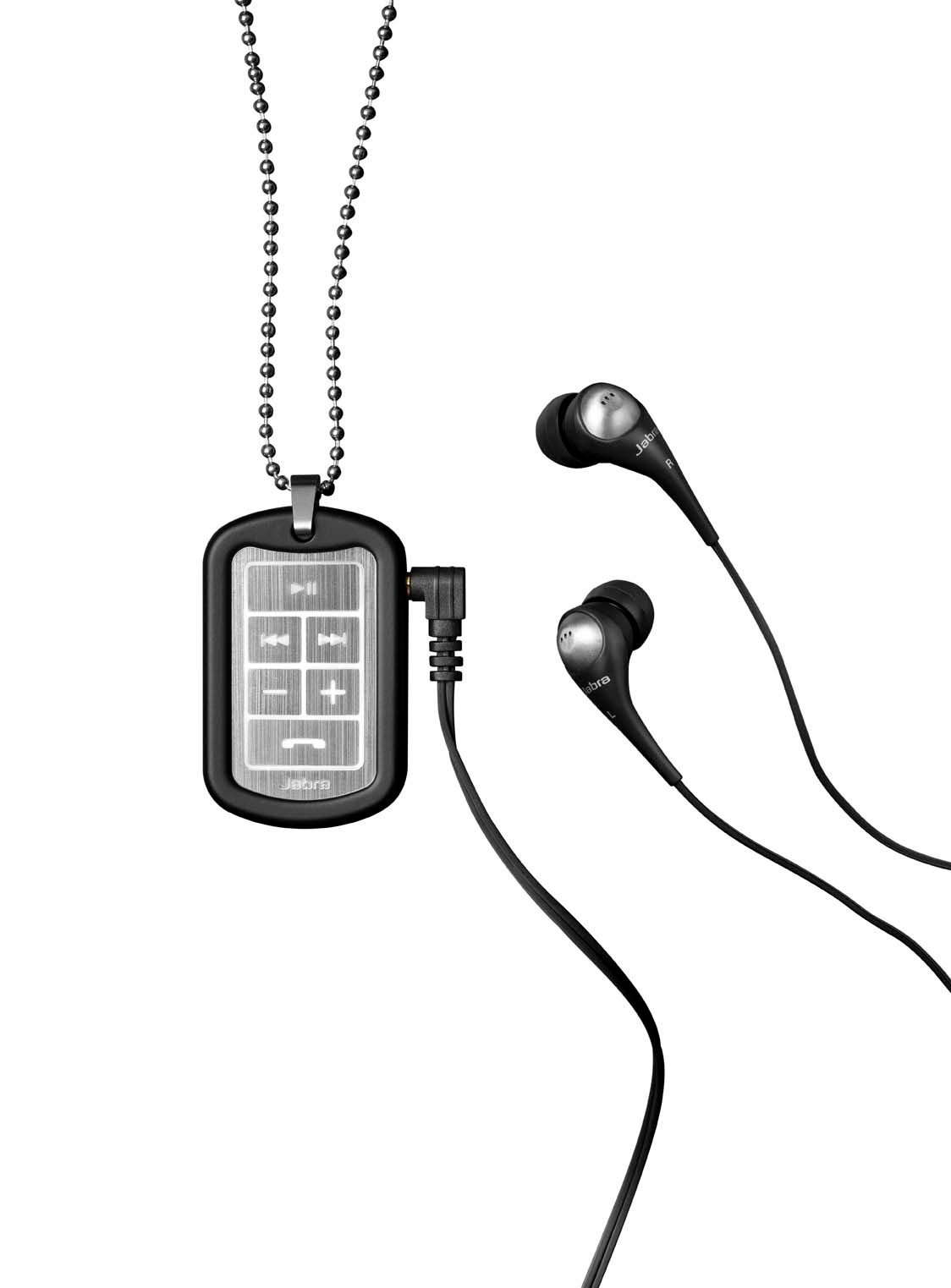
Image: The Jabra Music Street2 headset, highlighting the micro-USB charging port located on the side of the control unit.
- Толук кубаттоо, адатта, болжол менен 2 саатты талап кылат.
- LED индикатору кубаттоо абалын көрсөтөт (мисалы, кубаттоо үчүн кызыл, толук заряддалган үчүн көк).
2. Bluetooth түзмөгү менен жупташуу
- Гарнитура өчүрүлгөнүн текшериңиз.
- Press and hold the Multi-function button (usually the play/pause button) for approximately 5-7 seconds until the LED indicator flashes blue rapidly. This indicates pairing mode.
- Bluetooth иштетилген түзмөгүңүздө (смартфон, планшет ж.б.) Bluetooth жөндөөлөрүнө өтүп, Bluetooth'ду иштетиңиз.
- Издөө available devices. "Jabra Street2" should appear in the list.
- Select "Jabra Street2" to connect. If prompted for a passcode, enter "0000" (four zeros).
- Ийгиликтүү жупташтырылгандан кийин, LED индикатору көк түстө жай күйөт.
The headset can remember multiple paired devices but can only be connected to one at a time.
Иштөө нускамалары
Күйгүзүү/өчүрүү
- Күйгүзүү: Көп функциялуу баскычты көк түстөгү жарык күйгөнчө басып туруңуз.
- Өчүрүү: Көп функциялуу баскычты LED кызыл түстө күйүп-өчүп, андан кийин өчкөнгө чейин басып туруңуз.
Музыкалык башкаруу
- Ойнотуу/тындыруу: Көп функциялуу баскычты бир жолу басыңыз.
- Кийинки трек: "Кийинки трек" баскычын басыңыз (адатта алдыга багытталган жебе менен белгиленет).
- Мурунку трек: "Мурунку трек" баскычын басыңыз (адатта артка багытталган жебе менен белгиленген).
- Көлөмү: "+" баскычын басыңыз.
- Үнүн азайтуу: "-" баскычын басыңыз.
Чалууларды башкаруу
- Чакырууга жооп берүү: Көп функциялуу баскычты бир жолу басыңыз.
- Чакырууну аяктоо: Чалуу учурунда Көп функциялуу баскычты бир жолу басыңыз.
- Чакырууну четке кагуу: Көп функциялуу баскычты 2 секунд басып туруңуз.
- Акыркы номерди кайра терүү: Чалуу учурунда эмес кезде Көп функциялуу баскычты эки жолу басыңыз.
- Үн менен терүү: Press the Multi-function button once when not on a call (if supported by your phone).
The headset automatically switches between music and calls.
Техникалык тейлөө
- Keep the headset dry. Moisture can damage the electronic circuits.
- Экстремалдуу температурадан сактаныңыз. Жогорку температуралар электрондук шаймандардын иштөө мөөнөтүн кыскартып, батарейкаларды бузуп, айрым пластмассаларды ийритип же эритип коюшу мүмкүн.
- Do not attempt to open the headset. Unauthorized modifications can damage the unit and void your warranty.
- Clean the headset with a soft, dry cloth. Do not use harsh chemicals or detergents.
- Гарнитураны узак убакыт бою колдонбогон учурда салкын, кургак жерде сактаңыз.
Проблемаларды чечүү
Күч жок
- Гарнитура толук заряддалганын текшериңиз. Аны кубат булагына туташтырыңыз жана кубаттоо индикаторун текшериңиз.
Түзмөк менен жупташтыруу мүмкүн эмес
- Make sure the headset is in pairing mode (LED flashing blue rapidly).
- Түзмөгүңүздө Bluetooth күйгүзүлгөнүн жана ал байланыштын аралыгында (адатта 10 метр же 33 фут) экенин текшериңиз.
- Try turning off and on both the headset and your Bluetooth device.
- If previously paired, try deleting "Jabra Street2" from your device's Bluetooth list and re-pairing.
Үн жок же үн сапаты начар
- Гарнитурадагы жана туташкан түзмөгүңүздүн үнүнүн деңгээлин текшериңиз.
- Гарнитура түзмөгүңүзгө туура туташтырылганын текшериңиз.
- Кедерги болбош үчүн түзмөгүңүзгө жакыныраак жылыңыз.
- Ensure the ear buds are correctly inserted and fit snugly to block external noise.
Calls Not Switching Automatically
- Verify that the headset is the active audio device for calls on your phone's Bluetooth settings.
- Some phone models may require manual selection of the audio output during a call.
Техникалык шарттар
| Модель аты | Jabra Music Street2 |
| Bluetooth версиясы | 3.0 + EDR |
| Зымсыз диапазон | 10 метрге чейин (33 фут) |
| Talk Time | 8 саатка чейин |
| Күтүү убактысы | 9.5 күнгө чейин |
| Заряддоо убактысы | Болжол менен 2 саат |
| Байланыш | Bluetooth, 3.5 mm Jack (for wired connection if applicable) |
| Өзгөчөлүктөрү | Virtual surround sound, power bass, noise-blocking ear buds, automatic music/call switching |
Кепилдик жана колдоо
Jabra products are covered by a limited warranty. For specific warranty terms and conditions, please refer to the warranty card included with your product or visit the official Jabra webсайт.
For technical support, frequently asked questions, or to download the latest software/firmware updates, please visit the official Jabra support page:
You may also contact Jabra customer service directly for assistance.