
1. Киришүү
The ICM Controls ICM220 is a lockout protection relay designed to prevent nuisance lockouts in HVAC/R systems. It is specifically engineered to replace typical Series 84 and 93 impedance relays, offering reliable protection for compressor controllers. This manual provides essential information for the safe installation, operation, and maintenance of the ICM220.
2. Коопсуздук маалыматы
ЭСКЕРТҮҮ: This device operates with electrical current. Improper installation or handling can result in serious injury or death. Installation and servicing must be performed by a qualified, licensed HVAC/R technician or electrician.
Before installation, ensure that all power to the equipment is disconnected at the main service panel. Always follow local electrical codes and regulations.

2.1-сүрөт: This symbol indicates that installation requires a professional or qualified person due to electrical hazards.
The ICM220 is UL 873 recognized as a compressor controller, ensuring it meets specific safety and performance standards.
3. Продукт бүтүп калдыview
The ICM220 lockout protection relay is designed to monitor the compressor's operation and initiate a lockout if specific fault conditions persist, thereby protecting the compressor from damage. It is a direct replacement for many existing impedance relays, simplifying upgrades and repairs.
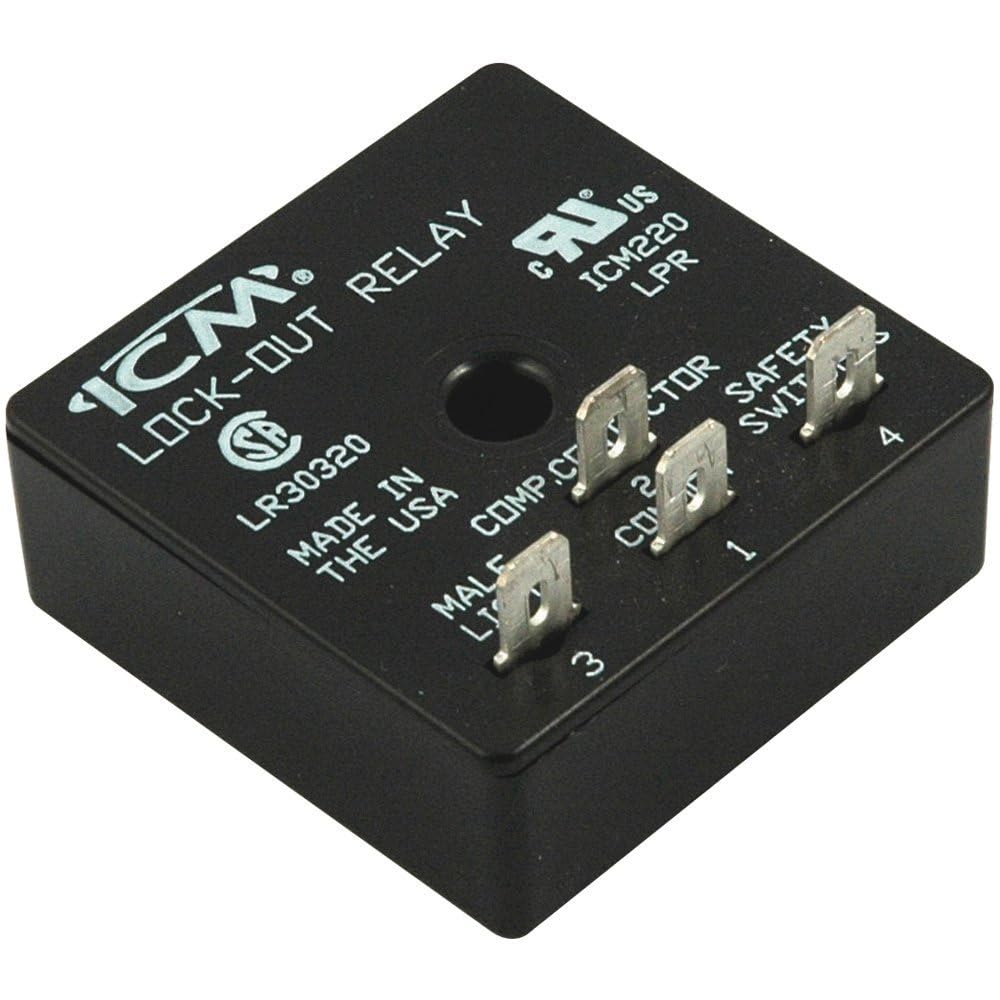
3.1-сүрөт: The ICM Controls ICM220 Lockout Protection Relay.
4. Орнотуу (Орнотуу)
Before beginning installation, ensure the main power supply to the HVAC/R unit is completely disconnected. The ICM220 is designed for easy integration into existing systems that utilize Series 84 or 93 impedance relays.
- Зымдарды аныктоо: Carefully identify the existing wiring connections to the old impedance relay. Note the function of each wire (e.g., compressor, safety switch, common).
- Эски реле алып салуу: Disconnect and remove the old impedance relay.
- Mount ICM220: Mount the ICM220 in a suitable location within the control panel, ensuring it is secure and protected from environmental factors.
- Зымдарды туташтыруу: Connect the wires to the corresponding terminals on the ICM220. Refer to the wiring diagrams provided with your specific HVAC/R unit and the terminal labels on the ICM220.

4.1-сүрөт: Example of wiring connections to the ICM220 relay.

4.2-сүрөт: The ICM220 relay installed with connected wiring.
Зымдарды туташтыргандан кийин, электр кубатын калыбына келтирүүдөн мурун, бардык туташуулардын бекемдигин жана тууралыгын эки жолу текшериңиз.
5. Операция
The ICM220 operates automatically to protect the compressor. Once installed and powered, it continuously monitors the compressor's operating conditions. If a fault condition (e.g., low pressure, high temperature, or other system anomalies) causes the compressor to cycle excessively or operate outside safe parameters, the ICM220 will initiate a lockout sequence.
During a lockout, the relay prevents the compressor from starting, protecting it from potential damage. The relay typically features an automatic reset function after a predetermined time delay, allowing the system to attempt a restart once conditions normalize. If the fault persists, the lockout will re-engage.
6. Техникалык тейлөө
The ICM Controls ICM220 Lockout Protection Relay is a solid-state device designed for long-term, maintenance-free operation. No user-serviceable parts are inside.
- Мезгилдүү текшерүү: It is recommended that a qualified technician periodically inspect the wiring connections to ensure they remain secure and free from corrosion.
- Тазалоо: Keep the relay free from dust and debris. Use a soft, dry cloth for cleaning if necessary. Do not use liquid cleaners.
7. Кыйынчылыктарды
If the system is experiencing repeated lockouts or the compressor is not operating as expected, consider the following troubleshooting steps:
- Күчтү текшерүү: Ensure that the ICM220 is receiving proper power. Check circuit breakers and fuses.
- Байланыштарды текшерүү: Inspect all wiring connections to the ICM220 for tightness and correct placement. Loose or incorrect wiring can cause erratic behavior.
- Системалык каталар: Repeated lockouts often indicate an underlying issue with the HVAC/R system itself (e.g., low refrigerant, clogged filters, motor issues). The ICM220 is protecting the compressor from these faults. Address the root cause of the system fault.
- Кесипкөйдөн кеңеш алыңыз: If the problem persists after checking basic connections and power, contact a qualified HVAC/R technician for further diagnosis and repair. Do not attempt to bypass the lockout relay.
8. Техникалык шарттар
| Спецификация | Нарк |
|---|---|
| Модел | ICM220 |
| Байланыш түрү | С формасы |
| Иштөө режими | Автоматтык |
| Ватtage | 2 ватт |
| Specification Met | UL |
| Элемент Салмагы | 0.11 фунт |
| Бирдик саны | 1 Сан |
| Камтылган компоненттер | Таймер |
9. Кепилдик маалыматы
ICM Controls products are manufactured to high standards and are designed for durability. For specific warranty terms and conditions applicable to the ICM220 Lockout Protection Relay, please refer to the official warranty statement provided with your product or contact ICM Controls directly.

9.1-сүрөт: ICM Controls commitment to quality and warranty.
10. Техникалык колдоо
For technical assistance, installation questions, or troubleshooting guidance, please contact ICM Controls Technical Support.

10.1-сүрөт: Technical Support Contact Information.
Телефон: 1-800-365-5525, Option 8
Сааттары: Дүйшөмбү - Жума, саат 8:00 - 5:00 (EST)