
Juniper Networks WLA532-WW
Juniper WLA532 Wireless Access Point User Manual
Model: WLA532-WW | Brand: Juniper Networks
1. Киришүү
The Juniper Networks WLA532 Wireless Access Point is designed to provide a high level of integration for security, performance, and manageability, ensuring an optimal WLAN user experience with enhanced reliability. This device features an energy-efficient power design, robust security protocols, dual radios, 3x3 MIMO technology, 3 spatial streams, and a 1 Gigabit Ethernet uplink port. Its compact footprint allows for efficient deployment. The WLA532 helps reduce Capital Expenditure (CAPEX) by requiring fewer access points per floor and lowers Operational Costs (OPEX) through reduced IT staffing demands, thanks to improved reliability with concurrent spectrum analysis and deployments optimized for known interference sources.
2. Пакеттин мазмуну
Please verify that all items are present in your package. If any items are missing or damaged, contact your vendor or Juniper Networks support immediately.
- Juniper WLA532 Wireless Access Point
- Mounting Bracket (for ceiling or wall mount)
- Монтаждоочу жабдуулар (буроолор, анкерлер)
- Ыкчам баштоо колдонмосу / Документация
- (Optional, depending on SKU) Power Adapter or PoE Injector
3. Коопсуздук маалыматы
Read all safety warnings and instructions before installing or operating this device. Keep this manual for future reference.
- Кубат булагы: Use only the power adapter or Power over Ethernet (PoE) source specified for this device. Incorrect voltagэ. зыянга же өрткө алып келиши мүмкүн.
- Вентиляция: Ensure proper ventilation. Do not block any ventilation openings. Overheating can cause damage.
- Курчап турган чөйрө: Do not expose the device to water, moisture, or extreme temperatures. Avoid placing it near heat sources or in direct sunlight.
- Тейлөө: Аппаратты өзүңүз ачууга же оңдоого аракет кылбаңыз. Бардык тейлөөлөрдү квалификациялуу кызматкерлерге тапшырыңыз.
- Монтаждоо: Ensure the device is securely mounted to a stable surface to prevent it from falling.
4. Орнотуу жана орнотуу
This section guides you through the physical installation and initial power-up of your Juniper WLA532 Access Point.
4.1. Физикалык бүтүрүүview
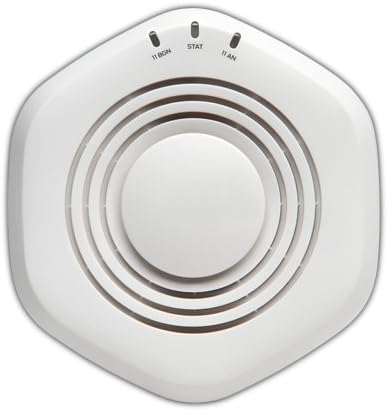
1-сүрөт: Жогорку view of the Juniper WLA532 Wireless Access Point. Note the indicator lights for 11 BGN, STAT, and 11 AN.
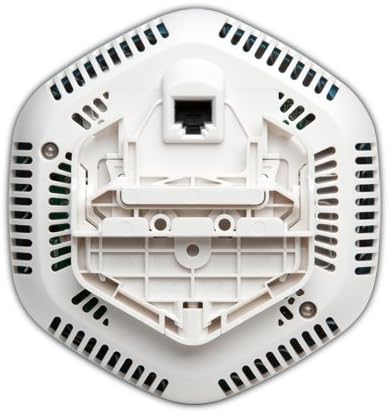
2-сүрөт: Төмөнкү view of the Juniper WLA532 Wireless Access Point, illustrating the integrated mounting bracket and the Gigabit Ethernet port for network connectivity and Power over Ethernet (PoE).
4.2. Кирүү пунктун орнотуу
The WLA532 can be mounted on a ceiling or wall. Choose a central location free from obstructions for optimal wireless coverage.
- Монтаждоо бетин даярдаңыз: Use the mounting bracket as a template to mark the drill holes on the ceiling or wall.
- Анкерлерди орнотуу: Drill pilot holes and insert appropriate wall anchors if mounting on drywall or plaster.
- Кронштейнди бекитүү: Берилген бурамалар менен бекитүүчү кронштейнди бетке бекитиңиз.
- Attach the Access Point: Align the access point with the mounting bracket and twist it clockwise until it clicks securely into place.
4.3. Тармакка жана электр кубатына туташуу
The WLA532 supports Power over Ethernet (PoE) for simplified installation.
- Ethernet туташуусу: Connect a standard Ethernet cable from your network switch (preferably a PoE-enabled switch) to the Gigabit Ethernet port on the bottom of the WLA532.
- Power (PoE): If using a PoE-enabled switch, the device will power on automatically once the Ethernet cable is connected.
- Power (Optional AC Adapter): If PoE is not available, connect a compatible Juniper Networks AC power adapter (sold separately) to the power input port on the device and then to a power outlet.
- Күчтү текшерүү: Once powered, the indicator lights on the top of the device (Figure 1) should illuminate, indicating power and network activity. Refer to the "Indicator Lights" section for details.
4.4. Баштапкы конфигурация
Initial configuration typically involves accessing the device's web-based management interface or using Juniper's network management software. Refer to the separate Juniper Networks WLA532 Software Configuration Guide for detailed instructions on setting up SSIDs, security, and other network parameters.
5. Кирүү чекитин иштетүү
Once installed and configured, the Juniper WLA532 operates as a wireless access point, broadcasting Wi-Fi signals for client devices to connect to your network.
5.1. Индикатор жарыктары
| Жарык | Статус | Description |
|---|---|---|
| 11 BGN | Катуу жашыл | 802.11b/g/n (2.4 GHz) radio is operational. |
| Былкылдаган жашыл | Activity on the 2.4 GHz radio. | |
| STAT | Катуу жашыл | Түзмөк күйгүзүлгөн жана кадимкидей иштеп жатат. |
| Былкылдаган жашыл | Firmware upgrade in progress or other system activity. | |
| 11 АН | Катуу жашыл | 802.11a/n (5 GHz) radio is operational. |
| Былкылдаган жашыл | Activity on the 5 GHz radio. |
5.2. Connecting Client Devices
Client devices (laptops, smartphones, tablets) can connect to the WLA532 using the configured Wi-Fi network (SSID) and password. Ensure your devices support 802.11n for optimal performance.
6. Техникалык тейлөө
Regular maintenance helps ensure the longevity and optimal performance of your access point.
- Тазалоо: Gently wipe the exterior of the device with a soft, dry cloth. Do not use liquid cleaners or aerosols. Ensure ventilation openings are free from dust accumulation.
- Программалык камсыздоонун жаңыртуулары: Juniper Networks колдоосун мезгил-мезгили менен текшерип туруңуз website for the latest firmware updates. Keeping the firmware updated ensures the best performance, security, and access to new features. Follow the instructions provided with the firmware update package carefully.
- Экологиялык шарттар: Ensure the operating environment remains within the recommended temperature and humidity ranges to prevent damage.
7. Кыйынчылыктарды
This section provides solutions to common issues you might encounter with your Juniper WLA532 Access Point.
7.1. No Power / Lights Off
- Кубат булагын текшерүү: Ensure the Ethernet cable is securely connected to a PoE-enabled switch or a compatible AC power adapter is properly connected to a working power outlet.
- PoE текшерүү: If using PoE, confirm that the switch port is configured for PoE and is supplying power. Try a different PoE port or switch.
7.2. No Wireless Connectivity
- Индикатор жарыктарын текшерүү: Ensure the "11 BGN" and "11 AN" lights are solid green, indicating the radios are operational. If not, check network connectivity.
- Тармак кабели: Verify the Ethernet cable connecting the access point to your network is securely plugged in and functional.
- Роутердин/коммутатордун абалы: Ensure your upstream router or switch is working correctly and providing internet access.
- SSID берүү: Confirm that the SSID (Wi-Fi network name) is being broadcast and is visible to client devices. Check your access point's configuration.
- Коопсуздук жөндөөлөрү: Double-check the Wi-Fi password and security settings (e.g., WPA2-PSK).
- Кайра жүктөө: Power cycle the access point by disconnecting and reconnecting its power source.
7.3. Slow Wireless Speed
- Интерференция: Wireless performance can be affected by interference from other Wi-Fi networks, cordless phones, microwaves, or other electronic devices. Consider changing the Wi-Fi channel in the access point's settings.
- Сигнал күчү: Ensure client devices are within optimal range of the access point. Obstacles like thick walls can degrade signal.
- Client Device Capability: Ensure your client devices support 802.11n and are using the appropriate wireless adapter drivers.
- Тармактын тыгыны: Тармакта өтө көп түзмөктөр же жогорку өткөрүү жөндөмдүүлүгүн колдонуу ылдамдыкты жайлатышы мүмкүн.
7.4. Башкаруу интерфейсине кирүү мүмкүн эмес
- IP дареги: Ensure your computer is on the same network segment as the access point and you are using the correct IP address for the management interface.
- Firewall: Temporarily disable any firewalls on your computer to rule out blocking issues.
- Демейки жөндөөлөргө кайтаруу: As a last resort, if you cannot access the device, you may need to perform a factory reset. Refer to the Juniper Networks WLA532 Software Configuration Guide for instructions on how to perform a factory reset. Эскертүү: Бул бардык ыңгайлаштырылган конфигурацияларды жок кылат.
8. Техникалык шарттар
| Өзгөчөлүк | Деталь |
|---|---|
| Модель номери | WLA532-WW |
| Зымсыз түрү | 802.11n |
| Жыштык тилкесинин классы | Кош тилкелүү (2.4 ГГц жана 5 ГГц) |
| Зымсыз байланыш стандарты | 802.11n |
| Байланыш технологиясы | Ethernet, Wi-Fi |
| Коопсуздук протоколу | WPS (Wi-Fi корголгон орнотуу) |
| Операция системасы | Junos OS |
| Элемент Салмагы | 13.9 унция (393 грамм) |
| Продукциянын өлчөмдөрү (LxWxH) | 5.71 x 5.37 x 1.77 дюйм |
| Тtage | 48 вольт (ток) |
| Процессорлордун саны | 1 |
| Сунушталган Колдонуулар | Бизнес |
| Өндүрүүчү | Juniper Networks, Inc. |
| Биринчи жеткиликтүү күн | 6-сентябрь, 2012-жыл |
9. Кепилдик жана колдоо
For detailed warranty information, please refer to the warranty card included with your product or visit the official Juniper Networks website. Warranty terms may vary by region and purchase agreement.
For technical support, product documentation, software downloads, and additional resources, please visit the Juniper Networks support portal:
When contacting support, please have your product model number (WLA532-WW) and serial number ready.
Ask a question about this manual
Ask about setup, troubleshooting, compatibility, parts, safety, or missing instructions. Manuals+ will review the question and use this page’s manual context to help answer it.