
1. Киришүү
The D-Link GO-SW-5G is a 5-Port Unmanaged Gigabit Desktop Switch designed for home and small office environments. This device provides a simple and cost-effective solution to expand your network connectivity, offering high-speed Gigabit Ethernet ports for reliable data transfer. It incorporates D-Link's Green Technology for energy efficiency, reduced heat generation, and extended product lifespan.
This switch is a plug-and-play device, requiring no complex configuration or software installation, making it easy to integrate into an existing network.
2. Пакеттин мазмуну
Төмөндө тизмеленген нерселердин баары пакетиңизге камтылганын текшериңиз:
- D-Link GO-SW-5G 5-Port Gigabit Desktop Switch
- Кубаттуу адаптер
- Ыкчам орнотуу көрсөтмөсү
Эгерде кандайдыр бир буюмдар жок же бузулуп калса, жардам алуу үчүн сатуучуга кайрылыңыз.
3. Орнотуу нускамалары
The D-Link GO-SW-5G switch is designed for easy plug-and-play installation. Follow these steps to set up your device:
3.1. Кубат адаптерин туташтырыңыз
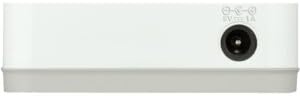
- Locate the power input port on the side of the D-Link GO-SW-5G switch.
- Connect the provided power adapter to this port.
- Кубат адаптеринин экинчи учун стандарттуу электр розеткасына сайыңыз.
- The power LED on the front of the switch will illuminate, indicating that the device is receiving power.

1-сүрөт: Side view of the D-Link GO-SW-5G switch with the power input port.
3.2. Тармагыңызга туташыңыз
- Using a standard Ethernet cable (RJ45), connect one end to an available LAN port on your router (not your modem).
- Connect the other end of this Ethernet cable to any of the five available ports on the back of the D-Link GO-SW-5G switch.
- The corresponding LED on the front of the switch will light up, indicating an active connection.
2-сүрөт: Арткы view of the D-Link GO-SW-5G switch with five Ethernet ports.
3.3. Connect Network Devices
- Connect your network devices (e.g., computers, gaming consoles, network printers, smart TVs) to the remaining available Ethernet ports on the D-Link GO-SW-5G switch using Ethernet cables.
- Each connected device will have its corresponding LED on the front of the switch illuminate, confirming a successful connection.

3-сүрөт: Фронт view of the D-Link GO-SW-5G switch showing active port LEDs.
4. Иштөө нускамалары
The D-Link GO-SW-5G is an unmanaged switch, meaning it operates automatically without requiring user configuration. Once connected as described in the Setup section, it will begin forwarding network traffic between connected devices.
- Автоматтык сүйлөшүүлөр: The switch automatically detects the network speed (10/100/1000 Mbps) and duplex mode (half/full) of connected devices and adjusts accordingly.
- Auto MDI/MDIX: All ports support automatic MDI/MDIX crossover, eliminating the need for crossover cables when connecting to other switches or hubs.
- LED көрсөткүчтөрү: Each port has an LED indicator on the front panel. A lit LED indicates an active link, and blinking indicates network activity.
5. Техникалык тейлөө
To ensure optimal performance and longevity of your D-Link GO-SW-5G switch, consider the following maintenance guidelines:
- Жайгашкан жери: Коммутаторду салкын, кургак, күн нуру түз тийбеген, жылуулук булактарынан жана ашыкча нымдуулуктан алыс жерге коюңуз. Түзмөктүн айланасында жетиштүү желдетүүнү камсыз кылыңыз.
- Тазалоо: Use a soft, dry cloth to clean the exterior of the switch. Avoid using liquid or aerosol cleaners, as they may damage the device.
- Кабелдик башкаруу: Ethernet кабелдеринин чаташкандыгын жана кокустан ажырап кетишин алдын алуу үчүн тыкан уюштурулган абалда кармаңыз.
- Power Cycle: If you experience network issues, a simple power cycle (unplugging the power adapter for 10 seconds and then plugging it back in) can often resolve minor problems.
6. Кыйынчылыктарды
If you encounter issues with your D-Link GO-SW-5G switch, refer to the following common troubleshooting steps:
- Электр жарыгы жок:
- Кубат адаптери өчүргүчкө да, иштеп жаткан электр розеткасына да бекем туташтырылганын текшериңиз.
- Башка аспапка туташтыруу менен электр розеткасынын иштешин текшериңиз.
- No Link/Activity LED for a Connected Device:
- Ethernet кабели коммутатор портуна жана тармак түзмөгүнө бекем сайылганын текшериңиз.
- Кабелдин бузулушуна жол бербөө үчүн башка Ethernet кабелин колдонуп көрүңүз.
- Туташкан түзмөк күйгүзүлгөнүн жана анын тармак адаптери туура иштеп жатканын текшериңиз.
- Аппаратты которгучтун башка портуна туташтырууга аракет кылыңыз.
- Жай тармак ылдамдыгы:
- Verify that all connected devices and cables support Gigabit Ethernet (1000 Mbps) for optimal performance. The switch will operate at the lowest common speed.
- Ensure your router and internet service provider (ISP) plan support the desired speeds.
- Perform a power cycle on the switch and your router.
- Үзгүлтүктүү туташуу:
- Кабелдик туташуулардын боштугун текшериңиз.
- Ensure the switch is not overheating; provide adequate ventilation.
- Test with different Ethernet cables.
7. Техникалык шарттар
| Бренд | D-Link |
| Модель номери | GO-SW-5G/B |
| Порттардын саны | 5 |
| Которуу түрү | Башкарылбайт |
| Маалыматтарды өткөрүү ылдамдыгы | 1 Gigabits Per Second (10/100/1000 Mbps) |
| Интерфейс | RJ45 |
| Түс | Ак |
| Элемент Салмагы | 0.22 фунт |
| Тtage | 100-240 Вольт |
| Шайкеш түзмөктөр | PC, Mac, and other Ethernet-enabled devices |
| Switching Fabric | 10 Гбит/сек |
| UPC | 790069365669 |
8. Кепилдик жана колдоо
Чектелген Кепилдик: The D-Link GO-SW-5G switch comes with a 3-year limited warranty. For detailed terms and conditions, please refer to the warranty information included in your package or visit the official D-Link webсайт.
Техникалык колдоо: For technical assistance, product registration, or to download the latest firmware and documentation, please visit the D-Link колдоо Webсайт or contact D-Link customer service.