
бейердинамик 721360
Beyerdynamic Stegos TB Wireless Boundary Microphone User Manual
Модель: 721360
Introduction
This manual provides comprehensive instructions for the setup, operation, and maintenance of your Beyerdynamic Stegos TB Wireless Boundary Microphone. Please read this manual thoroughly before using the device to ensure optimal performance and longevity.
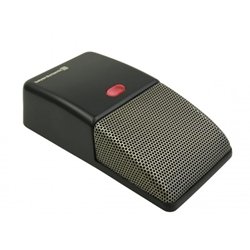
Image: Beyerdynamic Stegos TB Wireless Boundary Microphone. This image displays the compact, black wireless boundary microphone, designed for discreet placement on surfaces like conference tables.
Маанилүү коопсуздук нускамалары
- Аппаратты сууга же ашыкча нымдуулукка дуушар кылбаңыз.
- Ашыкча температурадан сактаныңыз.
- Түзмөктү ачууга же өзгөртүүгө аракет кылбаңыз. Бардык тейлөө иштерин квалификациялуу адистерге тапшырыңыз.
- Белгиленген кубат булактарын жана аксессуарларды гана колдонуңуз.
- Балдар жетпеген жерде сактаңыз.
Пакеттин мазмуну
Пакетте бардык буюмдар бар экенин текшериңиз:
- Beyerdynamic Stegos TB Wireless Boundary Microphone
- USB кубаттоочу кабели (Micro USB)
- Колдонуучунун Колдонмосу (бул документ)
Жайгашуу
1. Микрофонду заряддоо
- Connect the Micro USB end of the charging cable to the microphone's charging port.
- Connect the standard USB end of the cable to a powered USB port (e.g., computer, USB wall adapter).
- The LED indicator on the microphone will show charging status.
- Толук заряддалгандан кийин, заряддоо кабелин ажыратыңыз.
2. Түзмөккө туташуу
The Stegos TB microphone connects wirelessly to compatible devices, typically personal computers, for video conferencing applications.
- Микрофондун кубатталганын жана күйүп турганын текшериңиз.
- Activate Bluetooth on your personal computer or compatible device.
- Put the microphone into pairing mode (refer to the device's specific button combination, usually holding a power/pairing button). The LED indicator will typically flash to indicate pairing mode.
- On your computer, search for available Bluetooth devices. Select "Beyerdynamic Stegos TB" from the list.
- Once paired, the LED indicator on the microphone will show a solid light, indicating a successful connection.
- In your computer's sound settings or video conferencing software, select the "Beyerdynamic Stegos TB" as the input audio device.
Иштөө нускамалары
Күйгүзүү/өчүрүү
- To power on: Press and hold the power button for approximately 3 seconds. The LED indicator will illuminate.
- To power off: Press and hold the power button for approximately 3 seconds. The LED indicator will turn off.
Үнсүз функция
The microphone features a mute function for privacy during calls.
- To mute: Press the mute button once. The LED indicator may change color or flash to indicate mute status.
- To unmute: Press the mute button again. The LED indicator will return to its normal operating state.
Placement for Optimal Performance
For best audio pickup, place the Stegos TB microphone on a flat surface in the center of the participants. Its omnidirectional polar pattern ensures 360-degree sound capture.
Техникалык тейлөө
Тазалоо
- Wipe the microphone's exterior with a soft, dry, or slightly damp кездеме.
- Катуу химиялык заттарды, эриткичтерди же абразивдүү тазалагычтарды колдонбоңуз.
- Ensure no liquid enters the microphone grille or ports.
Сактагыч
When not in use for extended periods, store the microphone in a cool, dry place, away from direct sunlight and extreme temperatures. It is recommended to fully charge the battery before long-term storage and recharge it every few months to maintain battery health.
Проблемаларды чечүү
| Көйгөй | Мүмкүн себеп | Чечим |
|---|---|---|
| Микрофон күйбөйт. | Батарея аз же түгөнүп калган. | Берилген USB кабелин колдонуп, микрофонду кубаттаңыз. |
| Зымсыз туташуу мүмкүн эмес. | Bluetooth is off on the device; microphone not in pairing mode; out of range. | Ensure Bluetooth is enabled. Put microphone into pairing mode. Move microphone closer to the device. |
| Микрофондон аудио киргизүү жок. | Microphone is muted; incorrect audio input selected on computer/software. | Unmute the microphone. Select "Beyerdynamic Stegos TB" as the input device in your system settings or application. |
| Аудио сапаты начар. | Microphone too far from speaker; environmental noise; interference. | Place microphone closer to speakers. Reduce background noise. Ensure no obstructions between microphone and receiving device. |
Техникалык шарттар
- Бренд: Beyerdynamic
- Модел: Stegos TB (721360)
- Байланыш технологиясы: Зымсыз (кубаттоо үчүн USB)
- Туташтыргыч түрү: Микро USB (заряддоо үчүн)
- Өзгөчө өзгөчөлүгү: Зымсыз
- Шайкеш түзмөктөр: Персоналдык компьютер
- Түсү: Кара
- Полярдык үлгү: Көп багыттуу
- Кубат булагы: Батарея менен иштейт
- Сунушталган колдонуулар: Видеоконференция
Кепилдик маалымат
Beyerdynamic products are covered by a limited warranty. For specific warranty terms and conditions, please refer to the warranty card included with your product or visit the official Beyerdynamic webсайт. Кепилдик дооматтар үчүн сатып алганыңыздын далилин сактаңыз.
Note: Warranty details are subject to change and may vary by region.
Колдоо жана Байланыш
For further assistance, technical support, or service inquiries, please contact Beyerdynamic customer support through their official webсайт же продукт таңгагында көрсөтүлгөн байланыш маалыматы.
Официалдуу Webсайт: www.beyerdynamic.com
Колдоо кызматына кайрылганда моделиңиздин номерин (721360) жана сериялык номериңизди даярдап коюңуз.
Ask a question about this manual
Ask about setup, troubleshooting, compatibility, parts, safety, or missing instructions. Manuals+ will review the question and use this page’s manual context to help answer it.