
1. Киришүү
This manual provides essential information for the proper use and care of your Case Logic 14.1-Inch Slim Laptop and iPad Case, model AUA-314ANTH. Designed for practicality and protection, this slim case offers dedicated compartments for your laptop, iPad, and essential accessories, making it ideal for daily commutes or travel.
2. Негизги өзгөчөлүктөрү
- Dedicated Device Protection: Separate, protective pockets are designed for a laptop up to 14.1 inches and an iPad, ensuring both devices are securely stored and protected from scratches.
- Уюшкан сактоо: Files remain crisp and unbent in their designated pocket, separated from electronics. A front pocket neatly stores bulky power cords at the bottom, keeping them out of the way.
- Quick Access Pocket: A zippered front pocket provides secure yet easily accessible storage for your smartphone or other small essentials.
- Accessory Panel: The front pocket includes an organizer panel with dedicated slots for an external hard drive, pens, and other small accessories.
- Comfortable Portability: Features a comfortable, removable shoulder strap and a padded handle for versatile carrying options.
- Саякатка ылайыктуу дизайн: A luggage strap allows for secure attachment of the slim case to most rolling luggage handles, simplifying travel.
- Компакт өлчөмдөрү: Designed to fit devices up to 13.5 x 1.2 x 9.6 inches, maintaining a slim profile.

Сүрөт 1: Алдыңкы view of the Case Logic Slim Case, highlighting its sleek design and front pocket.
3. Орнотуу
- Ишти таңгактан чыгаруу: Remove the case from its packaging.
- Ийин боосун бекитүү (милдеттүү эмес): Locate the removable shoulder strap. Attach the swivel hooks on each end of the strap to the D-rings located on the sides of the case. Adjust the strap length for comfortable carrying.
- Prepare Compartments: Open all zippered compartments to familiarize yourself with the internal layout and pockets.

2-сүрөт: Каптал view of the case showing the attachment points for the removable shoulder strap.
4. Иштөө нускамалары
4.1. Inserting Your Laptop and iPad
- Негизги бөлүмдүн ачылышы: Unzip the main compartment of the case.
- Insert Laptop: Carefully slide your laptop (up to 14.1 inches) into the larger padded sleeve. Ensure it sits snugly within the compartment.
- iPad салыңыз: Place your iPad into the dedicated, smaller padded sleeve.
- Коопсуз түзмөктөр: Close the main compartment zipper completely.

3-сүрөт: Интерьер view showing a laptop and iPad securely placed in their respective padded sleeves.
4.2. Organizing Accessories
- Front Zippered Pocket: Use this pocket for quick access items like your smartphone, keys, or wallet.

Figure 4: Front pocket designed for easy access to a smartphone.
- Main Front Compartment: This larger front compartment features an organizer panel. Store pens, cards, and an external hard drive in the designated slots. The bottom section is ideal for power adapters and charging cables.

Figure 5: The main front compartment showing space for a power adapter and other accessories.
- Document Pocket: Utilize the dedicated pocket within the main compartment to keep documents and files flat and protected.
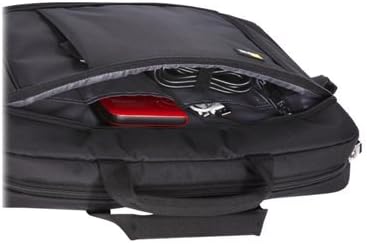
Figure 6: A separate compartment for keeping documents flat and secure.
4.3. Attaching to Rolling Luggage
For convenient travel, slide the luggage strap located on the back of the case over the handle of your rolling luggage. This secures the case on top of your suitcase, allowing for easier transport.
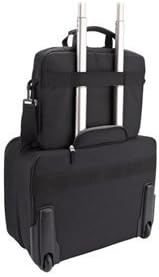
Figure 7: The luggage strap on the back of the case, designed to slide over a rolling luggage handle.
5. Техникалык тейлөө
- Тазалоо: Корпустун сыртын жарнама менен сүртүңүзamp cloth and mild soap. Do not use harsh chemicals or abrasive cleaners. Allow to air dry completely.
- Сыдырмага кам көрүү: Periodically check zippers for any debris and clean as needed. Lubricate with a zipper lubricant if they become stiff.
- Сактагыч: Колдонулбаган учурда кутучаны салкын, кургак жерде, күн нуру түз тийбеген жерде сактаңыз.
6. Кыйынчылыктарды
| Маселе | Мүмкүн себеп | Чечим |
|---|---|---|
| Zipper sticking or difficult to close. | Debris in zipper teeth, lack of lubrication. | Clean zipper teeth with a small brush. Apply a small amount of zipper lubricant or wax. |
| Devices do not fit snugly. | Device dimensions exceed case specifications. | Ensure your devices (laptop up to 14.1 inches, iPad) fit within the specified dimensions (13.5 x 1.2 x 9.6 inches). |
| Shoulder strap detaches. | Improper attachment or excessive force. | Verify swivel hooks are securely fastened to D-rings. Avoid overloading the case. |
7. Техникалык шарттар
| Өзгөчөлүк | Деталь |
|---|---|
| Бренд | Case Logic |
| Модель номери | AUA-314ANTH |
| Түс | Антрацит (боз) |
| Элемент Салмагы | 14.7 унция |
| Продукциянын өлчөмдөрү (LxWxH) | 14.6 x 2.8 x 11.4 дюйм |
| Max Device Dimensions (Laptop/iPad) | 13.5 x 1.2 x 9.6 дюйм |
| Материал | Туруктуу кездеме |
| Погон | Removable, adjustable |
| Luggage Pass-Through | Ооба |
8. Кепилдик жана колдоо
For warranty information and customer support, please refer to the official Case Logic webсайтка же түздөн-түз кардарларды тейлөөгө кайрылыңыз. Сатып алуу квитанциясын кепилдик дооматтары үчүн сатып алуунун далили катары сактаңыз.
Эскертүү: Кепилдиктин конкреттүү шарттары аймакка жана сатуучуга жараша өзгөрүшү мүмкүн.