
1. Киришүү
This manual provides detailed instructions for the proper use, setup, operation, and maintenance of your Telex RE-92TX Cardioid Lavalier Condenser Microphone. The RE-92TX is a premium lapel microphone designed for professional audio applications, featuring a cardioid polar pattern and a TA4F connector for compatibility with various wireless systems, including Telex R100, RE-2, and RE-1.
Please read this manual thoroughly before using the microphone to ensure optimal performance and longevity of the product.
2. Продукт бүтүп калдыview
The Telex RE-92TX is a compact and discreet lavalier microphone engineered for clear and articulate speech reproduction. Its cardioid pickup pattern helps to reduce background noise, focusing on the sound source directly in front of the microphone.
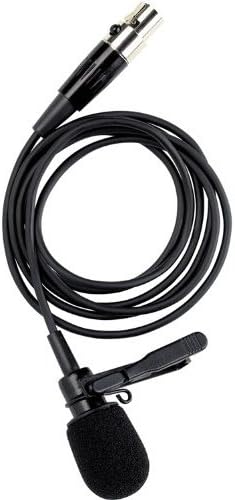
Figure 2.1: The Telex RE-92TX Cardioid Lavalier Condenser Microphone, showing the microphone capsule, cable, and attached lapel clip.
2.1 Компоненттер
- RE-92TX Lavalier Microphone with integrated cable
- Lapel Clip (pre-attached or included)
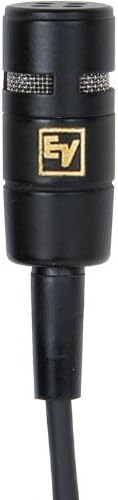
Сүрөт 2.2: Жакын пландан view of the RE-92TX microphone capsule, highlighting the grille and compact design.
2.2 Негизги өзгөчөлүктөрү
- Кардиоиддик полярдык үлгү: Provides excellent off-axis rejection, minimizing pickup of sounds from the sides and rear, which helps to reduce feedback and ambient noise.
- Конденсатор элементи: Offers a wide frequency response and high sensitivity for clear, detailed audio capture.
- TA4F Connector: Ensures compatibility with a wide range of Telex and Electro-Voice wireless bodypack transmitters.
- Compact and Discreet Design: Easily concealed for on-camera or stagд колдонуу.
3. Орнотуу
Proper setup is crucial for optimal performance of your RE-92TX microphone.
3.1 Микрофонду туташтыруу
- Ensure your wireless bodypack transmitter (e.g., Telex R100, RE-2, RE-1) is turned off.
- Align the TA4F connector of the RE-92TX microphone with the input jack on your bodypack transmitter.
- Push the connector firmly into the jack until it clicks into place, indicating a secure connection.
- To disconnect, gently pull back on the release collar of the TA4F connector and then pull the connector out of the jack. Do not pull directly on the cable.
3.2 Микрофонду жайгаштыруу
The placement of the lavalier microphone significantly impacts sound quality.
- Optimal Position: For most applications, clip the microphone to clothing approximately 6-8 inches (15-20 cm) below the chin, centered on the chest. This position typically provides a balanced sound.
- Clothing Noise: Ensure the microphone is not rubbing against clothing, jewelry, or other objects, as this can cause unwanted noise. Use the included clip to secure the microphone firmly.
- Шамалдын ызы-чуусу: If operating outdoors or in windy conditions, consider using an additional foam windscreen (not included) to minimize wind noise.
- Жакындык эффекти: Be aware that placing the microphone too close to the mouth can result in an exaggerated bass response (proximity effect). Adjust placement to achieve desired tonal balance.
4. Иштөө
Once connected and placed, follow these guidelines for operating your RE-92TX microphone.
4.1 Gain Setting
The input gain on your wireless bodypack transmitter should be set correctly to prevent distortion and ensure a strong signal.
- Test Level: Speak into the microphone at your normal speaking volume.
- Пайданы тууралоо: Adjust the gain control on your transmitter until the audio level indicator (if present) shows a strong signal without consistently peaking or clipping.
- Avoid Clipping: If the indicator frequently shows red or maximum levels, reduce the gain to prevent distortion.
4.2 Performance Tips
- Ачык сүйлө: Articulate your words clearly and maintain a consistent distance from the microphone for best results.
- Аудио монитор: If possible, monitor the audio output through headphones to catch any issues (e.g., clothing noise, low battery, interference) in real-time.
- Батареянын иштөө мөөнөтү: Ensure your wireless transmitter has sufficient battery life for the duration of your use. Low battery can affect audio quality.
5. Техникалык тейлөө
Proper care and maintenance will extend the life of your RE-92TX microphone.
5.1 Тазалоо
- Микрофон капсуласы: Gently wipe the microphone capsule and grille with a soft, dry, lint-free cloth. Do not use liquid cleaners directly on the capsule.
- Кабель: Wipe the cable with a damp cloth if necessary, then dry thoroughly. Avoid harsh chemicals.
- Айнек: If a foam windscreen is used, it can typically be removed and gently hand-washed with mild soap and water, then air-dried completely before reattaching.
5.2 Сактоо жана иштетүү
- Экстремалдуу шарттарды болтурбоо: Микрофонду экстремалдык температурага, жогорку нымдуулукка же түз күн нуруна узак убакытка калтырбаңыз.
- Таасирден коргоо: Handle the microphone carefully. Avoid dropping it or subjecting it to strong impacts.
- Кабельге кам көрүү: Do not sharply bend or crimp the cable. Coil it loosely when storing to prevent damage.
- Сактагыч: Store the microphone in a clean, dry place, preferably in its original packaging or a protective case.
6. Кыйынчылыктарды
If you encounter issues with your RE-92TX microphone, refer to the following common problems and solutions.
| Көйгөй | Мүмкүн себеп | Чечим |
|---|---|---|
| Үн чыгышы жок | Микрофон туура эмес туташтырылган Transmitter/receiver off Low/dead battery in transmitter Туура эмес күчөтүү жөндөөсү Faulty cable/microphone | Ensure TA4F connector is fully seated. Verify transmitter and receiver are powered on. Replace or recharge transmitter batteries. Increase gain on transmitter. Test with another microphone/cable if available. |
| Бурмаланган үн | Пайда өтө жогору коюлган Микрофон үн булагына өтө жакын Damaged microphone element | Reduce gain on transmitter. Adjust microphone placement further from mouth. Contact support if distortion persists after adjusting gain and placement. |
| Excessive background noise/feedback | Improper microphone placement Бөлмө акустикасы Өтө жогору пайда | Ensure microphone is positioned correctly and not rubbing against clothing. Adjust room acoustics if possible. Пайданы азайтыңыз. |
| Үзүлбөгөн үн | Бошоң байланыш Интерференция Батарея аз | Бардык байланыштарды текшериңиз. Ensure clear line of sight between transmitter and receiver; check for other wireless devices. Replace or recharge transmitter batteries. |
Бул чечимдерди колдонуу аракетинен кийин көйгөй чечилбесе, кардарларды колдоо кызматына кайрылыңыз.
7. Техникалык шарттар
The following are the technical specifications for the Telex RE-92TX Cardioid Lavalier Condenser Microphone:
| Өзгөчөлүк | Спецификация |
|---|---|
| Бренд | Electro-Voice |
| Өндүрүүчү | Телекс |
| Модел | RE-92TX |
| Микрофон форма фактору | Lavalier |
| Полярдык үлгү | Бир багыттуу (Кардиоид) |
| Байланыш технологиясы | TA4F (compatible with XLR via adapter, not included) |
| Өзгөчө өзгөчөлүк | Wireless (requires compatible transmitter) |
| Камтылган компоненттер | Микрофон |
| Элемент Салмагы | 2 фунт (болжолдуу жеткирүү салмагы) |
| UPC | 800549416641 |
| Биринчи жеткиликтүү күн | 16-октябрь, 2012-жыл |
8. Кепилдик жана колдоо
For specific warranty information regarding your Telex RE-92TX microphone, please refer to the warranty card included with your product or visit the official Electro-Voice webсайт. Кепилдиктин шарттары аймакка жана сатуучуга жараша өзгөрүшү мүмкүн.
8.1 Кардарларды колдоо
If you require technical assistance, have questions about your product, or need to arrange for service, please contact Electro-Voice customer support through their official website or the retailer from whom you purchased the product. When contacting support, please have your product model number (RE-92TX) and purchase information readily available.
You can visit the Electro-Voice Store for more information: Electro-Voice Store on Amazon