
iFrogz CAL-VANGAU
iFrogz CAL-VANGAU Caliber Vanguard Premium Gaming Headphones
Model: CAL-VANGAU
Продукт бүттүview
The iFrogz Caliber Vanguard headphones are designed for an immersive audio experience, suitable for both gaming and personal entertainment. They feature 40mm drivers that deliver clear and powerful 7.1 channel sound. An optional bass vibration feature enhances the audio experience by allowing users to feel the action. The integrated microphone is retractable, providing convenience for in-game communication or auto-muting when not in use. The headphones boast a sleek black finish with techno-cyan accents.
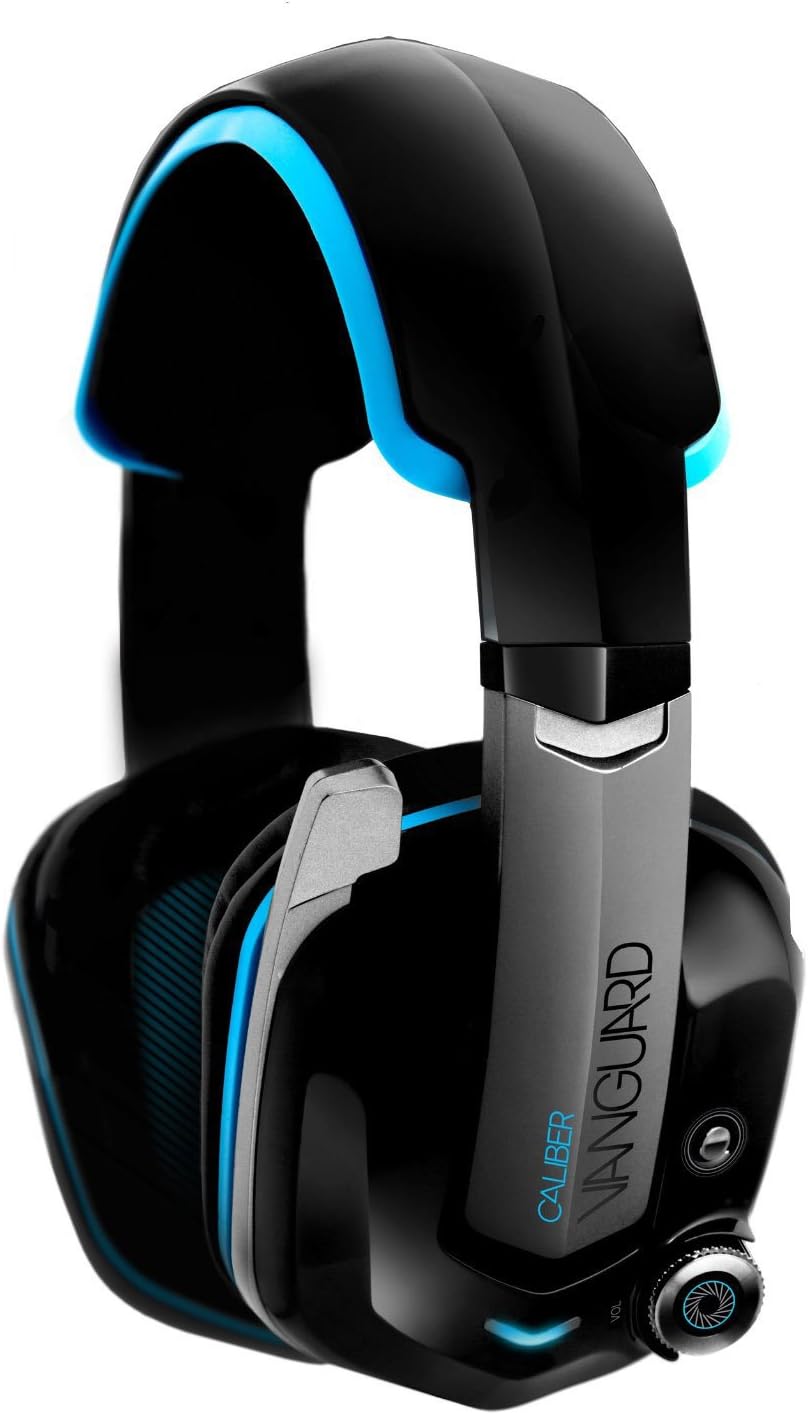
Image: iFrogz Caliber Vanguard Premium Gaming Headphones. This image displays the headphones from a front-side angle, highlighting their black and techno-cyan design, the retractable microphone, and the volume control knob on the ear cup.
Негизги өзгөчөлүктөрү
- Тартылуучу микрофон: For clear communication during gaming or convenient storage.
- 7.1 Айлана үн: Provides an immersive audio experience for gaming and multimedia.
- Vibrating Bass Driver: Enhances low-frequency sounds, allowing users to feel the bass.
- Closed-Ear Design: Offers passive noise isolation for focused listening.
- 40 мм неодим драйверлери: Delivers crisp, clear, and powerful audio.
- Зымдуу туташуу: Ensures a stable audio connection via a 3.5mm jack.
Орнотуу нускамалары
- Пакеттен чыгаруу: Наушниктерди жана камтылган аксессуарларды таңгактан кылдаттык менен чыгарып алыңыз. Бардык компоненттер бар экенин текшериңиз.
- Түзмөккө туташууда:
- Locate the 3.5mm audio jack on your gaming console, PC, or other audio device.
- Insert the 3.5mm connector from the headphone cable firmly into the audio jack.
- Тууралоо:
- Башыңызга ыңгайлуу болушу үчүн баш боону узартыңыз же тартыңыз. Наушник кулагыңызды толугу менен жаап турушу керек.
- Ensure a snug fit to optimize sound quality and passive noise isolation.
- Микрофонду жайгаштыруу:
- To use the microphone, gently pull it down from its retracted position until it is near your mouth.
- To mute the microphone, push it back into its retracted position.
Иштөө нускамалары
Үндү көзөмөлдөө
The headphones feature an integrated volume control knob, typically located on one of the earcups or along the cable. Rotate the knob clockwise to increase volume and counter-clockwise to decrease volume.
Bass Vibration Feature
The Caliber Vanguard headphones include an optional bass vibration feature. A dedicated button, usually located near the volume control, allows you to toggle this feature on or off. When activated, the headphones will vibrate in sync with low-frequency sounds, enhancing the immersive experience.
Микрофонду колдонуу
The retractable microphone can be extended for voice communication during gaming or calls. When not needed, retract the microphone fully into the earcup to automatically mute it and keep it out of the way.
Техникалык тейлөө
- Тазалоо: Use a soft, dry cloth to wipe down the headphones. For stubborn dirt, a slightly damp cloth can be used, but ensure no moisture enters the speaker grilles or control buttons.
- Сактагыч: Наушниктерди салкын, кургак жерде күндүн тике тийген нурунан жана экстремалдык температурадан алыс сактаңыз. Алардын үстүнө оор нерселерди коюудан алыс болуңуз.
- Кабельге кам көрүү: Avoid sharp bends or kinks in the cable. Do not pull the cable to disconnect the headphones; always grasp the plug.
- Кулак жаздыктары: Periodically check ear cushions for wear and tear. Replacement cushions may be available from the manufacturer or authorized retailers.
Проблемаларды чечүү
| Көйгөй | Мүмкүн себеп | Чечим |
|---|---|---|
| Наушниктен үн чыкпайт. |
|
|
| Микрофон иштебей жатат. |
|
|
| Bass vibration not active. |
|
|
Техникалык шарттар
| Модель аты | CAL-VANGAU |
| Байланыш технологиясы | Зымдуу (3.5 мм уяча) |
| Айдоочу бирдиги | 40 мм неодим |
| Импеданс | 32 Ом |
| Сезимталдуулук | 95 dB +/- 3 dB at 1 kHz |
| Frequency Response | 20 Гцден 20 кГцге чейин |
| Кордун узундугу | 2 метр |
| Форма фактору | Жабык арка, кулактын үстүнөн кийилүүчү |
| Микрофон | Тартылуучу |
| Surround Sound | 7.1 канал |
| Өзгөчөлүктөр | Vibrating Bass Driver |
| Продукциянын өлчөмдөрү | 11.43 x 20.32 x 24.77 см |
| Элемент Салмагы | 0.5 фунт (болжол менен 226.8 г) |
| Түс | Black with Techno-Cyan Accents |
| Өндүрүүчү | ZAGG |
Кепилдик маалымат
For specific warranty details, including coverage period and terms, please refer to the warranty card included with your product or visit the official iFrogz webсайт. Кепилдик дооматтар үчүн сатып алганыңыздын далилин сактаңыз.
Эскертүү: Кепилдик шарттары аймакка жана сатуучуга жараша өзгөрүшү мүмкүн.
Кардарларды колдоо
If you encounter any issues or have questions not covered in this manual, please contact iFrogz customer support. Support contact information can typically be found on the product packaging, the official iFrogz webсайты же сатуучу аркылуу.
Онлайн ресурстар: Visit the official iFrogz webКөп берилүүчү суроолор, жаңыртылган колдонмолор жана колдоонун байланыш маалыматтары үчүн сайт.
Өндүрүүчү: ZAGG
Ask a question about this manual
Ask about setup, troubleshooting, compatibility, parts, safety, or missing instructions. Manuals+ will review the question and use this page’s manual context to help answer it.