
Mohu MH-110584
Mohu Leaf 50 Ampliified Indoor HDTV Antenna User Manual
Модель: MH-110584
Introduction
Welcome to the Mohu Leaf 50 Amplified Indoor HDTV Antenna user manual. This guide provides detailed instructions for installing, operating, and maintaining your antenna to receive free over-the-air television broadcasts. The Mohu Leaf 50 is designed to deliver clear high-definition picture and sound, utilizing a Jolt in-line amplifier for enhanced signal reception up to a 60-mile range.
Эмне камтылган
- Mohu Leaf 50 Ampкөтөрүлгөн антенна
- 12 ft. Detachable High-Performance Coaxial Cable
- Jolt Switch 18 дБ In-Line Amplifier with 6 ft. USB Cable
- USB кубат адаптери
- Илгич жана илмек өтмөктөрү
- Push Pins
- Көрсөтмө (бул документ)

Image: The Mohu Leaf 50 antenna and all its included components, including the flat antenna, coaxial cable, Jolt Switch amplifier, and power adapter.
Орнотуу колдонмосу
Step 1: Plan Antenna Placement
Use a free antenna signal locator app (e.g., Antenna Point) to identify the location of broadcast towers relative to your home. This will help determine the optimal placement for your antenna.
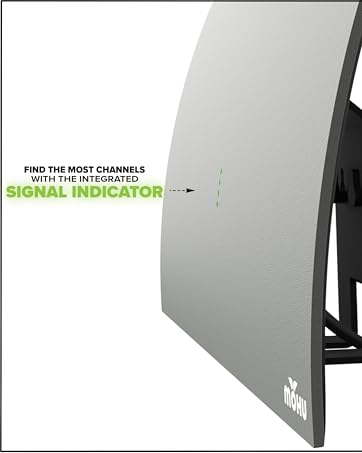
Image: A black Mohu Leaf 50 antenna mounted on a window, overlooking a city skyline, illustrating optimal placement for signal reception.
2-кадам: Антеннаны туташтырыңыз
Connect the 12 ft. coaxial cable to the antenna's F-connector port.
Step 3: Connect the Jolt Switch Ampөмүрлүү
Attach the other end of the coaxial cable to the Jolt Switch 18 dB in-line ampкөтөргүч. Бул ampкүчөткүч сигналды жакшыраак кабыл алуу үчүн күчөтөт.
Step 4: Power the Ampөмүрлүү
Connect the USB cable from the Jolt Switch amplifier to a USB port on your television or to the included USB power adapter, then plug the adapter into a wall outlet.
5 -кадам: сыналгыга туташуу
туташтыруу amplifier's coaxial output to the "Antenna In" or "Cable In" port on the back of your television.
6-кадам: Антеннаны орнотуңуз
Position the antenna in the location identified in Step 1. The antenna can be mounted on a wall or window using the provided hook & loop tabs or push pins. Optimal placement is often near a window and as high as possible.

Image: A black Mohu Leaf 50 antenna is mounted on a light-colored wall to the right of a large flat-screen television, which is displaying a green screen with the Mohu logo.
Иштөө нускамалары
Каналдарды издөө
After connecting the antenna, you must perform a channel scan on your television to find available over-the-air broadcasts.
- Телевизоруңузду күйгүзүп, туура киргизүү булагын тандаңыз (адатта "ТВ" же "Антенна").
- Navigate to your TV's "Settings" or "Setup" menu.
- Look for an option like "Channel Scan," "Auto Program," "Auto Tune," or "Antenna Setup."
- Select "Antenna" or "Air" as the signal source, not "Cable."
- Start the channel scan. This process may take several minutes.
- Once the scan is complete, your TV will display the channels it found.
Refer to your television's user manual for specific instructions on how to perform a channel scan.
Placement Tips for Optimal Reception
- Жогоркураак жакшыраак: Place the antenna as high as possible, ideally on an upper floor or attic.
- Терезенин жанында: Windows often provide the best line of sight to broadcast towers.
- Experiment with Orientation: Try different positions and orientations (flat on a wall, behind the TV, on a window) and re-scan for channels after each adjustment to find the best signal.
- Тоскоолдуктарды болтурбоо: Large metal objects, concrete walls, and other electronic devices can interfere with the signal.
- Сигнал күчүн текшерүү: Some TVs have a signal strength meter in their settings menu, which can help you fine-tune placement.
Проблемаларды чечүү
No Channels Found or Poor Reception
- Re-scan for Channels: Always perform a channel scan after moving the antenna or if you experience reception issues.
- Байланыштарды текшерүү: Бардык кабелдердин антеннага бекем туташтырылганын текшериңиз, amplifier, and TV.
- Антеннаны кайра жайгаштыруу: Try moving the antenna to a different location, especially higher up or closer to a window. Re-scan after each move.
- Текшерүү Ampөмүр кубаты: Verify that the Jolt Switch amplifier is powered (either via TV USB or wall adapter).
- Verify TV Input: Make sure your TV is set to the correct input (Antenna/Air).
- Тышкы кийлигишүү: Large appliances, LED lights, or other electronic devices can cause interference. Try moving the antenna away from such sources.
- Аба ырайы шарттары: Severe weather can temporarily affect signal reception.
Pixelated Picture or Audio Dropouts
- This often indicates a weak signal. Try repositioning the antenna and re-scanning for channels.
- камсыз кылуу ampкөтөргүч туура туташтырылган жана кубатталган.
Missing Specific Channels
- Some channels may broadcast from different directions. Try rotating the antenna slightly and performing another channel scan.
- Use an antenna locator app to confirm the direction of the missing channel's broadcast tower.
Техникалык шарттар
| Өзгөчөлүк | Деталь |
|---|---|
| Бренд | Mohu |
| Модель номери | MH-110584 |
| Элемент Салмагы | 9 унция |
| Продукциянын өлчөмдөрү | 0.04 x 11.5 x 10 дюйм |
| Түс | White, Black (Reversible) |
| Өзгөчөлүктөр | Dual Band, Full HD, Low Profile, Multidirectional, Signal Booster, Wall Mount |
| Импеданс | 75 Ом |
| Максималдуу диапазон | 60 миль |
| Антенна түрү | Ички телекөрсөтүү антеннасы |
| Жыштык колдоо | UHF, VHF |
| Ampөмүрлүү | Jolt Switch 18 дБ In-Line Ampөмүрлүү |
| Коаксиалдык кабель узундугу | 12 фут. |
Техникалык тейлөө
- Тазалоо: Wipe the antenna gently with a soft, dry cloth. Do not use harsh chemicals or abrasive cleaners.
- Кабельге кам көрүү: Коаксиалдык кабелди кыйшайтып же кескин ийип албаңыз, анткени бул ички зымдарга зыян келтирип, сигналдын сапатына таасир этиши мүмкүн.
- Үй ичинде гана колдонуу: This antenna is designed for indoor use. Exposure to outdoor elements can damage the unit and void the warranty.
Кепилдик жана колдоо
The Mohu Leaf 50 Amplified Indoor HDTV Antenna comes with a one-year manufacturer warranty. For warranty claims, technical support, or additional assistance, please visit the official Mohu webсайтка же кардарларды тейлөөгө кайрылыңыз.
Official Mohu Webсайт: www.gomohu.com
Ask a question about this manual
Ask about setup, troubleshooting, compatibility, parts, safety, or missing instructions. Manuals+ will review the question and use this page’s manual context to help answer it.