
1. Киришүү
Lorex LW2731AC1 – бул сиздин Lorex 7 дюймдук LCD зымсыз үй мониторинг тутумуңузду кеңейтүү үчүн иштелип чыккан кошумча зымсыз камера. Бул камера кошумча байкоо жүргүзүү мүмкүнчүлүктөрүн камсыз кылат, бул сизге үйүңүздүн же мүлкүңүздүн көбүрөөк аймактарын көзөмөлдөөгө мүмкүндүк берет. Ал күнү-түнү иштейт viewинг, эки тараптуу аудио байланыш жана ишенимдүү иштөө үчүн коопсуз санариптик зымсыз сигнал.
Бул колдонмо LW2731AC1 кошумча камераңызды туура орнотуу, иштетүү жана техникалык тейлөө боюнча маанилүү маалыматтарды берет.
2. Пакеттин мазмуну
Пакетте бардык компоненттер бар экенин текшериңиз:
- 1 x Үйдүн ичиндеги/Сырткы зымсыз камера (LW2731AC1)
- 1 x Камера үчүн кубат адаптери
3. Продукциянын өзгөчөлүктөрү
LW2731AC1 камерасы сиздин мониторинг тажрыйбаңызды жакшыртуу үчүн бир нече функциялар менен жабдылган:
- VGA (640 x 480) Чечилиши сенсору: Так видео тамактарды сунуштайтtage.
- 52 градус Viewбурч: Багытталган тармакты сунуштайт view белгилүү бир аймактар үчүн.
- 40 фут инфракызыл түнкү көрүнүш: Кара жана ак видео менен аз жарыкта же толук караңгылыкта көзөмөлдөөгө мүмкүндүк берет.
- IR Cut Filter: Күндүзгү жарыкта түстөрдүн так чагылдырылышын камсыз кылат.
- Өркүндөтүлгөн күндүзгү/түнкү режим: Оптималдуу тунуктук үчүн түстүү (күндүзгү) жана кара-ак (түнкү) режимдердин ортосунда автоматтык түрдө которулат.
- Пассивдүү инфракызыл (PIR) кыймылды аныктоо: Жаздырууну же эскертүүлөрдү иштетүү үчүн кыймылды аныктайт.
- Эки тараптуу аудио: Камерага орнотулган микрофон жана динамик камера аркылуу угууга жана сүйлөөгө мүмкүндүк берет.
- Коопсуз санариптик зымсыз сигнал: Жеке жана коопсуз видео жана аудио өткөрүү үчүн Frequency Hopping Spread Spectrum (FHSS) технологиясын колдонот.
- Аба ырайына туруктуу дизайн: Үйдүн ичинде да, сыртында да орнотууга ылайыктуу. Сыртта колдонуу үчүн, жамгырдын же кардын түз таасиринен коргоо үчүн баш калкалоочу жайдын астына орнотуңуз.

Сүрөт 3.1: Алдыңкы бурчтуу view Lorex LW2731AC1 кошумча камерасынын линзасын, инфракызыл светодиоддорун жана антеннасын көрсөтүү.

3.2-сүрөт: Жакынкы план view камеранын линзасын, инфракызыл светодиоддорду жана төмөндөгү кыймыл сенсорун баса белгилеп.
4. Орнотуу
4.1 Физикалык орнотуу
- Жайгашкан жерди тандаңыз: Камераңыз үчүн ылайыктуу жерди тандаңыз. Каалаган жериңизди карап көрүңүз viewLorex 7 дюймдук LCD мониторуңузга жакын жайгашкандыктан, камеранын айланасы, электр розеткасына жакындыгы жана зымсыз сигналдын күчү эске алынышы керек. Сыртта колдонуу үчүн, камераны түз аба ырайынын таасиринен коргоо үчүн капкактын астына орнотулганын текшериңиз.
- Камераны орнотуу: Камераны дубалга же шыпка бекем бекитүү үчүн берилген бекиткич жабдууну колдонуңуз. Каалаган жерди жабуу үчүн камеранын бурчун тууралаңыз.
- Туташуу кубаты: Камеранын кубат адаптерин камерага, андан кийин стандарттуу электр розеткасына сайыңыз. Камеранын иштеши үчүн жергиликтүү розетканы колдонуу керек.
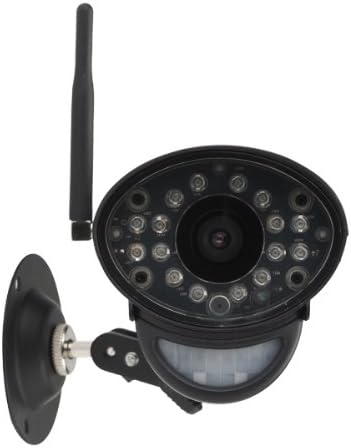
Сүрөт 4.1: Алдыңкы view жөнгө салынуучу орнотуу кронштейни менен камеранын орнотууга даяр.
4.2 Мониторинг системаңыз менен жупташуу
LW2731AC1 кошумча камерасын Lorex 7 дюймдук LCD мониторинг системаңыз менен интеграциялоо үчүн, негизги мониторинг системаңыз менен берилген жупташтыруу көрсөтмөлөрүн аткарыңыз. Адатта, бул төмөнкүлөрдү камтыйт:
- Lorex 7 дюймдук LCD мониторуңуздагы менюга кириңиз.
- "Камераны жупташтыруу" же "Камера кошуу" бөлүмүнө өтүңүз.
- Жаңы камера үчүн колдонулбаган каналды тандаңыз.
- Экрандагы көрсөтмөлөрдү аткарыңыз, аларда адатта көрсөтүлгөн убакыт аралыгында (мисалы, 30 секунд) камеранын арткы жагындагы "Жупташтыруу" же "Шайкештештирүү" баскычын басуу көрсөтүлөт.
- Ийгиликтүү жупташтырылгандан кийин, камеранын видео агымы мониторуңуздун тандалган каналында пайда болот.
Эскертүү: Жупташтыруу боюнча так көрсөтмөлөрдү алуу үчүн Lorex 7 дюймдук LCD монитор тутумуңуздун колдонмосун караңыз, анткени кадамдар моделге жараша бир аз айырмаланышы мүмкүн.
5. Операция
Жупташтырылгандан кийин, LW2731AC1 камерасы сиздин Lorex 7 дюймдук LCD мониторинг системаңыз менен бирге иштейт. Толук маалымат алуу үчүн негизги системаңыздын колдонмосун караңыз:
- Viewрежимдери: Бир камеранын ортосунда кантип которулуу керек view, сканерлөө режими (автоматтык түрдө которулуу) жана төрт экрандуу режим (эгер мониторуңуз колдосо).
- Кыймылды аныктоо жөндөөлөрү: Камеранын пассивдүү инфракызыл кыймыл сенсору үчүн сезгичтикти жана жаздыруу триггерлерин жөндөө.
- Эки тараптуу аудио: Камера аркылуу байланышуу үчүн Talk-back функциясын колдонуу.
- Жаздыруу жана ойнотуу: Мониторинг системаңыздын SD картасында сакталган видео жаздырууларды башкаруу.
Камеранын санариптик зымсыз сигналы купуя жана коопсуз байланышты камсыз кылат, видео түрмөгүңүзгө тоскоолдуктарды жана уруксатсыз кирүүлөрдү азайтат.
6. Техникалык тейлөө
6.1 Камераны тазалоо
Сүрөттүн сапатын оптималдуу сактоо үчүн, камеранын линзасын жана корпусун мезгил-мезгили менен тазалап туруңуз:
- Тазалоодон мурун камеранын өчүк экенин текшериңиз.
- Линзаны акырын сүртүү үчүн жумшак, түксүз чүпүрөктү колдонуңуз. Зарыл болсо,ampчүпүрөктү суу же жумшак линза тазалоочу эритме менен жууп салыңыз.
- Камера корпусун жумшак, d менен сүртүңүзamp кездеме. Катуу химиялык заттардан же абразивдүү тазалагычтардан алыс болуңуз.
6.2 Айлана-чөйрөнү коргоо
Камера аба ырайынын шарттарына туруктуу болгону менен, экстремалдык шарттар анын иштешине жана иштөө мөөнөтүнө таасир этиши мүмкүн:
- Камераны күндүн нуру түз тийген жерге көпкө орнотуудан алыс болуңуз, анткени бул ысып кетүүгө алып келиши мүмкүн.
- Камераны катуу жамгырдын, кардын же мөндүрдүн түз таасиринен коргоңуз. Сыртта колдонулганда, илинүүчү чатырдын же чатырдын астына орнотуңуз.
- Кубат адаптери нымдуулуктан корголгонун текшериңиз.
7. Кыйынчылыктарды
Эгерде сиз LW2731AC1 кошумча камераңыз менен көйгөйлөргө туш болсоңуз, төмөнкү кеңири таралган чечимдерди карап көрүңүз:
- Видео сигнал жок:
- Камера күйгүзүлгөнүн жана анын кубат адаптери иштеген розеткага бекем туташтырылганын текшериңиз.
- Камера Lorex 7 дюймдук LCD мониторуңуздун иштөө диапазонунда экенин текшериңиз. Калың дубалдар же бир нече кабат сыяктуу тоскоолдуктар зымсыз байланыштын диапазонун азайтышы мүмкүн.
- Камераны мониторинг системаңыз менен кайра жупташтырып көрүңүз (4.2-бөлүмдү караңыз).
- Камера же монитордун жанындагы тоскоолдук булактарын (мисалы, башка зымсыз түзмөктөр, микротолкундуу мештер) текшериңиз.
- Сүрөттүн сапаты начар:
- Камера линзасын тазалаңыз (6.1-бөлүмдү караңыз).
- Күндүзгү убакытта көзөмөлдөнгөн аймакта жетиштүү жарыктандырууну камсыз кылыңыз.
- Түнкү көрүү үчүн, камеранын инфракызыл светодиоддорунун алдында эч кандай тоскоолдуктар жок экенин текшериңиз.
- Кыймылды аныктоо иштебей жатат:
- Lorex 7 дюймдук LCD мониторуңуздагы кыймылды аныктоо жөндөөлөрүн текшерип, анын иштетилгенин жана сезгичтиги туура коюлганын текшериңиз.
- Камеранын кыймыл сенсору тосулуп калбаганын текшериңиз.
- Эки тараптуу аудио көйгөйлөр:
- Lorex 7 дюймдук LCD мониторуңуздагы үн жөндөөлөрүн текшериңиз.
- Камеранын микрофонун же динамикти тосуп турган эч кандай физикалык тоскоолдуктар жок экенин текшериңиз.
Эгерде көйгөйлөр чечилбесе, Lorexтин колдоо бөлүмүнө кайрылыңыз webсайтына кириңиз же кошумча жардам алуу үчүн Lorex кардарларды колдоо кызматына кайрылыңыз.
8. Техникалык шарттар
| Өзгөчөлүк | Спецификация |
|---|---|
| Модель номери | LW2731AC1 |
| Видео тартуунун резолюциясы | 640 x 480 (VGA) |
| талаасы View | 52 градус |
| Түнкү көрүү диапазону | 40 фут (12 м) чейин |
| Байланыш технологиясы | Зымсыз (FHSS) |
| Power Source | Электр зымдары |
| Аудио | Эки тараптуу аудио (Киргизилген микрофон жана динамик) |
| Motion Detection | Пассивдүү инфракызыл (PIR) |
| Ички/тышкы колдонуу | Үй ичинде, сыртта (аба ырайынын таасирине туруктуу) |
| Өлчөмдөрү (L x W x Y) | 9.6 x 3.6 x 3.4 дюйм (24.4 x 9.1 x 8.6 см) |
| Элемент Салмагы | 1.05 фунт (0.48 кг) |
| Түс | Кара |
| Эл аралык коргоо рейтинги | IP67 |
9. Кепилдик жана колдоо
Продукциянын кепилдиги, техникалык колдоо жана кошумча ресурстар жөнүндө маалымат алуу үчүн, расмий Lorex веб-сайтына кириңиз webсайт. Адатта, сиз ал жерден Көп берилүүчү суроолорду, программалык камсыздоону жүктөп алууну жана кардарларды тейлөө кызматынын байланыш маалыматын таба аласыз.
Webсайт: www.lorex.com