
Rademacher 36500512
Rademacher 36500512 Built-in Timer Instruction Manual
Модель: 36500512
Introduction
This manual provides detailed instructions for the installation, operation, and maintenance of your Rademacher 36500512 Built-in Timer. Please read this manual thoroughly before installation and use to ensure safe and efficient operation of the device. Keep this manual for future reference.
Продукт өзгөчөлүктөрү
The Rademacher 36500512 Built-in Timer offers advanced functionality for automated control of electrical devices. Key features include:
- Күнүмдүк жана жумалык программалоо: Set specific on/off times for each day of the week.
- Daylight-Dependent Program (Astro Function): Күн чыгышы жана батышы боюнча которулуу убактысын автоматтык түрдө тууралайт.
- Dawn/Dusk Sensor Compatibility: Connect an external sensor for enhanced light-dependent control.
- Жай/кышкы убакытты автоматтык түрдө өзгөртүү: The timer automatically adjusts for daylight saving time.
- Камдык батарея: Retains settings and time during power outages.
Маанилүү коопсуздук нускамалары
ЭСКЕРТҮҮ: Electrical installation should only be performed by a qualified electrician in accordance with local wiring regulations and standards. Failure to follow these instructions may result in electric shock, fire, or serious injury.
- Аппаратты орнотуудан же тейлөөдөн мурун ар дайым негизги өчүргүчтөн электр кубатын ажыратыңыз.
- нымдуу же г орнотууга болбойтamp жерлер.
- Бардык байланыштар коопсуз жана туура изоляцияланганын текшериңиз.
- Таймердин максималдуу жүктөм номиналдуулугунан ашпаңыз.
- Аппаратты балдардан алыс кармаңыз.
Пакеттин мазмуну
Пакетте бардык буюмдар бар экенин текшериңиз:
- Rademacher 36500512 Built-in Timer Unit
- Instruction Manual
- Монтаждоо бурамалар (эгер бар болсо)
Орнотуу жана баштапкы орнотуу
The Rademacher 36500512 is designed for flush-mounted installation. It is recommended that installation be carried out by a qualified electrician.
1. Таймерди орнотуу
- Электр энергиясын өчүрүү: Баштоодон мурун, орнотуу аймагына негизги электр энергиясы өчүргүчтөн өчүрүлгөнүн текшериңиз.
- Дубал кутучасын даярдоо: The timer is designed to fit into a standard flush-mounted wall box.
- Зымдар: Connect the electrical wires to the terminals on the back of the timer according to the wiring diagram provided in the separate wiring instructions (not part of this manual). Ensure correct phase, neutral, and load connections.
- Агрегатты коопсуздандырыңыз: Carefully place the timer into the wall box and secure it using the provided mounting screws.
- Алдыңкы панелди тиркөө: Snap the front panel with the display and buttons onto the mounted unit.

Сүрөт 1: Алдыңкы view of the Rademacher 36500512 Built-in Timer with its unlit display and control buttons. This shows the overall aesthetic and button layout before power-up.
2. Initial Power-Up and Basic Settings
- Күчтү калыбына келтирүү: Once installation is complete and secure, restore power at the main circuit breaker.
- Биринчи колдонуу: The display will illuminate. You may need to set the current time and date.
- Убакытты жана датаны коюу: колдонуу M (Menu) button to navigate and the Өйдө/Төмөн arrows to adjust values. Confirm with OK. Refer to the "Operating Instructions" section for detailed navigation.
Иштөө нускамалары
The Rademacher 36500512 timer is controlled via its integrated display and buttons. Familiarize yourself with the controls:
- M баскычы: Негизги менюга кирип, параметрлерди карап чыгат.
- Өйдө/төмөн жебелер: Adjust values, scroll through menu items, or manually control the connected device (e.g., blinds).
- OK баскычы: Confirms selections and saves settings.
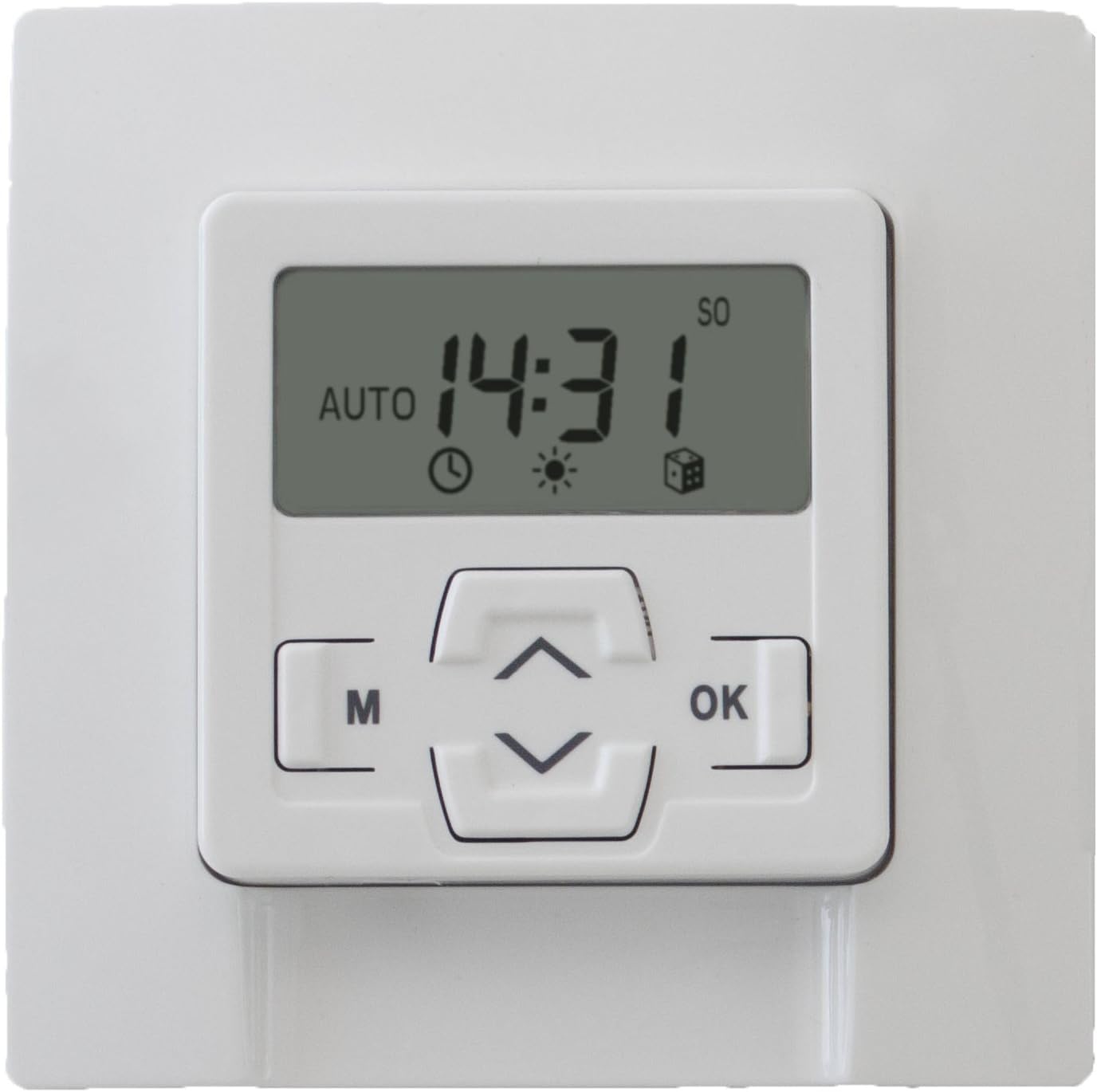
Сүрөт 2: Алдыңкы view of the Rademacher 36500512 Built-in Timer with its display illuminated, showing the current time (14:31) and indicating 'AUTO' mode, along with various status icons.
1. Учурдагы убакытты жана датаны орнотуу
- Басыңыз M негизги менюга кирүү үчүн.
- Navigate using Өйдө/Төмөн arrows to find "Time/Date" or similar option. Press OK.
- Adjust hours, minutes, day, month, and year using Өйдө/Төмөн arrows and confirm each with OK.
- басуу менен менюдан чыгуу M repeatedly or waiting for timeout.
2. Programming Daily/Weekly Schedules
- Басыңыз M негизги менюга кирүү үчүн.
- Select "Program" or "Schedule" and press OK.
- Choose between "Daily Program" or "Weekly Program".
- For each desired switching time (e.g., open, close), set the specific time and day(s) of the week. Use Өйдө/Төмөн тууралоо жана OK ырастоо үчүн.
- Save all settings before exiting the programming menu.
3. Astro Function (Daylight-Dependent Control)
The Astro function automatically adjusts switching times based on sunrise and sunset, which are calculated based on your geographical location (if configured) or a default setting. This provides a natural control rhythm.
- Access the main menu with M.
- Select "Astro" or "Daylight Program" and press OK.
- Activate the function and configure any offset times (e.g., close 15 minutes after sunset) if available.
- Ensure your location settings are accurate for optimal performance.
4. Кол менен өзгөртүү
You can temporarily override the programmed schedule at any time:
- басыңыз Up or Төмөн arrow buttons to manually activate or deactivate the connected device.
- The timer will return to its programmed schedule after the manual action is completed or after a set period, depending on the specific model's configuration.
Техникалык тейлөө
The Rademacher 36500512 Built-in Timer requires minimal maintenance.
- Тазалоо: Wipe the surface of the timer with a soft, dry cloth. Do not use abrasive cleaners or solvents.
- Камдык батарея: The internal backup battery ensures settings are retained during power outages. This battery is typically long-lasting and not user-replaceable. If the timer consistently loses settings after power interruptions, professional service may be required.
Проблемаларды чечүү
| Көйгөй | Мүмкүн себеп | Чечим |
|---|---|---|
| Таймердин дисплейи бош. | Электр энергиясы жок. | Check circuit breaker and wiring connections. Ensure power is restored. |
| Timer does not switch at programmed times. | Incorrect programming; Manual override active; Astro function interfering. | Review programmed schedules. Deactivate manual override. Check Astro settings. Ensure the timer is in automatic mode. |
| Убакыт/дата туура эмесtage. | Backup battery depleted or faulty. | Reset time and date. If issue persists, contact customer support for service. |
| Баскычтар жооп бербейт. | Убактылуу программалык камсыздоонун катасы; Физикалык зыян. | Try cycling power to the unit (turn off at breaker, wait 30 seconds, turn on). If issue persists, contact customer support. |
Техникалык шарттар
| Бренд | Rademacher |
| Модель номери | 36500512 |
| Тtage | 230 вольт |
| Материал | Пластик |
| Продукциянын өлчөмдөрү (L x W x Y) | 4.8 x 8 x 8 см |
| Элемент Салмагы | 159 г |
| Түс | Ultra-white |
Кепилдик жана Кардарларды колдоо
Your Rademacher 36500512 Built-in Timer is covered by a manufacturer's warranty. Please refer to the warranty card included with your purchase for specific terms and conditions.
For technical assistance, troubleshooting not covered in this manual, or warranty claims, please contact Rademacher customer support through their official webпродукт сатылып алынган сайт же сатуучу.
Ask a question about this manual
Ask about setup, troubleshooting, compatibility, parts, safety, or missing instructions. Manuals+ will review the question and use this page’s manual context to help answer it.