
1. Киришүү
This manual provides essential information for the proper installation, operation, and maintenance of your Maxcom KXT480 landline telephone. Please read these instructions carefully before using the device to ensure optimal performance and longevity. The Maxcom KXT480 is a corded landline telephone designed for reliable communication in a home or office environment.
2. Пакеттин мазмуну
Пакетте бардык буюмдар бар экенин текшериңиз:
- Maxcom KXT480 Telephone Unit
- Телефон
- Уюлдук аппараттын шнуры
- Телефон линиясы
- Колдонуучунун Колдонмосу (бул документ)
3. Продукт бүтүп калдыview
The Maxcom KXT480 is a corded telephone featuring a clear keypad, a comfortable handset, and essential functions for daily communication. It is designed for ease of use and durability.
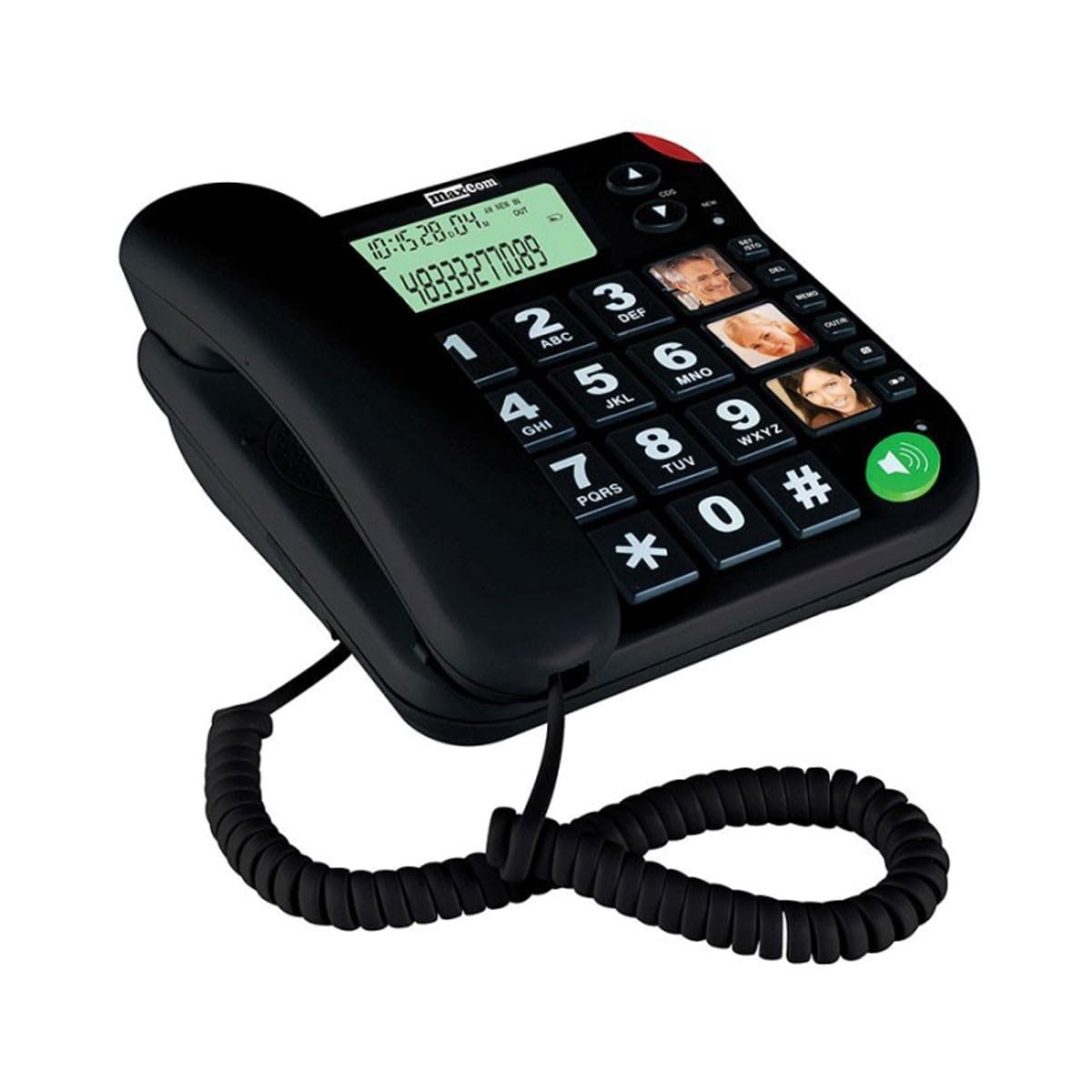
Image of the Maxcom KXT480 landline telephone, showing its black color, keypad, and handset.
Негизги өзгөчөлүктөр төмөнкүлөрдү камтыйт:
- Corded telephone for reliable connection
- Caller ID functionality
- Speakerphone function (requires batteries for full functionality)
- Basic conference call capability
- Memory storage for frequently dialed numbers
4. Орнотуу
4.1 Телефонду туташтыруу
- Connect one end of the coiled handset cord to the handset and the other end to the handset jack on the side of the telephone base.
- Телефон линиясынын шнурунун бир учун телефон базасынын арткы жагындагы LINE уячасына туташтырыңыз.
- Connect the other end of the telephone line cord to your wall telephone socket.
4.2 Battery Installation (Optional but Recommended)
The Maxcom KXT480 requires 1 Lithium-Ion battery (included) for certain advanced features such as the display and speakerphone functionality. While the basic telephone functions work without batteries, installing them is recommended for full feature access.
- Батарея бөлүмүн телефондун түбүнүн астыңкы бетинен табыңыз.
- Батарея уясынын капкагын ачыңыз.
- Insert the Lithium-Ion battery, ensuring correct polarity (+ and -).
- Батарея уясынын капкагын бекем жабыңыз.
5. Иштөө нускамалары
5.1 Чалуу
- Телефонду көтөрүңүз же басыңыз Динамик button (if batteries are installed).
- Клавиатураны колдонуп, каалаган телефон номерин териңиз.
- Чалуу туташуу үчүн күтө туруңуз.
- Чакырууну аяктоо үчүн телефонду алмаштырыңыз же басыңыз Динамик кайра баскычын.
5.2 Чалууларды кабыл алуу
- When the telephone rings, lift the handset or press the Динамик жооп берүү үчүн баскыч.
- Чакырууну аяктоо үчүн телефонду алмаштырыңыз же басыңыз Динамик кайра баскычын.
5.3 чалуучу ID
The telephone supports Caller ID functionality. When an incoming call is received, the caller's number will be displayed on the screen (if batteries are installed and Caller ID service is subscribed through your telephone provider).
5.4 Спикерфон функциясы
To use the speakerphone function, press the dedicated Динамик button. This allows hands-free communication. Ensure batteries are installed for this feature to work correctly.
5.5 Эстутум терүү
The Maxcom KXT480 allows you to store frequently used numbers for quick dialing. Refer to the on-screen prompts or specific buttons on your device for programming memory slots. Typically, this involves pressing a 'Store' or 'Memory' button, entering the number, and then selecting a memory location.
5.6 Conference Calling
The telephone supports basic conference call functionality. Consult your telephone service provider for details on how to initiate a three-way call, as this often depends on network services.
6. Техникалык тейлөө
6.1 Тазалоо
To clean the telephone, use a soft, damp cloth. Do not use abrasive cleaners or solvents, as these can damage the surface. Ensure the telephone is disconnected from the wall socket before cleaning.
6.2 Сактоо
If storing the telephone for an extended period, disconnect it from the telephone line and remove any installed batteries. Store in a cool, dry place away from direct sunlight.
7. Кыйынчылыктарды
If you encounter issues with your Maxcom KXT480 telephone, please refer to the following common problems and solutions:
| Көйгөй | Мүмкүн себеп | Чечим |
|---|---|---|
| Терүү үнү жок | Телефон линиясы ажыратылган же бузулган. | Check all cable connections. Try connecting another phone to the wall socket to verify line functionality. |
| Телефон шыңгырылбайт | Ringer volume is set to off or too low. | Adjust the ringer volume. Ensure the telephone line is active. |
| No display or speakerphone not working | Batteries are not installed or are depleted. | Install fresh batteries or check battery polarity. |
| Cannot hear caller or caller cannot hear me | Handset or speakerphone volume too low; faulty connection. | Adjust volume. Check handset cord connection. If using speakerphone, ensure you are close to the microphone. |
8. Техникалык шарттар
Detailed technical specifications for the Maxcom KXT480 telephone:
| Өзгөчөлүк | Спецификация |
|---|---|
| Бренд | Maxcom |
| Модель номери | KXT480 |
| Түс | Кара |
| Телефон түрү | жоон |
| Материал | Пластик |
| Power Source | AC/DC (Line Powered) |
| Батареяга талап | 1 Lithium-Ion battery (included) for display/speakerphone |
| Элементтин өлчөмдөрү (LxWxH) | 20.6 x 16.4 x 9.1 см |
| Шайкеш түзмөктөр | Стационардык тармактар |
| Терүүчү түрү | Жалгыз баскычтоп |
| Көп линиялуу операция | Single Line |
| Чалуучунун идентификациясы | Ооба |
| Conference Call Functionality | Негизги |
| GTIN | 05908235972039 |
| Келип чыккан өлкө | Португалия |
9. Кепилдик жана колдоо
Maxcom products are designed for reliability and performance. For warranty information, please refer to the warranty card included with your purchase or contact your retailer. For technical support or further assistance, please visit the official Maxcom webсайтка же кардарларды тейлөө бөлүмүнө кайрылыңыз. Сатып алуу квитанциясын кепилдик дооматтары үчүн сатып алуунун далили катары сактаңыз.