
1. Киришүү
Thank you for choosing the Fonestar AS-24U Hi-Fi USB/SD/MP3 Ampкөтөргүч. Бул колдонмо түзмөгүңүздүн коопсуз жана натыйжалуу иштеши үчүн маанилүү маалымат берет. Колдонуудан мурун аны кылдаттык менен окуп чыгып, келечекте колдонуу үчүн сактап коюңуз.
2. Коопсуздук нускамалары
- Электр камсыздоо: камсыз кылуу amplifier is connected to a power source matching the specified voltage (230V).
- Вентиляция: Вентиляция тешиктерин жаап албаңыз. Ашыкча ысып кетүүнүн алдын алуу үчүн, туура аба агымы үчүн аппараттын айланасында жетиштүү орун калтырыңыз.
- Нымдуулук: сактаңыз amplifier away from water, moisture, and high humidity environments. Do not expose it to dripping or splashing.
- Жылуулук булактары: Түзмөктү радиаторлор, жылыткычтар, мештер же башка жылуулук чыгаруучу шаймандар сыяктуу жылуулук булактарына жакын койбоңуз.
- Тазалоо: Тазалоодон мурун электр шнурун сууруп алыңыз. Кургак, жумшак чүпүрөктү колдонуңуз. Суюк тазалоочу каражаттарды же аэрозоль тазалоочу каражаттарды колдонбоңуз.
- Тейлөө: Бул продуктту өзүңүз тейлөөгө аракет кылбаңыз. Бардык тейлөөнү квалификациялуу тейлөө кызматкерлерине тапшырыңыз.
- Объект/суюктук кирүү: Эч качан бул буюмдун ичине тешиктер аркылуу эч кандай түрдөгү нерселерди түртпөңүз, анткени алар коркунучтуу томtagөрткө же электр шокуна алып келиши мүмкүн болгон чекиттер же кыска өчүк бөлүктөр.
3. Продукт бүтүп калдыview
3.1 алдыңкы панели
The front panel features controls for power, input selection, volume adjustment, and USB/SD media playback. It also includes a display for media information.
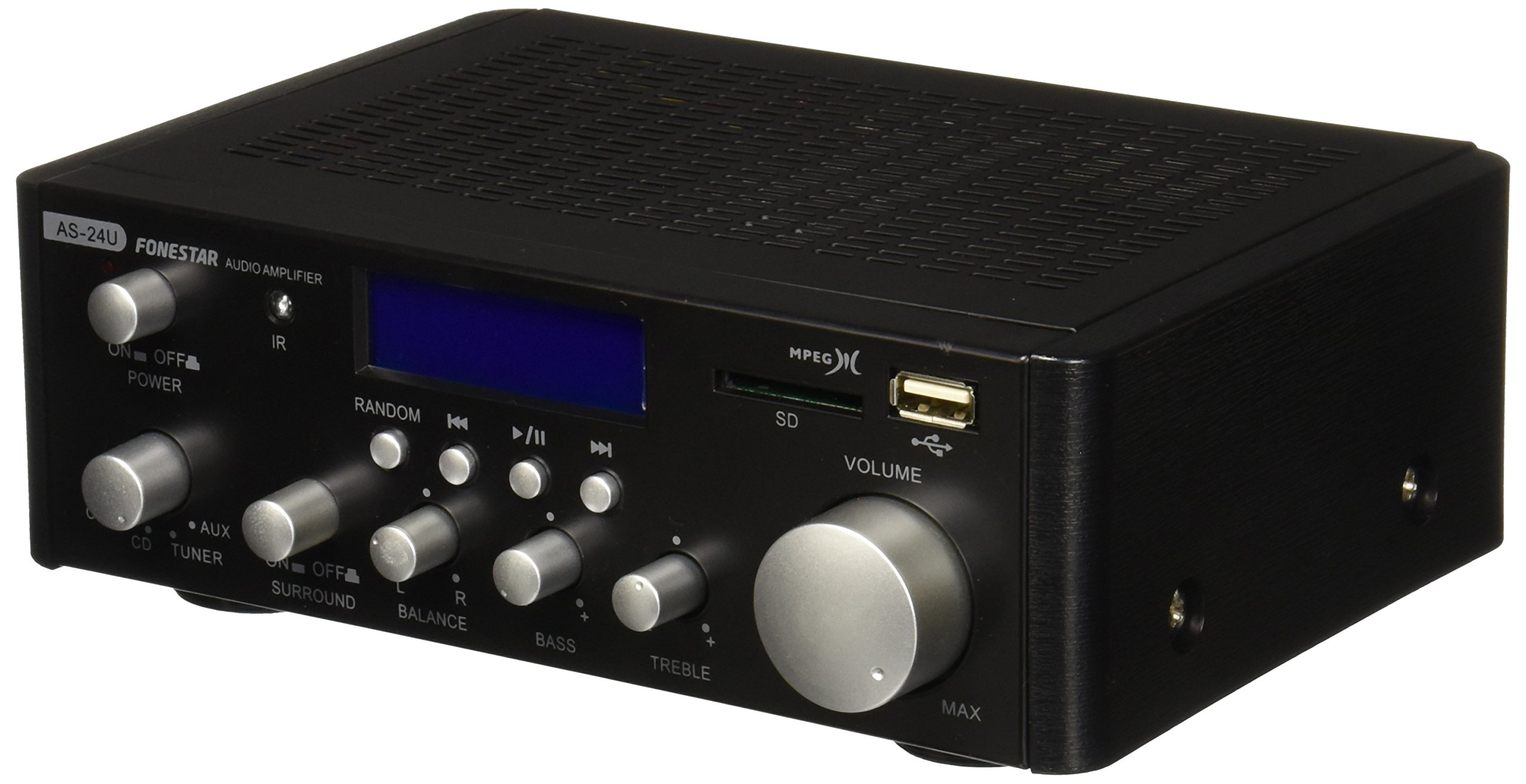
Сүрөт 1: Алдыңкы view of the Fonestar AS-24U amplifier, showing the main controls and display.
3.2 Арткы панель
The rear panel provides all necessary connections for audio input sources, speaker outputs, and power.

Сүрөт 2: Арткы view of the Fonestar AS-24U amplifier, detailing input/output ports and power connection.
- INPUT (AUX, TUNER, CD): RCA stereo inputs for connecting external audio sources.
- SPEAKER OUT (STEREO): Spring clip terminals for connecting passive speakers (4-8 Ω).
- SPEAKER OUT (SURROUND): Additional spring clip terminals for surround speakers (8 Ω).
- КУЧТУ КИРҮҮ: AC power input for the main power cable.
- ТОМTAGE Selector: Switch for selecting between 115V and 230V power input. Ensure this is set correctly for your region.
3.3 Алыстан башкаруу
Киргизилген алыстан башкаруу пульту ыңгайлуу иштөөгө мүмкүндүк берет amplifier's media playback functions.
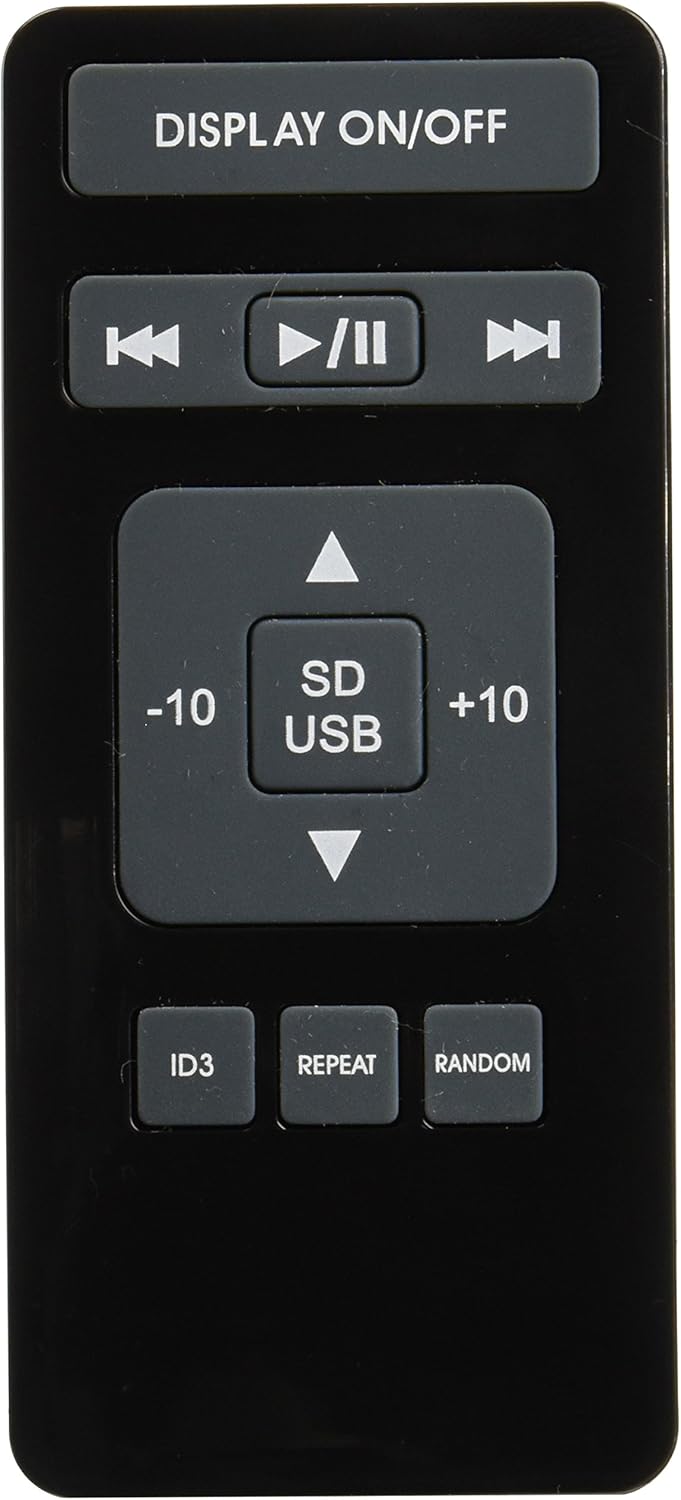
Image 3: Remote control for the Fonestar AS-24U amplifier, showing buttons for media playback and display control.
- КӨРСӨТҮҮ / ӨЧҮРҮҮ: Toggles the front panel display.
- ОЙНОТУУ/ТЫНДЫРУУ, МУРУНКУ/КИЙИНКИ: Controls for media playback.
- SD/USB: Selects between SD card and USB drive as the media source.
- -10/+10: Skips tracks by 10.
- ID3: Displays ID3 tag MP3 үчүн маалымат files.
- КАЙТАЛОО: Toggles repeat modes (e.g., repeat one, repeat all).
- КОКУС: Toggles random playback.
4. Орнотуу
4.1 Динамиктерди бириктирүү
- камсыз кылуу ampкөтөргүч өчүрүлгөн жана розеткадан суурулган.
- Connect your passive speakers to the SPEAKER OUT terminals on the rear panel.
- Match the positive (+) terminal on the amplifier to the positive (+) terminal on your speaker, and the negative (-) to the negative (-).
- For stereo speakers, use the 4-8 Ω terminals. For surround speakers, use the 8 Ω terminals. Ensure your speakers' impedance matches the ampкөтөргүчтүн спецификациялары.
4.2 Аудио булактарын туташтыруу
- Connect your audio devices (e.g., CD player, tuner, auxiliary device) to the corresponding RCA INPUT jacks (CD, TUNER, AUX) on the rear panel.
- Ensure left and right channels are correctly matched (red for right, white for left).
4.3 Кубат туташтыруу
- Verify the VOLTAGАрткы панелдеги E SELECTOR которгучу туура үн деңгээлине коюлганtage for your region (e.g., 230V).
- Connect the power cable to the POWER IN socket on the rear panel and then to a suitable wall outlet.
5. Иштөө нускамалары
5.1 Күйгүзүү/өчүрүү
күйгүзүү үчүн алдыңкы панелдеги кубат баскычын басыңыз amplifier on or off. A soft start protection circuit is integrated.
5.2 Киргизүү булагын тандоо
Use the input selector knob or buttons on the front panel to choose between CD, TUNER, AUX, USB, or SD inputs.
5.3 Үндү тууралоо
Rotate the main volume knob on the front panel to adjust the overall sound level. Start with a low volume and gradually increase it to a comfortable listening level.
5.4 USB/SD ойнотуу
- MP3 аудио камтылган USB флеш-дискти же SD картаны салыңыз fileалдыңкы панелдеги тиешелүү уячага киргизиңиз.
- Select the USB or SD input using the input selector.
- Use the playback controls (Play/Pause, Previous/Next) on the front panel or remote control to manage your music.
- The remote control allows for additional functions like skipping 10 tracks (+10/-10), displaying ID3 tags, repeating tracks, and random playback.
6. Техникалык тейлөө
6.1 Тазалоо
тазалоо үчүн amplifier, first unplug it from the power outlet. Use a soft, dry cloth to wipe down the exterior surfaces. Do not use abrasive cleaners, waxes, or solvents as they may damage the finish.
6.2 Сактоо
сакталган болсо amplifier for an extended period, ensure it is unplugged, clean, and stored in a cool, dry place away from direct sunlight and extreme temperatures.
7. Кыйынчылыктарды
- Кубат жок:
- Электр кабелинин экөөнө тең бекем туташтырылганын текшериңиз ampкөтөргүч жана розетка.
- Дубалдагы розетка иштеп турганын текшериңиз.
- Verify the VOLTAGE SELECTOR switch is set correctly.
- Үн жок:
- Туура киргизүү булагынын тандалганын ырастаңыз.
- Бардык динамик байланыштарын туура полярдуулук жана коопсуз тууралоо үчүн текшериңиз.
- Үндүн катуулугун жана үнү өчүп калбагандыгын текшериңиз.
- Башка аудио булагы менен сынап көрүңүз.
- Бурмаланган үн:
- Үнүн азайтыңыз.
- Динамиктин импеданс шайкештигин текшериңиз.
- Аудио кабелдердин бузулбагандыгын жана бекем туташтырылгандыгын текшериңиз.
- USB/SD ойнотуу маселелери:
- Ensure the USB drive or SD card is formatted to a compatible file системасы (мисалы, FAT32).
- Аудио экенин текшериңиз fileлар MP3 форматында.
- Башка USB дискти же SD картаны колдонуп көрүңүз.
8. Техникалык шарттар
| Бренд | ФОНЕСТАР |
| Модел | AS-24U |
| Stereo Power Output | 25 + 25 W max, 15 + 15 W RMS (4 Ω), 12 + 12 W RMS (8 Ω) |
| Surround Power Output | 10 + 10 W max, 6 + 6 W RMS (8 Ω) |
| Киргизүүлөр | 3 stereo (CD, Tuner, AUX), 2 x RCA 400 mV |
| Коргоо | Жумшак баштоо, кыска туташуу, ашыкча жүктөө |
| Тtage | 230 вольт |
| Өлчөмдөрү (L x W x Y) | 5 x 5 x 10 см (болжол менен 50 x 50 x 100 мм) |
| Салмагы | 1.9 кг |
| Speaker Connectivity | Зымдуу |
9. Кепилдик жана колдоо
This Fonestar AS-24U amplifier comes with a standard manufacturer's warranty. Please refer to the warranty card included with your purchase for specific terms and conditions. For technical support, service, or warranty claims, please contact your retailer or the official Fonestar customer service.