
Introduction
This manual provides comprehensive instructions for the installation, operation, maintenance, and troubleshooting of your EVGA GeForce GTX 780 SuperClocked graphics card. This high-performance graphics card is designed to deliver an enhanced visual experience for computing tasks and gaming.
The EVGA GeForce GTX 780 SuperClocked features 3GB GDDR5 memory, a 384-bit memory interface, and an ACX Cooler for efficient thermal management. It supports Microsoft DirectX 12 API (feature level 11_0) and offers multiple display outputs including DVI-I, DVI-D, HDMI, and DisplayPort.
Пакеттин мазмуну
Продукцияңыздын таңгагында бардык элементтер бар экенин текшериңиз:
- EVGA GeForce GTX 780 SuperClocked Graphics Card
- Driver CD / User Manual
- Power Adapters (if required for your system)
- DVI to VGA Adapter (if included)
- Promotional materials (stickers, posters)

1-сүрөт: Example of included accessories such as manuals, driver CD, and promotional stickers.

2-сүрөт: Power adapters and a DVI to VGA adapter, which may be included to facilitate connection to older monitors or power supplies.
Орнотуу жана орнотуу
Системалык талаптар
- PCI Express-compliant motherboard with one or more x16 graphics slots.
- Minimum 600W or greater power supply with two 6-pin or 8-pin PCI Express power connectors (check your specific card's power requirements).
- Минималдуу 4 ГБ тутум эстутуму (8 ГБ сунушталат).
- Microsoft Windows 10, 8, 7, Vista, or Linux operating system.
- Драйверди орнотуу үчүн CD-ROM/DVD-ROM диск же интернет байланышы керек.
Аппараттык орнотуу
- Өчүрүү системасы: Компьютериңизди өчүрүп, электр кабелин розеткадан ажыратыңыз.
- Ачык иш: Компьютериңиздин корпусун ачыңыз. Так көрсөтмөлөр үчүн компьютериңиздин колдонмосун караңыз.
- PCI Express уячасын табыңыз: Сиздин энелик платада жеткиликтүү PCI Express x16 уячасын аныктаңыз.
- Slot капкагын алып салуу: Тандалган PCI Express уячасына туура келген компьютер корпусунун артындагы металл уячасынын капкагын алып салыңыз.
- Графикалык картаны салыңыз: Carefully align the graphics card with the PCI Express slot and press it firmly until it is securely seated. Ensure the retention clip on the slot engages.
- Коопсуз карта: Secure the graphics card to the computer case with the screw or retention mechanism.
- Туташуу кубаты: Connect the required 6-pin and/or 8-pin PCI Express power connectors from your power supply to the graphics card. Ensure all connections are firm.
- Ишти жабуу: Компьютериңиздин корпусун жаап, электр кабелин кайра туташтырыңыз.
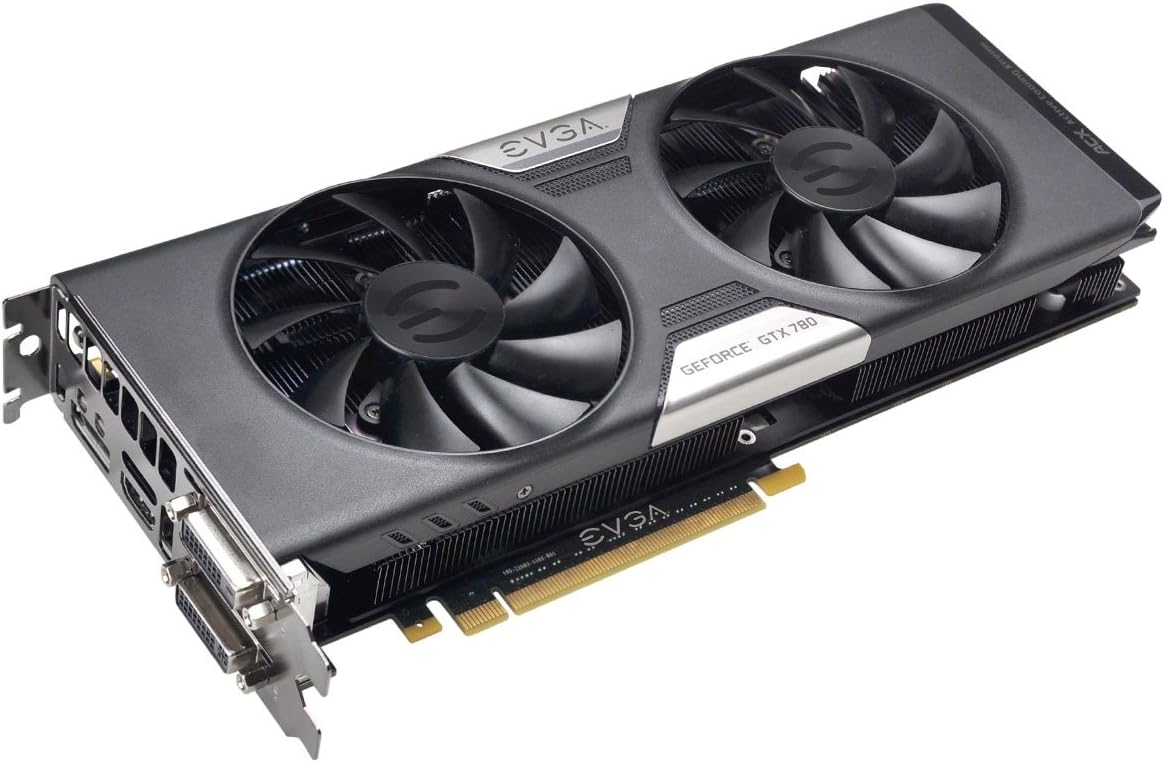
3-сүрөт: The EVGA GeForce GTX 780 SuperClocked graphics card, ready for installation into a PCI Express slot.
Драйверди орнотуу
- Күйгүзүү системасы: Компьютериңизди күйгүзүңүз.
- Драйверлерди орнотуу:
- CDден: Insert the EVGA driver CD into your optical drive and follow the on-screen instructions.
- From Web: Эң акыркы драйверлер үчүн расмий NVIDIA веб-сайтына кириңиз webсайт (www.nvidia.com/drivers) or EVGA webсайт (www.evga.com/support/download/). Select your product model and operating system, then download and run the installer.
- Кайра баштоо: Драйверди орнотуу аяктагандан кийин компьютериңизди өчүрүп күйгүзүңүз.
Иштөө нускамалары
Дисплейлерди туташтыруу
Your EVGA GeForce GTX 780 SuperClocked graphics card supports multiple display configurations. Connect your monitor(s) to the available ports:
- DVI-I: Digital and Analog output. Can be used with a DVI to VGA adapter for analog monitors.
- DVI-D: Digital output only.
- HDMI: High-Definition Multimedia Interface for audio and video.
- DisplayPort (DP): High-performance digital display interface.

4-сүрөт: Display output ports on the graphics card, including DVI-I, DVI-D, HDMI, and DisplayPort.
After connecting your display(s), you may need to configure display settings within your operating system to set resolution, refresh rate, and multi-monitor arrangements.
Негизги өзгөчөлүктөр жана технологиялар
- NVIDIA GeForce GTX 780 GPU: Powerful graphics processing unit for demanding applications.
- EVGA ACX Cooler: Advanced Cooling eXperience cooler with dual fans designed for improved airflow, lower temperatures, and quieter operation compared to reference designs.
- SuperClocked Performance: Factory overclocked for enhanced performance out of the box.
- 3 ГБ GDDR5 эстутум: High-speed memory for texture and frame buffer storage.
- NVIDIA GPU Boost 2.0: Dynamically maximizes clock speeds based on workload and temperature for optimal performance.
- NVIDIA SLI Ready: Supports multi-GPU configurations for scalable performance.
- Microsoft DirectX 12 API Support: Ensures compatibility with the latest graphics technologies.

5-сүрөт: The ACX Cooler with dual fans, designed for efficient heat dissipation.
Техникалык тейлөө
Туура тейлөө иштөө мөөнөтүн узартат жана графикалык картаңыздын оптималдуу иштешин камсыздай алат.
- Тазалыкты сактоо: Periodically clean dust from the graphics card's heatsink and fans using compressed air. Ensure the system is powered off and unplugged before cleaning. Avoid touching internal components directly.
- Драйвер жаңыртуулары: Regularly check the NVIDIA or EVGA website for the latest graphics drivers. Keeping drivers updated can improve performance, stability, and compatibility with new software and games.
- Системанын аба агымы: Ensure your computer case has adequate airflow to prevent heat buildup, which can affect the graphics card's performance and longevity.
Проблемаларды чечүү
Эгерде сиз графикалык картаңыз менен көйгөйлөргө туш болсоңуз, төмөнкү жалпы көйгөйлөрдү чечүү кадамдарын карап көрүңүз:
- Дисплей чыгышы жок:
- Монитордун графикалык картага туура туташып, күйгүзүлгөнүн текшериңиз.
- Видео картанын PCI Express уячасына толугу менен орнотулганын текшериңиз.
- Check that all required power connectors are securely attached to the graphics card.
- Мүмкүн болсо, башка дисплей кабели же монитор менен сынап көрүңүз.
- Driver Issues / Instability:
- NVIDIA же EVGAдан эң акыркы графикалык драйверлерди таза орнотууну аткарыңыз webсайт.
- Иштөө тутумуңуз жаңыртылганын текшериңиз.
- Башка орнотулган программалык камсыздоо менен карама-каршылыктарды текшериңиз.
- Overheating / Performance Throttling:
- Видеокарта желдеткичтеринен жана радиаторунан чаңды тазалаңыз.
- Компьютериңиздин корпусунда жетиштүү аба айланышын камсыз кылыңыз.
- Monitor temperatures using third-party software (e.g., EVGA Precision X, MSI Afterburner).
- Artifacts / Visual Glitches:
- Графикалык драйверлерди жаңыртыңыз.
- Reduce graphics settings in applications or games.
- Эгер маселе чечилбесе, бул аппараттык катаны көрсөтүшү мүмкүн.
Кошумча жардам алуу үчүн, караңыз EVGA колдоосу webсайт or contact their technical support.
Техникалык шарттар
| Өзгөчөлүк | Деталь |
|---|---|
| Модель номери | 03G-P4-2784-KR |
| GPU | NVIDIA GeForce GTX 780 |
| Негизги саат | 967 МГц (базалык) |
| Video Memory | 3 ГБ GDDR5 |
| Memory Interface | 384-бит |
| Memory Speed | 6008 МГц (натыйжалуу) |
| Max чечим | 4096 x 2160 |
| Туташтыргычтар | DVI-I, DVI-D, HDMI, DisplayPort |
| Интерфейс | PCI Express 3.0 x16 |
| Муздатуу | EVGA ACX Cooler (Dual Fan) |
| SLI колдоосу | Yes, SLI Ready |
| Өлчөмдөрү (LxWxH) | 10.5 x 1.5 x 4.38 дюйм |
| Элемент Салмагы | 3 фунт |
Кепилдик жана колдоо
For detailed warranty information, including terms, conditions, and registration procedures, please visit the official EVGA website. Warranty periods can vary by region and product, and registration may be required to activate or extend your warranty.
EVGA колдоосу:
- Webсайт: www.evga.com/support/
- Билим базасы: Access FAQs, troubleshooting guides, and driver downloads.
- Техникалык колдоо: Contact EVGA's technical support team for personalized assistance.
It is recommended to register your product on the EVGA website after purchase to ensure access to full support and warranty benefits.