
Supersonic SC-25
SuperSonic SC-25 2.0 Channel DVD Player with USB Input User Manual
Модели: SC-25
Introduction
Сатып алганыңыз үчүн рахматasing the SuperSonic SC-25 2.0 Channel DVD Player with USB Input. This manual provides essential information for the safe and efficient operation of your new device. Please read it thoroughly before use and retain it for future reference.
Коопсуздук чаралары
- Өрт же электр тогуна урунуп калбаш үчүн аппаратты жамгырга же нымга тийгизбеңиз.
- в ачпагылаasinг. Бардык тейлөөлөрдү квалификациялуу кызматкерлерге тапшырыңыз.
- Агрегаттын айланасын туура желдетүүнү камсыз кылыңыз.
- Агрегатты туруксуз беттерге коюудан алыс болуңуз.
- Чагылгандуу жаан учурунда же көпкө чейин колдонулбаган учурда электр шнурун сууруп коюңуз.
Пакеттин мазмуну
Before setup, please verify that all items are present:
- 1 SuperSonic SC-25 DVD Player Unit
- 1 Алыстан башкаруу
- 1 Колдонуучунун колдонмосу (бул документ)
- Электр кабели
- Audio/Video (AV) Cable
Орнотуу нускамалары
1. Телевизорго туташуу
- Ensure both the DVD player and your television are powered off.
- Connect one end of the AV cable (red, white, yellow connectors) to the corresponding output jacks on the back of the DVD player.
- Connect the other end of the AV cable to the corresponding input jacks on your television.
- For optimal video quality, ensure the television input is set to the correct AV channel (e.g., Video 1, AV1). The player supports NTSC video format.
2. Power Connection
- Plug the power cable into the AC IN port on the back of the DVD player.
- Электр кабелинин экинчи учун стандарттуу электр розеткасына сайыңыз.
3. Баштапкы күйгүзүү
- Press the Power button on the front panel of the DVD player or on the remote control.
- Turn on your television and select the correct input source (e.g., AV1, Video 1) to see the DVD player's display.
Иштөө нускамалары
1. Дискти ойнотуу
- Диск салгычын ачуу үчүн алдыңкы панелдеги АЧУУ/ЖАБУУ баскычын басыңыз.
- Place a compatible disc (DVD, CD, VCD, SVCD, MP3, Picture CD, CD-R, CD-RW) onto the disc tray with the label side facing up.
- Диск салгычын жабуу үчүн АЧУУ/ЖАБУУ баскычын кайра басыңыз. Ойноткуч автоматтык түрдө дискти окуй баштайт.
- Use the PLAY, PAUSE, STOP, FAST FORWARD, and REWIND buttons on the remote control to manage playback.
- The player supports multi-level fast forward and backward scan functionalities.
2. USB ойнотуу
- Insert a USB flash drive into the USB input port on the front of the DVD player.
- The player should automatically detect the USB device and display its contents. If not, use the SOURCE or USB button on the remote to switch to USB mode.
- Сиздин аркылуу чабыттоо files using the arrow keys and SELECT/ENTER button on the remote.
- The player supports MP3 file format for audio playback.
3. Language and Subtitle Settings
- During DVD playback, press the AUDIO button on the remote to cycle through available audio languages (up to 8 languages supported).
- Press the SUBTITLE button on the remote to cycle through available subtitle languages (up to 32 subtitles supported).
Техникалык тейлөө
1. Агрегатты тазалоо
- Wipe the exterior of the DVD player with a soft, dry cloth.
- Суюк тазалоочу каражаттарды же аэрозоль чачыраткычтарын колдонбоңуз, анткени алар капталга же ички компоненттерге зыян келтириши мүмкүн.
2. Дисктерди тазалоо
- Манжа издерин болтурбоо үчүн дисктерди четинен кармаңыз.
- Эгерде диск кир болсо, аны жумшак, мамыксыз чүпүрөк менен ортосунан сыртка карай акырын сүртүңүз.
- Do not use abrasive cleaners or solvents on discs.
3. Сактоо
- Store the DVD player in a cool, dry place away from direct sunlight and extreme temperatures.
- When not in use, store discs in their cases to protect them from dust and scratches.
Проблемаларды чечүү
| Көйгөй | Мүмкүн себеп | Чечим |
|---|---|---|
| Күч жок | Электр зымы туташкан эмес; Электр розеткалары активдүү эмес. | Электр шнурунун бекем сайылганын текшериңиз. Розетканы башка аспап менен текшериңиз. |
| Сүрөт же үн жок | AV cables incorrectly connected; Incorrect TV input selected. | Check AV cable connections. Select the correct input source on your TV. |
| Диск ойнобой жатат | Disc is dirty or scratched; Disc is incompatible; Disc inserted incorrectly. | Clean the disc. Ensure the disc type is supported. Insert disc with label side up. |
| USB түзмөгү таанылган жок | USB device not properly inserted; Unsupported file format on USB. | Re-insert the USB device. Ensure fileлар MP3 форматында. |
Техникалык шарттар
- Бренд: Supersonic
- Модель номери: SC-25
- Медиа түрү: CD, DVD (Compatible with DVD/CD/VCD/SVCD/MP3/Picture/CD-R/CD-RW)
- Байланыш технологиясы: Powerline (Implies standard AC power connection)
- Түсү: Кара
- Элемент Салмагы: 1.9 фунт
- Шайкеш түзмөктөр: Телевидение
- Input Video Compatibility: NTSC
- Каналдардын саны: 2
- Аналогдук видео форматы: NTSC
- Контроллердин түрү: Алыстан башкаруу
- File Format (USB): MP3
- UPC: 639131000254
- Өндүрүүчү: СУПЕРСОНИК ЖЧКсы
- Пакеттин өлчөмдөрү: 7.874 H x 24.13 L x 24.13 Вт (сантиметр)
- Пакет Салмагы: 2.160 фунт
- Келип чыккан өлкө: Кытай
Кепилдик жана колдоо
This SuperSonic SC-25 DVD Player is covered by a Өндүрүүчүнүн Кепилдиги. For specific details regarding warranty terms and conditions, please refer to the documentation included with your purchase or contact SuperSonic customer support.
For technical assistance or customer service inquiries, please visit the official SuperSonic website or contact their support channels. Keep your purchase receipt for warranty claims.
Продукт бүттүview
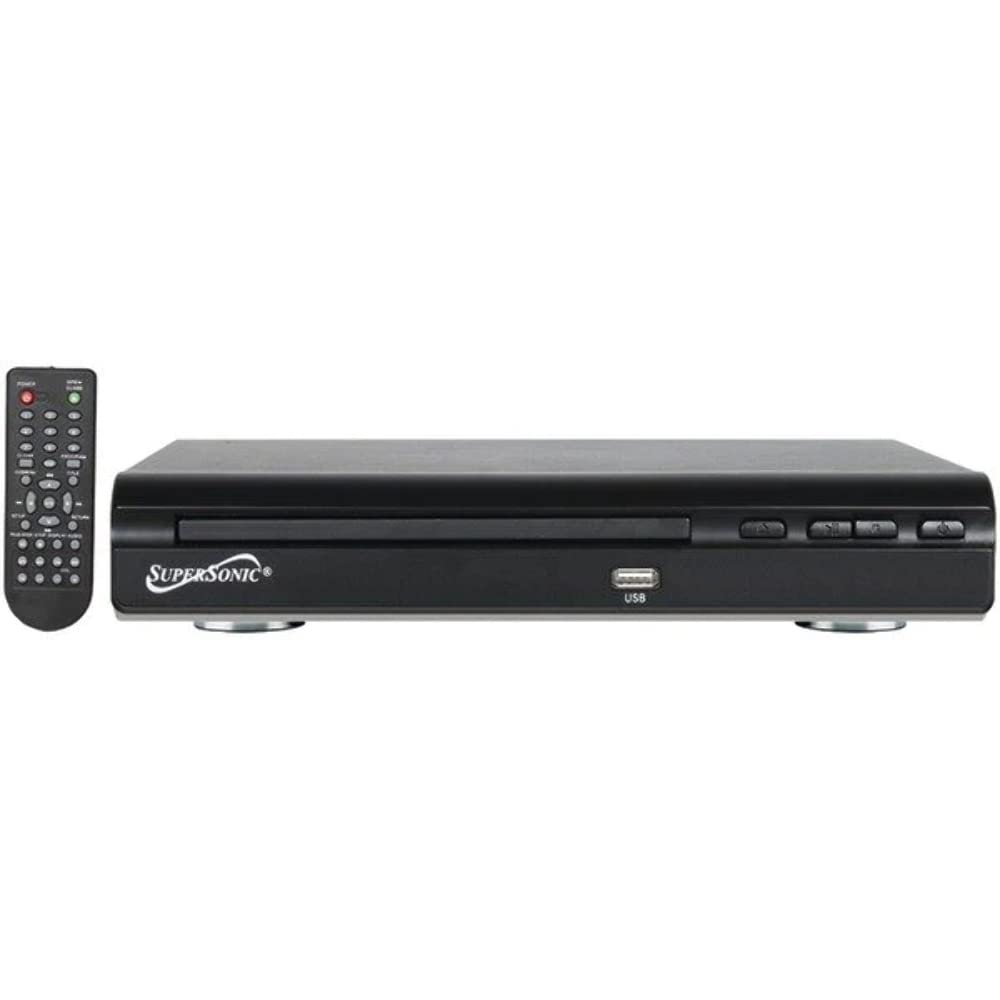
Фронт view of the SuperSonic SC-25 DVD player, showing the disc tray, USB port, and control buttons.
Ask a question about this manual
Ask about setup, troubleshooting, compatibility, parts, safety, or missing instructions. Manuals+ will review the question and use this page’s manual context to help answer it.