
1. Киришүү
This manual provides comprehensive instructions for the setup, operation, maintenance, and troubleshooting of your Gigaset DA610 Corded Phone. Please read this manual carefully to ensure proper use and to fully utilize all features of your device.
2. Продукт бүтүп калдыview жана өзгөчөлүктөрү
The Gigaset DA610 is a corded telephone designed for ease of use, offering essential communication features for home or office environments. Key features include hands-free operation, caller identification, and a clear display for call information.
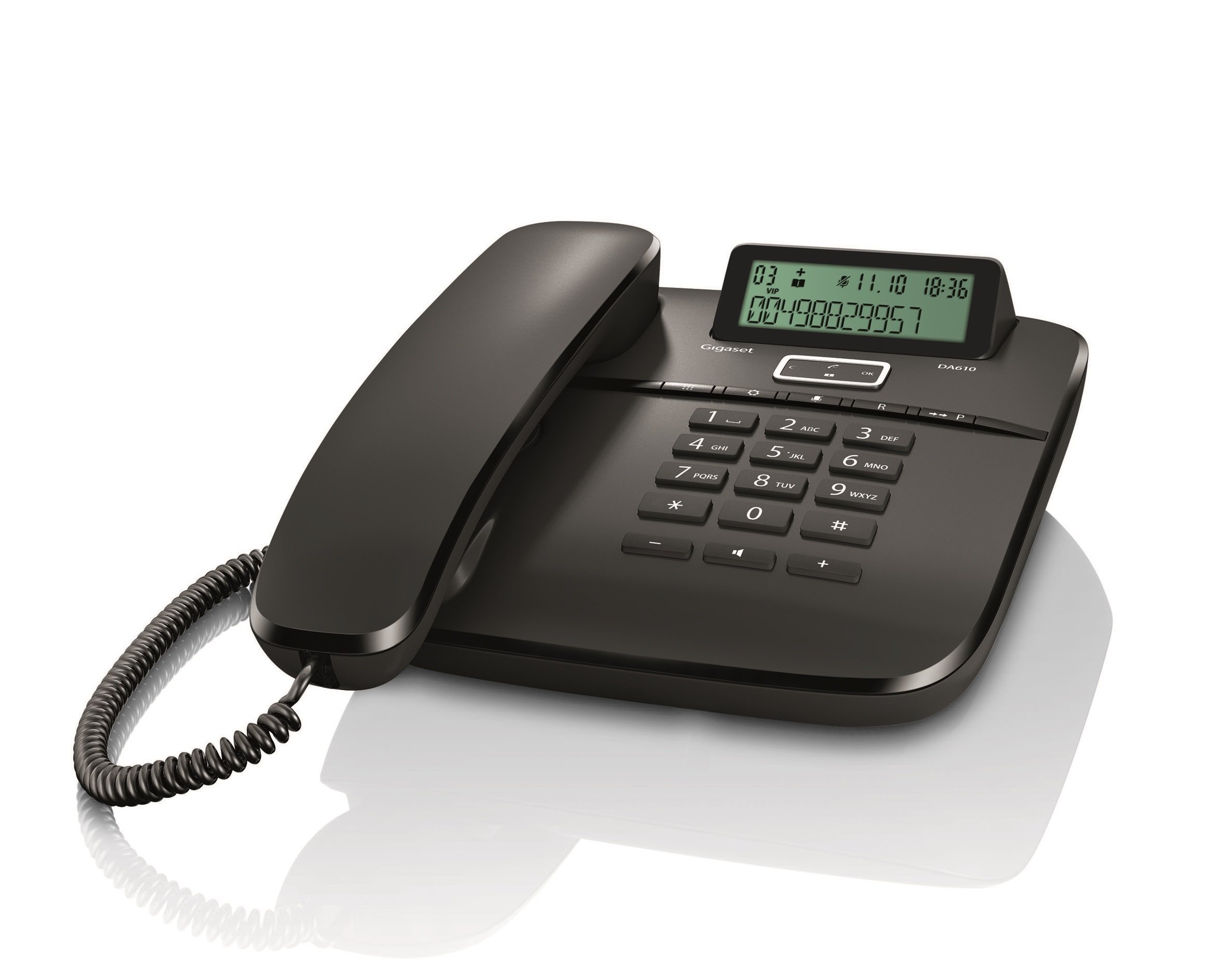
Сүрөт: алдыңкы view of the Gigaset DA610 Corded Phone, showing the handset, keypad, and display screen.
Дисплей өзгөчөлүктөрү:
- Two-line display for clear information viewing.
- Keypad lock functionality.
- Time, date, and call duration display.
- Visual signal for incoming calls.
Байланыш:
- Supports PSTN (Public Switched Telephone Network).
- Supports PABX (Private Automatic Branch Exchange) networks.
Кошумча өзгөчөлүктөр:
- Mute mode indicator.
- Hands-free function for convenient conversations.
- Caller identification feature to see who is calling.
Продукт видеосу бүттүview:
Видео: Кыскачаview of the Gigaset DA610 Corded Phone, highlighting its display, screen features, and connectivity options.
3. Кутуда эмне бар
Upon opening the product packaging, please ensure all items are present and undamaged.
- Gigaset DA610 Corded Phone unit (including handset and base).
- Coiled handset cord.
- Telephone line cord.
- Колдонуучунун колдонмосу (бул документ).
4. Орнотуу
Follow these steps to set up your Gigaset DA610 Corded Phone:
- Телефонду туташтыруу: Plug one end of the coiled handset cord into the handset and the other end into the designated port on the phone base unit.
- Телефон линиясына туташуу: Plug one end of the telephone line cord into the "LINE" port on the back of the phone base unit. Plug the other end into your telephone wall socket.
- Кубат туташуу (эгер бар болсо): The Gigaset DA610 is primarily line-powered for basic functions. However, for features like the display backlight and memory retention, batteries are required (not included). Insert the specified batteries into the battery compartment if you wish to use these features.
- Алгачкы текшерүү: Трубканы көтөрүп, чалуу сигналын угуңуз. Эгерде чалуу сигналы жок болсо, бардык туташууларды текшериңиз.
- Дата менен убакытты коюу: Refer to the display features section or the on-screen prompts to set the current date and time for accurate call logging and display.
5. Иштөө нускамалары
Чакыруу:
- Телефонду көтөрүңүз же басыңыз Hands-free баскычы.
- Клавиатураны колдонуп, каалаган телефон номерин териңиз.
- Чалуу туташуу үчүн күтө туруңуз.
- Чакырууну аяктоо үчүн телефонду алмаштырыңыз же басыңыз Hands-free кайра баскычын.
Чалууга жооп берүү:
- Телефон шыңгыраганда, телефонду көтөрүңүз же басыңыз Hands-free баскычы.
Using Hands-free:
- Чалуу учурунда, басыңыз Hands-free динамикти иштетүү үчүн баскыч.
- Трубкага кайра которулуу үчүн, трубканы көтөрүңүз.
- Колсуз чалууну аяктоо үчүн, баскычын басыңыз Hands-free кайра баскычын.
Caller Identification (CLIP):
- When an incoming call is received, the caller's number (and name, if stored in your phonebook or provided by your service provider) will be displayed on the screen.
- Ensure your telephone service provider supports Caller ID (CLIP) for this feature to function.
Үнсүз функция:
- Чалуу учурунда, басыңыз Үнсүз button to temporarily disable your microphone. The mute mode indicator will illuminate.
- басыңыз Үнсүз button again to reactivate your microphone.
6. Техникалык тейлөө
To ensure the longevity and optimal performance of your Gigaset DA610 Corded Phone, follow these maintenance guidelines:
- Тазалоо: жумшак колдонуу, damp cloth to clean the phone's surface. Avoid abrasive cleaners or solvents that may damage the finish.
- Жайгашкан жери: Телефонду туруктуу, тегиз жерге, күн нуру, жылуулук булактары жана нымдуулук тийбеген жерге коюңуз.
- Корддор: Periodically check the handset and line cords for any signs of wear or damage. Replace if necessary.
- Вентиляция: Ensure the phone's ventilation openings are not blocked to prevent overheating.
7. Кыйынчылыктарды
If you encounter issues with your Gigaset DA610, refer to the following common problems and solutions:
- Терүү үнү жок:
- Check that the telephone line cord is securely connected to both the phone and the wall socket.
- Ensure your telephone service is active.
- Caller ID Not Working:
- Verify that your telephone service provider offers Caller ID (CLIP) and that it is activated on your line.
- Some service providers may require specific settings or a brief power cycle of the phone to activate CLIP.
- Display Not Working / Blank:
- Check if batteries are installed and correctly inserted, as they power the display.
- Ensure the telephone line is connected, as the phone may draw power from the line for basic functions.
- Poor Sound Quality / Static:
- Check the handset cord and telephone line cord for damage.
- Ensure the phone is not placed too close to other electronic devices that might cause interference.
- Баскычтоп жооп бербейт:
- Check if the keypad lock feature is activated. Refer to the "Operating Instructions" section to unlock the keypad.
Бул чечимдерди колдонуп көргөндөн кийин көйгөй чечилбесе, кардарларды колдоо менен байланышыңыз.
8. Техникалык шарттар
| Өзгөчөлүк | Деталь |
|---|---|
| Бренд | Gigaset |
| Модел | DA610 |
| Өндүрүүчү | Siemens |
| Телефон түрү | жоон |
| Түс | Кара |
| Дисплей түрү | LED (2 display lines) |
| Power Source | Battery Powered (for display/memory) |
| Батареялар камтылган | Жок |
| Батареялар талап кылынат | Ооба |
| Монтаж түрү | Дубалга орнотуу |
| Терүүчү түрү | Жалгыз баскычтоп |
| Продукциянын өлчөмдөрү (LxWxH) | 22.4 x 18.2 x 8 см |
| Элемент Салмагы | 897 г |
9. Кепилдик жана колдоо
The Gigaset DA610 Corded Phone comes with a 1-year manufacturing warranty.
For any service issues or after-sales support, please contact Gigaset support via email:
You can expect a response within 48 hours.