
Miditech MIT-00151
Miditech MIDIFACE 4x4 USB MIDI Interface User Manual
Model: MIT-00151
Introduction
This manual provides comprehensive instructions for the setup, operation, and maintenance of your Miditech MIDIFACE 4x4 USB MIDI Interface. The MIDIFACE 4x4 is a versatile and compact device designed to connect your MIDI-compatible instruments and devices to your computer, offering 4 MIDI inputs and 4 MIDI outputs for extensive connectivity.
Продукт бүттүview
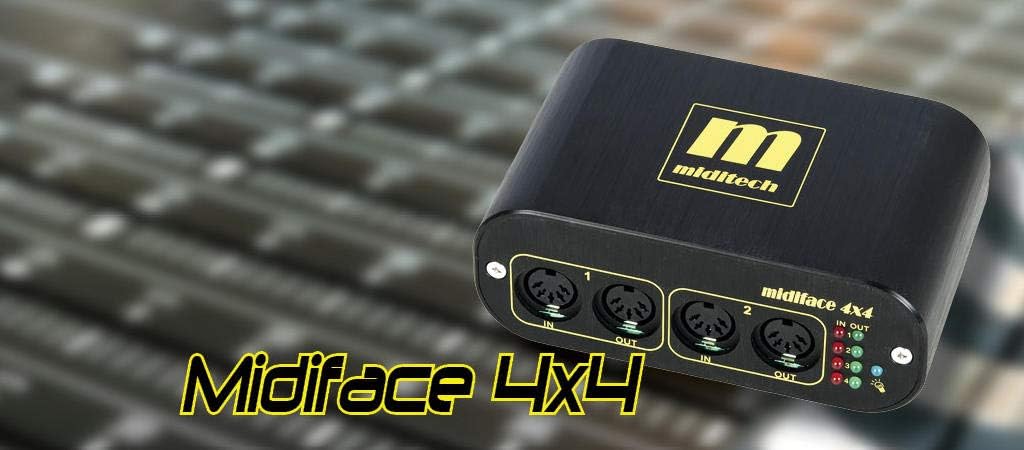
The Miditech MIDIFACE 4x4 USB MIDI Interface, a compact black unit with gold branding, designed for seamless MIDI connectivity.
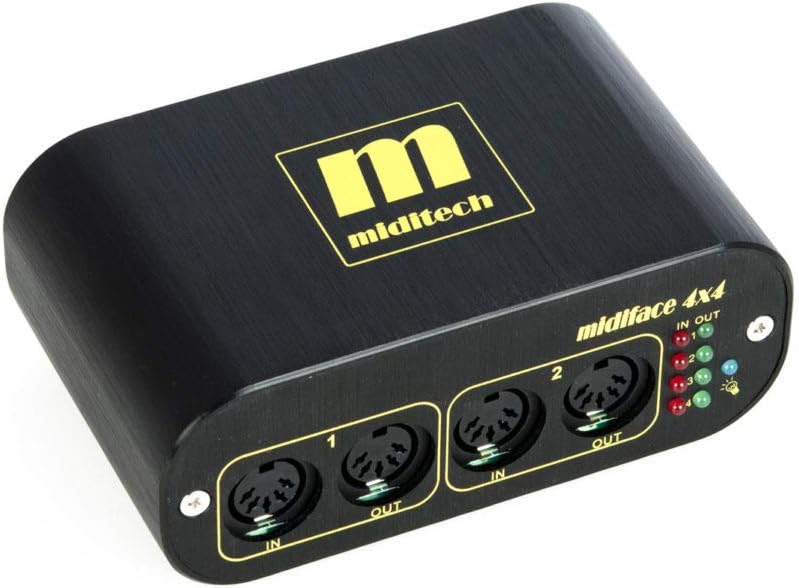
Фронт view of the Miditech MIDIFACE 4x4, showing MIDI IN/OUT ports 1 and 2, along with the status LEDs for activity indication.
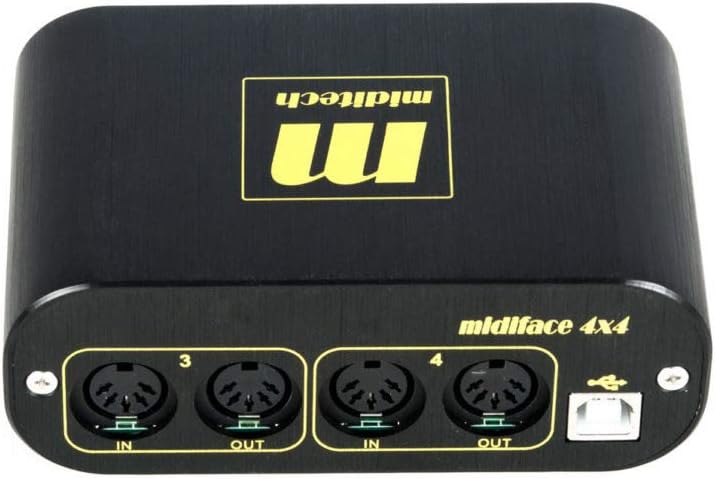
Арткы view of the Miditech MIDIFACE 4x4, displaying MIDI IN/OUT ports 3 and 4, and the USB connection port for computer interface.
Жайгашуу
Системалык талаптар
- Операция системасы: Class Compliant with MAC OSX, Windows XP SP2, Windows Vista, Windows 7, 8, and 10.
- USB порт: Available USB 2.0 or 3.0 port.
Connecting the MIDIFACE 4x4
- Connect the USB cable from the MIDIFACE 4x4 to an available USB port on your computer. The device is USB bus-powered and does not require an external power supply.
- The MIDIFACE 4x4 is "class compliant," meaning it does not require special driver installation on supported operating systems. Your computer should automatically recognize the device.
- Connect your MIDI instruments and devices to the MIDI IN and MIDI OUT ports on the MIDIFACE 4x4 using standard MIDI cables. Ensure MIDI OUT from your instrument connects to MIDI IN on the MIDIFACE, and MIDI IN on your instrument connects to MIDI OUT on the MIDIFACE.
Операция
MIDI туташуу
The MIDIFACE 4x4 provides four independent MIDI input and four independent MIDI output ports. Each pair of IN/OUT ports functions as a separate MIDI interface, allowing for flexible routing and control of multiple MIDI devices.
Статус светодиоддору
The device features status LEDs for each MIDI IN and MIDI OUT port. These LEDs illuminate to indicate MIDI activity, helping you confirm data transmission and reception.
Программалык камсыздоо интеграциясы
Once connected, the MIDIFACE 4x4 will appear as multiple MIDI input and output devices within your Digital Audio Workstation (DAW) software or other MIDI applications. Select the appropriate MIDI ports within your software for sending and receiving MIDI data.
Техникалык тейлөө
The Miditech MIDIFACE 4x4 is designed for durability and requires minimal maintenance.
- Аппаратты таза, жумшак, кургак чүпүрөк менен сүртүңүз. Суюк тазалагычтарды же эриткичтерди колдонуудан алыс болуңуз.
- Ensure the device is stored in a dry environment, away from extreme temperatures and direct sunlight.
- Protect the MIDI and USB ports from dust and debris when not in use.
Проблемаларды чечүү
Түзмөк таанылган жок
- USB туташуусун текшерүү: Ensure the USB cable is securely connected to both the MIDIFACE 4x4 and your computer. Try a different USB port or cable.
- Операциялык системанын шайкештиги: Verify your operating system is listed as "class compliant" (MAC OSX, Windows XP SP2, Windows Vista, Windows 7, 8, and 10). For Windows 10, some users have reported issues with USB 3.0 ports; if possible, try connecting to a USB 2.0 port.
- Компьютерди кайра иштетүү: Жөнөкөй өчүрүп-күйгүзүү көп учурда таануу көйгөйлөрүн чече алат.
No MIDI Signal
- Кабелдик байланыштар: Double-check that MIDI IN on your instrument is connected to MIDI OUT on the MIDIFACE, and MIDI OUT on your instrument is connected to MIDI IN on the MIDIFACE.
- Статус диоддору: Observe the status LEDs on the MIDIFACE 4x4. If they are not flashing during MIDI activity, there might be an issue with the MIDI cable or the connected instrument.
- Программалык камсыздоонун жөндөөлөрү: Ensure the correct MIDI input/output ports are selected and enabled within your DAW or MIDI application.
- Older Synthesizers: Some older synthesizers may have specific MIDI implementation requirements. Consult your synthesizer's manual for details.
Intermittent Connection/Performance Issues
- USB Power: While bus-powered, ensure your computer's USB port is providing sufficient power. Avoid connecting through unpowered USB hubs if issues persist.
- Кабелдин сапаты: Use high-quality USB and MIDI cables.
Техникалык шарттар
| Өзгөчөлүк | Деталь |
|---|---|
| Бренд | Miditech |
| Модель номери | MIT-00151 |
| MIDI порттору | 4 MIDI Inputs, 4 MIDI Outputs |
| Байланыш технологиясы | USB |
| Күч | USB шинасы менен иштейт |
| Операциялык системанын шайкештиги | MAC OSX, Windows XP SP2, Windows Vista, Windows 7, 8, 10 (Class Compliant) |
| Өлчөмдөрү (W x D x H) | 114 x 68.5 x 42.5 мм (4.49 x 2.7 x 1.67 дюйм) |
| Салмагы | 287 г (12.6 унция) |
| Статус көрсөткүчтөрү | LEDs for MIDI IN/OUT activity |
Кепилдик жана колдоо
For warranty information and technical support, please refer to the Miditech official webсайтка же түздөн-түз кардарларды тейлөөгө кайрылыңыз. Кепилдик дооматтар үчүн сатып алуу дүмүрчөгүңүздү сактаңыз.
Ask a question about this manual
Ask about setup, troubleshooting, compatibility, parts, safety, or missing instructions. Manuals+ will review the question and use this page’s manual context to help answer it.