
1. Киришүү
This manual provides comprehensive instructions for the safe and efficient operation, installation, and maintenance of the Mean Well RSP-2400-24 AC to DC Power Supply. This high-performance power supply delivers a single 24 Volt output at 100 Amps, providing 2.4 Kilowatts of power. Please read this manual thoroughly before using the product.

1.1-сүрөт: Mean Well RSP-2400-24 AC to DC Power Supply. This image shows the overall physical appearance of the power supply unit, highlighting its robust metal casing and terminal connections.
2. Коопсуздук нускамалары
Always observe the following safety precautions to prevent injury or damage to the power supply:
- Кубат менен камсыздоону туташтыруудан мурун туура жерге туташтырууну камсыз кылыңыз.
- Агрегатты нымдуу жерде иштетпеңиз же damp шарттар.
- Киргизилген томду ырастооtage and current ratings match your power source.
- Ашыкча ысып кетүүнүн алдын алуу үчүн вентиляция тешиктерин жабуудан качыңыз.
- Монтаждоо жана тейлөөнү квалификациялуу кызматкерлер гана аткарышы керек.
- Кандайдыр бир туташтырууларды же жөндөөлөрдү жасоодон мурун электр кубатынан ажыратыңыз.
3. Продукциянын өзгөчөлүктөрү
The Mean Well RSP-2400-24 power supply incorporates several advanced features:
- AC input active surge current limiting.
- 90% га чейин жогорку натыйжалуулук.
- Built-in active Power Factor Correction (PFC) function (PF>0.95).
- Comprehensive protections: short circuit, overload, over voltagд, ашыкча температура.
- Fan alarm and forced air cooling by built-in DC fan with speed control.
- Чыгуу томtage trim function (20% to 110% of rated output voltagжана).
- High power density: 12.5W/inch³.
- Current sharing capability for up to 2 units.
- Alarm signal output via relay contact and TTL signal.
- Output connector type: Lug terminal female.
4. Механикалык спецификация
Detailed mechanical dimensions and component layout are provided below for installation planning.
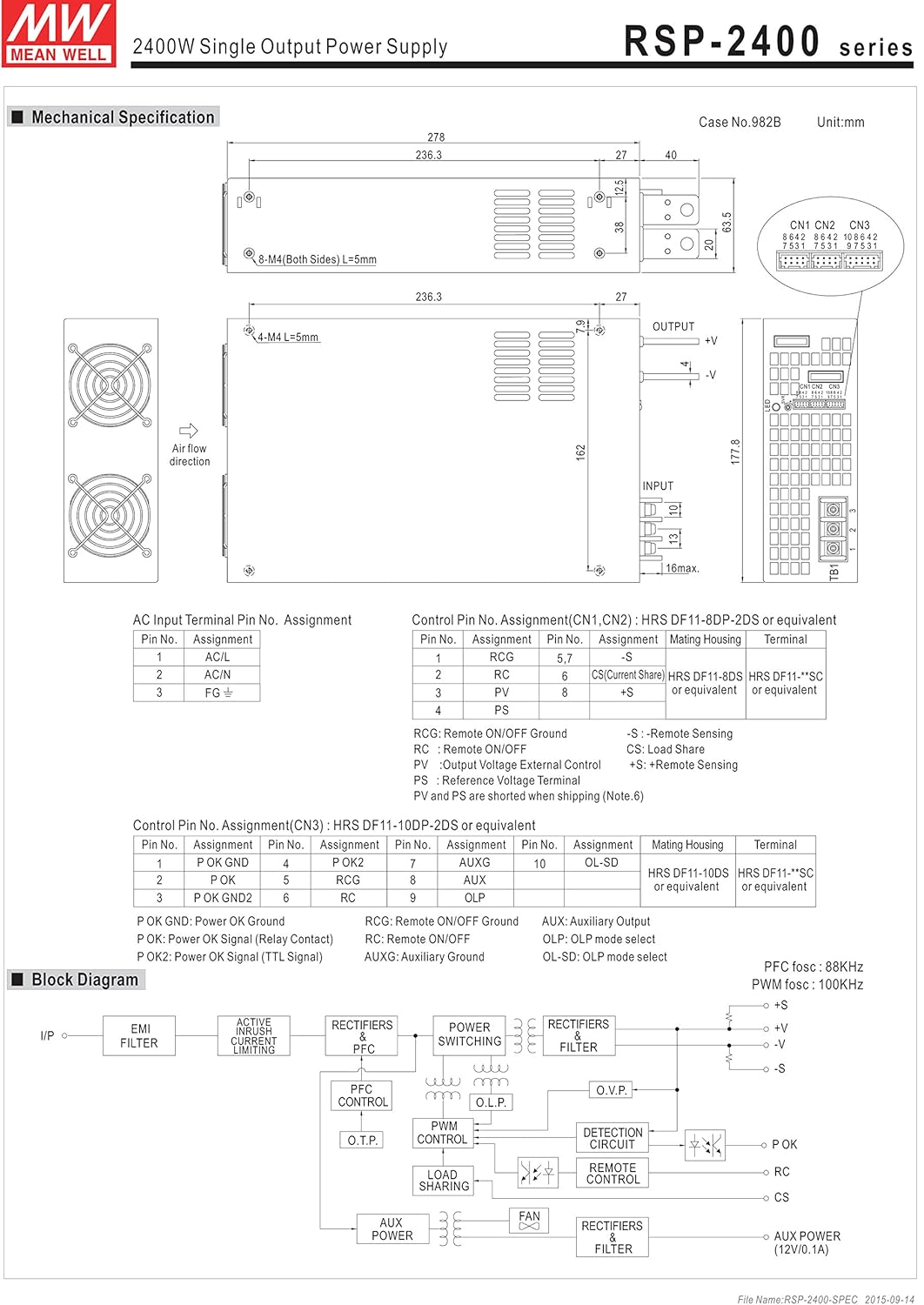
4.1-сүрөт: Mechanical drawing of the RSP-2400 series power supply. This diagram illustrates the physical dimensions, mounting hole locations, and general layout of the input/output terminals and cooling fans. Key dimensions are provided in millimeters.
The diagram shows the overall dimensions of 278mm (L) x 177.8mm (W) x 63.5mm (H), along with details for mounting holes (M4, L=5mm) and air flow direction for the cooling fans.
5. Орнотуу жана орнотуу
5.1. AC Input Terminal Pin Assignment
Connect the AC input according to the following pin assignments:
5.1-сүрөт: AC Input Terminal Pin Assignment. This section of the mechanical drawing details the connections for the AC input, including AC/L, AC/N, and FG (Frame Ground) terminals.
| PIN No. | Дайындоо |
|---|---|
| 1 | AC / L |
| 2 | AC / N |
| 3 | FG |
5.2. Control Pin No. Assignment
The control pins (CN1, CN2, CN3) allow for remote control and monitoring functions. Refer to the diagram for detailed assignments.
5.2-сүрөт: Control Pin No. Assignment for CN1, CN2, and CN3. This part of the mechanical drawing provides a detailed pinout for the control connectors, including functions like Remote ON/OFF, Current Share, and Auxiliary output.
| PIN No. | Дайындоо | Жупташуу турак жайы | Терминал |
|---|---|---|---|
| 1 | RCG | HRS DF11-8DP-2DS же ага барабар | HRS DF11-**SC же эквиваленти |
| 2 | RC | ||
| 3 | PV | ||
| 4 | PS | HRS DF11-8DS же эквиваленти | HRS DF11-**SC же эквиваленти |
| 5 | CS (Current Share) | ||
| 6 | +S | ||
| 7 | -S |
RCG: Remote ON/OFF Ground
RC: Remote ON / OFF
Кабарчы: Output Voltage Тышкы көзөмөл
PS: Power Supply Status Signal
CS: Жүк бөлүшүү
+S, -S: Remote Sensing (Note 6)
| PIN No. | Дайындоо | PIN No. | Дайындоо | PIN No. | Дайындоо | Жупташуу турак жайы | Терминал |
|---|---|---|---|---|---|---|---|
| 1 | P OK GND | 6 | RCG | 10 | OL-SD | HRS DF11-10DP-2DS же ага барабар | HRS DF11-**SC же эквиваленти |
| 2 | P OK | 7 | RC | ||||
| 3 | P OK GND2 | 8 | AUX | ||||
| 4 | P OK2 | 9 | AUXG | ||||
| 5 | P OK GND |
P OK: Power OK сигналы (Релелик байланыш)
P OK2: Power OK сигналы (TTL сигналы)
AUX: Көмөкчү чыгаруу
AUXG: Көмөкчү жер
OL-SD: OLP mode select
OLP: OLP mode select
5.3. Three Phase Connection
The RSP-2400 series can be configured for 3-phase power systems. Refer to the diagrams for standard configurations.

5.3-сүрөт: Three Phase Connection Diagrams. This image displays three different configurations for connecting the RSP-2400 units to a 3-phase power system: 3-wire 220VAC, 3-wire 220/380VAC, and 3-wire 190/110VAC systems. Each diagram shows the wiring for multiple units (Unit 1, Unit 2, Unit 3) and their connection to the R, N, T, and FG lines.
- FIG. A: 3∅ 3W 220VAC SYSTEM (STANDARD MODEL FOR STOCK): Illustrates connection for a 3-wire, 220VAC three-phase system.
- FIG. B: 3∅ 4W 220/380VAC SYSTEM: Illustrates connection for a 4-wire, 220/380VAC three-phase system.
- FIG. C: 3∅ 4W 190/110VAC SYSTEM: Illustrates connection for a 4-wire, 190/110VAC three-phase system.
6. Операция
6.1. Remote ON/OFF Function
The power supply can be remotely turned ON or OFF by applying voltage to the control pins (CN1 & CN2 & CN3). Refer to the following table and diagrams for connection examples.
| Туташуу ыкмасы | Сүрөт 1.2(A) | 1.2(B) сүрөт | Сүрөт 1.2(C) |
|---|---|---|---|
| SW Logic | Чыгуу күйүк | SW Open | SW Open |
| Чыгуу өчүрүлгөн | SW Close | SW Close |

6.1-сүрөт: Examples of connecting remote ON/OFF. This image provides three circuit diagrams (A, B, C) illustrating different methods for implementing the remote ON/OFF function using external voltage sources or the internal 12V auxiliary output, showing connections to AUX, RCG, RC, SW, and AUXG pins.
- (A) Using external voltage булагы: Connect an external 12V source to control the SW pin.
- (B) Using internal 12V auxiliary output: Utilize the power supply's internal 12V AUX output for control.
- (C) Using internal 12V auxiliary output: Another configuration using the internal 12V AUX output for control.
6.2. Сигналдын чыгышы
The power supply provides alarm signals via P OK and P OK2 GND pins. An external voltage булагы бул функция үчүн талап кылынат.
| Функция | Description | Output of alarm (P OK, Relay Contact) | Output of alarm (P OK2, TTL Signal) |
|---|---|---|---|
| P OK | The signal is "Low" when the power supply is above 80% of the rated output voltage. | Төмөн (0.5мАда 500V максимум) | Төмөн (0.5мАда 10V максимум) |
| The signal turns to be "High" when the power supply is under 80% of the rated output voltage or Power Fail. | Жогорку же ачык (Тышкы колдонулуучу томtage, 500mA макс.) | Жогорку же ачык (Тышкы колдонулуучу томtage, 10mA макс.) |

6.2-сүрөт: Internal circuit of P OK (Relay, total is 10W) and P OK2 (Open collector method). These diagrams show the internal circuitry for the alarm signal outputs, including connections for external voltage and resistance for both P OK and P OK2.
6.3. Output Voltage Trim
Output voltage can be trimmed between 20% and 110% of the rated output voltage. The PV (PIN3) and PS (PIN4) of CN1 or CN2 must be disconnected if "Output Voltage TRIM" function is used. Otherwise, the internal electrical components may be damaged, and the power supply unit may thus be out of order.
6.3-сүрөт: Output Voltage Trimming. This section of the image includes a diagram showing how to add an external 1-6V external voltage for trimming, and two graphs: one illustrating output voltage vs. external voltage, and another showing output current vs. output voltagэ пайызtage.
- Connect +S and -S to the load.
- Connect +V and -V to the load.
- Чыгуу көлөмүн тууралооtage is possible between 20-110% (Typ.) of the rated output which is shown in Fig. 3.2. Reducing output current is required when the output voltage is trimmed up.
6.4. Учурдагы бөлүшүү
Up to 2 units can share current in parallel. For optimal performance, ensure the voltage difference among each output should be minimized (less than 0.2V).

6.4-сүрөт: Current Sharing Connection. This diagram illustrates how to connect multiple RSP-2400 units (Master, Slave 2, Slave 3) in parallel for current sharing, showing the connections for AC/L, AC/N, FG, +V, -V, +S, and -S terminals.
- Connect +S, -S, and CS (Current Share) pins in parallel.
- The total output current must not exceed the value determined by the following equation: (Output current at parallel operation) = (Rated output per unit) × (Number of unit) × 0.9.
- For parallel operation with 3 units or more, consult the manufacturer for specific applications.
- Ensure remote sensing wires are kept at least 10 cm from input wires.
- Under parallel operation, the "output voltage trim" function is not available.
- When in parallel operation, the minimum output load should be greater than 3% of total output load (Min. Load >3% rated current per unit × number of unit).
6.5. OLP Select (Overload Protection)
The OLP (Overload Protection) mode can be selected by modifying the connector on CN3.
6.5-сүрөт: OLP Mode Selection. This section of the image shows two diagrams: one for removing the shorting connector on CN3 for "constant current limiting" OLP mode, and another for inserting the shorting connector on CN3 for "constant current limiting with delay shutdown after 5 seconds" OLP mode.
- Removing the shorting connector on CN3: The O.L.P. mode will be "continuous constant current limiting".
- Inserting the shorting connector on CN3: The O.L.P. mode will be "constant current limiting with delay shutdown after 5 seconds, re-power on to recover".
7. Техникалык тейлөө
Regular maintenance ensures the longevity and reliable operation of your power supply.
- Тазалоо: Periodically clean the exterior of the unit and ventilation openings with a soft, dry cloth. Ensure the power supply is disconnected from all power sources before cleaning. Do not use liquid cleaners.
- Текшерүү: Кабелдерди жана туташууларды эскирүүнүн, бузулуунун же бош туташуулардын белгилерин үзгүлтүксүз текшерип туруңуз.
- Вентиляция: Ensure that the area around the power supply is clear and that airflow to the cooling fans is not obstructed.
- Экологиялык шарттар: Электр менен камсыздоону көрсөтүлгөн температура жана нымдуулук диапазондорунда иштетиңиз.
8. Кыйынчылыктарды
Бул бөлүмдө сиз кабылышы мүмкүн болгон жалпы маселелерди чечүү жолдору каралган.
| Көйгөй | Мүмкүн себеп | Чечим |
|---|---|---|
| Чыгаруунун көлөмү жокtage | No AC input power; Remote ON/OFF is OFF; Internal fuse blown; Overload protection activated. | Check AC input connection and power source; Verify Remote ON/OFF settings; Contact service if fuse is suspected; Reduce load and cycle power. |
| Чыгуу томtage туруксуз | Loose connections; Overload; Faulty load. | Check all connections; Ensure load is within specifications; Test with a different load. |
| Ашыкча ысып кетүү | Blocked ventilation; Excessive ambient temperature; Overload. | Clear obstructions from vents; Ensure adequate airflow; Reduce ambient temperature; Reduce load. |
| Желдеткич иштебейт | Fan failure; Unit not under sufficient load/temperature to activate fan. | Check if the unit is hot enough to require fan operation; If fan still doesn't work when hot, contact service. |
Бул чечимдерди колдонуу аракетинен кийин көйгөй чечилбесе, кардарларды колдоо кызматына кайрылыңыз.
9. Техникалык шарттар
Key technical specifications for the Mean Well RSP-2400-24 AC to DC Power Supply:
| Параметр | Нарк |
|---|---|
| Модель номери | RSP-2400-24 |
| Бренд | ЖАКШЫ МЕНЕН |
| Output Voltage | 24 вольт |
| Output Current | 100 Amps |
| Чыгуу Wattage | 2400 Ватт |
| Натыйжалуулук | 90% чейин |
| Power Factor Correction (PFC) | Active PFC, PF>0.95 |
| Өлчөмдөрү (L x W x Y) | 11.02 x 7.09 x 2.56 дюйм (278 x 177.8 x 63.5 мм) |
| Салмагы | 7.28 фунт (3.3 килограмм) |
| Муздатуу ыкмасы | Орнотулган DC желдеткич менен мажбурланган аба муздатуу |
| Коргоо | Кыска туташуу, Ашыкча жүктөө, Ашыкча томtage, Ашыкча температура |
| Туташтыргыч түрү | Lug terminal female |
| Шайкеш түзмөктөр | Персоналдык компьютер (Note: This is a general classification, actual compatibility depends on power requirements.) |
10. Кепилдик жана колдоо
Кепилдик маалыматы жана техникалык колдоо үчүн расмий MEAN WELLди караңыз webсайтына кириңиз же ыйгарым укуктуу дистрибьюторуңузга кайрылыңыз. Кепилдик талаптары үчүн сатып алуунун далили катары сатып алуу квитанцияңызды сактап коюңуз.
Кошумча жардам алуу үчүн төмөнкү дарекке кайрылыңыз: www.meanwell.com