
1. Киришүү
This manual provides detailed instructions for the safe and efficient operation of your VOLTCRAFT 8210 Function Generator. The 8210 is a versatile instrument combining a sweep function, function generator, pulse generator, and frequency counter into a single unit. It is designed for professional use, generating various waveforms with precision.
2. Коопсуздук нускамалары
Please read these safety instructions carefully before operating the device to prevent injury and damage. Keep this manual for future reference.
- Аппаратты ар дайым жерге туташтырылган розеткага туташтырыңыз.
- Аппаратты нымдуу жерде иштетпеңиз же damp шарттар.
- Ашыкча ысып кетүүнүн алдын алуу үчүн туура желдетүүнү камсыз кылыңыз.
- Аппаратты ачпаңыз casing; ичинде колдонуучу тейлей турган тетиктер жок. Тейлөөнү квалификациялуу адистерге тапшырыңыз.
- Түзмөктү тазалоодон же жылдыруудан мурун электр кубатынан ажыратыңыз.
- Томду колдонуудан качыңызtages exceeding the specified maximum input ratings.
3. Продукт бүтүп калдыview
The VOLTCRAFT 8210 is a versatile 4-in-1 instrument designed for various electronic testing and development applications. It integrates the functionalities of a sweep function generator, a standard function generator, a pulse generator, and a frequency counter.
Негизги өзгөчөлүктөрү:
- Four-in-one functionality: Sweep function, function generator, pulse generator, and frequency counter.
- Жыштык диапазону: Generates signals from 0.1 Hz to 10 MHz.
- Жыштык эсептегичи: Measures frequencies from 2 Hz to 100 MHz.
- Толкун формасын түзүү: Produces professional-grade rectangular, triangular, and sawtooth signals.
- Чыгуу Ampжарыктык: Максималдуу amplitude of 20 Vpp (10 Vpp into 50 ohms).
Продукт сүрөттөрү:
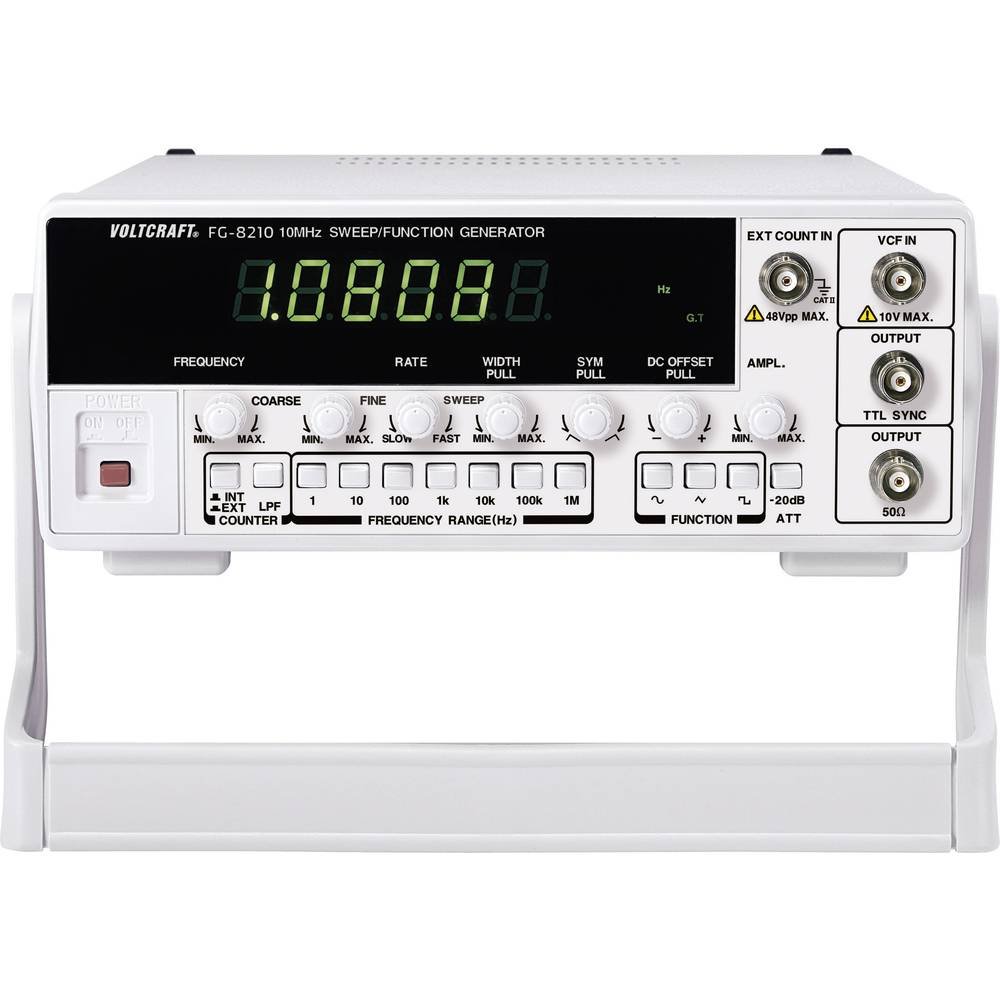


Расмий продукт видеолору:
Учурда сатуучунун расмий продукт видеолору кыстаруу үчүн жеткиликтүү эмес.
4. Орнотуу
- Пакеттен чыгаруу: Carefully remove the function generator from its packaging. Inspect the unit for any signs of damage during transit. Retain the packaging for future storage or transport.
- Жайгашкан жери: Place the unit on a stable, flat surface with adequate ventilation around it. Avoid placing it near heat sources or in direct sunlight.
- Кубат туташуу: Connect the provided power cord to the power input on the rear panel of the 8210 and then to a suitable grounded AC power outlet. Ensure the power switch is in the OFF position before connecting.
- Баштапкы күйгүзүү: Flip the power switch to the ON position. The display should illuminate, indicating the unit is receiving power.
- Чыгуу туташуулары: Connect your test leads or cables to the appropriate output terminals (e.g., BNC connectors for main output, TTL output) on the front panel, depending on your application.
5. Иштөө нускамалары
This section details the basic operation of the VOLTCRAFT 8210 for its primary functions.
5.1. Function Generator Mode
- Select Waveform: Use the dedicated buttons (e.g., Sine, Square, Triangle) on the front panel to select the desired output waveform.
- Жыштык коюу: Adjust the frequency using the frequency control knob and range buttons. The display will show the current frequency.
- Тууралоо Ampжарыктык: колдонуу amplitude knob to set the desired output voltage peak-to-peak (Vpp). Monitor the output with an oscilloscope for precise adjustment.
- DC Offset: If available, use the DC offset control to add a DC bias to the output signal.
- Туташуу чыгаруу: Connect the main output (e.g., BNC) to your circuit or device under test.
5.2. Sweep Function Mode
The sweep function allows the output frequency to vary automatically over a specified range.
- Activate Sweep: Press the "Sweep" button to enable this mode.
- Set Start/Stop Frequencies: Use the frequency controls to define the lower and upper limits of the sweep range.
- Adjust Sweep Rate: Set the sweep duration or rate using the dedicated control.
- Монитордун чыгышы: Observe the sweeping signal on an oscilloscope to verify the settings.
5.3. Frequency Counter Mode
The built-in frequency counter measures external signals.
- Select Counter Input: Connect the external signal to the designated frequency counter input terminal.
- Activate Counter: Press the "Counter" or "Freq. Meas." button to switch to frequency measurement mode.
- Read Frequency: The display will show the frequency of the input signal.
6. Техникалык тейлөө
Proper maintenance ensures the longevity and accuracy of your VOLTCRAFT 8210.
- Тазалоо: Агрегаттын сыртын тазалоо үчүн жумшак, кургак чүпүрөктү колдонуңуз. өжөр кир үчүн, бир аз гamp Аппараттын ичине суюктуктун кирбешин камсыз кылуу үчүн жумшак жуугуч каражаты бар чүпүрөктү колдонсо болот. Абразивдүү тазалоочу каражаттарды же эриткичтерди колдонбоңуз.
- Сактагыч: When not in use for extended periods, store the unit in a dry, dust-free environment, preferably in its original packaging.
- Калибрлөө: Periodic calibration by qualified service personnel is recommended to maintain measurement accuracy, especially for critical applications.
7. Кыйынчылыктарды
If you encounter issues with your VOLTCRAFT 8210, refer to the following common problems and solutions:
| Көйгөй | Мүмкүн себеп | Чечим |
|---|---|---|
| Кубат жок/Дисплей өчүк | Power cord disconnected, power switch off, faulty outlet. | Check power cord connection, ensure power switch is ON, test outlet with another device. |
| Чыгуу сигналы жок | Output cable disconnected, amplitude set to zero, incorrect function selected. | Verify output cable connection, increase amplitude, ensure correct waveform/function is selected. |
| Incorrect frequency reading (counter) | Signal too weak, incorrect input range, noisy signal. | Ensure signal amplitude is sufficient, check input range settings, use shielded cables. |
Эгерде бул чечимдерди колдонуп көргөндөн кийин көйгөй чечилбесе, кардарларды колдоо кызматына кайрылыңыз.
8. Техникалык шарттар
The following are the technical specifications for the VOLTCRAFT 8210 Function Generator:
- Өндүрүүчү: VOLTCRAFT
- Модель номери: 8210
- Элемент Салмагы: 3 килограмм
- Number of items in package: 1
- Батареялар камтылган: Жок
- Батареялар талап кылынат: Жок
- ASIN: B00EPLFP46
- Amazon.fr сайтында биринчи жеткиликтүү датасы: 15 февраль 2014
- Запастык бөлүктөрдүн болушу: Запастык бөлүктөр боюнча маалымат жок
9. Кепилдик жана колдоо
Information regarding specific warranty terms and conditions for the VOLTCRAFT 8210 Function Generator is not available in the provided product data. Please refer to the documentation included with your purchase or contact VOLTCRAFT customer support directly for warranty details and technical assistance.
For further support, visit the official VOLTCRAFT webсайтына же алардын ыйгарым укуктуу тейлөө борборлоруна кайрылыңыз.