
1. Киришүү
The NOYAFA NF-806R is a versatile cable testing device designed for professionals and enthusiasts to efficiently manage and troubleshoot network and telephone cables. This device allows for quick identification, tracing, and verification of cable integrity, ensuring reliable network and communication setups.
Негизги функцияларга төмөнкүлөр кирет:
- Examine and locate specific cables among multiple cables.
- Test continuity for LAN network cables, identifying breaks, opens, shorts, and cross-connections.
- Provide a visual end-to-end cable map for individual wires.
- Equipped with an RJ11 connector and alligator clips for diverse applications.
- Suitable for testing individual connectors, twisted pairs, phone cables, and powered electrical wires.
2. Коопсуздук маалыматы
Түзмөктү иштетүүдөн мурун бардык коопсуздук көрсөтмөлөрүн окуп чыгып, түшүнүп алыңыз. Бул көрсөтмөлөрдү аткарбоо электр тогуна урунууга, өрткө же түзмөктүн бузулушуна алып келиши мүмкүн.
- Аппаратты суунун жанында же дamp чөйрөлөр.
- Батареялар полярдуулук белгилерине ылайык туура салынганын текшериңиз.
- Do not attempt to test live circuits with voltages exceeding the device's specified limits.
- Аппаратты балдардан алыс кармаңыз.
- If the device is damaged, do not use it. Contact support for assistance.
3. Пакеттин мазмуну
Пакетиңизде бардык буюмдар бар экенин текшериңиз:
- NOYAFA NF-806R Transmitter Unit
- NOYAFA NF-806R Receiver Unit (Probe)
- RJ11 кабели
- Alligator Clip Cable Pair
- Headset (for noisy environments)
- Ташуу баштыгы
- User Manual
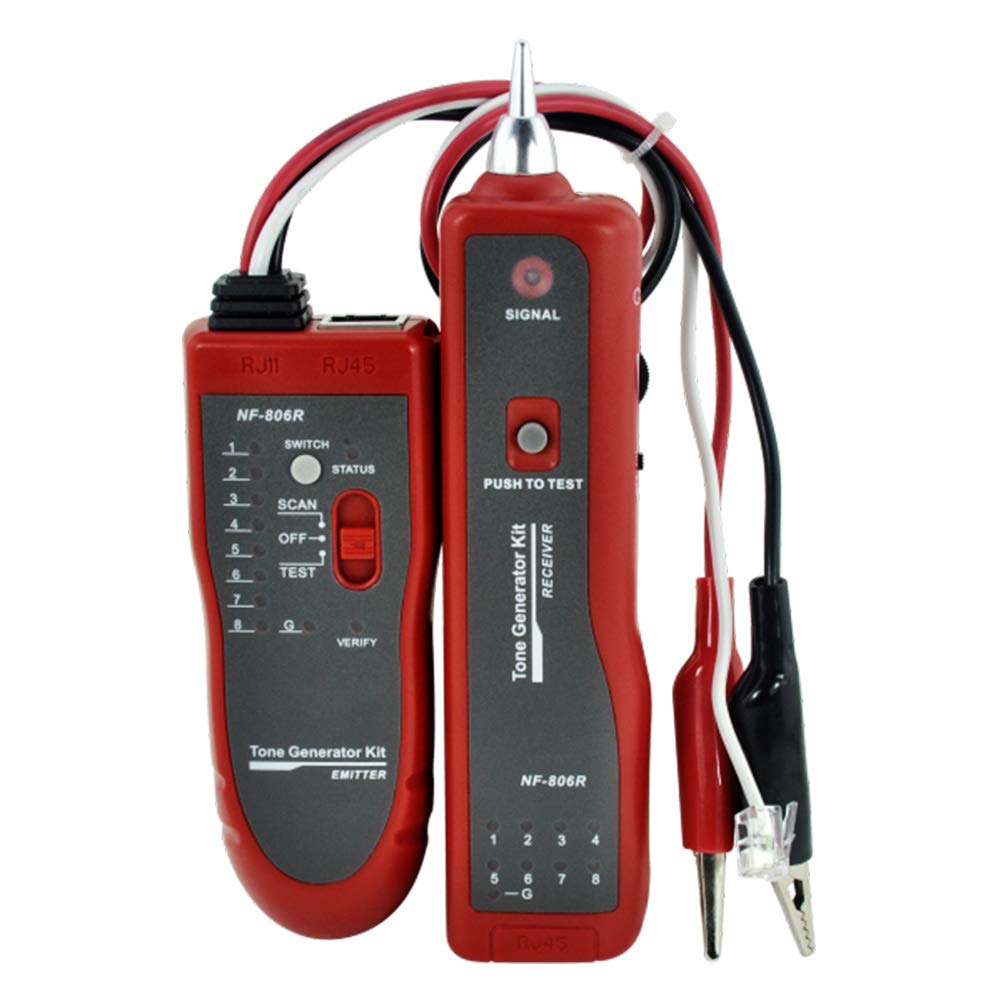
Image: Main components of the NOYAFA NF-806R cable tester, showing the red transmitter and receiver units along with the included RJ11 and alligator clip cables.
4. Продукт бүтүп калдыview
The NF-806R consists of two main parts: the Transmitter and the Receiver.
Бергич бирдиги
- RJ45 Порт: For connecting LAN network cables for continuity testing.
- RJ11 Порт: For connecting phone cables or using the RJ11 cable with alligator clips.
- LED көрсөткүчтөрү: Display cable status (open, short, cross, normal).
- Функция которуу: To select between SCAN (tracing) and TEST (continuity).
- Кубат которгучу: On/Off.
Receiver Unit (Probe)
- Текшерүү кеңеши: Used to detect the signal from the transmitter.
- Үндү көзөмөлдөө: Adjusts the sound level of the detected signal.
- Гарнитура уясы: For connecting the included headset.
- LED көрсөткүчү: Visual confirmation of signal detection.
- Кубат которгучу: On/Off.
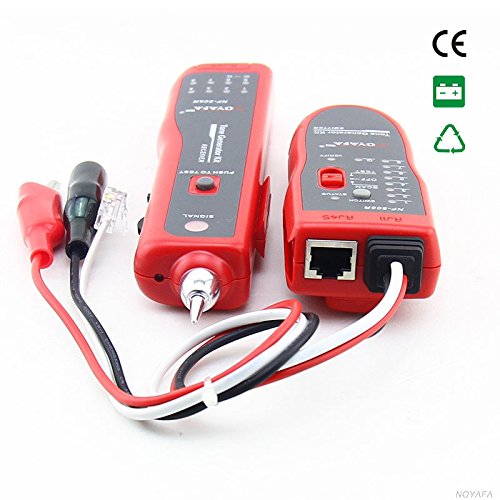
Сүрөт: бир тарап view of the NOYAFA NF-806R receiver unit, highlighting the probe tip and various ports for connectivity.
5. Орнотуу
5.1 Батареяны орнотуу
Both the transmitter and receiver units require batteries (not included). Locate the battery compartments on the back of each unit. Open the cover, insert the required batteries (typically 9V batteries for each unit) observing the correct polarity, and close the cover securely.
5.2 Туташтыруучу кабельдер
Depending on the test, connect the cable to be tested to the appropriate port on the transmitter unit (RJ45 for network cables, RJ11 for phone cables or alligator clips). For cable tracing, only the transmitter needs to be connected to one end of the cable.
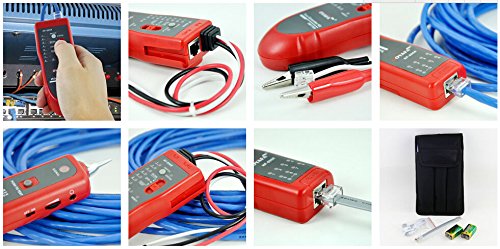
Image: A collage showing the NOYAFA NF-806R in various operational scenarios, including connecting an RJ45 cable, using the alligator clips, and the device being held for tracing.
6. Иштөө нускамалары
6.1 Cable Tracing/Locating
- Connect one end of the target cable to the RJ45 or RJ11 port on the transmitter unit.
- Turn on the transmitter unit and set the function switch to SCAN режими.
- Кабыл алгычты күйгүзүңүз.
- Use the receiver's probe to scan along the cable path. The receiver will emit an audible tone when it detects the signal from the transmitter. The tone will be loudest when the probe is directly over the correct cable.
- Adjust the volume control on the receiver for optimal listening. For noisy environments, connect the headset.
6.2 LAN Cable Continuity Testing (RJ45)
- Connect one end of the RJ45 network cable to the RJ45 port on the transmitter unit.
- Connect the other end of the RJ45 network cable to the RJ45 port on the receiver unit.
- Turn on both the transmitter and receiver units. Set the transmitter's function switch to СЫНОО режими.
- Observe the LED indicators on both units. The LEDs will light up sequentially, indicating the status of each wire pair.
- Normal Connection: LEDs on both units light up in the same sequence (1-8).
- Open Circuit/Break: An LED fails to light up on either unit.
- Кыска туташуу: Two or more LEDs light up simultaneously or in an incorrect sequence.
- Cross-Connection: LEDs light up in a different but consistent sequence on the receiver compared to the transmitter.
6.3 Phone Cable Continuity Testing (RJ11)
- Connect one end of the RJ11 phone cable to the RJ11 port on the transmitter unit.
- Connect the other end of the RJ11 phone cable to the RJ11 port on the receiver unit.
- Follow steps 3-5 from the LAN Cable Continuity Testing section, observing the RJ11 specific LED indicators.
7. Техникалык тейлөө
- Тазалоо: Аппаратты тазалоо үчүн жумшак, кургак чүпүрөктү колдонуңуз. Абразивдүү тазалагычтарды же эриткичтерди колдонбоңуз.
- Сактагыч: Аппаратты салкын, кургак жерде, тике күн нурунан жана экстремалдык температурадан алыс сактаңыз. Узак мөөнөткө сактасаңыз, акып кетпеш үчүн батарейкаларды алып салыңыз.
- Батареяны алмаштыруу: Replace batteries when the low battery indicator lights up or when the device's performance degrades.
8. Кыйынчылыктарды
| Көйгөй | Мүмкүн себеп | Чечим |
|---|---|---|
| Күч жок | Батареялар өлүп калган; Батареяны туура эмес орнотуу | Батареяларды алмаштырыңыз; Батареянын полярдуулугун текшериңиз |
| No signal during tracing | Transmitter off or in wrong mode; Receiver off or too far; Cable fault | Ensure transmitter is ON and in SCAN mode; Ensure receiver is ON; Move receiver closer; Check cable for damage |
| Incorrect continuity test results | Poor cable connection; Damaged cable; Wrong test mode | Ensure cables are fully inserted; Inspect cable for damage; Ensure transmitter is in TEST mode |
| Faint or distorted tracing tone | Low battery on receiver; High ambient noise; Receiver volume too low | Replace receiver batteries; Use headset; Increase receiver volume |
9. Техникалык шарттар
| Өзгөчөлүк | Деталь |
|---|---|
| Бренд | НОЯФА |
| Модель номери | D3IN0009 (NF-806R) |
| Өлчөө түрү | Wire Tracker, Continuity Tester |
| Cable Types Tested | RJ45 (LAN), RJ11 (Phone), Individual Wires, Twisted Pairs, Powered Electrical Wires |
| Power Source | Battery Powered (typically 9V for each unit) |
| Стиль | Жеңил |
| Түс | Кызыл |
| Жеткирүү өлчөмдөрү | 27.9 x 15 x 4.6 см |
| Салмагы | 272 грамм (болжол менен) |
| ASIN | B00F5W9VIK |
| GTIN | 06920548147750 |
10. Кепилдик маалыматы
NOYAFA products are manufactured to high-quality standards. This product comes with a standard manufacturer's warranty against defects in materials and workmanship. Please refer to the warranty card included in your package or visit the official NOYAFA webКепилдиктин толук шарттары жана эрежелери менен сайттан таанышсаңыз болот. Сатып алганыңыздын далили катары сатып алуу квитанцияңызды сактап коюңуз.
11. Колдоо
For technical support, troubleshooting assistance, or service inquiries, please contact NOYAFA customer service. Contact information can typically be found on the product packaging, the official NOYAFA webсайты же сатуучу аркылуу.
When contacting support, please have your product model (NF-806R) and purchase details ready.