
1. Киришүү
Thank you for choosing the Rabbit Air BioGS 2.0 Air Purifier. This advanced system is designed to significantly improve your indoor air quality by effectively removing allergens, pollutants, odors, and harmful particles. Featuring a 4-stage filtration and deodorization process, including a BioGS HEPA filter and activated carbon filter, the SPA-550A is engineered for quiet operation and long-lasting performance. Please read this manual thoroughly to ensure proper setup, operation, and maintenance of your air purifier.

Сүрөт 1: Алдыңкы view of the Rabbit Air BioGS 2.0 Air Purifier.
2. Маанилүү коопсуздук нускамалары
Өрт, электр шок же жаракат алуу коркунучун азайтуу үчүн ар дайым төмөнкү коопсуздук чараларын аткарыңыз:
- Шайманды иштетүүдөн мурун бардык көрсөтмөлөрдү окуп чыгыңыз.
- Көчүрүү, тазалоо же тейлөө иштерин жүргүзүү алдында аба тазалагычты дайыма электр розеткасынан ажыратыңыз.
- Do not operate any appliance with a damaged cord or plug. If the cord or plug is damaged, contact customer support.
- Электр шнурын ысытылган беттерден алыс кармаңыз.
- Аба тазалагычты сыртта же нымдуу жерде колдонбоңуз.
- Аба кирүүчү тешиктерди жаппаңыз же жабдууну тешиктер тыгылып калышы мүмкүн болгон жумшак бетке койбоңуз.
- Do not insert foreign objects into any ventilation or exhaust opening.
- Бул шаймандын поляризацияланган сайгычы бар (бир бычак экинчисине караганда кененирээк). Электр тогуна урунуу коркунучун азайтуу үчүн, бул сайгыч поляризацияланган розеткага бир гана жол менен туура келет. Эгер сайгыч розеткага толук туура келбесе, сайгычты артка буруңуз. Эгерде ал дагы эле туура келбесе, квалификациялуу электрикке кайрылыңыз. Бул коопсуздук өзгөчөлүгүн бузууга аракет кылбаңыз.
3. Продукт бүтүп калдыview
The BioGS 2.0 Air Purifier features an intuitive design with easy-to-access controls and indicators. Familiarize yourself with the main components and functions:

Figure 2: Top control panel and indicators.
Компоненттери:
- Аба чыгаруу: Where purified air is released.
- Алыстан башкаруучу: Convenient storage for the remote control.
- Башкаруу баскычы: Main power and mode selection.
- Абанын сапатынын көрсөткүчү: LED lights indicating current air quality.
- Желдетүүчү ылдамдык көрсөткүчтөрү: Displays the current fan speed setting (1-5).
- Timer Indicators: Shows active timer settings.
- Negative Ion On/Off: Indicator for the negative ionizer function.
- Аба алуу: Located on both sides and bottom for efficient air circulation.
- Абанын сапаты сенсору: Detects odors and particles in the air.
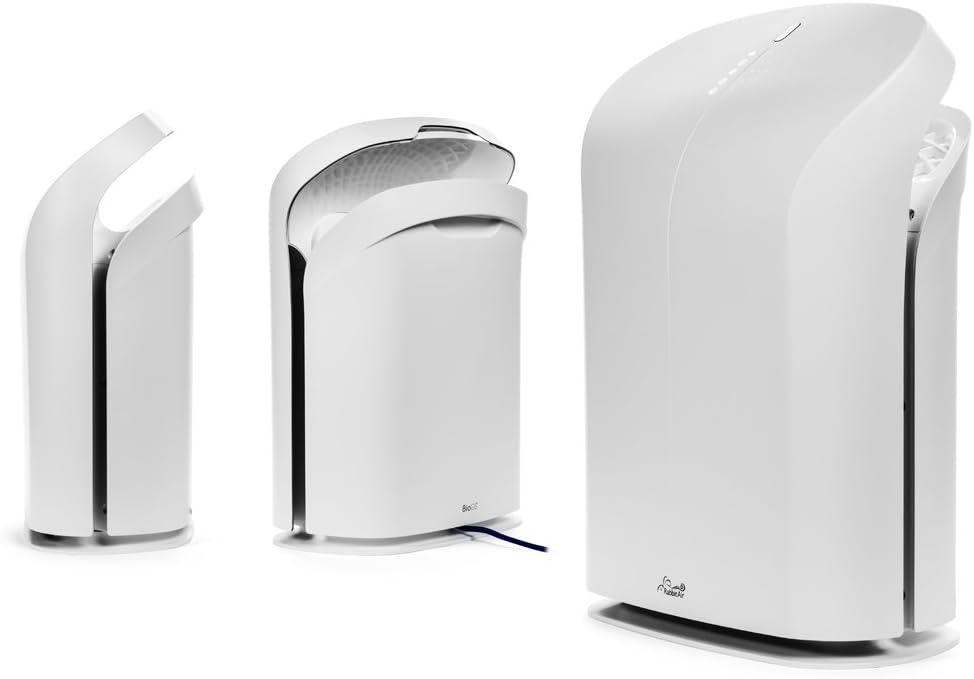
3-сүрөт: Ар түрдүү views of the BioGS 2.0 Air Purifier.
4. Баштапкы орнотуу
Follow these steps to set up your BioGS 2.0 Air Purifier:
- Агрегатты таңгактан чыгаруу: Carefully remove the air purifier from its packaging. Retain packaging for future transport or storage.
- Чыпканы орнотуу: The filters are typically pre-installed. However, ensure all protective plastic packaging is removed from the filters before first use. Refer to the 'Maintenance' section for filter access.
- Жайгашкан жери: Place the air purifier on a firm, level surface. Ensure there is adequate space around the unit (at least 6 inches from walls or furniture) for optimal air intake and output. Avoid placing it near heat sources or in direct sunlight.
- Кубат туташуу: Электр шнурын стандарттуу электр розеткасына сайыңыз.

Figure 4: Recommended placement in a living room setting.
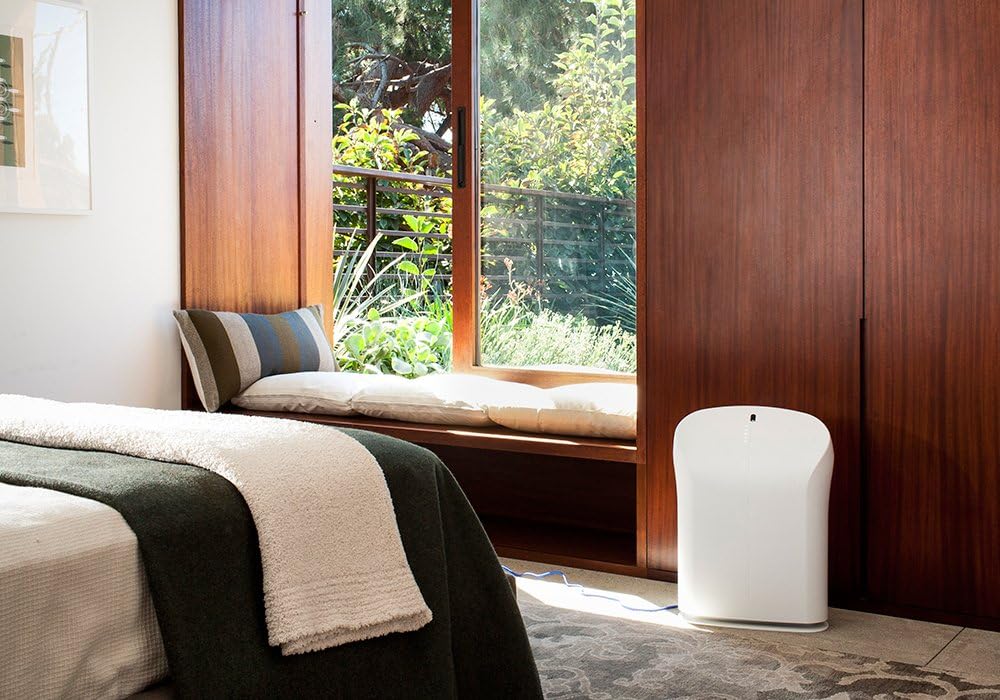
Figure 5: Recommended placement in a bedroom setting.
5. Иштөө нускамалары
The BioGS 2.0 can be operated using the control panel on the unit or the included remote control.

Figure 6: Remote control for the BioGS 2.0 Air Purifier.
5.1. Күйгүзүү/өчүрүү
Press the power button (usually indicated by a circle with a vertical line) on the control panel or remote to turn the unit on or off.
5.2. Желдетүүчү ылдамдыкты жөндөө
The unit has five adjustable fan speeds. Press the fan speed button (often depicted as a gear or fan icon) repeatedly to cycle through the speeds. The corresponding LED indicators will illuminate.
5.3. Auto Mode
Activate Auto Mode by pressing the dedicated button (often an 'A' or circular arrow icon). In this mode, the air purifier automatically adjusts the fan speed based on the detected air quality, optimizing performance and energy consumption.
5.4. Таймер функциясы
Use the timer button (clock icon) to set the operating duration. You can typically set the unit to run for a specific number of hours before automatically turning off.
5.5. Negative Ion Function
The negative ionizer can be turned on or off by pressing its respective button (often a smiling face or wave icon). This function helps to freshen the air by releasinг терс иондор.
5.6. Абанын сапатынын көрсөткүчү
The LED lights on the control panel provide a visual indication of the current air quality, allowing you to monitor your environment at a glance.
6. Техникалык тейлөө жана кам көрүү
Үзгүлтүксүз тейлөө оптималдуу иштешин камсыз кылат жана аба тазалагычыңыздын иштөө мөөнөтүн узартат.
6.1. Фильтрди алдын ала тазалоо
The washable pre-filter captures larger particles. It should be cleaned regularly, typically once a month or as needed. To clean:
- Агрегатты сууруп алыңыз.
- Remove the front panel and carefully detach the pre-filter.
- Vacuum the pre-filter with a brush attachment or rinse it under cool running water.
- Кайра орнотуудан мурун, алдын ала чыпканы толугу менен кургатыңыз.
6.2. HEPA and Activated Carbon Filter Replacement
The BioGS HEPA and Charcoal-Based Activated Carbon Filters are designed to last up to three years with 12-hour daily use. Filter life may vary based on usage and air quality. Replace filters when the filter indicator light illuminates or when you notice a decrease in performance or an increase in odors.
- Агрегатты сууруп алыңыз.
- Remove the front panel and old filters.
- Install new genuine Rabbit Air replacement filters, ensuring they are correctly seated.
- Reset the filter life indicator according to the instructions provided with the replacement filters or in the full user manual.
6.3. Жалпы тазалоо
Wipe the exterior of the unit with a soft, dry cloth. Do not use abrasive cleaners or solvents. Ensure the unit is unplugged before cleaning.
7. Көйгөйлөрдү чечүү боюнча колдонмо
Жалпы маселелер жана аларды чечүү үчүн бул таблицаны караңыз:
| Көйгөй | Мүмкүн себеп | Чечим |
|---|---|---|
| Түзмөк күйбөйт. | No power, power cord loose, unit not plugged in. | Электр тармагына туташууну текшериңиз, розетка иштеп турганын текшериңиз. |
| Алсыз аба агымы. | Clogged pre-filter, dirty HEPA/Carbon filters. | Clean pre-filter, replace HEPA/Carbon filters. |
| Адаттан тышкаркы ызы -чуу. | Foreign object in fan, unit not on a level surface. | Unplug and check for obstructions. Place on a stable surface. |
| Жыты сакталып турат. | Activated carbon filter saturated, source of odor too strong. | Replace activated carbon filter. Identify and remove odor source. |
8. Техникалык шарттар
| Өзгөчөлүк | Спецификация |
|---|---|
| Модель номери | SPA-550A |
| Продукциянын өлчөмдөрү (D x W x Y) | 9.8" x 16.6" x 22.2" |
| Салмагы | 16.8 фунт |
| Сунушталган полдун аянты | 550 чарчы футка чейин |
| Ызы-чуу деңгээли | 25 Decibels (at lowest setting) |
| Ватtage | 39 ватт |
| Өмүр чыпкасы | Up to 3 years (HEPA & Activated Carbon, 12-hour daily use) |
9. Кепилдик жана Кардарларды колдоо
Rabbit Air stands behind the quality of its products. The BioGS 2.0 Air Purifier comes with an industry-leading five-year warranty, covering defects in materials and workmanship under normal use.
For technical assistance, warranty claims, or general inquiries, Rabbit Air offers 24/7 lifetime technical support. Please visit the official Rabbit Air website or refer to the contact information provided in your product packaging for the most current support details.
Онлайн ресурстар: For additional information, FAQs, and filter purchasing, please visit the Rabbit Air Store on Amazon.