
1. Киришүү
The CoolStream Go is a versatile Bluetooth adapter designed to bring wireless audio streaming capabilities to your existing 30-pin docking stations and select motorcycle audio systems. This device allows you to stream music from your Bluetooth-enabled smartphone or tablet to compatible audio equipment, revitalizing older systems with modern connectivity. It is important to note that the CoolStream Go is ЖОК compatible with all car models, specifically 2009 to Present Models of Mercedes and Audi when using the 30-pin iPod cable, and is ЖОК for Harley Davidson motorcycles.
2. Продукциянын өзгөчөлүктөрү
- 30 пин туташтыргыч: Designed to seamlessly integrate with 30-pin Bose SoundDock systems (Original, I, II, Portable, 10) and compatible motorcycle iPod cables.
- AUX уячасы: Features a built-in 3.5mm AUX jack for connecting to wired headphones or stereo receivers, enabling Bluetooth functionality for these devices.
- Кайра заряддалуучу батарея: Provides up to 5 hours of continuous music streaming on a single charge.
- Кеңири шайкештик: Works with iPhone (including iPhone 7, iPhone 6), Android phones, and any other Bluetooth-enabled devices. Compatible with Victory Motorcycle iPod cables.
- Bluetooth 5.0: Utilizes Bluetooth 5.0 technology for stable and efficient wireless connections.
3. Пакеттин мазмуну
- CoolStream Go Bluetooth Adapter
- 3.5mm Audio Cable (for AUX connection)
4. Орнотуу нускамалары
4.1 Connecting to a 30-Pin Docking Station (e.g., Bose SoundDock)
- Ensure your 30-pin docking station is powered on.
- Carefully insert the CoolStream Go Bluetooth Adapter into the 30-pin connector on your docking station. Ensure it is firmly seated.

Image: The CoolStream Go Bluetooth Adapter being inserted into a Bose SoundDock.

Image: The CoolStream Go Bluetooth Adapter properly installed in a white Bose SoundDock.
4.2 Connecting via 3.5mm AUX Jack
If your audio system does not have a 30-pin dock but features a 3.5mm AUX input, you can use the included audio cable to connect the CoolStream Go.
- Plug one end of the 3.5mm audio cable into the AUX jack on the CoolStream Go.
- Plug the other end of the audio cable into the 3.5mm AUX input on your stereo receiver or wired headphones.
- Ensure the CoolStream Go is charged or connected to a power source if not docked.

Image: The CoolStream Go Bluetooth Adapter connected to an Amazon Echo via its AUX port.
5. Иштөө нускамалары
5.1 Түзмөгүңүздү жупташтыруу
- Once the CoolStream Go is powered on (either by docking or internal battery), its LED indicator will flash, indicating it is in pairing mode.
- Смартфонуңузда же планшетиңизде Bluetooth жөндөөлөрүнө өтүңүз.
- Издөө available devices. You should see "CoolStream Go" or "CoolStream Duo" in the list.
- Select the CoolStream device to pair. The LED indicator on the CoolStream Go will become solid once successfully paired.
5.2 Музыка агымы
After successful pairing, open your preferred music application (e.g., Spotify, Apple Music, Pandora) on your smartphone or tablet and begin playing audio. The sound will be wirelessly transmitted to your connected audio system via the CoolStream Go.
Video: This video demonstrates the process of adding Bluetooth functionality to a Bose SoundDock using the CoolStream Go adapter, including pairing with a smartphone.
6. Шайкештик жөнүндө маалымат
The CoolStream Go is designed for broad compatibility with many 30-pin docking stations. However, specific models may vary. Please review төмөнкү маалыматты кылдаттык менен окуп чыгыңыз.
6.1 Шайкеш түзмөктөр
The CoolStream Go is compatible with various Bose SoundDock models (Original, I, II, Portable, 10), iPhone, Android phones, and Victory Motorcycle iPod cables. For a detailed list of compatible iPod docks, refer to the image below.

Image: Table of iPod Docks Compatible with CoolStream Go.
6.2 Шайкеш келбеген түзмөктөр
The CoolStream Go is ЖОК compatible with all 2009 to Present Models of Mercedes and Audi when using the 30-pin iPod cable. It is also ЖОК for Harley Davidson motorcycles. For a detailed list of incompatible iPod docks, refer to the image below.
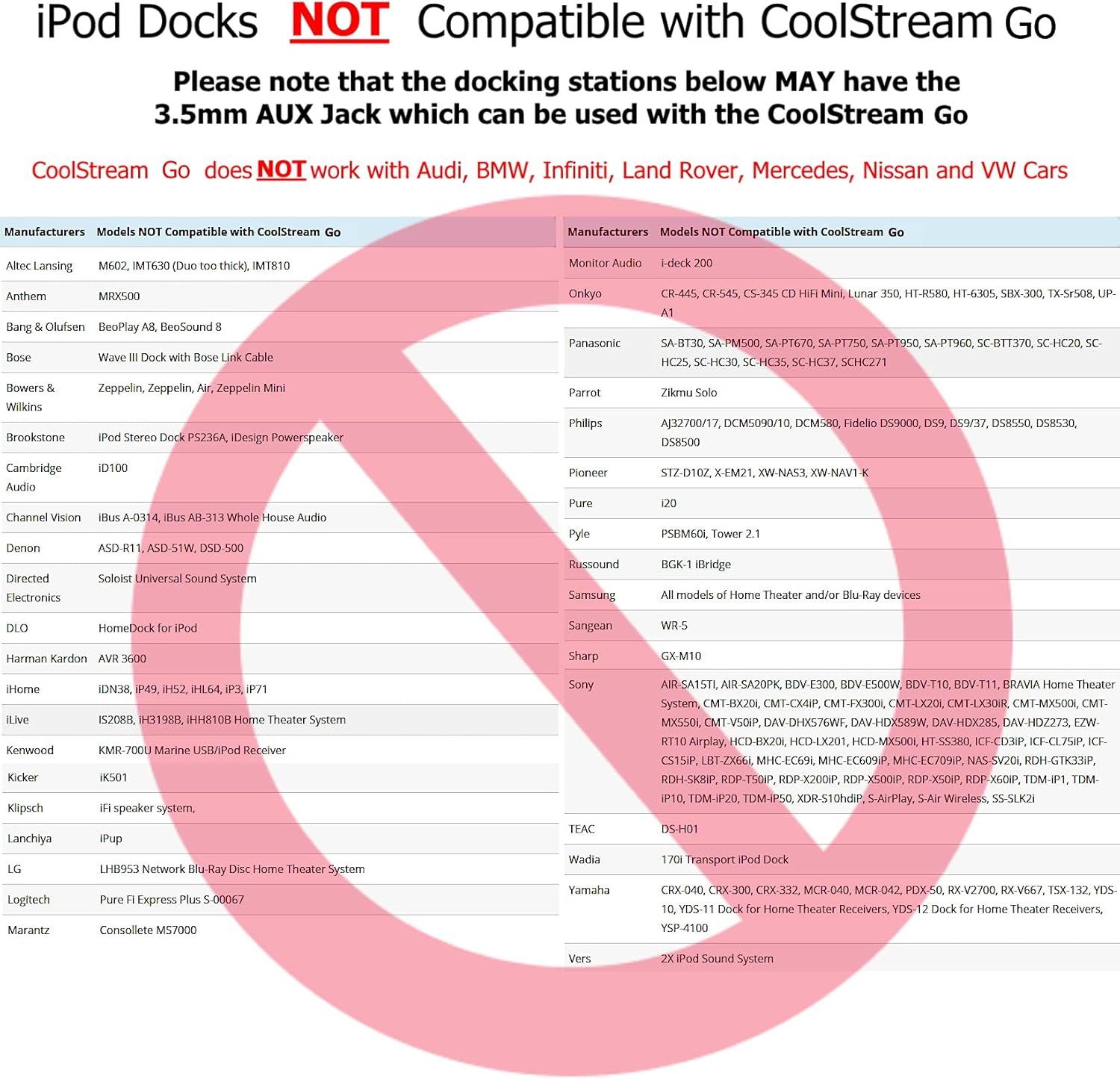
Image: Table of iPod Docks NOT Compatible with CoolStream Go.
7. Кыйынчылыктарды
- Үн/Туташуу маселеси жок: Ensure the CoolStream Go is fully inserted into the 30-pin dock or securely connected via the AUX cable. Verify that your audio system is set to the correct input (e.g., iPod, AUX). Try resetting the CoolStream Go by unplugging and re-plugging it, then re-attempt pairing.
- Bluetooth ажыратылат: Ensure your streaming device is within the Bluetooth range of the CoolStream Go. Obstacles or other wireless devices can interfere with the signal. Try moving your device closer to the adapter.
- Начар аудио сапаты: Check the volume levels on both your streaming device and the audio system. Ensure there are no other devices interfering with the Bluetooth signal.
8. Техникалык шарттар
| Модель аты | CoolStream Go |
| Бренд | CoolStream |
| Байланыш технологиясы | Bluetooth, көмөкчү |
| Bluetooth версиясы | 5.0 |
| Колдоого алынган стандарттар | Bluetooth 5.0, A2DP |
| Power Source | 30 Pin Connector for 5V and 12V Firewire Docks, Rechargeable Battery |
| Батарея түрү | Литий-полимер |
| Батареяны заряддоо убактысы | 5 саат |
| Аудио киргизүү | 3.5mm auxiliary jack, 30 pin connector |
| Аудио чыгаруу режими | Стерео |
| Колдоого алынган медиа түрү | MP3, WAV, AAC |
| Материал | Пластик |
9. Коопсуздук маалыматы
The CoolStream Go contains a battery. Use with caution, keep away from water, and dispose of properly according to local regulations.
10. Кепилдик жана колдоо
The CoolStream Go comes with a БИР ЖЫЛ КЕПИЛДИК. For technical support or warranty claims, please contact CoolStream directly.
- Техникалык колдоо электрондук почтасы: contact-us@coolstreamrocks.com
- Техникалык колдоо телефону: 603-421-6515