
DigiTech DOD250-13
DOD Overdrive 250 Analog Overdrive Preamp User Manual
Model: DOD250-13
Introduction
The DOD Overdrive Preamp 250 is a legendary analog overdrive pedal designed for guitar and bass instruments. This manual provides essential information for setting up, operating, maintaining, and troubleshooting your DOD Overdrive 250 to ensure optimal performance and longevity.
Жайгашуу
Педалга кубат берүү
The DOD Overdrive 250 can be powered by a single 9V alkaline dry battery or an optional 9V DC power supply (PS0913DC). Ensure the power source is correctly connected before use.

1-сүрөт: Power Supply Connector. Connect a 9V DC power adapter here.
Педальды туташтыруу
Аспабыңызды туташтырыңыз IN jack on the right side of the pedal using a standard 1/4-inch instrument cable. Connect the OUT педалдын сол тарабындагы уячага ampкөтөргүчтү же сигнал чынжырыңыздагы кийинки педалды дагы бир 1/4 дюймдук аспап кабелин колдонуп басыңыз.

2-сүрөт: Input and Output Jacks. The input jack is on the right, and the output jack is on the left.
Педалды иштетүү
The DOD Overdrive 250 features two primary control knobs: АЛУУ жана LEVEL, along with a footswitch and an LED indicator.
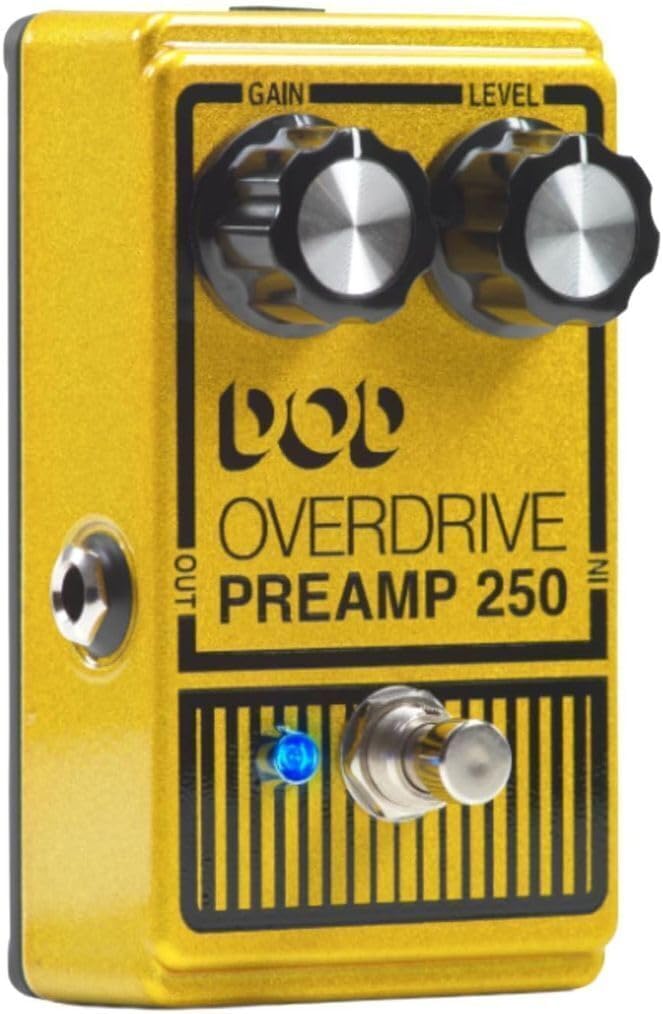
3-сүрөт: Front Panel Controls. The Gain and Level knobs are at the top, with the footswitch and LED below.
Controls
- УТУШ: This knob controls the amount of overdrive or distortion applied to your signal. Turning it clockwise increases the saturation, ranging from a subtle grit to a full, aggressive grind.
- ДЕҢГЭЭЛ: This knob adjusts the overall output volume of the pedal. It can be used to match the bypassed signal volume, or to provide a significant boost for solos or to push your amplifier harder. With the Gain set low, increasing the Level can provide a clean boost.
Бут өчүргүч жана LED көрсөткүч
The large footswitch activates or bypasses the effect. When the effect is active, the crisp blue LED indicator will illuminate, providing clear visual feedback of the pedal's status.

4-сүрөт: Crisp Blue LED Indication. The LED illuminates when the effect is active.
Чыныгы айланып өтүү
The DOD Overdrive 250 features true bypass circuitry. This means that when the pedal is disengaged (effect off), your guitar's signal passes directly through the pedal without any electronic interference, preserving your original tone. This is a significant improvement over older designs that could color the bypassed signal.
Техникалык тейлөө
Батареяны алмаштыруу
If using a 9V battery, replace it when the LED indicator dims or the pedal's performance degrades. To replace the battery, carefully remove the bottom plate of the pedal. Disconnect the old battery and connect a new 9V alkaline battery, ensuring correct polarity. Securely reattach the bottom plate.
Тазалоо
Wipe the pedal's exterior with a soft, dry cloth. Avoid using abrasive cleaners or solvents, as these can damage the finish and internal components.
Сактагыч
When not in use for extended periods, disconnect the power supply or remove the battery to prevent leakage and preserve battery life. Store the pedal in a cool, dry place away from direct sunlight and extreme temperatures.
Проблемаларды чечүү
| Көйгөй | Мүмкүн себеп | Чечим |
|---|---|---|
| Үн жок же начар сигнал | Incorrect cable connections, dead battery, faulty power supply, pedal not engaged. | Check all cable connections. Replace 9V battery or verify power supply connection. Ensure the pedal is engaged (blue LED on). Test with different cables. |
| Керексиз ызы-чуу же ызы-чуу | Ground loop, faulty cables, interference from other electronics, power supply issues. | Ensure all equipment is properly grounded. Try different cables. Move pedal away from power transformers or fluorescent lights. Use a regulated power supply. |
| LED күйбөйт | No power, dead battery, faulty LED. | Check power supply or replace battery. If problem persists, contact support. |
Техникалык шарттар
| Өзгөчөлүк | Деталь |
|---|---|
| Модел | DOD250-13 |
| Өлчөмдөрү (L x W x Y) | 4.88 x 2.61 x 3.25 дюйм |
| Салмагы | 9.92 ounces (~0.62 lbs) |
| Киргизүү | 1/4-inch Instrument |
| Чыгуу(лар) | 1/4-inch Instrument |
| Шасси материалы | All Metal (Aluminum) |
| Электр камсыздоо | 9V Alkaline Dry Battery or 9V DC (PS0913DC) |
| Сигнал форматы | Аналог |
| Түс | Yellow Metallic Flake |
Кепилдик жана колдоо
For detailed warranty information, please refer to the documentation included with your purchase or visit the official DigiTech website. DigiTech provides support for their products through their authorized service centers and online resources.
You can find more information and contact support via the official DigiTech store: Amazon'догу DigiTech дүкөнү.
Note: No official product videos from the seller were found in the provided data to be embedded in this manual.
Ask a question about this manual
Ask about setup, troubleshooting, compatibility, parts, safety, or missing instructions. Manuals+ will review the question and use this page’s manual context to help answer it.