
1. Киришүү
This manual provides instructions for the setup, operation, and maintenance of your Uniden AS7412 Corded Phone. Please read this manual thoroughly before using your new phone.
The Uniden AS7412 is a corded telephone featuring a large LCD display and a speakerphone function, designed for clear communication and ease of use.
2. Продукт бүтүп калдыview
Негизги өзгөчөлүктөрү:
- FSK/DTMF Caller ID Display
- Large LCD Display with Clock and Call Timer
- Спикерфон функциясы
- Pre-Dial Function and Last Number Redial
- Уурулукка каршы функция
- Memory for 50 Incoming Calls and 15 Outgoing Calls
- 8 One-Touch Memory and 10 Two-Touch Memory Functions
- IDD Code and PABX Dial Out Code Setting
- Adjustable LCD Contrast
- Күтүүдөгү музыка
- Adjustable Flash Timing (90/95/100/120/180/300/600/1000mS)
Телефондун компоненттери:
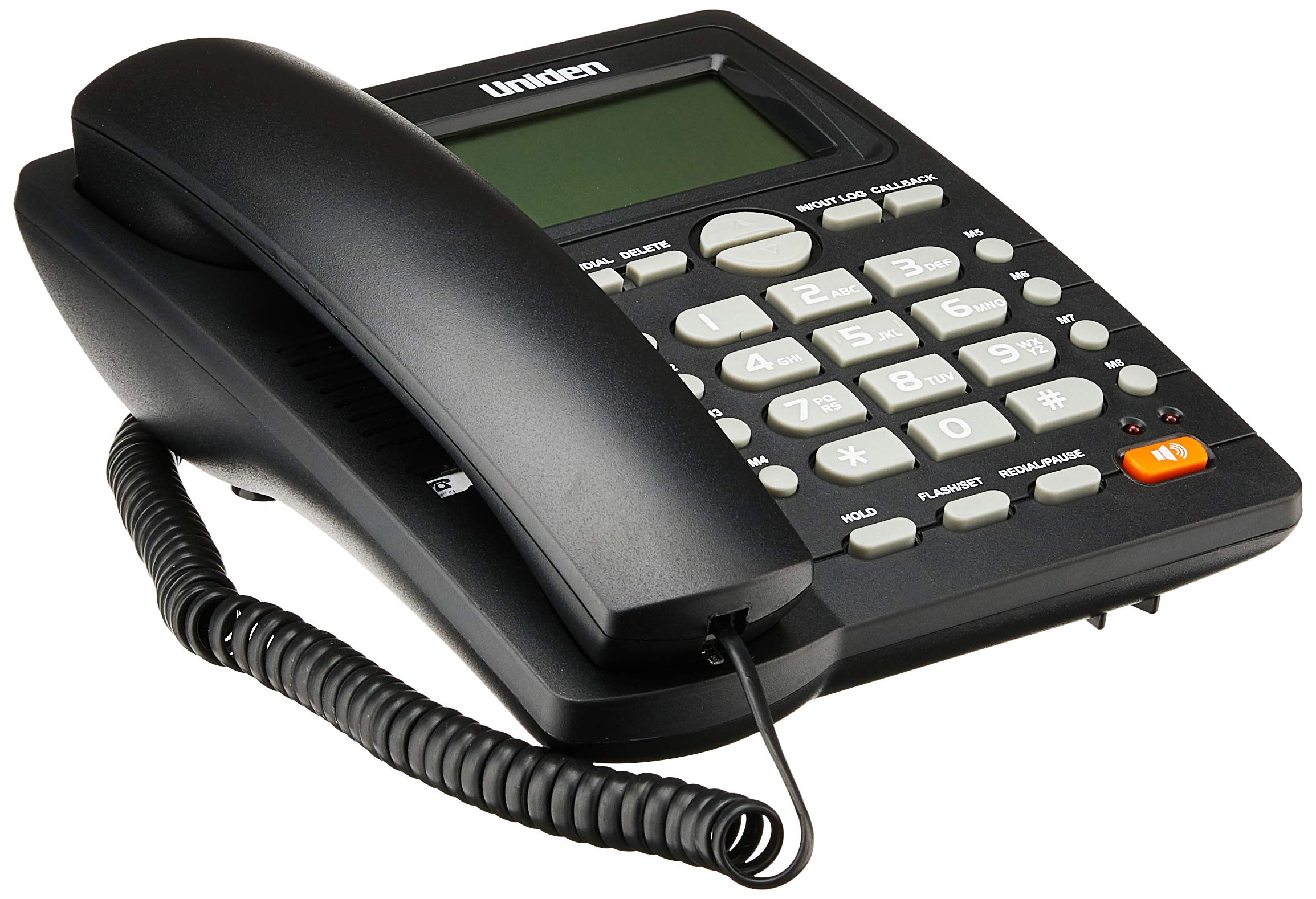
The phone features a standard handset, a numeric keypad, dedicated function buttons, and a large LCD display for caller information and settings. A prominent speakerphone button allows for hands-free communication.

On the rear of the unit, you will find the telephone line input port and a switch for adjusting the ringer volume.
3. Орнотуу
- Телефонду туташтыруу: Plug one end of the coiled cord into the handset and the other end into the handset jack on the side of the phone base unit.
- Телефон линиясын туташтыруу: Plug one end of the telephone line cord into the "LINE" jack on the rear of the phone base unit (refer to Figure 2). Plug the other end into your telephone wall jack.
- Кубат туташуу: The phone is powered by the telephone line. No external power adapter is required for basic operation.
- Баштапкы дисплей: Upon connection, the LCD display should illuminate and show the current time or a default standby screen.
4. Иштөө нускамалары
Чакыруу:
- Телефонду колдонуу: Lift the handset, wait for a dial tone, then dial the desired number using the keypad.
- Динамикти колдонуу: басыңыз СПИКЕРФОН button, wait for a dial tone, then dial the desired number. To end the call, press the СПИКЕРФОН кайра баскычын.
- Алдын ала терүү: Dial the number first, then lift the handset or press the СПИКЕРФОН чалууну баштоо үчүн баскычты басыңыз.
Чалуу кабыл алуу:
- Телефон шыңгыраганда, телефонду көтөрүңүз же басыңыз СПИКЕРФОН жооп берүү үчүн баскыч.
Акыркы номерди кайра терүү:
- Телефонду көтөрүңүз же басыңыз СПИКЕРФОН баскычын, андан кийин басыңыз КАЙРА ТЕРҮҮ/ТЫНЫГЫ баскычы.
Caller ID Function:
- When a call comes in, the caller's number (and name, if available and subscribed to service) will be displayed on the LCD screen.
- колдонуу IN/OUT LOG buttons (up/down arrows) to scroll through the incoming call history.
- To call back a number from the call log, select the number and press the CALLBACK баскычы.
Memory Dialing (One-Touch and Two-Touch):
- Сандарды сактоо:
- Басыңыз STORE/DIAL.
- Сактагыңыз келген телефон номерин териңиз.
- Басыңыз STORE/DIAL кайра.
- Press the desired memory button (M1-M8 for one-touch, or a numeric key for two-touch).
- Эстутумдан терүү:
- One-Touch: Телефонду көтөрүңүз же басыңыз СПИКЕРФОН, then press the desired memory button (M1-M8).
- Two-Touch: Телефонду көтөрүңүз же басыңыз СПИКЕРФОН, андан кийин басыңыз STORE/DIAL followed by the numeric key where the number is stored.
Adjusting LCD Contrast:
- Refer to the on-screen menu or specific button combination (often involving FLASH/SET or similar) to access display settings and adjust contrast for optimal readability.
5. Техникалык тейлөө
- Тазалоо: Телефонду жумшак, d менен сүртүңүзamp кездеме. Катуу химиялык заттарды же абразивдүү тазалагычтарды колдонбоңуз.
- Жайгашкан жери: Place the phone on a stable surface, away from direct sunlight, heat sources, and moisture.
- Корддор: Ensure all cords are securely connected and not tangled or pinched.
6. Кыйынчылыктарды
| Көйгөй | Мүмкүн себеп | Чечим |
|---|---|---|
| Терүү үнү жок | Телефон линиясы ажыратылган же бузулган. | Check the telephone line connection at both the phone and the wall jack. Try a different line cord if available. |
| LCD display is blank or dim | Contrast setting is too low or phone line power issue. | Adjust the LCD contrast setting. Ensure the phone line is active. |
| Чалууларды кабыл алуу же жасоо мүмкүн эмес | Incorrect line connection or service issue. | Verify all connections. Contact your telephone service provider if the issue persists. |
| Ringer does not sound | Ringer volume is set to OFF. | Adjust the ringer volume switch on the rear of the phone to LOW or HI (refer to Figure 2). |
7. Техникалык шарттар
| Өзгөчөлүк | Деталь |
|---|---|
| Бренд | Uniden |
| Модел | AS7412 |
| Түс | Кара |
| Телефон түрү | жоон |
| Материал | Пластик |
| Power Source | Зымдуу электр (линия менен иштейт) |
| Терүүчү түрү | Жалгыз баскычтоп |
| Өлчөмдөрү (L x W x Y) | 21.8 x 7 x 22 сантиметр |
| Элемент Салмагы | 650 грамм |
| Көп линия операциясы | Бир линиялык операция |
| Чалуучунун идентификациясы | Yes (FSK/DTMF) |
| Өндүрүүчү | UNIDEN |
8. Кепилдик жана колдоо
Кепилдик жөнүндө маалымат жана техникалык колдоо алуу үчүн, өнүмүңүз менен кошо берилген кепилдик картасын караңыз же расмий Uniden веб-сайтына кириңиз. webсайт. Сатып алганыңыздын далили катары сатып алуу дүмүрчөгүңүздү сактаңыз.
Эскертүү: Продукттун мүнөздөмөлөрү жана өзгөчөлүктөрү эскертүүсүз өзгөртүлүшү мүмкүн.