
1. Киришүү
1.1 Продукт бүттүview
The CELLULARLINE Interphone F5MC is a advanced Bluetooth communication system designed for motorcycle helmets. It provides hands-free communication, music streaming, and GPS navigation audio, compatible with both open and closed helmets. This device features a new microchip for enhanced performance and offers robust functionality for riders.
1.2 Негизги өзгөчөлүктөрү
- Bluetooth Connectivity for wireless communication.
- Integrated Microphone for clear audio transmission.
- Waterproof design for use in various weather conditions.
- Touch control method for intuitive operation.
- Compatible with smartphones, tablets, and car audio systems.
- Designed for motorcycle riding applications.
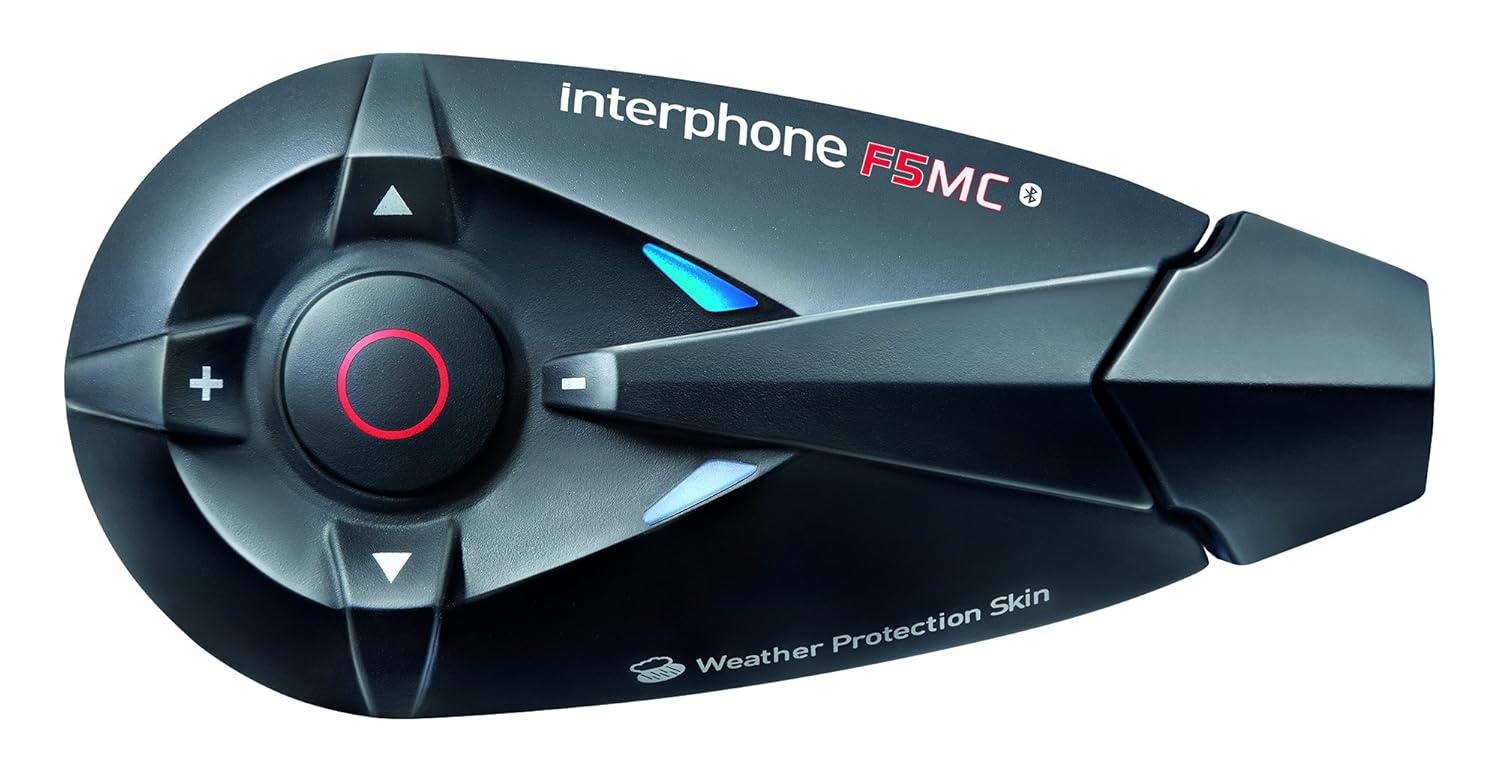
1.1-сүрөт: The Interphone F5MC Bluetooth Headset. This image displays the main unit of the Interphone F5MC, highlighting its ergonomic design and control buttons, including the central multifunction button and volume controls.
2. Пакеттин мазмуну
The Interphone F5MC package typically includes the following components:
- Interphone F5MC Main Unit(s)
- Ear Cushions / Speakers
- Microphone for full-face helmet
- Microphone for jet helmet
- DC Power Charging & Music Line In Cable
- Mounting Brackets (clip and adhesive options)
- USB заряддоо кабели

2.1-сүрөт: Interphone F5MC Product Packaging. This image shows the retail box for the Interphone F5MC, indicating it is a dual unit package suitable for two helmets, highlighting features like multi-user conference and long distance communication.

2.2-сүрөт: Interphone F5MC Component Diagram. This diagram illustrates the various components included with the Interphone F5MC system, such as the main unit, different microphone types (for full-face and jet helmets), speakers, and charging/audio cables, along with their connections.
3. Орнотуу
3.1 Бөлүктү кубаттоо
- Connect the DC power charging cable to the charging port on the Interphone F5MC unit.
- Кабелдин экинчи учун ылайыктуу USB кубат булагына сайыңыз (мисалы, компьютердин USB порту, USB дубал адаптери).
- The status LED will indicate charging status. A full charge is recommended before first use.
3.2 Mounting the Unit to a Helmet
- Choose between the clip mount or adhesive mount option based on your helmet type and preference.
- Securely attach the chosen mounting bracket to the side of your helmet. Ensure it is positioned where the unit will not obstruct vision or movement.
- Slide the Interphone F5MC main unit onto the mounted bracket until it clicks into place.
3.3 Микрофонду жана динамикти орнотуу
- Select the appropriate microphone for your helmet type (full-face or jet).
- Attach the speakers inside the helmet, aligning them with your ears for optimal audio. Use the provided adhesive pads if necessary.
- Position the microphone close to your mouth, ensuring it is not directly in the path of wind noise.
- Connect the speaker and microphone cables to the corresponding ports on the Interphone F5MC main unit. Refer to Figure 2.2 for connection details.
3.4 Алгачкы Bluetooth жупташтыруу
- Ensure the Interphone F5MC unit is powered off.
- Press and hold the Multi-Function Button (MFB) until the status LED flashes rapidly, indicating pairing mode.
- Смартфонуңузда же башка Bluetooth түзмөгүңүздө Bluetooth'ту күйгүзүп, жеткиликтүү түзмөктөрдү издеңиз.
- Select "Interphone F5MC" from the list of found devices.
- If prompted, enter the PIN code (usually "0000").
- Once paired, the status LED will change to a slow flash or solid blue, depending on the unit's status.
4. Иштөө нускамалары
4.1 Күйгүзүү/өчүрүү
- Күйгүзүү үчүн: Press and hold the MFB for approximately 3 seconds until you hear an audible tone and the LED illuminates.
- Өчүрүү үчүн: Press and hold the MFB for approximately 5 seconds until you hear a descending tone and the LED turns off.
4.2 Домофондук байланыш
The F5MC supports multi-user intercom communication. Refer to the full manual for detailed pairing instructions for multiple units.
- Домофонду баштоо: Briefly press the Intercom button (specific button may vary, refer to unit's markings).
- Домофондун аягы: Домофон баскычын кайрадан кыскача басыңыз.
4.3 Телефон чалуулар
- Чакырууга жооп берүү: MFBге кыскача басыңыз.
- Чакырууну аяктоо: MFBге кыскача басыңыз.
- Чакырууну четке кагуу: MFBди 2 секунд басып туруңуз.
- Үн терүү: With the unit in standby, briefly press the MFB twice to activate your phone's voice assistant (if supported).
4.4 Музыканы ойнотуу
Ensure your Interphone F5MC is paired with a music source (e.g., smartphone).
- Ойнотуу/тындыруу: MFBге кыскача басыңыз.
- Кийинки трек: Press the 'Volume Up' button for 2 seconds.
- Мурунку трек: Press the 'Volume Down' button for 2 seconds.
- Үндү тууралоо: Briefly press the 'Volume Up' or 'Volume Down' buttons.
4.5 FM радиосу
- Turn On/Off Radio: Press a dedicated FM button or a combination of buttons (refer to specific unit markings).
- Скандоо станциялары: Press and hold the 'Volume Up' or 'Volume Down' buttons to scan for the next/previous station.
5. Техникалык тейлөө
5.1 Тазалоо
- Аппаратты жумшак менен сүртүңүз, гamp кездеме. Катуу химиялык заттарды же абразивдүү тазалагычтарды колдонбоңуз.
- Аксессуарларды заряддоо же туташтыруудан мурун бардык порттор кургак экенин текшериңиз.
5.2 Сактоо
- Аппаратты күн нурунан жана экстремалдык температурадан алыс салкын, кургак жерде сактаңыз.
- Узак мөөнөткө сактасаңыз, батареянын иштөө мөөнөтүн сактоо үчүн бир нече ай сайын батарейканы болжол менен 50% чейин заряддаңыз.
5.3 Батареяга кам көрүү
- Батареяны бат-баттан толук кубаттап калуудан алыс болуңуз.
- Use only the provided charging cable and compatible power sources.
6. Кыйынчылыктарды
6.1 Күч жок
- Аппараттын толук заряддалганын текшериңиз. Аны кубат булагына туташтырыңыз жана кубаттоо индикаторун текшериңиз.
- Verify that the power button is being pressed and held for the correct duration (approximately 3 seconds).
6.2 Аудио жок
- Check that the speakers are correctly connected to the main unit and properly positioned inside the helmet.
- Ensure the volume is not set to minimum. Adjust using the volume buttons.
- Verify that the unit is successfully paired with your audio source (e.g., smartphone).
6.3 Жупташтыруу маселелери
- Ensure both devices are in pairing mode and within close proximity.
- Turn off and restart both the Interphone F5MC and the device you are trying to pair.
- Эки түзмөктөн мурунку Bluetooth жупташууларын тазалап, кайра жупташтырууга аракет кылыңыз.
6.4 Intercom Disconnection
- Ensure units are within the specified intercom range and have a clear line of sight.
- Башка электрондук түзүлүштөрдөн келип чыгышы мүмкүн болгон тоскоолдуктарды текшериңиз.
- Attempt to re-establish the intercom connection by briefly pressing the intercom button.
7. Техникалык шарттар
| Өзгөчөлүк | Деталь |
|---|---|
| Модель аты | INTERPHONEF5MCTP |
| Байланыш технологиясы | Bluetooth |
| Зымсыз байланыш технологиясы | Bluetooth |
| Камтылган компоненттер | Ear Cushions, Microphones |
| Материал | Пластик |
| Продукт үчүн атайын колдонуу | Мотоцикл минүү |
| Шайкеш түзмөктөр | Smartphones, Tablets, Car Audio Systems |
| Сууга туруктуулук деңгээли | Суу өткөрбөйт |
| Башкаруу ыкмасы | тийүү |
| Өндүрүүчү | CELLULARLINE |
| Продукциянын өлчөмдөрү | 8.99 x 4.5 x 2.01 см |
| Элемент Салмагы | 54.4 г (0.12 фунт) |
| Батареялар | 1 Литий Полимердик батарейка (кошулган) |
| Өзгөчөлүктөр | Микрофон камтылган |
| Түс | Кара |
| Кулак жайгаштыруу | Ачык кулак |
| Форма фактору | Кулак үстүндө |
8. Кепилдик жана колдоо
For warranty information, technical support, or service inquiries, please refer to the documentation provided with your purchase or contact CELLULARLINE customer service directly. Details regarding warranty periods and support procedures are typically available on the manufacturer's official webсайт же сатуучу аркылуу.