
1. Киришүү
This user manual provides comprehensive instructions for the Yamaha PSRE443 61-Key Portable Keyboard. It covers essential information for setting up, operating, maintaining, and troubleshooting your instrument. The PSRE443 is designed for musicians of all levels, offering a wide range of voices, accompaniment styles, and interactive learning features.
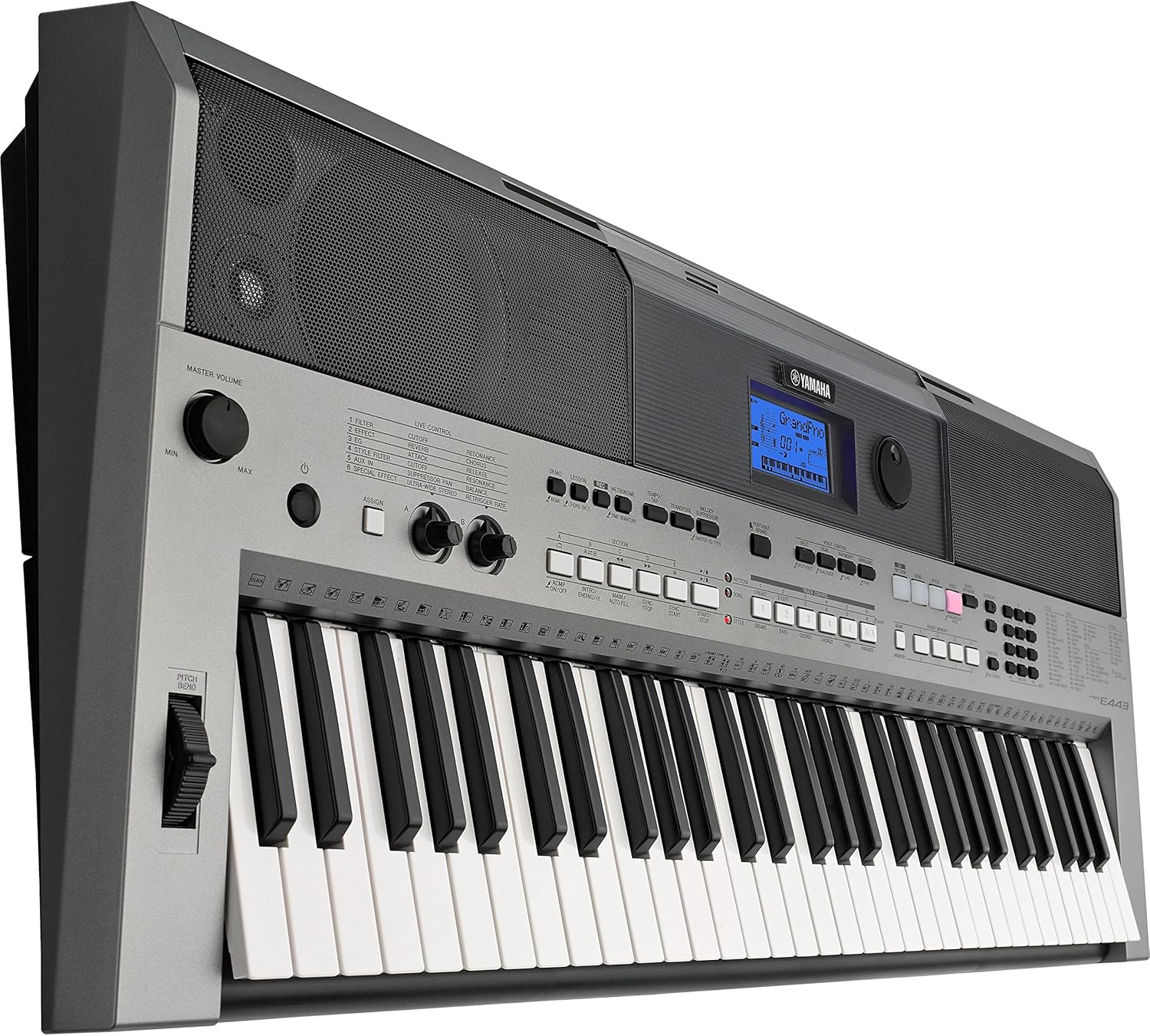
Сүрөт 1.1: Алдыңкы view of the Yamaha PSRE443 Portable Keyboard, showcasing the 61 keys, control panel, and integrated speakers.
2. Коопсуздук маалыматы
Please read these safety precautions carefully before using your PSRE443 keyboard to ensure safe and optimal performance.
- Электр камсыздоо: Use only the specified power adapter (not included) or 6 AA batteries. Ensure the voltage инструменттин талаптарына жооп берет.
- Жайгашкан жери: Аспапты түз күндүн нуру астында, жылуулук булактарынын жанында же өтө чаңдуу, нымдуу же титирөө чөйрөсүнө коюудан алыс болуңуз.
- Суу жана ным: Аспапты жамгырга же нымга тийгизбеңиз. Суюктуктар салынган идиштерди аспаптын үстүнө коюуга болбойт.
- Колдонуу: Баскычтарга, баскычтарга же туташтыргычтарга ашыкча күч колдонбоңуз. Аспапты түшүрүп албоо керек.
- Тазалоо: Clean the instrument with a soft, dry cloth. Do not use paint thinners, solvents, or cleaning fluids.
3. Орнотуу
3.1 Пакеттен чыгаруу
Carefully remove the keyboard from its packaging. Retain the packaging materials for future transport or storage.
3.2 Кубат туташтыруу
The PSRE443 can be powered using an AC adapter (sold separately) or batteries.
- Using an AC Adapter: Connect the appropriate Yamaha AC power adapter (e.g., PA-150, sold separately) to the 12V DC IN jack on the rear panel of the keyboard. Plug the adapter into a standard AC outlet.
- Батареяларды колдонуу: Open the battery compartment on the underside of the keyboard. Insert six new "AA" size alkaline (LR6) or rechargeable Ni-MH batteries, ensuring correct polarity.
3.3 Connecting Headphones or External Audio System
To listen privately or connect to an external amplifier/speaker system, use the PHONES/OUTPUT jack.
- Connect stereo headphones to the PHONES/OUTPUT jack. The internal speakers will be muted.
- Тышкы үчүн amplification, connect an audio cable from the PHONES/OUTPUT jack to the input of your ampкөтөргүч же кубаттуу динамиктер.

Figure 3.1: Rear panel connections, including DC IN, USB TO HOST, USB TO DEVICE, SUSTAIN, AUX IN, and PHONES/OUTPUT jacks.
4. Негизги операция
4.1 Күйгүзүү/өчүрүү
басыңыз [БИЙЛИК] аспапты иштетүү үчүн баскыч. басып, кармап туруңуз [БИЙЛИК] өчүрүү үчүн баскычын бир нече секунд басып туруңуз.
4.2 Үндү башкаруу
тууралаңыз [МАСТЕР Көлөм] knob to set the overall output level of the instrument.
4.3 Үндөрдү тандоо
The PSRE443 features 755 high-quality voices, including realistic Sweet! and Cool! Voices.
- басыңыз [VOICE] баскычы.
- Use the numeric keypad or the [CATEGORY] buttons to browse and select a voice. The selected voice name and number will appear on the LCD display.
4.4 Selecting Styles
The keyboard includes 200 diverse accompaniment styles.
- басыңыз [СТИЛ] баскычы.
- Use the numeric keypad or [CATEGORY] buttons to select a style.
- басыңыз [ACMP КҮЙҮК/ӨЧҮРҮҮ] button to start/stop the accompaniment.
5. Өркүндөтүлгөн функциялар
5.1 Real-time Control Knobs
The two assignable real-time control knobs allow for dynamic manipulation of sound parameters such as filter cutoff, effects, and sound envelope during performance.
- бургула [ASSIGN] button to select the parameter you wish to control (e.g., Filter, Effect, EQ).
- айлантыңыз [CONTROL KNOB A] or [CONTROL KNOB B] to adjust the selected parameter in real-time.

Figure 5.1: Real-time control knobs (A and B) and the ASSIGN button for dynamic sound manipulation.
5.2 Pitch Bend Wheel
Use the pitch bend wheel located on the left side of the keyboard to smoothly raise or lower the pitch of notes while playing.
5.3 PATTERN Function
The PATTERN function allows you to create and play dynamic grooves, similar to a DJ. Press the [DJ PATTERN] button to activate this mode and use the various pads and controls to build your patterns.
5.4 Arpeggio Function
The Arpeggio function automatically generates arpeggiated phrases based on the chords you play. Press the [ARPEGGIO] button to activate and deactivate this feature.
5.5 6-Track Sequencer
Record your performances using the built-in 6-track sequencer. This allows you to layer multiple instrument parts to create complete songs.
- басыңыз [REC] жаздыруу күтүү режимине өтүү үчүн баскыч.
- Басыңыз [БАШТОО / ТОКТОТУУ] жазууну баштоо.
- Басыңыз [БАШТОО / ТОКТОТУУ] жазууну токтотуу үчүн дагы.
5.6 Music Database
The Music Database provides 305 song titles with pre-configured keyboard settings (voice, style, tempo) for quick and easy setup. Press the [MUSIC DATABASE] button and use the numeric keypad to select a song.
5.7 Yamaha билим берүү топтому (Ооба)
Y.E.S. offers a suite of lesson functions to help beginners learn to play. These include listening, timing, and waiting modes to practice songs at your own pace.
6. Байланыш
6.1 AUX IN Terminal
Connect an external audio player (e.g., smartphone, MP3 player) to the AUX IN terminal using a stereo mini cable. This allows you to play along with your favorite songs through the keyboard's speakers.

Figure 6.1: Connecting an external audio device to the AUX IN terminal.
6.2 USB TO HOST Terminal
Connect the keyboard to a computer (PC or Mac) using a standard USB cable. This enables MIDI communication, allowing you to use the keyboard as a MIDI controller or transfer MIDI data to and from your computer.
6.3 USB TO DEVICE Terminal
Insert a USB flash drive into the USB TO DEVICE terminal to save and load user data, such as recorded songs or registration memories.

Сүрөт 6.2: Жакын пландан view of the USB TO HOST and USB TO DEVICE ports for computer and storage connectivity.
6.4 iOS Device Connectivity
The PSRE443 supports connectivity with iOS devices (iPhone/iPod touch/iPad) for use with various Yamaha apps, enhancing your playing, performing, and practicing experience.
7. Техникалык тейлөө
7.1 Тазалоо
Куралды жумшак, кургак чүпүрөк менен сүртүңүз. өжөр кир үчүн, бир аз d колдонууamp чүпүрөк, анан кургатып сүртүңүз. Абразивдүү тазалагычтардан же эриткичтерден качыңыз.
7.2 Сактоо
When not in use for extended periods, disconnect the AC adapter or remove the batteries. Store the instrument in a cool, dry place away from extreme temperatures and humidity.
8. Кыйынчылыктарды
| Көйгөй | Мүмкүн себеп | Чечим |
|---|---|---|
| Күч жок | AC adapter not connected, batteries depleted/incorrectly inserted | AC адаптер байланышын текшерүү; батарейкаларды алмаштырыңыз же туура полярдуулукту камсыз кылыңыз. |
| Үн жок | Volume too low, headphones connected, local control off | Increase MASTER VOLUME; disconnect headphones; check Local Control setting (refer to full manual). |
| Ачкычтар жооп бербейт | MIDI settings, specific mode activated | Check MIDI settings if connected to computer; ensure not in a mode that disables keyboard input. |
For more detailed troubleshooting, please refer to the complete owner's manual available on the Yamaha webсайт.
9. Техникалык шарттар
| Өзгөчөлүк | Description |
|---|---|
| Модель аты | PSRE443 |
| Модель номери | PSR-E433 |
| Ачкычтардын саны | 61 |
| Үндөр | 755 High Quality Voices (including Sweet! and Cool! Voices) |
| Стилдер | 200 Varieties of Styles |
| Sequencer | 6 тректи жаздыруу |
| Башкаруу баскычтары | 2 Real-time Control Knobs |
| Байланыш | USB TO HOST, USB TO DEVICE, AUX IN (3.5mm Jack), PHONES/OUTPUT (3.5mm Jack), SUSTAIN |
| Power Source | AC Adapter (12V, sold separately) or 6 "AA" Batteries |
| Элемент Салмагы | 22 фунт (болжол менен 9.98 кг) |
| Элементтин өлчөмдөрү (L x W x Y) | 41.34 x 19.69 x 8.54 дюйм (болжол менен 105 x 50 x 21.7 см) |
10. Расмий продукт Video
Видео 10.1: Бүттүview of the Yamaha PSRE443 61-Key Portable Keyboard, highlighting its versatile features, extensive voice library, and real-time controls.
11. Кепилдик жана колдоо
11.1 Кепилдик маалыматы
The Yamaha PSRE443 Portable Keyboard comes with a limited 1-year warranty covering parts and labor. Please retain your proof of purchase for warranty claims.
11.2 Кардарларды колдоо
For further assistance, technical support, or to download the full owner's manual, please visit the official Yamaha website or contact Yamaha customer service.