
1. Киришүү
This manual provides comprehensive instructions for the Adesso AKB-132UY Luminous Large Print Multimedia Desktop USB Keyboard. This keyboard is designed with large, high-contrast keys to enhance readability, particularly for users with visual impairments. It also integrates multimedia controls for convenience.

Figure 1: Adesso AKB-132UY Luminous Large Print Multimedia Desktop USB Keyboard. This image displays the full keyboard with its black frame and bright yellow keys, featuring large black characters.
2. Пакеттин мазмуну
Пакетте бардык буюмдар бар экенин текшериңиз:
- Adesso EasyTouch 132 - Florescent Yellow Multimedia Desktop Keyboard
- Quick Start Guide
3. Орнотуу нускамалары
3.1 Баскычтопту туташтыруу
- Компьютериңизден жеткиликтүү USB портун табыңыз.
- Plug the USB connector of the Adesso AKB-132UY keyboard into the USB port.
- The operating system will automatically detect and install the necessary drivers. No additional software installation is typically required.
The keyboard is powered via the USB connection.
4. Баскычтопту иштетүү
4.1 Негизги өзгөчөлүктөрү
- Fluorescent 4X Large Print Keys: The keyboard features black characters printed in a large 4X size on bright fluorescent yellow keys. This design provides high contrast for improved visibility and readability, particularly beneficial for users with visual impairments.

Сүрөт 2: Жакын пландан view of the keyboard's QWERTY section, highlighting the large black characters on fluorescent yellow keys.
- Мультимедиа башкаруу элементтери: Dedicated hotkeys allow for one-touch control of media functions. These include:
- Медиа ойноткуч
- Үндү төмөндөтүү
- Үндү көтөрүү
- Үнсүз
- Ойнотуу/Тыныгуу
- Мурунку трек
- Кийинки трек
- Токто

Сүрөт 3: Жакын пландан view of the numeric keypad and dedicated multimedia control keys located on the upper right side of the keyboard.
- Windows One-Touch Controls: Access common Windows applications directly with dedicated hotkeys:
- Менин компьютерим
- издөө
- Калькулятор
- Почта
- Home (Browser)
- Favorites (Browser)
- Quiet Membrane Key Switches: The keyboard utilizes membrane key switches designed to provide a responsive and quiet typing experience. These switches are rated for a lifespan of up to five million keystrokes.
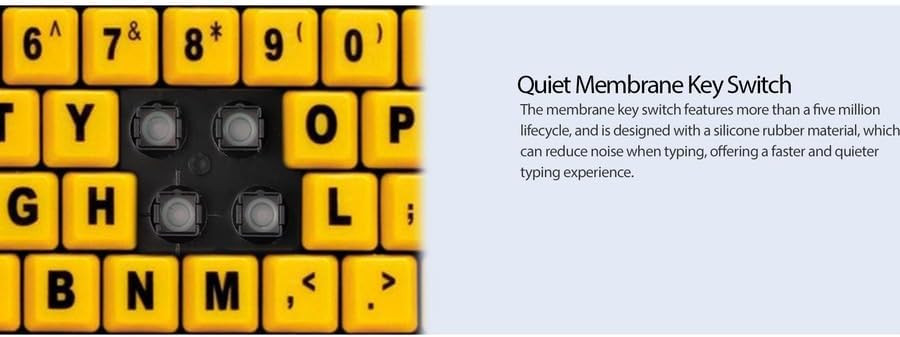
4-сүрөт: Детальдуу view showing the internal membrane key switch mechanism beneath a keycap.
- 104-Key US Layout: The keyboard features a standard 104-key US layout, providing a familiar typing experience.
5. Техникалык тейлөө
5.1 Баскычтопту тазалоо
Клавиатуранын көрүнүшүн жана функционалдуулугун сактоо үчүн:
- Тазалоодон мурун клавиатураны компьютерден ажыратыңыз.
- жумшак, бир аз колдонуу damp cloth to wipe the surface of the keys and the keyboard body.
- For stubborn dirt or debris between keys, use compressed air or a soft brush.
- Клавиатуранын сырткы көрүнүшүнө же ички компоненттерине зыян келтириши мүмкүн болгондуктан, катуу химиялык заттарды, абразивдүү тазалоочу каражаттарды же ашыкча нымдуулукту колдонуудан алыс болуңуз.
6. Кыйынчылыктарды
If you encounter issues with your Adesso AKB-132UY keyboard, refer to the following troubleshooting steps:
6.1 Баскычтоп жооп бербейт
- USB туташуусун текшерүү: Ensure the keyboard's USB cable is securely plugged into a functioning USB port on your computer. Try unplugging and re-plugging the cable.
- Башка USB портун колдонуп көрүңүз: Connect the keyboard to another USB port on your computer to rule out a faulty port.
- Компьютерди кайра иштетүү: Кээде жөнөкөй системаны өчүрүп күйгүзүү байланыш маселелерин чечиши мүмкүн.
- Башка компьютерде сыноо: If possible, test the keyboard on a different computer to determine if the issue is with the keyboard or your computer's setup.
6.2 Баскычтардын тыгылып калышы же катталбай калышы
- Clean Under Keys: Dust, crumbs, or debris can get lodged under keys. Use compressed air to clear any obstructions.
- Төгүлгөндөн сактаныңыз: Liquid spills can cause keys to stick or malfunction. If a spill occurs, disconnect the keyboard immediately and allow it to dry completely before reconnecting.
7. Техникалык шарттар
| Өзгөчөлүк | Description |
|---|---|
| Бренд | Adesso |
| Модель номери | AKB-132UY |
| Модель аты | EasyTouch 132 |
| Байланыш технологиясы | USB |
| Keyboard Description | Мембрана |
| Өзгөчө өзгөчөлүк | Large Print Keys |
| Түс | Кара сары |
| Материал | Пластик |
| Ачкычтардын саны | 104 |
| Баскычтоптун жайгашуусу | QWERTY (US Layout) |
| Power Source | USB кубаты |
| Элемент Салмагы | 1.5 фунт |
| Шайкеш түзмөктөр | PC |
8. Кепилдик маалыматы
The Adesso AKB-132UY keyboard comes with a 1 жылдык чектелген кепилдик from the date of purchase. This warranty covers defects in materials and workmanship under normal use. For specific terms and conditions, please refer to the warranty card included in your package or visit the official Adesso webсайт.
9. Колдоо
For technical support, product registration, or additional information, please visit the official Adesso webсайтында www.adesso.com. You may also find FAQs and driver downloads on their support pages.