
1. Киришүү
This manual provides essential instructions for the safe and efficient installation, operation, and maintenance of your TSL DV-AT1210A-D10 18 Port Fused Outputs Power Distribution Box. Please read this manual thoroughly before using the product and retain it for future reference. The TSL DV-AT1210A-D10 is designed to provide regulated 12VDC power distribution to multiple devices, featuring 18 individually fused outputs for enhanced protection.
2. Коопсуздук маалыматы
Always observe the following safety precautions to prevent injury and damage to the product or connected equipment:
- Ensure the power distribution box is installed in a dry, well-ventilated area, away from direct sunlight, heat sources, and moisture.
- Do not exceed the maximum total output current of 10 amps.
- Each output is fused at 3.0 amps. Do not bypass or use fuses with higher ratings than specified.
- Only connect devices that operate on 12VDC and do not exceed the 3.0 amp fuse rating per output.
- Disconnect the power distribution box from the AC mains before performing any maintenance or making connections.
- в ачпагылаasing of the power distribution box. There are no user-serviceable parts inside. Refer all servicing to qualified personnel.
- Бардык туташтырылган жабдуулардын туура жерге туташтырылышын камсыз кылыңыз.
3. Пакеттин мазмуну
Пакетте бардык буюмдар бар экенин текшериңиз:
- TSL DV-AT1210A-D10 Power Distribution Box
- AC Power Cord
- Колдонуучунун Колдонмосу (бул документ)
4. Продукт бүтүп калдыview
The TSL DV-AT1210A-D10 is an 18-port power distribution box designed for security cameras and other 12VDC devices. It features individual fuse protection for each output, an AC power switch, and a power LED indicator.
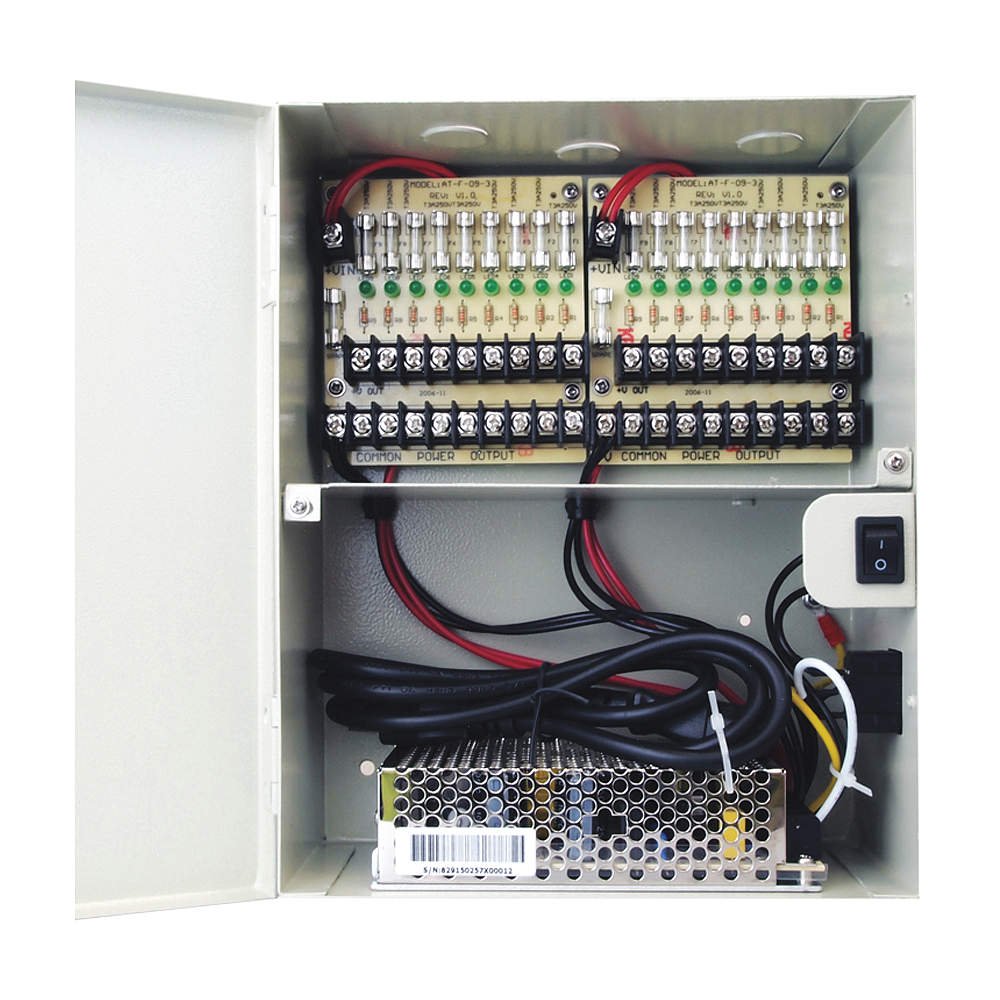
Фронт view of the TSL DV-AT1210A-D10 power distribution box, showing the input, output terminals, and indicators.
4.1 Негизги өзгөчөлүктөрү
- 12VDC Output with 10 amp total supply current.
- 18 individually fused protected outputs.
- Each output fuse rated at 3.0 amp.
- 115VAC 60Hz input.
- Integrated AC Power Switch and Power LED indicator.
- Compact dimensions: 10.6" H x 8.0" W x 3.9" D.
5. Орнотуу жана орнотуу
Follow these steps to properly set up your power distribution box:
- Монтаждоо: Choose a suitable location for mounting the power distribution box. Ensure it is a secure, dry, and well-ventilated area. Use appropriate screws and anchors (not included) to mount the box securely to a wall or surface.
- AC кубат туташуу: Ensure the AC power switch on the unit is in the OFF position. Connect the provided AC power cord to the power distribution box's AC input and then plug it into a standard 115VAC 60Hz wall outlet.
- Түзмөк байланыштары: Connect your 12VDC devices (e.g., security cameras) to the individual output terminals. Each output terminal provides 12VDC and is protected by a 3.0 amp fuse. Ensure the polarity is correct (+ to + and - to -).
- Байланыштарды текшерүү: Double-check all connections to ensure they are secure and correctly wired.
6. Иштөө нускамалары
Operating the TSL DV-AT1210A-D10 is straightforward:
- Күйгүзүү: Once all devices are connected and verified, flip the AC power switch to the ON position. The Power LED indicator on the unit should illuminate, indicating that the unit is receiving AC power and distributing 12VDC to the outputs.
- Аппараттын иштеши: Your connected 12VDC devices should now receive power and operate as intended.
- Өчүрүү: To power off the connected devices, simply flip the AC power switch to the OFF position.
7. Техникалык тейлөө
Regular maintenance ensures optimal performance and longevity of your power distribution box:
- Тазалоо: Periodically clean the exterior of the unit with a soft, dry cloth. Do not use liquid cleaners or aerosols. Ensure the unit is powered off and unplugged before cleaning.
- Сактагычты алмаштыруу: If an output stops providing power, the corresponding fuse may have blown.
- Disconnect the power distribution box from the AC mains.
- Identify the blown fuse (often indicated by a visible break in the wire inside the fuse).
- Carefully remove the blown fuse and replace it with a new 3.0 amp fuse of the same type. Using a fuse with a higher rating can damage the unit or connected devices.
- Reconnect AC power and test the output.
- Вентиляция: Ашыкча ысып кетүүнүн алдын алуу үчүн вентиляция тешиктери тосулуп калбагандыгын текшериңиз.
8. Кыйынчылыктарды
Жалпы маселелер жана аларды чечүү үчүн төмөнкү таблицаны караңыз:
| Көйгөй | Мүмкүн себеп | Чечим |
|---|---|---|
| No power to any output, Power LED is off. | No AC power, AC switch is off. | Check AC power cord connection. Ensure AC power switch is ON. Test the wall outlet. |
| One output has no power, others are working. | Blown fuse for that specific output. | Replace the blown 3.0 amp fuse (refer to Maintenance section). Check the connected device for short circuits. |
| All outputs have low or intermittent power. | Total current draw exceeds 10 amp кубаттуулугу. | Reduce the number of connected devices or replace high-current devices with lower-current alternatives. |
| Unit feels excessively hot. | Начар желдетүү, ашыкча жүк. | Ensure proper airflow around the unit. Reduce load if necessary. |
Бул чечимдерди колдонуу аракетинен кийин көйгөй чечилбесе, кардарларды колдоо кызматына кайрылыңыз.
9. Техникалык шарттар
| Модел | DV-AT1210A-D10 |
| Киргизүү көлөмүtage | 115VAC, 60Гц |
| Output Voltage | 12VDC |
| Жалпы чыгаруу ток | 10 Amps |
| Чыгуулардын саны | 18 Fused Outputs |
| Fuse Rating (per output) | 3.0 Amps |
| Өлчөмдөрү (H x W x D) | 10.6" x 8.0" x 3.9" |
| Салмагы | 6 фунт |
| Агенттиктин тизмеси | UL / CUL |
10. Кепилдик маалыматы
This product is covered by a limited warranty. For specific warranty terms and conditions, please refer to the warranty card included with your purchase or visit the official TSL webсайт. Сатып алуу квитанциясын кепилдик дооматтары үчүн сатып алуунун далили катары сактаңыз.
11. Кардарларды колдоо кызматы
If you have any questions, require technical assistance, or need to report an issue, please contact TSL customer support. Contact details can typically be found on the product packaging or the official TSL webсайт.
Онлайн колдоо: www.tsl.com/support (Example link, please refer to actual manufacturer's webсайт)