
1. User Guide & Product Overview
The Valcom VC-V-400 is an omni-directional dynamic desktop microphone designed for clear audio capture in various applications. It features a low impedance design and includes a push-to-talk switch with a locking bar for convenient operation. This manual provides essential information for setting up, operating, and maintaining your Valcom VC-V-400 microphone.
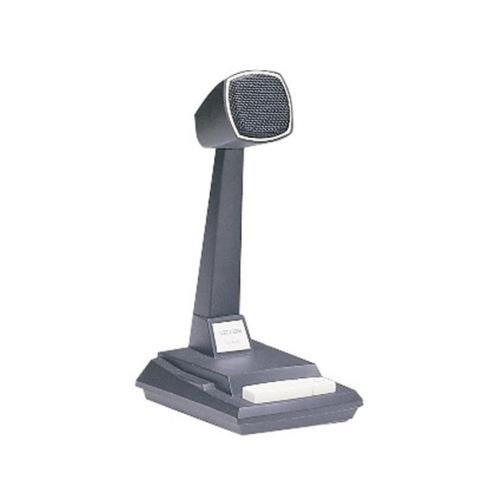
Figure 1: Valcom VC-V-400 Dynamic Desktop Microphone. An image showing the Valcom VC-V-400 Dynamic Desktop Microphone, featuring a dark grey base with a white push-to-talk bar, and a tall stand supporting the microphone head with a metallic grille.
2. Орнотуу нускамалары
To ensure proper functionality, the Valcom VC-V-400 microphone requires the Valcom V-9939B Microphone Adapter (sold separately) for connection to your system.
2.1 Пакеттен чыгаруу
- Микрофонду таңгагынан этияттык менен чыгарыңыз.
- Verify that all components are present: Valcom VC-V-400 Microphone.
2.2 Connection
- Ensure your audio system or device is powered off before making connections.
- Connect the XLR connector of the Valcom VC-V-400 microphone to the appropriate input on the Valcom V-9939B Microphone Adapter.
- Connect the Valcom V-9939B Microphone Adapter to your audio system or PC as per the adapter's instructions.
- Once all connections are secure, you may power on your audio system.
3. Иштөө нускамалары
The Valcom VC-V-400 microphone is designed for ease of use with its integrated push-to-talk functionality.
3.1 Push-to-Talk (PTT) Operation
- To activate the microphone for speaking, press and hold the white push-to-talk bar located on the base of the microphone.
- Release the bar to mute the microphone.
3.2 Locking Bar Feature
- For continuous microphone activation, push the white push-to-talk bar down and slide the locking bar (if present and functional on your model) to hold it in the depressed position.
- To disengage, slide the locking bar back and allow the push-to-talk bar to return to its original position.
3.3 Микрофонду жайгаштыруу
As an omni-directional microphone, the VC-V-400 picks up sound equally from all directions. Position the microphone centrally within the desired speaking area for optimal audio capture.
4. Техникалык тейлөө
Proper care and maintenance will extend the life of your Valcom VC-V-400 microphone.
- Тазалоо: Use a soft, dry cloth to wipe the exterior of the microphone. Do not use liquid cleaners or abrasive materials.
- Сактагыч: Микрофонду колдонбогон учурда, аны таза, кургак чөйрөдө, өтө жогорку температурадан жана нымдуулуктан алыс сактаңыз.
- Колдонуу: Микрофонду түшүрүүдөн же ага катуу таасир этүүдөн качыңыз, анткени бул ички компоненттерге зыян келтириши мүмкүн.
5. Кыйынчылыктарды
If you encounter issues with your Valcom VC-V-400 microphone, refer to the following common problems and solutions:
| Көйгөй | Мүмкүн себеп | Чечим |
|---|---|---|
| Аудио чыгышы жок |
|
|
| Poor audio quality (e.g., static, low volume) |
|
|
6. Техникалык шарттар
| Өзгөчөлүк | Деталь |
|---|---|
| Бренд | Valcom |
| Модель аты | VC-V-400 |
| Микрофон форма фактору | Таблица массив |
| Полярдык үлгү | Көп багыттуу |
| Байланыш технологиясы | XLR |
| Туташтыргыч түрү | XLR |
| Өзгөчө өзгөчөлүк | Push-to-talk with locking bar, Lift-to-talk mode |
| Шайкеш түзмөктөр | Personal Computer (requires V-9939B adapter) |
| Түс | White (microphone base) |
| Камтылган компоненттер | Микрофон |
| Элемент Салмагы | 3.4 фунт (болжол менен 1.54 кг) |
| Power Source | Corded Electric (via adapter) |
| Ызы-чуунун катышы | 60 дБ |
| Каналдардын саны | 1 |
| Frequency Response | 15 KHz |
| Өндүрүүчү | VALCOM |
| UPC | 809390045079, 807035655225 |
| Дата биринчи жеткиликтүү | 11-июнь, 2014-жыл |
7. Кепилдик маалыматы
Specific warranty details for the Valcom VC-V-400 Dynamic Desktop Microphone are not provided in this document. Please refer to the product packaging or contact Valcom directly for comprehensive warranty information.
8. Колдоо
For technical assistance, product inquiries, or further support regarding your Valcom VC-V-400 microphone, please contact Valcom customer service. Contact information can typically be found on the manufacturer's official webсайт же продукт таңгак.