
1. Киришүү
This user manual provides essential information for the safe and efficient installation, operation, and maintenance of your Supermicro YM-5201D ATX & EPS12V Power Supply. Please read this manual thoroughly before using the product to ensure proper functionality and to prevent damage.

Figure 1: Supermicro YM-5201D ATX & EPS12V Power Supply, showing the main unit and attached power cables.
2. Коопсуздук маалыматы
Электр менен камсыздоого жана туташкан компоненттерге жаракат алуунун же бузулуунун алдын алуу үчүн ар дайым төмөнкү коопсуздук чараларын сактаңыз:
- Орнотуудан же алып салуудан мурун, кубат булагынын AC розеткасынан ажыратылганын текшериңиз.
- Электр жабдыгын ачпаңыз casing. There are no user-serviceable parts inside, and opening it voids the warranty and exposes you to dangerous voltages.
- Ашыкча ысып кетүүнүн алдын алуу үчүн электр менен камсыздоону жакшы желдетилген жерге орнотуңуз.
- Use only the cables provided or approved by Supermicro for this power supply.
- Электр булагына нымдуулук же өтө жогорку температура таасир этүүдөн алыс болуңуз.
- Ensure proper grounding of the computer system.
3. Пакеттин мазмуну
Пакетте бардык буюмдар бар экенин текшериңиз:
- Supermicro YM-5201D ATX & EPS12V Power Supply
- AC кубат кабели (аймакка тиешелүү)
- Монтаждоо бурамалар
- Колдонуучунун Колдонмосу (бул документ)
4. Орнотуу жана орнотуу
Follow these steps to install the power supply into your computer chassis:
- Системаны даярдоо: Disconnect the computer from the AC power outlet. Open the computer case according to its manufacturer's instructions.
- Эски кубат менен жабдууну алып салуу (эгер бар болсо): Unscrew and remove the existing power supply. Disconnect all power cables from the motherboard, graphics card, drives, and other components.
- Install New Power Supply: Carefully slide the Supermicro YM-5201D power supply into the designated power supply bay in your chassis. Ensure the fan is oriented correctly for optimal airflow (typically facing downwards or towards the rear vent).
- Secure the Power Supply: Align the screw holes on the power supply with those on the chassis. Secure the power supply using the provided mounting screws.
- Кабелдерди туташтыруу:
- 24-пин ATX Motherboard Connector: Connect the large 24-pin connector to the corresponding port on your motherboard. Ensure it clicks into place.
- 8-pin (4+4) EPS12V CPU Connector: Connect the 8-pin or split 4+4-pin connector to the CPU power port on your motherboard.
- PCIe Connectors (if applicable): If your graphics card requires additional power, connect the appropriate 6-pin or 8-pin PCIe power connectors.
- SATA Power Connectors: SATA кубат кабелдерин катуу дисктерге, SSDлерге жана оптикалык дисктерге туташтырыңыз.
- Molex Connectors (if applicable): Connect Molex power cables to any legacy devices or case fans that require them.
- Кабелдик башкаруу: Корпустун ичиндеги аба агымын жана эстетиканы жакшыртуу үчүн кабелдерди тыкан өткөрүңүз.
- Шассиди жабуу: Once all connections are secure, close the computer case.
- AC кубатына туташтыруу: Connect the AC power cord to the power supply's inlet and then to a grounded wall outlet or surge protector.
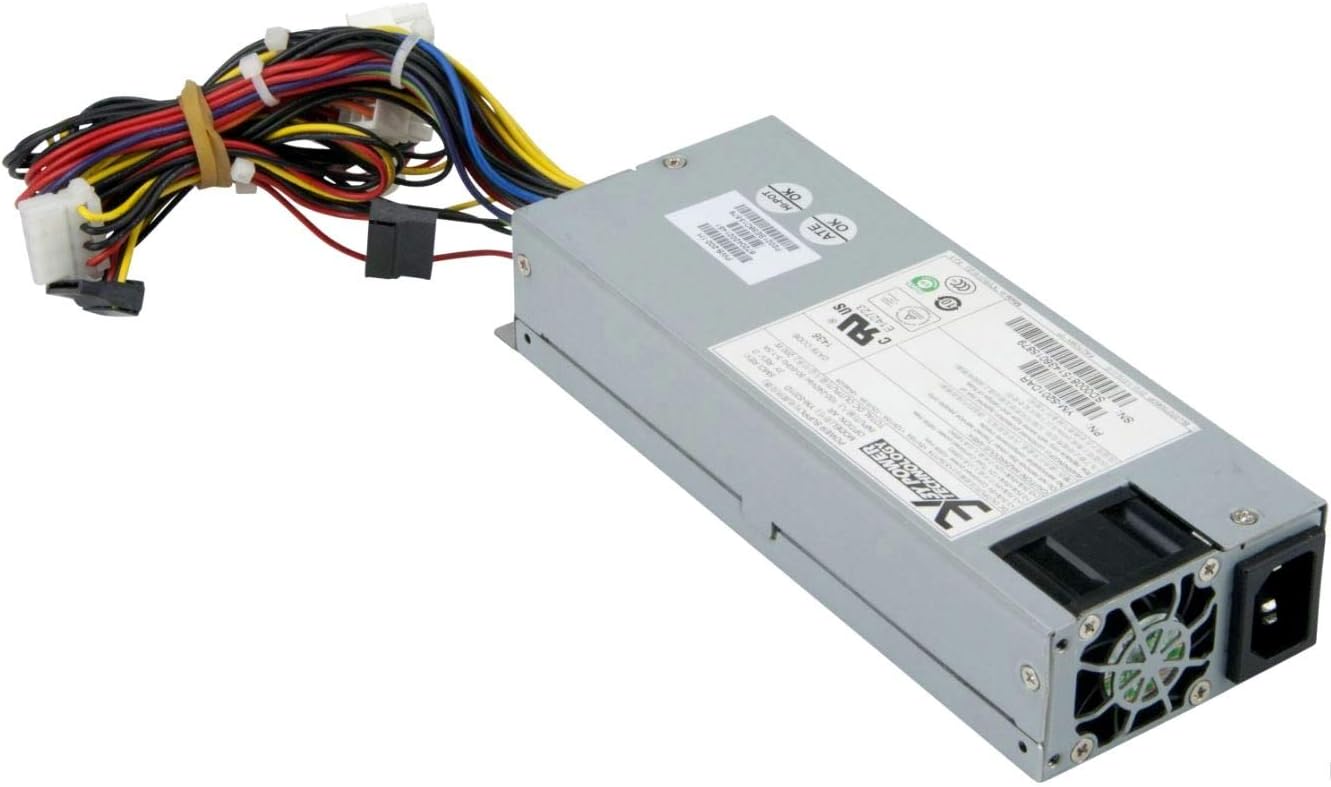
2-сүрөт: Арткы view of the Supermicro YM-5201D Power Supply, highlighting the cooling fan and AC power input.
5. Иштөө нускамалары
After successful installation, operating the power supply is straightforward:
- Күйгүзүү: Ensure the power switch on the rear of the power supply (if present) is in the 'ON' (I) position. Then, press the power button on your computer case.
- Өчүрүү: Shut down your computer through the operating system. Once the system is off, you can flip the power switch on the power supply to the 'OFF' (O) position for complete power disconnection.
- Кадимки операция: The power supply will automatically regulate power delivery to your components based on demand. Ensure adequate ventilation around your computer to prevent heat buildup.
6. Техникалык тейлөө
Regular maintenance helps prolong the life of your power supply:
- Чаңды тазалоо: Periodically (e.g., every 3-6 months), disconnect the power supply from the AC outlet and use compressed air to gently blow dust out of the power supply's fan and vents. Do not open the casing.
- Кабелдик текшерүү: Occasionally check all power cables for any signs of wear, fraying, or loose connections.
- Вентиляция: Ensure that the computer case's ventilation openings are not obstructed.
7. Кыйынчылыктарды
Эгер көйгөйлөргө туш болсоңуз, төмөнкү жалпы көйгөйлөрдү жана чечимдерди караңыз:
| Көйгөй | Мүмкүн себеп | Чечим |
|---|---|---|
| Компьютер күйбөйт. | Power cable loose; Power switch off; Faulty component; Insufficient power. | Check AC power cord connection. Ensure power supply switch is ON. Verify all internal power connections (24-pin, 8-pin CPU). Test with minimal components. |
| Система күйөт, бирок дароо өчүрүлөт. | Overload; Overheating; Short circuit. | жалпы ват камсыз кылууtage draw is within PSU limits. Check for proper ventilation. Inspect for any loose screws or components that might be causing a short. |
| Электр кубаты менен камсыздоочу станциядан чыккан катуу желдеткичтин үнү. | Dust buildup; Fan bearing issue; High load. | Clean dust from fan and vents using compressed air. If noise persists and is excessive, consider professional inspection. |
If troubleshooting steps do not resolve the issue, contact Supermicro technical support.
8. Техникалык шарттар
Key technical specifications for the Supermicro YM-5201D Power Supply:
| Өзгөчөлүк | Деталь |
|---|---|
| Модель аты | YM-5201D |
| Элемент моделинин номери | PWS-202-1H |
| Бренд | Supermicro |
| Форма фактору | 1U |
| Чыгуу Wattage | 200 Ватт |
| Туташтыргыч түрү | ATX |
| Шайкеш түзмөктөр | Desktop Computers, Servers, Desktop Components |
| Муздатуу ыкмасы | Аба |
| Продукциянын өлчөмдөрү (L x W x Y) | 1.1 x 9.7 x 6.5 дюйм |
| Элемент Салмагы | 6.6 фунт |
| Дата биринчи жеткиликтүү | 14-ноябрь, 2012-жыл |
9. Кепилдик жана колдоо
Кепилдик маалыматы жана техникалык колдоо үчүн расмий Supermicro караңыз webсайтка же түздөн-түз кардарларды тейлөөгө кайрылыңыз. Кепилдик дооматтар үчүн сатып алганыңыздын далилин сактаңыз.
Supermicro расмий Webсайт: www.supermicro.com