
DEWALT DCR006
DEWALT DCR006 Bluetooth Jobsite Speaker User Manual
Model: DCR006 | Brand: DEWALT
Introduction
Thank you for choosing the DEWALT DCR006 Bluetooth Jobsite Speaker. This speaker is designed to provide robust audio performance and versatility in various work environments. It features Bluetooth connectivity, auxiliary input, and a USB charging port, powered by either AC/DC or DEWALT 12V/20V MAX battery packs. This manual provides essential information for safe and effective use of your speaker.
Маанилүү коопсуздук нускамалары
Өрт, электр тогуна урунуу жана жеке жаракат алуу коркунучун азайтуу үчүн электр шаймандарын колдонууда ар дайым негизги коопсуздук чараларын сактаңыз.
- Динамикти иштетүүдөн мурун бардык көрсөтмөлөрдү окуп чыгыңыз.
- Do not expose the speaker to rain or wet conditions.
- Do not use the speaker near water, such as bathtubs, sinks, or swimming pools.
- Кургак чүпүрөк менен гана тазалаңыз.
- Эч кандай желдетүүчү тешиктерди жаап албаңыз. Өндүрүүчүнүн көрсөтмөлөрүнө ылайык орнотуу.
- Радиаторлор, жылуулук регистрлери, мештер же башка аппараттар (анын ичинде) сыяктуу жылуулук булактарынын жанына орнотпоңуз ampкөтөргүчтөр) жылуулукту пайда кылуучу.
- Электр шнурунун басылып кетүүсүнөн же кысып калуудан сактаңыз, өзгөчө сайгычтарда, розеткаларда жана алар аппараттан чыга турган жеринде.
- Өндүрүүчү тарабынан көрсөтүлгөн тиркемелерди/аксессуарларды гана колдонуңуз.
- Бул аппаратты чагылгандуу бороондордо же узак убакыт бою колдонбогондо электр розеткасынан ажыратыңыз.
- Бардык тейлөөлөрдү квалификациялуу тейлөө кызматкерлерине тапшырыңыз. Аппарат кандайдыр бир зыянга учураганда, мисалы, кубат берүүчү шнур же сайгыч бузулганда, суюктук төгүлгөндө же аппараттын ичине нерселер түшкөндө, аппарат жамгырга же нымдуулукка дуушар болгондо, нормалдуу иштебей калганда тейлөө талап кылынат. , же түшүрүлгөн.
- Use only with the battery pack specified by DEWALT.
Продукт бүттүview
The DEWALT DCR006 is a compact and durable Bluetooth speaker designed for jobsite use. It features a rugged rubber housing for enhanced durability.

Сүрөт 1: Алдыңкы view of the DEWALT DCR006 Bluetooth Jobsite Speaker, showing the speaker grille and control panel.

2-сүрөт: Бурчтуу view of the DEWALT DCR006 Bluetooth Jobsite Speaker, highlighting its compact design and robust construction.
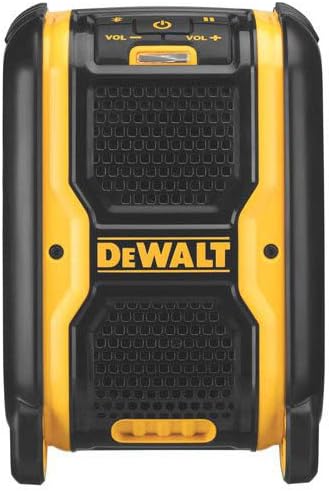
3-сүрөт: Каптал view of the DEWALT DCR006 Bluetooth Jobsite Speaker, showing the battery compartment area.
Башкаруу каражаттары жана порттор:
- Кубат баскычы: Динамикти күйгүзөт же өчүрөт.
- Көлөмдү өйдө / ылдый баскычтары: Динамиктин чыгаруу үнүн тууралайт.
- Bluetooth жупташтыруу баскычы: Bluetooth жупташтыруу режимин баштайт.
- Ойнотуу/тындыруу баскычы: Медианы ойнотууну көзөмөлдөйт.
- Көздү өткөрүп жиберүү баскычтары: Кийинки же мурунку трекке өткөрүп жиберет.
- Көмөкчү киргизүү (AUX IN): 3.5 мм аудио кабели аркылуу түзмөктөрдү туташтыруу үчүн.
- USB кубаттоо порту: For charging external devices (5V/2.1A output).
- AC/DC кубат порттору: For connecting to wall power or a DC power source.
- Батарея бөлүмү: Located on the side, compatible with DEWALT 12V or 20V MAX battery packs.
Жайгашуу
Спикерди иштетүү:
The DCR006 speaker can be powered by an AC adapter or a DEWALT 12V/20V MAX battery pack.
- AC кубатын колдонуу:
- Connect the provided AC power adapter to the AC power port on the speaker.
- Адаптерди кадимки эле розеткага сайыңыз.
- Using a DEWALT Battery Pack:
- Open the battery compartment cover on the side of the speaker.
- Slide a charged DEWALT 12V or 20V MAX battery pack into the compartment until it clicks into place.
- Батарея уясынын капкагын бекем жабыңыз.
The speaker will automatically draw power from the connected source. If both AC power and a battery are connected, the speaker will prioritize AC power and charge the battery (if applicable and the battery is a charging type).
Иштөө нускамалары
1. Күйгүзүү/өчүрүү:
- басып, кармап туруңуз Кубат баскычы for approximately 2 seconds to turn the speaker on or off.
- A power indicator light will illuminate when the speaker is on.
2. Bluetooth жупташтыруу:
Connect your mobile device wirelessly to the DCR006 speaker via Bluetooth.
- Динамик күйгүзүлгөнүн текшериңиз.
- басып, кармап туруңуз Bluetooth жупташтыруу баскычы for approximately 2 seconds. The Bluetooth indicator light will flash, indicating pairing mode.
- Мобилдик түзмөгүңүздө Bluetooth иштетип, жеткиликтүү түзмөктөрдү издеңиз.
- Select "DEWALT DCR006" from the list of devices.
- Once paired, the Bluetooth indicator light on the speaker will turn solid, and you will hear an audible confirmation.
- Эми сиз түзмөгүңүздөн аудиону динамик аркылуу ойной аласыз.
3. Auxiliary Input (AUX IN):
Bluetooth жок түзмөктөр үчүн кошумча киргизүүнү колдонуңуз.
- 3.5 мм аудио кабелдин бир учун (кошулмада жок) динамиктеги AUX IN портуна туташтырыңыз.
- Кабелдин экинчи учун аппаратыңыздын гарнитура уячасына же аудио чыгышына туташтырыңыз.
- Динамик автоматтык түрдө кошумча режимге өтөт.
- Adjust the volume on both your device and the speaker.
4. USB заряддоо порту:
The USB port provides power to charge compatible external devices.
- Түзмөгүңүздүн USB кубаттоочу кабелин динамиктин USB портуна туташтырыңыз.
- Динамик күйгүзүлгөнүн текшериңиз.
- The speaker will begin charging your device. Note that charging speed may vary depending on the device and the speaker's power source.
5. Үндү көзөмөлдөө:
- басыңыз Үнүн жогорулатуу (+) or Үнүн азайтуу (-) спикердин үнүн тууралоо үчүн баскычтар.
Техникалык тейлөө
- Тазалоо: Динамикти жумшак менен сүртүңүз, гamp cloth. Do not use abrasive cleaners or solvents. Ensure all ports are dry before use.
- Сактагыч: Store the speaker in a clean, dry environment when not in use. Remove battery packs if storing for extended periods.
- Батареяга кам көрүү: Follow the instructions provided with your DEWALT 12V/20V MAX battery packs for proper charging and storage.
Проблемаларды чечүү
| Көйгөй | Мүмкүн себеп | Чечим |
|---|---|---|
| Динамик күйбөйт. | No power source connected or battery is depleted. | Connect to AC power or insert a charged DEWALT 12V/20V MAX battery pack. |
| Динамиктен үн жок. | Volume too low, incorrect input source, or device not connected properly. | Increase speaker and device volume. Ensure correct input (Bluetooth/AUX) is selected. Re-pair Bluetooth or re-connect AUX cable. |
| Bluetooth түзмөгү жупташтырылбайт. | Speaker not in pairing mode, device too far, or previously paired. | Ensure speaker is in Bluetooth pairing mode (flashing light). Move device closer to speaker. Forget "DEWALT DCR006" on your device and try pairing again. |
| USB кубаттоо иштебей жатат. | Speaker not powered on, or device not compatible. | Ensure speaker is powered on. Check device compatibility and cable connection. |
Техникалык шарттар
| Бренд | ДЕВАЛЬТ |
| Модел | DCR006 |
| Динамиктин максималдуу чыгаруу күчү | 6 Ватт |
| Байланыш технологиясы | Көмөкчү, Bluetooth, USB |
| Киргизүү көлөмүtage | 20 Volts (compatible with 12V/20V MAX batteries) |
| Турак жай материалы | Каучук |
| Динамик түрү | Сыртта |
| Сунушталган Колдонуулар | Workplaces, outdoor activities, portable music playback, mobile device charging |
| Түс | Сары/Кара |
| Максималдуу диапазон (Bluetooth) | 100 Фут |
| Башкаруу ыкмасы | Tactile Buttons |
| Элементтин өлчөмдөрү (L x W x Y) | 15.2 см x 25.4 см x 30.2 см (6 дюйм x 10 дюйм x 11.9 дюйм) |
| Power Source | Battery (DEWALT 12V/20V MAX) or AC Adapter |
| Коробканын мазмуну | Speaker, AC Power Adapter |

Figure 4: Dimensions of the DEWALT DCR006 Bluetooth Jobsite Speaker.
Кепилдик жана колдоо
The DEWALT DCR006 Bluetooth Jobsite Speaker comes with a 3 жылдык чектелген кепилдик. This warranty covers defects in materials and workmanship. For detailed warranty information, please refer to the warranty card included with your product or visit the official DEWALT webсайт.
For technical support, service, or replacement parts, please contact DEWALT customer service. Contact information can typically be found on the DEWALT webсайтында же продуктунун таңгагында.
Ask a question about this manual
Ask about setup, troubleshooting, compatibility, parts, safety, or missing instructions. Manuals+ will review the question and use this page’s manual context to help answer it.