
1. Киришүү
The FURUNO NavPilot 711C is an advanced autopilot control unit designed for marine vessels. It features a sunlight-viewable color day/night graphic display and incorporates a self-learning and adaptive software algorithm to optimize course-keeping capabilities. This manual provides essential information for the proper setup, operation, and maintenance of your NavPilot 711C system.
The NavPilot 711C dynamically adjusts parameters such as vessel speed, trim, draught, tide, and wind effects during navigation. These parameters are continuously stored and optimized in the system memory, enhancing the autopilot's versatility and accuracy.
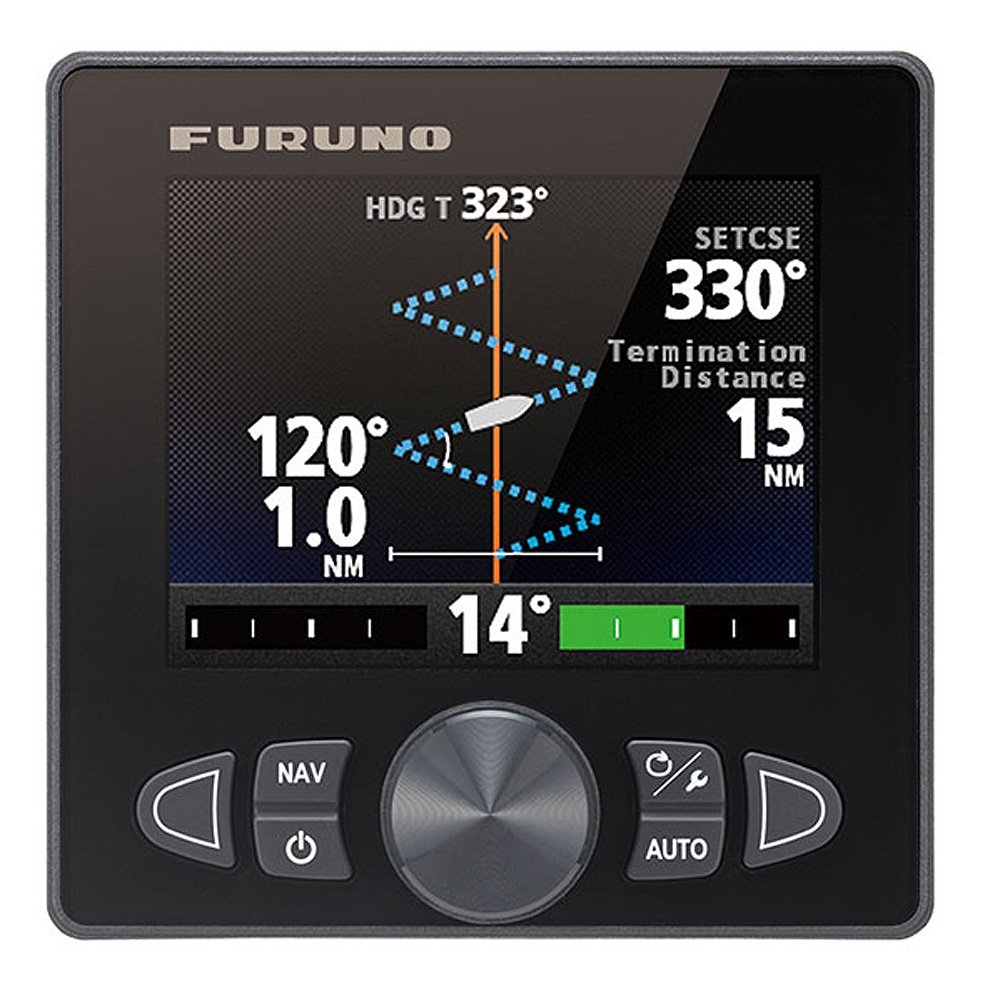
Сүрөт 1: Алдыңкы view of the FURUNO NavPilot 711C Autopilot Control Unit. This image shows the color display and control buttons.
2. Орнотуу
2.1 Орнотууга байланыштуу маселелер
Professional installation by a qualified marine electronics technician is highly recommended to ensure optimal performance and safety. Ensure the control unit is mounted in a location that provides clear visibility, protection from direct weather exposure, and easy access for operation.
2.2 Зымдар жана байланыштар
Connect the NavPilot 711C to the vessel's power supply, rudder feedback unit, compass, and other necessary sensors according to the detailed wiring diagrams provided in the full installation manual. Pay close attention to polarity and secure all connections to prevent corrosion and signal loss.
- Электр камсыздоо: Connect to a stable 12/24V DC power source.
- NMEA 2000/0183: Integrate with other marine electronics for data exchange.
- Rudder Feedback: Essential for accurate rudder position sensing.
- Compass/Heading Sensor: Provides critical heading information to the autopilot.
2.3 Баштапкы конфигурация
Upon initial power-on, the system will guide you through a setup wizard. This includes:
- Тил тандоо: Choose your preferred operating language.
- Vessel Type: Select the type of vessel (e.g., power, sail).
- Rudder Type: Configure the rudder system (e.g., hydraulic, mechanical).
- Компас калибрлөө: Perform a compass calibration for accurate heading data.
- Sea Trial: Conduct a sea trial to allow the self-learning algorithm to begin optimizing the vessel's steering characteristics.
3. Иштөө нускамалары
3.1 Негизги башкаруу каражаттары
The NavPilot 711C features an intuitive interface with dedicated buttons and a rotary knob for easy operation. Refer to the unit's front panel for button layout.
- AUTO баскычы: Engages or disengages autopilot mode.
- Күтүү режиминдеги баскыч: Puts the autopilot in standby mode, allowing manual steering.
- +/- 1°/10° Buttons: Adjusts the course in 1-degree or 10-degree increments.
- MENU баскычы: Accesses system settings and advanced features.
- Ротари баскычы: Used for menu navigation and fine-tuning adjustments.
3.2 Engaging Autopilot
To engage the autopilot, steer the vessel to the desired heading and press the АВТО button. The system will then maintain this course. Monitor the vessel's behavior and make minor adjustments as needed.
3.3 Course Adjustment
While in AUTO mode, use the +/- 1 ° or +/- 10 ° buttons to change the vessel's heading. The new course will be displayed on the screen. For larger course changes, it is often safer to temporarily switch to STANDBY, manually steer to the new course, and then re-engage AUTO.
3.4 Day/Night Display Modes
The NavPilot 711C features a color display optimized for both day and night viewing. Access the display settings through the MENU to switch between day and night modes, adjusting brightness and color schemes to suit ambient light conditions. Night mode is designed to minimize impact on night vision.
4. Техникалык тейлөө
4.1 Агрегатты тазалоо
Regularly clean the display and control panel with a soft, damp cloth. Avoid using abrasive cleaners, solvents, or harsh chemicals, as these can damage the screen and casing. Ensure the unit is powered off before cleaning.
4.2 Программалык камсыздоо жаңыртуулары
Periodically check the FURUNO website for available software updates. Updates can provide performance enhancements, new features, and bug fixes. Follow the instructions provided with the update package carefully to avoid damaging the unit.
4.3 System Inspection
Conduct periodic visual inspections of all cables and connections to the NavPilot 711C. Look for signs of corrosion, fraying, or loose connections. Ensure all mounting hardware is secure. Address any issues promptly to prevent system malfunctions.
5. Кыйынчылыктарды
This section provides solutions to common issues you might encounter with your NavPilot 711C. For more complex problems, consult a qualified technician or FURUNO support.
| Көйгөй | Мүмкүн себеп | Чечим |
|---|---|---|
| Түзмөк күйбөйт. | No power supply, blown fuse, loose connection. | Check power cables, fuses, and battery connections. Ensure the main power switch is on. |
| Autopilot not holding course accurately. | Improper calibration, sensor issues, strong currents/winds, incorrect vessel parameters. | Perform compass calibration. Check rudder feedback unit. Verify vessel parameters in settings. Allow the self-learning algorithm time to adapt. |
| Дисплей күңүрт же окулбайт. | Brightness setting too low, incorrect display mode, direct sunlight glare. | Adjust display brightness. Switch between day/night modes. Reposition to avoid direct glare if possible. |
| Ката билдирүү көрсөтүлдү. | Sensor failure, communication error, internal fault. | Note the error code and consult the full manual or contact FURUNO support with the code. Check connections to relevant sensors. |
6. Техникалык шарттар
Key technical specifications for the FURUNO NavPilot 711C Autopilot Control Unit:
- Модель номери: FUR-FAP7011C
- Бренд: ФУРУНО
- Дисплей түрү: Color Day/Night Graphic Display
- Өндүрүүчү: ФУРУНО
- ASIN: B00OM52HFA
- Биринчи жеткиликтүү: 17-октябрь, 2014-жыл
Note: Some screen size and resolution specifications found in general product data may not accurately reflect the compact display of the NavPilot 711C control unit. Please refer to official FURUNO documentation for precise display dimensions.
7. Кепилдик маалыматы
The FURUNO NavPilot 711C Autopilot Control Unit is covered by a manufacturer's warranty. The specific terms and duration of the warranty may vary by region and purchase location. Please retain your proof of purchase. For detailed warranty information, including coverage and claims procedures, refer to the warranty card included with your product or visit the official FURUNO webсайт.
8. Кардарларды колдоо кызматы
For technical assistance, troubleshooting beyond this manual, or service inquiries, please contact FURUNO customer support. Have your product model number (FUR-FAP7011C) and serial number ready when contacting support.
- FURUNO Official Webсайт: www.furunousa.com
- Байланыш маалыматы: Аткаминердин "Биз менен байланыш" бөлүмүнө кайрылыңыз webсиздин аймагыңызга тиешелүү телефон номерлери жана электрондук почта даректери үчүн сайт.