
Electro-Voice SxA250
Electro-Voice SxA250 15 дюймдук эки тараптуу динамик колдонуучусунун колдонмосу
Model: SxA250
Introduction
This manual provides essential information for the proper setup, operation, and maintenance of your Electro-Voice SxA250 15-Inch 2-Way Powered Speaker. Please read this manual thoroughly before using the product to ensure optimal performance and safety.
The Electro-Voice SxA250 is a high-performance, self-powered loudspeaker designed for professional audio applications. It features a 15-inch dynamic driver, delivering robust and clear audio with an 80 x 55-degree coverage pattern. Its durable construction and versatile mounting options make it suitable for various environments.
Маанилүү коопсуздук маалыматы
Ар дайым төмөнкү коопсуздук чараларын сактаңыз:
- Динамикти жамгырдын же нымдуулуктун таасирине дуушар кылбаңыз.
- Динамиктин айланасында туура желдетүүнү камсыз кылыңыз.
- Only connect to the specified power supply (100-120V).
- Агрегатты өзүңүз тейлөөгө аракет кылбаңыз. Бардык тейлөөлөрдү квалификациялуу кызматкерлерге тапшырыңыз.
- Динамикти күн нуру түз тийген жерге же жылуулук булактарынын жанына койбоңуз.
Кутуда эмне бар
Таңгактан чыгарганда, бардык компоненттердин бар экендигин текшериңиз:
- Electro-Voice SxA250 Powered Speaker
- Speaker Stand (if included with specific package)
- Tabletop Mount (if included with specific package)
- Floor Stand (if included with specific package)
- Электр кабели
- Колдонуучунун Колдонмосу (бул документ)
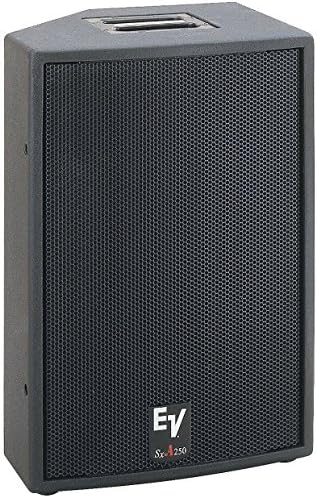
Сүрөт: алдыңкы view of the Electro-Voice SxA250 powered speaker, showing the black cabinet and metal grille. The EV logo and SxA250 model name are visible on the lower front.
Жайгашуу
1. Жайгаштыруу
Position the SxA250 speaker on a stable, flat surface or mount it using a compatible speaker stand or floor stand. Ensure the speaker is placed in a location that allows for optimal sound dispersion and avoids obstructions.
- Этаж: Use the integrated mounting points for a floor stand.
- Столдун үстүнө орнотуу: Place the speaker on a sturdy tabletop, ensuring stability.
2. Power Connection
- Динамиктин кубат которгучу "OFF" абалында экенин текшериңиз.
- Connect the provided power cord to the AC inlet on the rear panel of the speaker.
- Plug the other end of the power cord into a grounded electrical outlet (100-120V AC).
3. Аудио байланыштары
The SxA250 features multiple input options:
- Микрофон/Лин Киргизүүлөрү: Two combination XLR/TRS inputs are available for connecting microphones or line-level audio sources.
- Line Level Output: An XLR output is provided for linking multiple speakers or sending the audio signal to another device.
- USB киргизүү: Шайкеш келген USB түзмөктөрүн туташтыруу үчүн.
- Aux Киргизүү: For connecting auxiliary audio sources.
- RCA киргизүүлөр: RCA чыгыштары бар түзмөктөрдү туташтыруу үчүн.
Connect your audio source (mixer, microphone, instrument, etc.) to the appropriate input on the speaker's rear panel using high-quality cables.
Иштөө нускамалары
1. Күйгүзүү / Өчүрүү
- Күйгүзүүдөн мурун, үндү башкаруу элементтеринин баары минималдуу деңгээлге коюлганын текшериңиз.
- Flip the power switch on the rear panel to the "ON" position. The power indicator LED will illuminate.
- To power off, set the power switch to the "OFF" position.
2. Үн деңгээлин жана тонду тууралоо
- Киргизүүнүн кирешесин көзөмөлдөө: Adjust the individual gain controls for each input to achieve the desired input level without clipping.
- Негизги том: Use the master volume control to set the overall output level of the speaker.
- Бас жогорулатуу: Activate the Bass Boost feature for enhanced low-frequency response, if desired.
3. Үн менен башкаруу (эгер бар болсо)
The SxA250 is compatible with voice assistants for hands-free operation. Refer to your voice assistant's specific instructions for pairing and command setup. Ensure the speaker is connected to a network if required for voice control functionality.
Техникалык тейлөө
Тазалоо
- Disconnect the speaker from the power outlet before cleaning.
- Динамиктин сырткы беттерин сүртүү үчүн жумшак, кургак чүпүрөктү колдонуңуз.
- Абразивдүү тазалагычтарды, эриткичтерди же химиялык спрейлерди колдонбоңуз, анткени алар финишке зыян келтириши мүмкүн.
- Periodically check the grille for dust accumulation and gently clean if necessary.
Сактагыч
When not in use for extended periods, store the speaker in a cool, dry place, away from direct sunlight and extreme temperatures. It is recommended to use the original packaging for storage and transport.
Проблемаларды чечүү
| Көйгөй | Мүмкүн себеп | Чечим |
|---|---|---|
| Үн чыгышы жок |
|
|
| Distorted Sound |
|
|
| Кубат индикаторунун жарыгы жок |
|
|
If the problem persists after attempting these solutions, please contact Electro-Voice customer support.
Техникалык шарттар
| Өзгөчөлүк | Деталь |
|---|---|
| Модель аты | SxA250 |
| Динамик түрү | Кубаттуу Динамик |
| Вуфердин диаметри | 15 дюйм |
| Аудио драйвер түрү | Динамикалык драйвер |
| Камтуу бурч | 80 х 55 градус |
| Байланыш технологиясы | USB, Aux, RCA |
| Киргизүү көлөмүtage | 100-120 Вольт |
| Башкаруу ыкмасы | Voice Control (compatible), Manual Knobs |
| Камтылган компоненттер | Speaker Stand, Tabletop Mount, Floor Stand (depending on package) |
| Түс | Кара |
| Элемент Салмагы | 74 фунт |
| Өлчөмдөрү (болжол менен) | 30 x 24 x 17 дюйм (Пакеттин өлчөмдөрү) |
Кепилдик жана колдоо
Кепилдик маалымат
The Electro-Voice SxA250 comes with a Limited Warranty. Please refer to the warranty card included with your product or visit the official Electro-Voice webкепилдик камтууга жана узактыгына байланыштуу толук шарттар жана шарттар үчүн сайт.
Кардарларды колдоо
For technical assistance, service, or replacement parts, please contact Electro-Voice customer support. You can find contact information on the official Electro-Voice webсайты же сатуучуңуз тарабынан берилген кардарларды колдоо шилтемеси аркылуу.
Онлайн ресурстар: For additional information, FAQs, and software updates, visit the official Electro-Voice webсайт: www.electrovoice.com
Ask a question about this manual
Ask about setup, troubleshooting, compatibility, parts, safety, or missing instructions. Manuals+ will review the question and use this page’s manual context to help answer it.