
Creative X7
Creative Sound Blaster X7 Колдонуучунун колдонмосу
Модели: X7
1. Киришүү
The Creative Sound Blaster X7 is a high-resolution audio device designed to function as an external USB Digital-to-Analog Converter (DAC) and a powerful audio amplifier. It features low-latency Bluetooth connectivity and an integrated Dolby Digital decoder, providing an enhanced audio experience for various applications.
This manual provides detailed instructions for setting up, operating, and maintaining your Sound Blaster X7 to ensure optimal performance and longevity.

Сүрөт 1: Алдыңкы view of the Creative Sound Blaster X7, showcasing its design and main volume control.
2. Пакеттин мазмуну
Пакетте бардык буюмдар бар экенин текшериңиз:
- Creative Sound Blaster X7 Unit
- Кубаттуу адаптер
- USB кабели
- Стерео RCAдан 3.5 мм кабелге чейин
- Оптикалык кабель
- Ыкчам баштоо колдонмосу (эгер бар болсо)
3. Орнотуу
3.1 Кубатка туташуу
Connect the provided power adapter to the DC IN 24V port on the rear of the Sound Blaster X7, then plug it into a wall outlet.
3.2 Аудио байланыштар
The Sound Blaster X7 offers various audio input and output options. Refer to the diagram below for connection points.
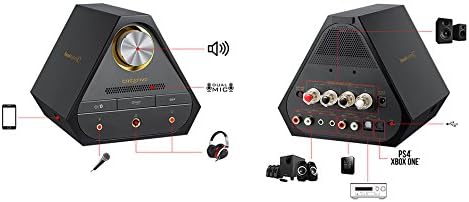
Image 2: Rear panel connections of the Sound Blaster X7, including speaker terminals, line out, optical in/out, and USB ports.
- USB Connection (PC/Mac): Use the supplied USB cable to connect the Sound Blaster X7 to your computer for high-resolution audio playback and control.
- Оптикалык киргизүү/чыгуу: Connect to compatible devices such as game consoles (PS4, Xbox One) or AV receivers using an optical cable for digital audio transmission.
- Line Out (RCA): Тышкы динамиктерге туташыңыз же ampRCA кабелдерин колдонуу менен көтөргүчтөр.
- Динамик терминалдары: For passive bookshelf speakers, connect speaker wires to the binding posts. Ensure correct polarity (+/-). The impedance switch allows selection between 4-8 ohms.
- Гарнитуранын чыгышы: Two 3.5mm and one 6.3mm (1/4-inch) headphone jacks are available on the front panel for connecting headphones.
- Микрофон киргизүү: A 3.5mm microphone input is available on the front panel.
3.3 Драйверди орнотуу (PC/Mac үчүн)
For optimal performance and access to all features, download and install the latest drivers and software from the official Creative webсайт. Орнотуу учурунда экрандагы көрсөтмөлөрдү аткарыңыз.
4. Иштөө нускамалары
4.1 Күйгүзүү/өчүрүү
Press the power button on the front panel to turn the unit on or off. The LED indicator will illuminate when powered on.
4.2 Үндү башкаруу
Rotate the large knob on the front panel to adjust the master volume. Press the knob to mute/unmute audio.
4.3 Киргизүү булагын тандоо
Use the input selection buttons on the front panel or the companion software/app to switch between connected audio sources (e.g., USB, Optical, Bluetooth).
4.4 Bluetooth жупташтыруу
Bluetooth түзмөгүн жупташтыруу үчүн:
- Ensure the Sound Blaster X7 is powered on.
- Press and hold the Bluetooth button on the front panel until the Bluetooth indicator blinks rapidly.
- On your mobile device, search for Bluetooth devices and select "Sound Blaster X7".
- Once paired, the Bluetooth indicator will glow solid.
4.5 Software and Mobile App Control
The Sound Blaster X7 can be controlled and customized using the Creative Sound Blaster software on PC/Mac or the Sound Blaster Central mobile app (iOS/Android). These applications allow for advanced audio adjustments, sound profiles, and input/output management.
Видео 1: Бүттүview of the Creative Sound Blaster X7's features and connectivity options. This video demonstrates the product's versatility across different devices.
5. Техникалык тейлөө
- Тазалоо: Use a soft, dry cloth to clean the exterior of the Sound Blaster X7. Avoid using liquid cleaners or abrasive materials.
- Вентиляция: Ensure the unit has adequate ventilation to prevent overheating. Do not block the ventilation grilles.
- Сактагыч: Узак мөөнөткө колдонулбаганда, аспапты кургак, салкын жерде, тике күндүн нурунан жана өтө температурадан алыс сактаңыз.
6. Кыйынчылыктарды
| Көйгөй | Мүмкүн себеп | Чечим |
|---|---|---|
| Аудио чыгышы жок | Incorrect input source selected; cables not connected properly; volume too low. | Verify input source; check all cable connections; increase volume. Ensure drivers are installed for PC/Mac. |
| Bluetooth жупташуу көйгөйлөрү | Device too far; Sound Blaster X7 not in pairing mode; interference. | Ensure devices are within range; put Sound Blaster X7 into pairing mode (blinking LED); restart both devices. |
| Бузулган аудио | Volume too high; incorrect audio settings; faulty cable. | Reduce volume; check audio settings in software/app; try a different cable. |
7. Техникалык шарттар
- Модел: X7
- Аудио чечилиши: Up to 24-bit / 192kHz
- Наушник импедансы: Supports up to 600 ohms
- Ampкөтөргүч чыгаруу: 100W stereo (with appropriate speakers)
- Байланыш: USB, Optical In/Out, RCA Line Out, Speaker Terminals, 3.5mm/6.3mm Headphone Out, 3.5mm Mic In, Bluetooth
- DAC: Burr-Brown PCM1794 127dB
- Декодер: Dolby Digital
- Зымсыз технология: Bluetooth
8. Кепилдик жана колдоо
Кепилдик жөнүндө маалымат жана техникалык колдоо алуу үчүн, расмий Creative сайтына кириңиз webсайтка же кардарларды тейлөөгө кайрылыңыз. Кепилдик дооматтар үчүн сатып алганыңыздын далилин сактаңыз.
Чыгармачылык колдоо: us.creative.com/support/
Ask a question about this manual
Ask about setup, troubleshooting, compatibility, parts, safety, or missing instructions. Manuals+ will review the question and use this page’s manual context to help answer it.