
Introduction
Сатып алганыңыз үчүн рахматasing the GPX 9-inch Portable DVD Player, Model PD901BDLP. This manual provides essential information for the safe and efficient operation of your device. Please read it thoroughly before use and retain it for future reference.
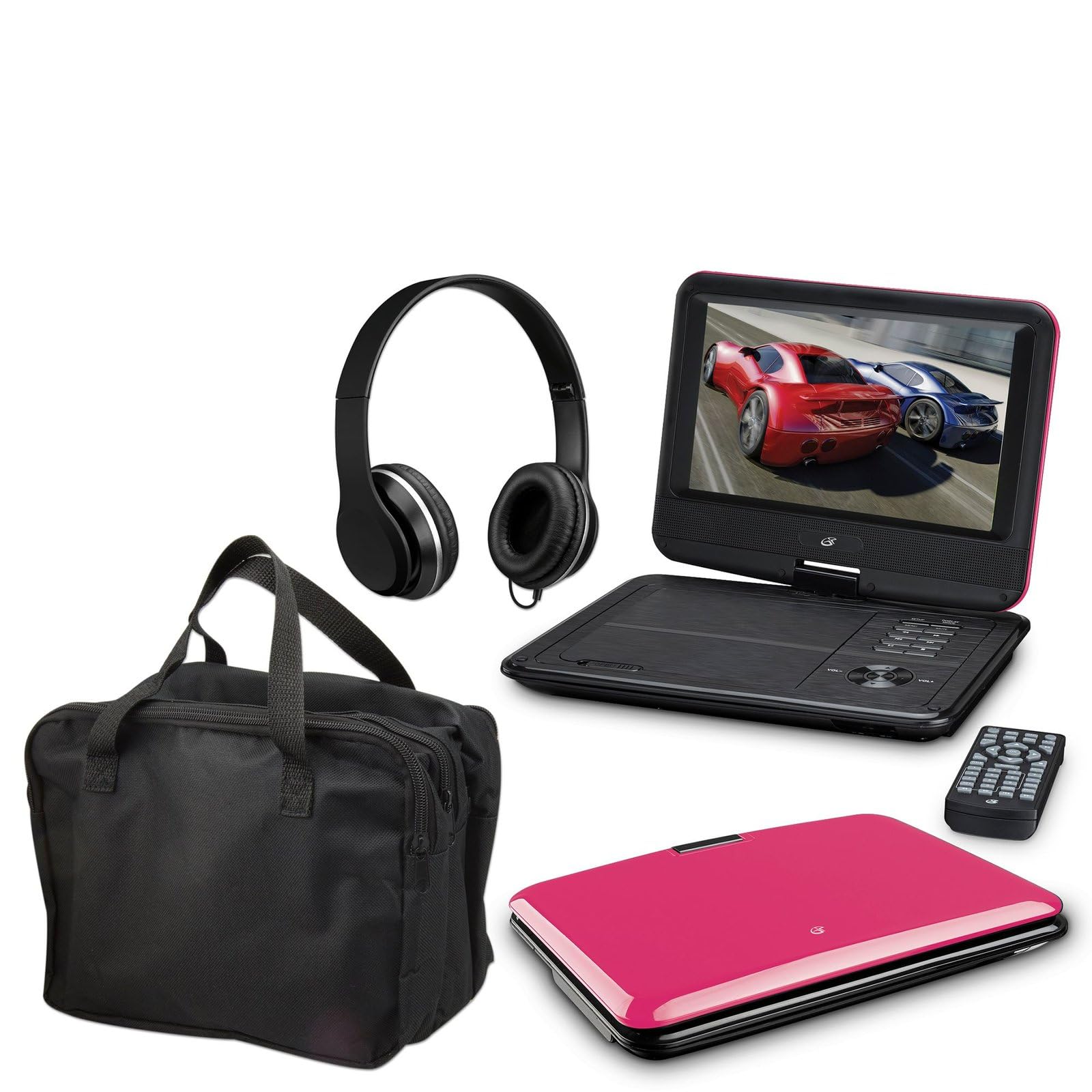
Image: The GPX 9-inch Portable DVD Player in its closed position, showcasing its vibrant pink top casing and sleek design.
Пакеттин мазмуну
Төмөндө тизмеленген нерселердин баары пакетиңизге камтылганын текшериңиз:
- GPX 9-inch Portable DVD Player (Model PD901BDLP)
- Алыстан башкаруу (2 AAA батарейка талап кылынат, камтылган)
- AC/DC кубат адаптери
- 12V унаа адаптер
- 3.5mm-to-RCA audio/video cable
- Көтөрмө куту
- Наушник
- Көрсөтмө (бул документ)
Продукт өзгөчөлүктөрү
- 9 дюймдук 800x480 LCD экран
- Screen tilts and swivels for versatile viewбурчтар
- Rechargeable lithium polymer battery with up to 2 hours of battery life
- Камтылган стерео динамиктер
- Жеке угуу үчүн наушник уячасы
- RCA output for connection to external displays
- Supports DVD, DVD-R/RW, DVD+R/RW, CD, CD-R/RW, JPEG, MP3 formats
Жайгашуу
1. Батареяны заряддоо
Before first use, fully charge the internal lithium polymer battery. Connect the AC/DC power adapter to the DC IN port on the DVD player and plug the other end into a standard wall outlet. The charging indicator light will illuminate. Charging typically takes approximately 3-4 hours for a full charge, providing up to 2 hours of playback.
2. Алыстан башкаруунун батареяларын орнотуу
Open the battery compartment on the back of the remote control. Insert two (2) AAA batteries, ensuring correct polarity (+/-). Close the compartment securely.
3. Connecting to a Television (Optional)
үчүн view content on a larger screen, use the included 3.5mm-to-RCA audio/video cable. Connect the 3.5mm end to the AV OUT port on the DVD player. Connect the RCA (red, white, yellow) ends to the corresponding AV INPUT ports on your television. Select the correct AV input source on your TV.
4. Using the Car Adapter (Optional)
For in-car use, connect the 12V car adapter to the DC IN port on the DVD player and plug the other end into your vehicle's cigarette lighter socket.
Иштөө нускамалары
1. Күйгүзүү / Өчүрүү
басып, кармап туруңуз КҮЧ button on the player or remote control to turn the device on or off.
2. Inserting a DVD
- Gently open the DVD player lid.
- Place a DVD disc onto the spindle with the label side facing up.
- Дисктин ортосун акырын басып, ал ордунан чыккыча басыңыз.
- Close the lid. The player will automatically begin reading the disc.
3. Экранды тууралоо
The LCD screen can be tilted and swiveled to achieve the optimal viewing angle. Carefully adjust the screen to your preferred position.
4. Негизги ойнотуу башкаруулары
- ОЙНОО/ТЫНЫТТЫРУ: Press to start or pause playback.
- ТОКТОТ: Ойноону токтотуу үчүн басыңыз.
- ӨТКӨРҮП ЖИБЕРҮҮ (<< / >>): Press to skip to the previous or next chapter/track.
- FF/REW: Press and hold to fast forward or rewind.
- Көлөмү (+/-): Adjust the audio volume.
5. Наушниктерди колдонуу
Plug the included headphones into the НАУШНИК jack for private listening. The built-in speakers will automatically mute when headphones are connected.
Техникалык тейлөө
- Экранды тазалоо: Use a soft, lint-free cloth to gently wipe the LCD screen. Do not use liquid cleaners or abrasive materials.
- Диск лотокту тазалоо: Диск салгычты чаңдан жана таштандылардан таза кармаңыз. Зарыл болсо, жумшак щетканы же кысылган абаны колдонуңуз.
- Батареяга кам көрүү: To prolong battery life, avoid fully discharging the battery frequently. If storing the player for an extended period, charge it periodically.
- Сактагыч: Store the DVD player in a cool, dry place away from direct sunlight and extreme temperatures. Use the included carrying case for protection during transport.
Проблемаларды чечүү
| Көйгөй | Чечим |
|---|---|
| Оюнчу күйбөйт. | Ensure the battery is charged or the AC/DC adapter is securely connected to a working power outlet. Check the power switch. |
| Эч кандай диск табылган жок. | Verify the disc is inserted correctly with the label side up and seated properly on the spindle. Ensure the disc is clean and free of scratches. Try a different disc. |
| Үн жок. | Check the volume level. Ensure headphones are not plugged in if you intend to use the built-in speakers. If connected to a TV, check the TV's volume and input settings. |
| Пульт иштебей жатат. | Check and replace the AAA batteries in the remote. Ensure there are no obstructions between the remote and the player's IR sensor. |
| Сүрөт бурмаланган же бүдөмүк. | Clean the disc. Adjust the screen angle. If connected to a TV, check the AV cable connections. |
Техникалык шарттар
- Модел: PD901BDLP
- Экрандын өлчөмү: 9 дюйм
- Дисплей түрү: LCD
- Түпкү резолюция: 800 x 480
- Медиа түрү: DVD, DVD-R/RW, DVD+R/RW, CD, CD-R/RW, JPEG, MP3
- Батарея: Кайра заряддалуучу литий полимери
- Батареянын иштөө мөөнөтү: 2 саатка чейин
- Байланыш: 3.5mm AV Out, Headphone Jack, DC In
- Кубат киргизүү: AC/DC Adapter, 12V Car Adapter
- Салмагы: Болжол менен 1.9 фунт (0.86 кг)
- Түсү: Кызгылт
- UPC: 047323179044
Кепилдик жана колдоо
This GPX Portable DVD Player is covered by a 90 күндүк чектелген өндүрүүчү кепилдик баштапкы сатып алынган күндөн тартып. Бул кепилдик нормалдуу колдонуудагы материалдардагы жана жасалгадагы кемчиликтерди камтыйт.
For warranty service or technical support, please refer to the contact information provided with your product packaging or visit the official GPX webсайт. Сатып алганыңыздын далили катары сатып алуу дүмүрчөгүңүздү сактаңыз.
Көбүрөөк маалымат алуу үчүн, сиз иш сапары менен болот Amazon'догу GPX дүкөнү.