
1. Киришүү
This manual provides essential information for the proper installation, operation, and maintenance of your Intel Core i3-370M Mobile CPU Processor. Please read this guide thoroughly before proceeding with installation to ensure correct handling and optimal performance.
2. Коопсуздук маалыматы
Processors are sensitive electronic components. Observe the following safety precautions:
- Always handle the processor by its edges to avoid touching the pins or electrical contacts.
- Use an anti-static wrist strap or take other anti-static precautions to prevent electrostatic discharge (ESD) damage.
- Ensure the system is powered off and unplugged from the electrical outlet before installing or removing the processor.
- Avoid bending or damaging the pins on the processor.
3. Продукт бүтүп калдыview
The Intel Core i3-370M is a mobile dual-core processor designed for laptop systems. It operates at a base frequency of 2.40 GHz, features a 3 MB L3 cache, and utilizes the Socket G1 (rPGA988A) interface. This processor is suitable for general computing tasks and multimedia consumption.
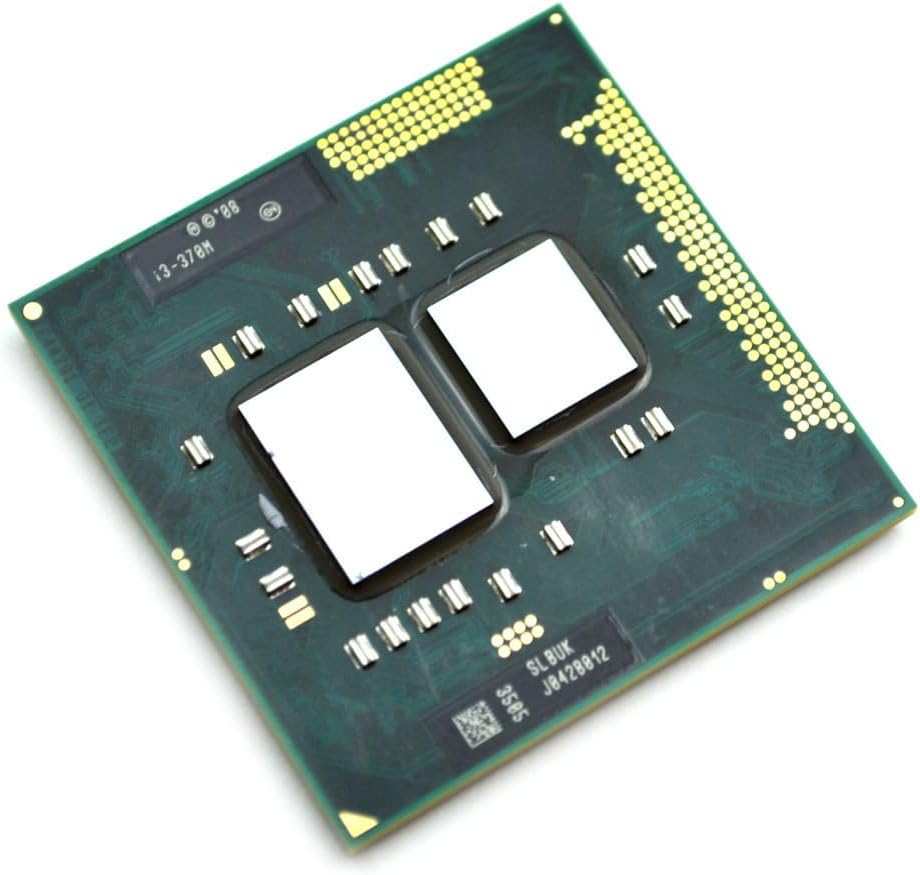
4. Орнотуу (Орнотуу)
Follow these steps to install the Intel Core i3-370M processor into a compatible laptop motherboard:
- Motherboard даярдоо: Ensure the laptop motherboard is compatible with Socket G1 (rPGA988A) processors. Locate the CPU socket and gently lift the socket retention lever to the open position.
- Процессорду орнотуу: Carefully align the triangular marker on the corner of the processor with the corresponding marker on the CPU socket. Gently lower the processor straight down into the socket. Do not force the processor; it should drop in easily if aligned correctly.
- Процессорду коргоо: Once the processor is fully seated, push the socket retention lever back down and lock it into place to secure the processor.
- Термикалык пастаны колдонуу: Apply a small, pea-sized amount of high-quality thermal paste to the center of the processor's integrated heat spreader (IHS). This ensures efficient heat transfer to the cooling solution.
- Жылыткычты орнотуу: Mount the CPU heatsink and fan assembly according to your laptop manufacturer's instructions. Ensure even pressure is applied when securing the heatsink to the motherboard to maintain good contact with the processor.
5. Иштөө
Once correctly installed, the Intel Core i3-370M processor will function automatically within your laptop system. The operating system will detect and utilize the processor. Ensure that your laptop's cooling system is functioning correctly to prevent overheating during operation, especially under heavy workloads. You may use system monitoring software to observe CPU temperatures if desired.
6. Техникалык тейлөө
To ensure the longevity and stable performance of your processor, consider the following maintenance practices:
- Clean Cooling System: Regularly clean the laptop's cooling system, including the fan blades and heatsink fins, to prevent dust buildup. Dust can impede airflow and lead to increased operating temperatures.
- Термикалык паста: The thermal paste applied between the CPU and heatsink can degrade over time. Consider reapplying high-quality thermal paste every few years, or if you notice consistently high CPU temperatures.
- Программалык камсыздоо жаңыртуулары: Keep your operating system and drivers updated. BIOS/UEFI updates from your laptop manufacturer may include performance improvements or bug fixes related to CPU operation.
7. Кыйынчылыктарды
If you encounter issues after installing the processor, consider the following troubleshooting steps:
- Система жүктөлбөй жатат: Verify that the processor is correctly seated in the socket and the retention lever is fully closed. Check for any bent or damaged pins on the processor. Ensure all power connections to the motherboard are secure.
- Ашыкча ысып кетүү: If the system experiences high temperatures or unexpected shutdowns, confirm that the heatsink is properly installed and making good contact with the CPU. Check if the thermal paste was applied correctly and if the cooling fan is spinning. Clean any dust from the heatsink and fan.
- Системанын туруксуздугу: Ensure your laptop's BIOS/UEFI is updated to the latest version compatible with your motherboard and processor. Verify that your operating system drivers are current.
8. Техникалык шарттар
| Өзгөчөлүк | Спецификация |
|---|---|
| Процессордун модели | Intel Core i3-370M |
| Өзөктөрдүн саны | 2 |
| Сааттын негизги ылдамдыгы | 2.40 ГГц |
| Кэш | 3 MB L3 Cache |
| Сокет түрү | Socket G1 (rPGA988A) |
| Процессор бренди | Intel |
| Платформа | Өзгөчө машина эмес |
9. Кепилдик маалыматы
This Intel processor is typically covered by a limited manufacturer's warranty. The duration and terms of the warranty may vary depending on your region and point of purchase. Please refer to Intel's official website or the documentation provided with your original system for detailed warranty terms and conditions.
10. Колдоо маалыматы
For technical assistance, driver downloads, or further product information regarding your Intel Core i3-370M processor, please visit the official Intel support website. You can also contact Intel customer service for direct support.
Intel колдоосу Webсайт: https://www.intel.com/content/www/us/en/support.html