
Performance Tool W2446
Performance Tool W2446 3D LED Firepoint Flashlight User Manual
Model: W2446 | Brand: Performance Tool
Introduction
Thank you for choosing the Performance Tool W2446 3D LED Firepoint Flashlight. This manual provides essential information for the safe and effective operation, maintenance, and troubleshooting of your new flashlight. Designed for durability and versatility, this flashlight features a super bright Nichia LED, multiple output modes, and a robust aircraft-grade aluminum construction.

1-сүрөт: Performance Tool W2446 3D LED Firepoint Flashlight. This image shows the sleek black body of the flashlight with a textured grip section and a green ring near the LED head.
Маанилүү коопсуздук маалыматы
- Көздүн коопсуздугу: Do not look directly into the LED light or shine it directly into the eyes of people or animals. The intense light can cause temporary vision impairment or permanent eye damage.
- Батареянын коопсуздугу:
- Use only the specified battery type (3-D batteries).
- Эски жана жаңы батарейкаларды же ар кандай типтеги батареяларды аралаштырбаңыз.
- Ensure correct battery polarity (+/-) when installing.
- Кол чырак агып кетпеш үчүн узак убакыт бою колдонулбай турган болсо, батареяларды алып салыңыз.
- Колдонулган батарейкаларды жергиликтүү эрежелерге ылайык таштаңыз.
- Жылуулук: The flashlight head may become warm during prolonged use. This is normal. Avoid prolonged direct contact with hot surfaces.
- Балдар: Балдардын колу жетпеген жерде сактаңыз. Бул оюнчук эмес.
- Курчап турган чөйрө: Do not expose the flashlight to extreme temperatures, open flames, or immerse it in water unless specified as waterproof (this model is not specified as waterproof).
Пакеттин мазмуну
Сураныч, бардык буюмдар бар экенин жана жакшы абалда экендигин текшерүү үчүн пакеттин мазмунун текшериңиз.
- Performance Tool W2446 3D LED Firepoint Flashlight (x1)
- D-Cell Batteries (x3)
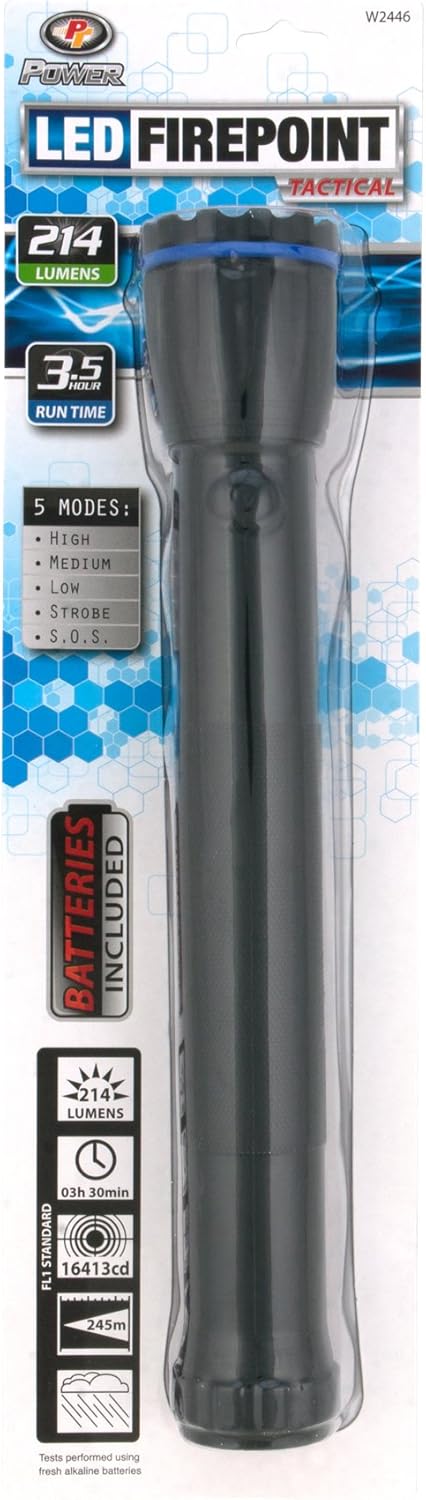
2-сүрөт: Packaging of the Performance Tool W2446 Flashlight. This image displays the retail packaging, highlighting features like 214 lumens, 3.5-hour run time, 5 modes, and "Batteries Included".
Орнотуу: Батареяны орнотуу
Your Performance Tool W2446 flashlight requires three (3) D-cell batteries for operation. Batteries are included in the package.
- Unscrew the Tail Cap: Hold the flashlight firmly and twist the tail cap (the end opposite the light head) counter-clockwise until it detaches.
- Батареяларды салыңыз: Insert three D-cell batteries into the battery compartment, ensuring the positive (+) end of each battery faces towards the flashlight head. Follow the polarity markings inside the battery tube if available.
- Replace Tail Cap: Carefully screw the tail cap back onto the flashlight body by twisting it clockwise until it is securely tightened. Do not overtighten.
- Сыноо: Press the power button to ensure the flashlight turns on.
Иштөө нускамалары
The Performance Tool W2446 flashlight features a single power button located on the side of the body, which controls both power and mode selection.
Күйгүзүү/өчүрүү
- Кол чыракты буруш үчүн ON, кубат баскычын бир жолу басыңыз.
- Кол чыракты буруш үчүн ӨЧҮРҮҮ, press and hold the power button for approximately 1-2 seconds, or cycle through all modes until the light turns off.
Чыгуу режимдери
The flashlight offers 5 distinct output modes. To cycle through these modes, quickly press the power button repeatedly while the flashlight is on.
- Жогорку: Provides maximum brightness (200 lumens) for powerful illumination.
- Орточо: A balanced brightness level for general use, conserving battery life.
- Төмөн: Lowest brightness setting, ideal for close-up tasks or extended runtimes.
- Строб: A rapid flashing light, useful for signaling or disorienting.
- SOS: Flashes the international Morse code signal for distress (three short, three long, three short flashes).
The flashlight will typically remember the last used mode when turned off and on again, but this may vary. If not, it will default to the first mode (High).
Техникалык тейлөө
- Тазалоо: Кол чырактын корпусун жумшак менен сүртүңүз, гamp кездеме. Абразивдүү тазалагычтарды же эриткичтерди колдонбоңуз.
- Батареяны алмаштыруу: Replace batteries when the light dims significantly or fails to turn on. Refer to the "Setup: Battery Installation" section for instructions.
- Сактагыч: Store the flashlight in a cool, dry place away from direct sunlight and extreme temperatures. If storing for an extended period (more than a month), remove the batteries to prevent leakage and corrosion.
- LED: The Nichia LED is designed for long life and typically does not require replacement.
Проблемаларды чечүү
| Көйгөй | Мүмкүн себеп | Чечим |
|---|---|---|
| Кол чырак күйбөйт. |
|
|
| Жарык күңүрт же бүлбүлдөп турат. |
|
|
| Режимдер аркылуу айлануу мүмкүн эмес. |
|
|
Техникалык шарттар
| Модел: | W2446 |
| Жарык булагы түрү: | Nichia LED |
| Жарыктык: | 200 люмен (Жогорку режим) |
| Чыгуу режимдери: | High, Medium, Low, Strobe, S.O.S. (5 modes) |
| Кубат булагы: | 3 x D-Cell Batteries (Included) |
| Аткаруу убактысы: | Up to 75 hours (on lower settings) |
| Beam Distance: | 250 метрге чейин |
| Материал: | Учак классындагы алюминий |
| Өлчөмдөрү: | 16.1 x 4.6 x 2.3 дюйм (болжол менен) |
| Элемент Салмагы: | 1 pound (approximate, without batteries) |
| Өзгөчө өзгөчөлүгү: | Portable |
| UPC: | 039564109164 |
Кепилдик жана колдоо
For specific warranty information regarding your Performance Tool W2446 Flashlight, please refer to the documentation included with your purchase or visit the official Performance Tool webсайт. Кепилдиктин шарттары жана шарттары ар кандай болушу мүмкүн.
If you encounter any issues not covered in the troubleshooting section or require further assistance, please contact Performance Tool customer support. Contact details are typically available on the product packaging or the manufacturer's official webсайт.
Сиз да зыярат кылсаңыз болот Performance Tool Store on Amazon көбүрөөк продукт маалымат жана колдоо ресурстар үчүн.
Ask a question about this manual
Ask about setup, troubleshooting, compatibility, parts, safety, or missing instructions. Manuals+ will review the question and use this page’s manual context to help answer it.