
DigiTech TRIO
DigiTech TRIO Band Creator Pedal Instruction Manual
Модел: ТРИО | Бренд: DigiTech
Introduction
The DigiTech TRIO is an innovative electric guitar multi-effect pedal designed to be your personal band. It listens to your guitar playing and automatically generates accompanying bass and drum parts. This manual provides comprehensive instructions for setting up, operating, and maintaining your TRIO pedal, ensuring you get the most out of its unique features.
Негизги өзгөчөлүктөрү
- Seven Music Genres and Twelve Song Styles Per Genre to Choose From
- The TRIO can learn up to three different song parts that can be recalled on-the-fly
- Adjustable Tempo & Alternate Half Time/Double Time Variants Bass & Drum Level Controls
- Hands-Free Control Using a DigiTech FS3X Footswitch (optional)
- Amp & Mixer Outputs Headphone Output w/Level Control Power Supply Included
Орнотуу колдонмосу
Follow these steps to set up your DigiTech TRIO pedal:
- Connect the included 9V DC power supply to the КҮЧ input on the pedal and plug it into a power outlet.
- Электр гитараңызды туташтырыңыз ГИТАРА IN стандарттуу 1/4 дюймдук аспап кабелин колдонуу менен джек.
- туташтыруу AMP OUT гитараңды черт ampкөтөргүчтүн киргизүүсүн дагы бир 1/4 дюймдук аспап кабели аркылуу.
- For connecting to a mixer or PA system, use the МИКСЕР ЧЫГАРЫЛАТ джек.
- Жеке практика үчүн кулакчындарды туташтырыңыз НАУШНИК ЧЫГАТ джек.
- Optionally, connect a DigiTech FS3X Footswitch to the CONTROL IN jack for extended hands-free control.
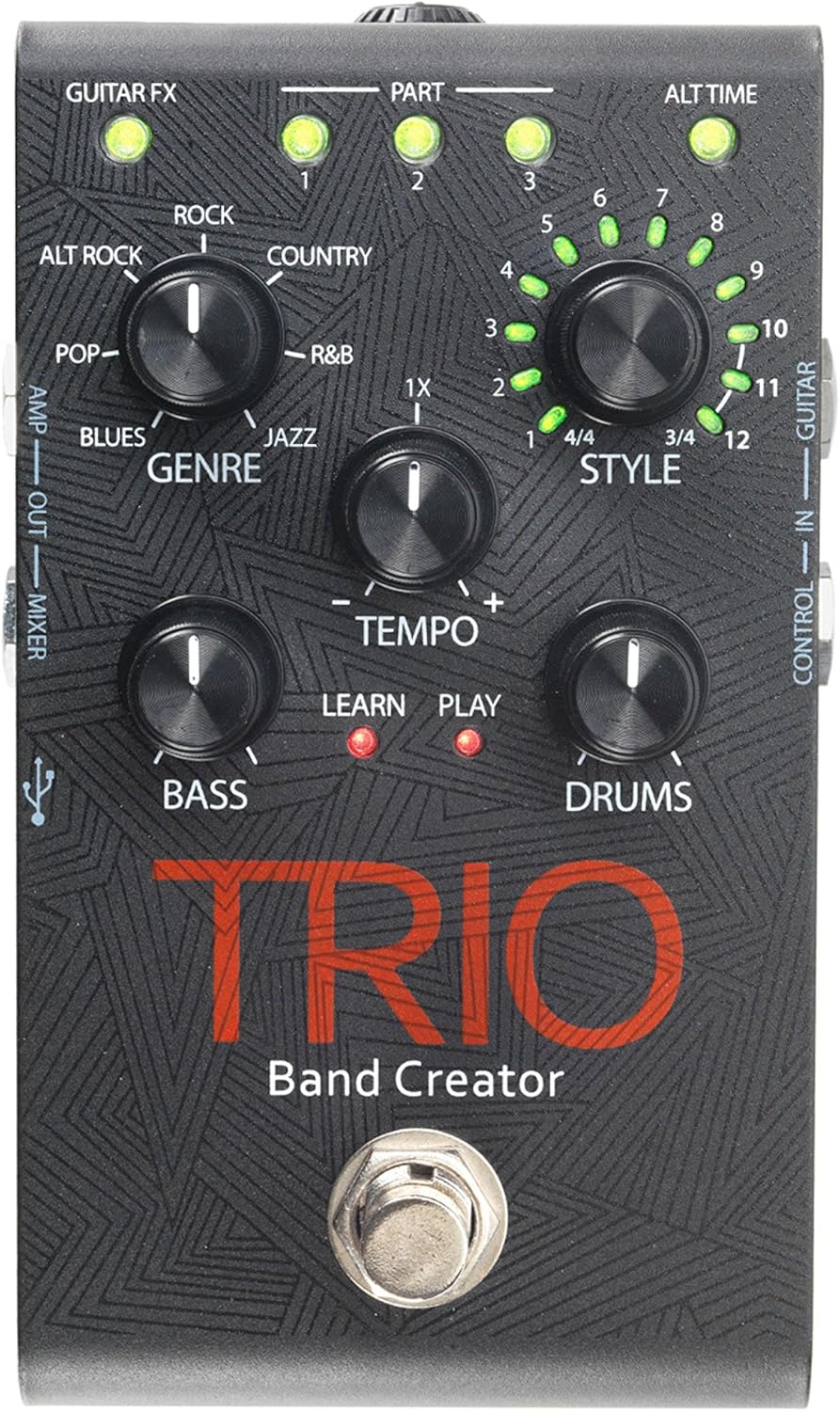
1-сүрөт: Жогорку view of the DigiTech TRIO pedal, showing the main controls and footswitch.
Иштөө нускамалары
Basic Operation: Teaching the TRIO a Song
- басыңыз БАНД footswitch once to enter 'Listen' mode. The ҮЙРӨНҮҮ LED күйөт.
- Play your desired chord progression and rhythm clearly. The TRIO will analyze your playing.
- басыңыз БАНД footswitch again to stop 'Listen' mode. The ОЙНОО LED will illuminate, and the TRIO will immediately begin playing generated bass and drum parts.
- You can now play along with your virtual band.
Genre and Style Selection
- колдонуу ЖАНР knob to select from Blues, Pop, Alternative Rock, Rock, Country, R&B, and Jazz. The genre affects the overall feel of the generated bass and drum parts.
- колдонуу СТИЛЬ knob to choose from twelve different song styles available for each genre. This allows for further customization of the rhythm and feel.
- The ALT TIME button allows you to switch between 3/4 and 4/4 time signatures.
Looping and Song Parts
- The TRIO can learn up to 3 different song parts. To record a new part, select an empty БӨЛҮМ slot (1, 2, or 3) using the corresponding buttons.
- Follow the 'Basic Operation' steps to teach the TRIO the new song part.
- During playback, you can switch between learned song parts on-the-fly by pressing the corresponding БӨЛҮМ баскычы.
- The LOOPER footswitch allows you to record and playback your own guitar loops. Press once to start recording, press again to stop recording and start playback, and press and hold to clear the loop.
Adjusting Levels and Tempo
- The ТЕМПО knob adjusts the playback speed of the band and loops.
- The БАС knob controls the volume level of the generated bass line.
- The БАРАБАНДАР knob controls the volume level of the generated drum track.
- The LOOP knob controls the volume level of your recorded guitar loop.

2-сүрөт: Бурчтуу view of the DigiTech TRIO pedal, highlighting the control knobs and input/output jacks.
Башкаруу каражаттары жана байланыштар
The DigiTech TRIO pedal features a user-friendly layout with clearly labeled controls and versatile connection options:
Алдыңкы панелдин башкаруу элементтери:
- GUITAR FX: Activates built-in guitar effects tailored to the selected genre.
- PART 1, 2, 3: Buttons to select and recall different learned song parts.
- ALT TIME: Toggles between 3/4 and 4/4 time signatures.
- ТЕМПО баскычы: Adjusts the overall playback speed.
- ЖАНР баскычы: Selects the musical genre (Blues, Pop, Alt Rock, Rock, Country, R&B, Jazz).
- STYLE Knob: Selects one of twelve styles within the chosen genre.
- LOOP Knob: Controls the volume of your recorded guitar loop.
- BASS баскычы: Controls the volume of the generated bass line.
- DRUMS Knob: Controls the volume of the generated drum track.
- LOOPER Footswitch: Records/plays/clears guitar loops.
- BAND Footswitch: Enters 'Listen' mode to learn chords/rhythm, or starts/stops band playback.
Side and Rear Panel Connections:
- ГИТАРАДА: 1/4-inch input for your electric guitar.
- AMP ЧЫГЫШ: 1/4-inch output to your guitar ampөмүрлүү.
- MIXER OUT: 1/4-inch output for connecting to a mixer or PA system.
- ЧАЧЫК ЧЫГАТ: Кулакчындар үчүн 1/8 дюймдук стерео чыгыш.
- БАШКАРУУ: 1/4-inch input for optional DigiTech FS3X Footswitch.
- КҮЧ: 9V DC input for the included power supply.
- USB: Mini-USB port for firmware updates.

3-сүрөт: Арткы view of the DigiTech TRIO pedal, showing the power input and headphone jack.
Техникалык шарттар
| Өзгөчөлүк | Деталь |
|---|---|
| Элемент Салмагы | 10.6 унция (0.3 кг) |
| Продукциянын өлчөмдөрү | 4.63 x 3.19 x 2.13 дюйм (11.76 x 8.10 x 5.41 см) |
| Элемент моделинин номери | ТРИО |
| Батареялар | 1 9V battery required (for internal use, not primary power) |
| Аппараттык интерфейс | 1/4 дюймдук аудио |
| Сигнал форматы | Аналог |
| Power Source | Corded Electric (9V DC adapter included) |
| Тtage | 9 вольт |
| Ampөчүрүү | 300 миллионamps |
Техникалык тейлөө
- Педалды жумшак, кургак чүпүрөк менен сүртүп, таза кармаңыз. Абразивдүү тазалоочу каражаттарды же эриткичтерди колдонуудан алыс болуңуз.
- Педальды салкын, кургак жерде, күндүн түз нурунан жана өтө жогорку температурадан алыс сактаңыз.
- Сигналдын жоголушун же бузулушун алдын алуу үчүн бардык кабелдердин бекем туташтырылганын текшериңиз.
- Педалды түшүрүп алуудан же катуу соккуга кабылтуудан алыс болуңуз.
Проблемаларды чечүү
- Үн жок: Бардык кабелдик туташууларды текшериңиз (гитара, amp, power). Ensure the pedal is powered on and the volume knobs are not set to zero.
- Үн сапаты начар: Verify that your instrument and amplifier are functioning correctly. Check for damaged cables.
- Band Not Generating Correctly: Ensure you are playing clear, distinct chords during the 'Listen' phase. Try different genres and styles to see if a different setting better interprets your playing.
- Бут алмаштыргыч жооп бербей жатат: Disconnect and reconnect the power supply. If using an optional FS3X footswitch, ensure it is properly connected.
Кепилдик жана колдоо
Кепилдик жөнүндө маалымат жана техникалык колдоо алуу үчүн, расмий DigiTech компаниясына кайрылыңыз webсайтка же кардарларды тейлөөгө кайрылыңыз. Кепилдик дооматтар үчүн сатып алганыңыздын далилин сактаңыз.
Ask a question about this manual
Ask about setup, troubleshooting, compatibility, parts, safety, or missing instructions. Manuals+ will review the question and use this page’s manual context to help answer it.