
1. Орнотуу
1.1 Пакеттен чыгаруу жана мазмуну
Телевизорду жана бардык аксессуарларды таңгактан этияттык менен чыгарыңыз. Бардык компоненттердин бар экенин текшериңиз:
- Sharp LC-40LE653U 40-Inch Smart LED TV
- Алыстан башкаруу
- 2 АА батарейкалар
1.2 Стендди орнотуу
If placing the TV on a table, attach the included stand. Refer to the diagram below for proper assembly. Ensure all screws are securely fastened.
1.3 Тышкы түзмөктөрдү туташтыруу
Connect your external devices such as cable boxes, Blu-ray players, or gaming consoles to the TV's input ports. The TV features multiple connectivity options.


Жеткиликтүү портторго төмөнкүлөр кирет:
- HDMI: 2 ports for high-definition audio and video. One HDMI port supports MHL (Mobile High-Definition Link).
- USB: 1 port for media playback or connecting a USB device.
- Ethernet: Зымдуу тармак туташуусу үчүн.
- Component/Video: For older video devices.
- DTV/TV (Antenna): Антеннаны же кабелдик телекөрсөтүү каналын туташтыруу үчүн.
- Аудио чыгышы: Optical for digital audio, and RCA for analog audio.
1.4 Кубат туташтыруу
After connecting all necessary devices, plug the TV's power cord into a wall outlet.
1.5 Баштапкы орнотуу
Upon first power-on, the TV will guide you through an initial setup process. This includes language selection, time zone, and network configuration. For Wi-Fi setup, select your network and enter the password.
2. Иштөө нускамалары
2.1 Алыстан башкаруу функциялары
The remote control allows you to access all TV functions. Insert the two AA batteries into the remote control, ensuring correct polarity.

- Кубат (кызыл баскыч): Телевизорду күйгүзөт же өчүрөт.
- Киргизүү: Selects the input source (HDMI, TV, USB, etc.).
- VOL +/-: Үн деңгээлин тууралайт.
- CH +/-: Телеканалдарды өзгөртөт.
- Навигация баскычтары (Өйдө/Төмөн/Сол/Оң/Кирүү): Менюларда багыттоо жана параметрлерди тандоо үчүн колдонулат.
- АКЫЛДУУ: Accesses the Smart Central Apps menu.
- МЕНЮ: Opens the main TV menu for settings adjustments.
- NETFLIX: Netflix тиркемесине түз кирүү баскычы.
2.2 Smart TV Features (Smart Central Apps)
The Sharp LC-40LE653U features Smart Central Apps, providing access to various online services and a web browser. Ensure your TV is connected to the internet via Wi-Fi or Ethernet.

- Колдонмолорго кирүү: Press the 'SMART' button on your remote to open the Smart Central Apps menu.
- Колдоого алынган кызматтар: Includes Hulu Plus, Netflix, Pandora, Vudu, and YouTube.
- Web Браузер: Камтылганды колдонуңуз web browser for general internet browsing. Navigation is done via the remote control.
2.3 Wallpaper Mode
When the TV is turned off, Wallpaper Mode can display virtually any image. To use this feature, connect a USB drive containing your desired images to the TV's USB port. Navigate to the Wallpaper Mode settings in the TV menu to select and configure your images.
3. Техникалык тейлөө
3.1 Телевизорду тазалоо
Экранды тазалоо үчүн аны жумшак, кургак, түксүз чүпүрөк менен акырын сүртүңүз. өжөр белгилери үчүн, бир аз гampen the cloth with water or a specialized screen cleaner. Avoid using harsh chemicals, abrasive cleaners, or direct spraying of liquids onto the screen or cabinet.
Clean the TV cabinet with a soft, dry cloth. Ensure the TV is unplugged before cleaning.
3.2 Программалык камсыздоо жаңыртуулары
Periodically check for software updates through the TV's settings menu to ensure optimal performance and access to the latest features. Updates can be performed via the internet connection.
4. Кыйынчылыктарды
If you encounter issues with your Sharp LC-40LE653U TV, refer to the following common solutions:
- Кубат жок: Ensure the power cord is securely plugged into both the TV and a working wall outlet. Check if the power indicator light on the TV is on.
- Сүрөт/үн жок: Verify the correct input source is selected using the 'Input' button on the remote. Check all cable connections (HDMI, component, etc.) are secure.
- Сүрөттүн сапаты начар: Телевизор менюсунан сүрөт жөндөөлөрүн (жарыктык, контраст, курчтук) тууралаңыз. Киргизүү булагы жогорку сапаттагы сигналды берип жатканын текшериңиз.
- Интернет байланышы жок: Check your Wi-Fi router or Ethernet cable connection. Re-enter your Wi-Fi password in the TV's network settings. Restarting your router may resolve connectivity issues.
- Алыстан башкаруу иштебейт: Пульттагы батарейкаларды алмаштырыңыз. Пульт менен сыналгынын IR сенсорунун ортосунда эч кандай тоскоолдуктар жок экенин текшериңиз.
For more detailed troubleshooting steps, consult the full online manual or contact customer support.
5. Техникалык шарттар
Key technical specifications for the Sharp LC-40LE653U 40-Inch Smart LED TV:
| Өзгөчөлүк | Спецификация |
|---|---|
| Модель номери | LC-40LE653U |
| Screen Size | 39.5 дюйм (40 дюймдук класс) |
| Дисплей технологиясы | LCD |
| Резолюция | 1080p (Full HD) |
| Жаңыртуу ылдамдыгы | 60 Гц |
| Аспект катышы | 16:9 |
| Байланыш технологиясы | Wi-Fi |
| Аппараттык интерфейс | Ethernet, HDMI, USB |
| HDMI портторунун жалпы саны | 2 (one with MHL support) |
| Жалпы USB порттору | 1 |
| Аудио киргизүү | HDMI, Optical, USB |
| Динамиктин максималдуу чыгаруу күчү | 20 Ватт |
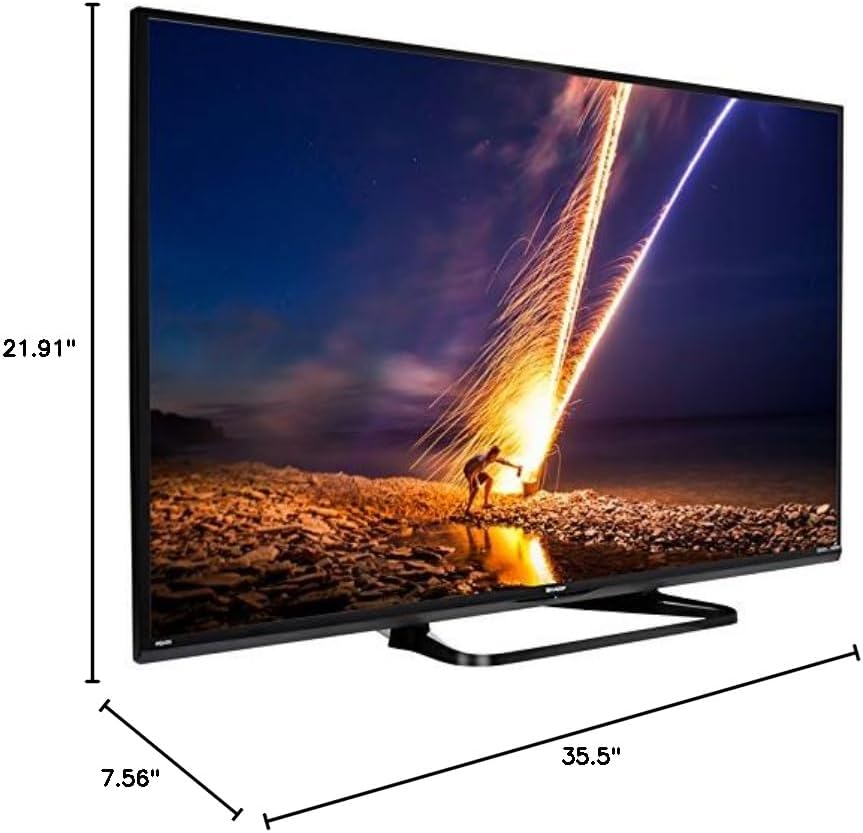
| Продукциянын өлчөмдөрү (D x W x Y) | 7.56" x 35.5" x 21.91" |
| Элемент Салмагы | 16.3 фунт |
| Монтаж түрү | Стол орнотуу |
| Колдоого алынган Интернет кызматтары | Hulu Plus, Netflix, Pandora, Vudu, YouTube |
| Energy Star сертификацияланган | Ооба |
6. Кепилдик жана колдоо
6.1 Продукциянын кепилдиги
This Sharp LC-40LE653U TV comes with a 1 жылдык чектелген кепилдик. Кепилдик дооматтары үчүн сатып алганыңыздын далилин сактап коюңуз. Кепилдик нормалдуу колдонуу шарттарында өндүрүштүк кемчиликтерди камтыйт.
6.2 Кардарларды колдоо
For technical assistance, troubleshooting beyond this manual, or warranty service, please contact Sharp customer support. Refer to the official Sharp webакыркы байланыш маалыматы үчүн сайтты же продуктуңуздун каттоо картасын.